Modules
https://docs.python.org/pt-br/3/tutorial/modules.html
Modules are sets of new features that we can import into Python. What a plugin is to a program, an extension is to a browser, is what a module is to Python. Making another analogy, we buy a basic car (Python) and add various improvements (Python Modules), like air conditioning, power steering, sunroof, leather seats, etc. In other languages, we also call them libraries, packages...
It wouldn't make sense for the Python interpreter to have everything available if we were only going to create a program to read and write from a database. We'd have a bloated binary with resources not useful for this case and many features that could even generate security flaws.
Thus, we need to load modules as needed.
A module can contain function definitions that are considered executable parts or class definitions, like creating a new type of object.
Think of a function as a power adapter. You have inputs and an output. Sometimes a single input just to transform something into a specific output, or has 2, 3 inputs to also generate a specific output. Sometimes it even has 10 inputs like in the case of a power strip, but only one output.
Modules are created to be reused. If you have the same functionality in program A, the same in program B and C, it's time to create a module.
In the end, programs are like building with Lego. Think of modules as various types of pieces that you'll keep available in your little box.
To bring a module inside we need to import it using import.
One thing I see many people doing is importing an entire module to use only 1 feature. It's like downloading a complete album to listen to only one of 15 songs we have.
Let's take this to the math module. The math module brings us various math features, but let's use only the square root calculation function (sqrt). See the difference.
In this case, I imported the complete math module to use the sqrt() function which receives a number as input and returns its square root that was assigned to the root variable. In this case, we have all the available functionalities of the math module.
>>> import math
>>> root = math.sqrt(49)
>>> print(root)
7.0
In this case, I only imported sqrt from the math module and observe.
>>> from math import sqrt
>>> root = sqrt(49)
>>> print(root)
7.0
>>>
If we wanted to give another name to the math module we could do the following...
>>> import math as mathematics
>>> root = mathematics.sqrt(49)
>>> print (root)
7.0
>>>
Where Do I Find Modules?
Official documentation: https://docs.python.org/3/library/index.html
Going back to the subject of having a prepared IDE, if you type import in a Python script (file with .py extension) and if you followed the recommendations with vscode, press CTRL + space and see vscode showing you all Python's built-in modules.
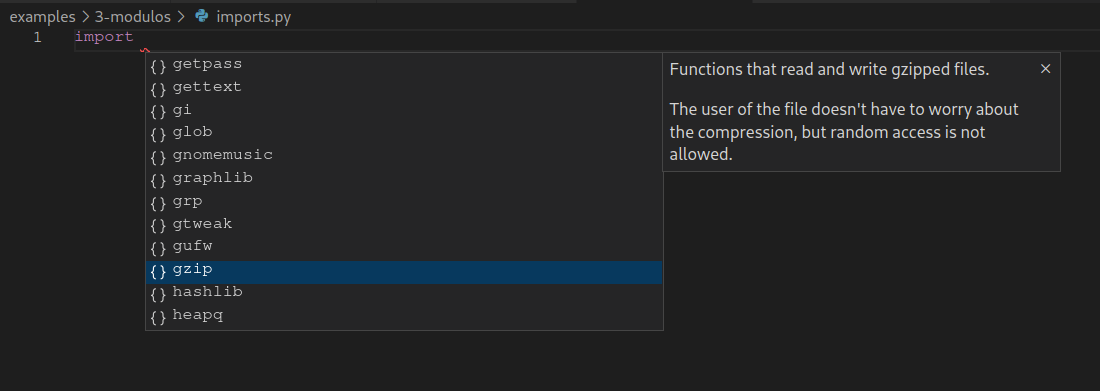
According to what you need, you'll study. You don't need to know all of this. By the end of the study, you'll know the main built-in modules, and when you do something specific, study the case. Take a look at what's available just to know.
There's a module for almost everything, believe me. Your problem has a 99.99999% chance of being someone else's.
Besides Python's built-in modules, we have extra packages that can be developed by third parties and that you can import for use.
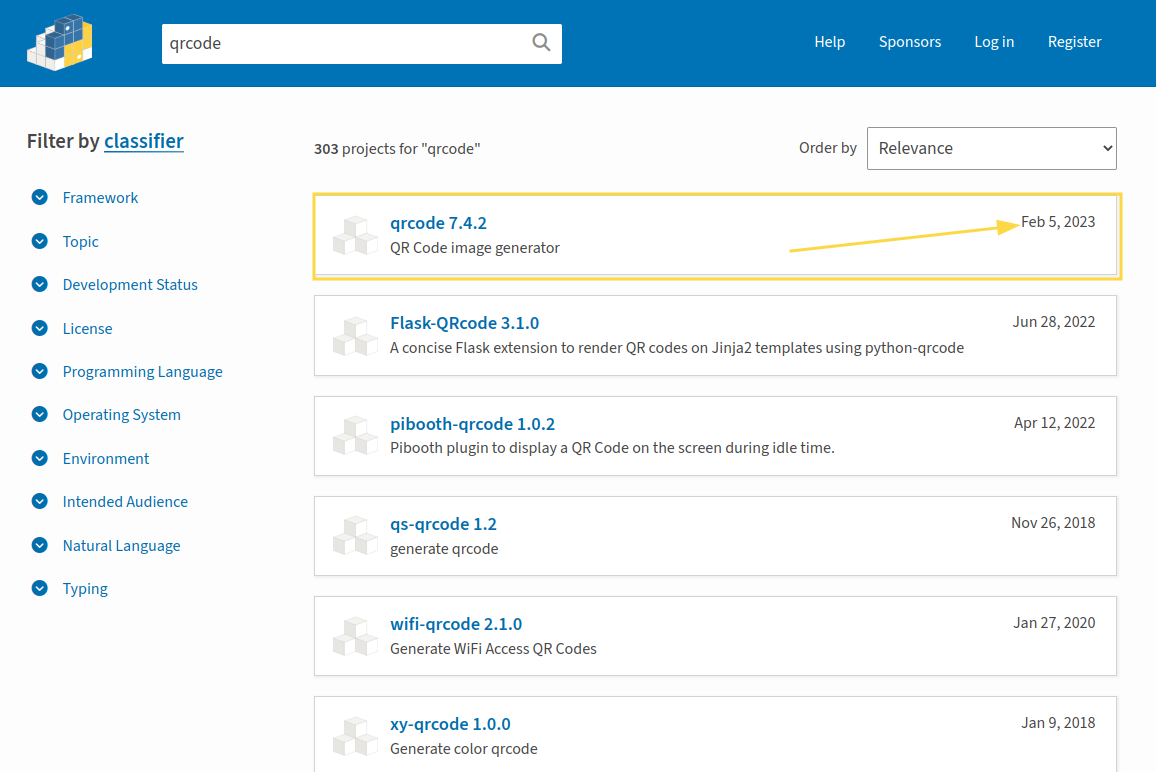
If you go to https://pypi.org/ look for what might interest you and see if there's something already done. Also, when you do something and want to make it available to the community, you can publish here.
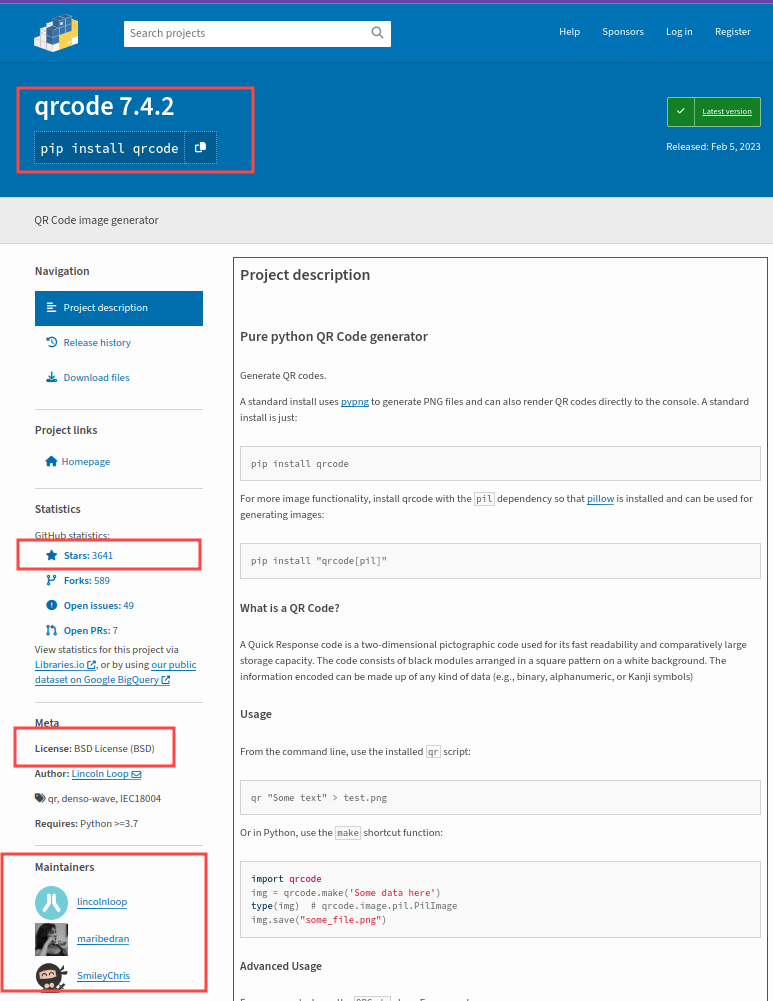
Attention: Always check third-party code licenses and the module maintainer. Prefer MIT, BSD, and Apache licenses. Always look for modules that get updates, have more than one maintainer, and have good stars.
When you have enough knowledge, analyze the module's code, it's always good for learning and seeing what's inside before importing it into your code.
Let's test by searching for qrcode
Virtual Environments
If we install libraries from PyPI directly into the system's main Python, we can create conflicts and leave the environment full of libraries that can become obsolete. To solve these problems, it's recommended to create a sandbox, a separate environment where we can have an isolated copy of the Python environment where we don't run the risk of creating conflicts.
Let's now prepare a project with a venv (virtual environment)
# creating a folder for a project and entering it
mkdir project
cd project
# creating the project's main.py file
touch main.py
# creating a venv folder in the project and initializing the virtual environment
python -m venv venv

# If you want the folder hidden
# python -m venv .venv
Notice that it created a copy of Python inside this folder
❯ ls -a venv
total 24K
drwxr-xr-x 5 david david 4.0K Jun  3 11:43 .
drwxr-xr-x 3 david david 4.0K Jun  3 11:43 ..
drwxr-xr-x 2 david david 4.0K Jun  3 11:43 bin
drwxr-xr-x 3 david david 4.0K Jun  3 11:43 include
drwxr-xr-x 3 david david 4.0K Jun  3 11:43 lib
lrwxrwxrwx 1 david david    3 Jun  3 11:43 lib64 -> lib
-rw-r--r-- 1 david david  169 Jun  3 11:43 pyvenv.cfg
Inside the bin folder is where we find python and also other tools like pip, and from now on all modules we install will go inside this project's lib folder.
You already have a project with a virtual environment, but it's necessary to activate this environment when using it and deactivate it when not. Inside the venv/bin/ folder, we have the activate that needs to be loaded.
source ./venv/bin/activate
To make sure the environment is running correctly use the site module. Notice that some folders changed to the project path.
❯ python3 -m site
sys.path = [
    '/home/david/gitlab/project',
    '/usr/lib/python311.zip',
    '/usr/lib/python3.11',
    '/usr/lib/python3.11/lib-dynload',
    '/home/david/gitlab/project/venv/lib/python3.11/site-packages',
]
USER_BASE: '/home/david/.local' (exists)
USER_SITE: '/home/david/.local/lib/python3.11/site-packages' (doesn't exist)
ENABLE_USER_SITE: False
And we can also check which Python binary will be called when invoked
which python
/home/david/gitlab/project/venv/bin/python
To deactivate just type
deactivate

# to check, run site again and see where it's pointing
❯ python3 -m site
sys.path = [
    '/home/david/gitlab/project',
    '/usr/lib/python311.zip',
    '/usr/lib/python3.11',
    '/usr/lib/python3.11/lib-dynload',
    '/usr/lib/python3.11/site-packages',
]
USER_BASE: '/home/david/.local' (exists)
USER_SITE: '/home/david/.local/lib/python3.11/site-packages' (doesn't exist)'
ENABLE_USER_SITE: True

# Check now which Python is loaded
❯ which python
/usr/bin/python
Whenever you open a terminal, before executing commands you must activate your project's virtual environment.
In vscode, if it finds venv in the project folder, it will show it next to the extension.
If you're versioning the code, remember to put the venv or .venv folder so you don't version it, otherwise your repository will become very large, as this folder has hundreds of files.
echo 'venv/' >> .gitignore
Installing Modules
Make sure you're in a virtual environment first, otherwise it will be installed system-wide.
https://packaging.python.org/en/latest/tutorials/installing-packages/
The module's own documentation shows the command to install it using pip. Pip is Python's package manager. Pip will search PyPI for the module to install on your system. However, if you do this directly on the system, this module will be available throughout your operating system and outside the project folder.
To install the pip manager:
## Debian-based
sudo apt install python-pip
## Red Hat-based
sudo yum install python-pip
## Arch-based
sudo pacman -S python-pip
## Windows in cmd
curl https://bootstrap.pypa.io/get-pip.py -o get-pip.py
Update pip using pip!
python3 -m pip install --upgrade pip
Let's install for example a package that is another, more evolved Python terminal (IPython) than the standard terminal. This terminal has colored outputs for the output, facilitates reading, and has easier tools to get help. IPython is a version of the Python interpreter that has more functionalities and has tab for auto-complete!
python3 -m pip install ipython
❯ ipython
Python 3.11.3 (main, Apr  5 2023, 15:52:25) [GCC 12.2.1 20230201]
Type 'copyright', 'credits' or 'license' for more information
IPython 8.14.0 -- An enhanced Interactive Python. Type '?' for help.

In [1]: 6+5
Out[1]: 11

In [2]: ?

In [3]: p<tab>
 pass       property   %pastebin  %pdoc      %pinfo     %popd      %prun      %psource   %pycat     %%python
 pow()      %page      %pdb       %%perl     %pinfo2    %pprint    %%prun     %pushd     %pylab     %%python2
 print()    %paste     %pdef      %pfile     %pip       %precision %psearch   %pwd       %%pypy     %%python3
Exercise 1 - random
Create a file random.py and import the random module and print a random number created by this library.
Create a project with a venv and activate it for the next exercises. All should be in the same project.
Exercise 2 - emojis
Install an emoji lib and print some on the screen, make examples that the lib itself provided. The code is in
Exercise 3 - Int
Read a real number and only show the integer part. Use the math module for this. The code is in int_part.py
There's also conversion by variable types, let's not forget that, but don't use it in this exercise.
>>> real = float(4.5677)
>>> integer = int(real)
>>> print(integer)
4
>>>
Exercise 4 - Draw
Read the name of 4 fruits and draw one. For this exercise, only import exactly what you'll use. Code in sort_frutas.py
Exercise 5 - Draw with Order
Read the name of 4 fruits and draw one. For this exercise, only import exactly what you'll use. Code in sort_frutas.py
Exercise 6 - Play Music (Challenge)
Use a Python module to open and play an mp3 file. Try to find modules that do this job, don't reinvent the wheel. Only see the code if you really couldn't do it. The mp3 file can be of your choice or Euphoria.mp3. Place the file together with the script to make your life easier at this moment. You need to search as much as you can on the Internet for how to do this, so we can talk about your suffering later. Only see the code after you've suffered a lot... Code in playmp3.
import os
os.system("mpg123 " + "Euphoria.mp3")
Let's Have a Little Chat
The IT world is an eternal study. Sometimes you grab onto a line of code and spend the day finding the problem, or how to solve it. It's a good time to reflect if this is for you or not. Programming is a constant challenge.
Choose Modules Correctly
Many modules stop being updated over time. Developers easily abandon their projects, as they no longer use them, or are involved with something else, etc. Security flaws, bugs, and other things can appear.
CVE means "Common Vulnerabilities and Exposures". It's an international system for identifying, classifying, and cataloging security vulnerabilities in software and hardware. It's a database that shows library vulnerabilities and whether they were corrected in some other version or not.
- If a lib has no one fixing these flaws, it will remain with the vulnerability exposed. Hence the importance of using well-regarded modules with plenty of maintainers, good ratings, to avoid YOU having to solve the problem.
- Libs that undergo constant updates besides fixing flaws bring new functionalities.
- Some libs only work with a specific Python version because they don't have updates for new versions, forcing the use of an old Python that can also have vulnerabilities.
Search on the internet for the most used libs, check pypi.org before using.
Module That Needs to Be Mastered
Don't panic, but by the end of the study try to master these libs:
- RE: that does regex treatment, for data validation
- DateTime: To manipulate time
- Statistics: To complement the math lib
- functools: Functions that receive and return another function.
- Socket: to communicate through the network
Modules to Keep in Mind for the Future
Here are some libraries to keep in mind that exist and can be used in the work environment in the future. Libraries that are native to Python are not listed here, only those that need to be imported.
Don't worry about mastering them while you don't need to, gain knowledge along the way. Know that they exist for when you need them.
For websites:
For data science and artificial intelligence:
Data visualization graphics:
- https://pypi.org/project/plotly/
- https://pypi.org/project/matplotlib/
- https://pypi.org/project/seaborn/
- https://pypi.org/project/streamlit/
Artificial intelligence:
- https://pypi.org/project/tensorflow/
- https://pypi.org/project/keras/
- https://docs.opencv.org/
- https://scikit-learn.org/stable/
- https://github.com/pytorch/pytorch
- https://www.nltk.org/
- https://pypi.org/project/Pillow/
Automation:
- https://pypi.org/project/selenium/
- https://pypi.org/project/Scrapy/
- https://www.crummy.com/software/BeautifulSoup/bs4/doc/
- https://pypi.org/project/PyAutoGUI/
- https://pypi.org/project/pyodbc/
- https://pypi.org/project/pywin32/
Graphical interface creation: