ConfigMap and Environment Variables
Many applications need values in their environment variables. Many images have environment variables defined in their dockerfiles that can be overridden if necessary, just as we did with entrypoint and cmd.
In a pod we can simply declare by passing env this way:
apiVersion: v1
kind: Pod
metadata:
  labels:
    run: echo
  name: echo
spec:
  containers:
  - image: ubuntu
    name: echo
    command: ["echo"]
    args:
    - "The value of TEST is: $TEST"
    env:
    - name: TEST
      value: my_test_var_env
    - name: TEST1
      value: my_test_var_env
    - name: TEST2
      value: my_test_var_env
    - name: TEST3
      value: my_test_var_env
  dnsPolicy: ClusterFirst
  restartPolicy: Always
status: {}
This pod should then print the value:
The value of TEST is: my_test_var_env
But see what happened:
kubectl apply -f echoenv.yaml

# It didn't interpret
kubectl logs pods/echo
The value of TEST is: $TEST
We'll understand the reason later.
Well, we could pass as many environment variables as we wanted to the container, but at some point it will become so large that it's better to create a configuration file known as ConfigMap.
We could keep these configurations outside the pod and reference them.
Like other components, we could create configmaps through manifests or using the command line.
kubectl create configmap myconfigmap --from-literal=TEST=my_test_var_env
configmap/myconfigmap created

kubectl describe configmaps myconfigmap
Name:         myconfigmap
Namespace:    default
Labels:       <none>
Annotations:  <none>

Data
====
TEST:
----
my_test_var_env

BinaryData
====

Events:  <none>

kubectl delete configmaps myconfigmap
configmap "myconfigmap" deleted

To create a configmap using a file:

```yaml
kind: ConfigMap
apiVersion: v1
metadata:
  name: myconfigmap
data:
  TEST1: my_test_var_env1
  TEST2: my_test_var_env2
  TEST3: my_test_var_env3
  TEST4: my_test_var_env4
kubectl apply -f configmap.yaml
configmap/myconfigmap created

kubectl describe configmaps myconfigmap
Name:         myconfigmap
Namespace:    default
Labels:       <none>
Annotations:  <none>

Data
====
TEST1:
----
my_test_var_env1
TEST2:
----
my_test_var_env2
TEST3:
----
my_test_var_env3
TEST4:
----
my_test_var_env4

BinaryData
====

Events:  <none>

kubectl get configmaps myconfigmap
NAME          DATA   AGE
myconfigmap   5      4m19

kubectl get configmaps myconfigmap -o yaml
apiVersion: v1
data:
  TEST1: my_test_var_env1
  TEST2: my_test_var_env2
  TEST3: my_test_var_env3
  TEST4: my_test_var_env4
  TEST5: my_test_var_env4
kind: ConfigMap
metadata:
  annotations:
    kubectl.kubernetes.io/last-applied-configuration: |
      {"apiVersion":"v1","data":{"TEST1":"my_test_var_env1","TEST2":"my_test_var_env2","TEST3":"my_test_var_env3","TEST4":"my_test_var_env4","TEST5":"my_test_var_env4"},"kind":"ConfigMap","metadata":{"annotations":{},"name":"myconfigmap","namespace":"default"}}
  creationTimestamp: "2023-12-31T02:06:29Z"
  name: myconfigmap
  namespace: default
  resourceVersion: "23405"
  uid: 2a68c93a-1ce9-49ad-81e6-097c06fe6265
We could also create our configmap using dry-run to make testing easier:
kubectl create configmap myconfigmap --dry-run=client -o yaml --from-literal=test=testvalue
apiVersion: v1
data:
  test: testvalue
kind: ConfigMap
metadata:
  creationTimestamp: null
  name: myconfigmap
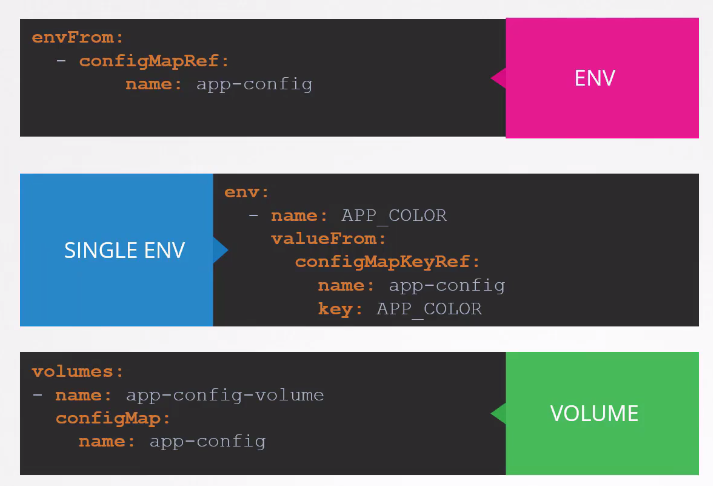
To create a pod injecting this configmap we need to do the following:
apiVersion: v1
kind: Pod
metadata:
  labels:
    run: echo
  name: echo
spec:
  containers:
  - image: ubuntu
    name: echo
    command:
    - "/bin/sh"
    - "-c"
    - "echo $test && sleep 10"
    envFrom:
    - configMapRef:
        name: myconfigmap
  dnsPolicy: ClusterFirst
  restartPolicy: Always
status: {}
In this case below we could create an env based on the value defined in the configmap:
apiVersion: v1
kind: Pod
metadata:
  labels:
    run: echo
  name: echo
spec:
  containers:
  - image: ubuntu
    name: echo
    command:
    - "/bin/sh"
    - "-c"
    - "echo $NEWENV && sleep 10"
    # In this case I'm creating a new variable based on a key from the configmap
    env:
    - name: NEWENV
      valueFrom:
       configMapKeyRef:
         name: myconfigmap
         key: test
  restartPolicy: Always
status: {}
We could use configmap values in several ways: