Container Entrypoint and Command
An image can have entrypoints and commands and what's the difference between them?
First we need to understand that a container must die if the process it needs to execute also dies. This is the lifecycle of a container.
If we do a simple test of running a standard ubuntu container without passing anything, it executes and dies. Why?
docker run ubuntu
Unable to find image 'ubuntu:latest' locally
latest: Pulling from library/ubuntu
a48641193673: Pull complete
Digest: sha256:6042500cf4b44023ea1894effe7890666b0c5c7871ed83a97c36c76ae560bb9b
Status: Downloaded newer image for ubuntu:latest

docker ps
CONTAINER ID   IMAGE                            COMMAND                  CREATED       STATUS         PORTS                             NAMES

docker ps -a
CONTAINER ID   IMAGE                            COMMAND                  CREATED          STATUS                      PORTS                             NAMES
7b8e6f3f1825   ubuntu                           "/bin/bash"              22 seconds ago   Exited (0) 21 seconds ago                                     jovial_noyce
Because it did what had to be done... It executed the /bin/bash command and that's it. Nothing kept it alive.
Let's run it again but now passing what we want to execute.
docker ps
CONTAINER ID   IMAGE                            COMMAND                  CREATED          STATUS          PORTS                             NAMES
15c54353ebf9   ubuntu                           "sleep 60"               12 seconds ago   Up 11 seconds                                     adoring_ramanujan

docker ps -a
CONTAINER ID   IMAGE                            COMMAND                  CREATED          STATUS                      PORTS                             NAMES
15c54353ebf9   ubuntu                           "sleep 60"               49 seconds ago   Up 48 seconds                                                 adoring_ramanujan

# and after 60s it died
docker ps
CONTAINER ID   IMAGE                            COMMAND                  CREATED       STATUS          PORTS                             NAMES
Within the dockerfile definitions we have:
ENTRYPOINT \
CMD
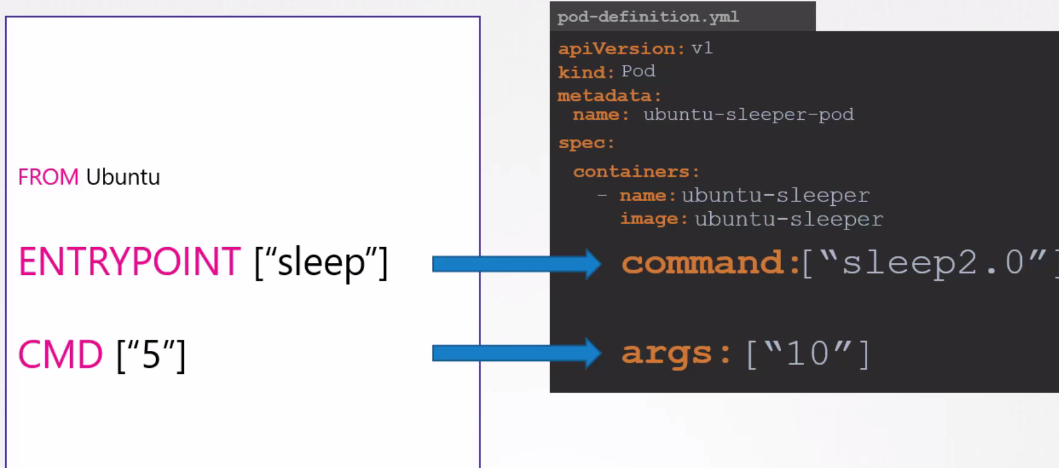
ENTRYPOINT represents the executable that will run and CMD what comes after.
If we have a container with:
ENTRYPOINT ["sleep"]
CMD ["10"]
What it will always try to execute will be ENTRYPOINT + CMD, that is: sleep 10
If we don't have the entrypoint and only CMD, just 10 wouldn't work, but we could bring the binary here. The first string always needs to be an executable and the rest are its parameters.
CMD ["sleep", "10"]
On the other hand, if we only had the entrypoint sleep without cmd, it wouldn't do anything by itself, and would cause an error, because it's expecting a parameter.
ENTRYPOINT ["sleep"]
It would be the same as doing this.
sleep
sleep: missing operand
Try 'sleep --help' for more information.
In the case where we only need to execute a binary that doesn't need inputs, it would work perfectly.
If we wanted to create a pod with the ubuntu image and run sleep 10, we could replace the entrypoint and cmd.
apiVersion: v1
kind: Pod
metadata:
  creationTimestamp: null
  labels:
    run: sleeper
  name: sleeper
spec:
  containers:
  - image: ubuntu
    name: sleeper
    command: ["sleep"]
    args: ["10"]
  # would be the same thing
  # command:
  # - sleep
  # args:
  # - "10"
    resources: {}
  dnsPolicy: ClusterFirst
  restartPolicy: Always
status: {}
Just for reference:
kubectl apply -f sleeper.yaml
kubectl get pods
NAME                     READY   STATUS    RESTARTS      AGE
nginx-7b8df77865-gt6fd   1/1     Running   1 (39m ago)   128m
nginx-7b8df77865-95qhp   1/1     Running   1 (39m ago)   128m
sleeper                  1/1     Running   0             8s

kubectl get pods
NAME                     READY   STATUS      RESTARTS      AGE
nginx-7b8df77865-gt6fd   1/1     Running     1 (39m ago)   128m
nginx-7b8df77865-95qhp   1/1     Running     1 (39m ago)   128m
sleeper                  0/1     Completed   0             16s
To start a pod and pass commands we have:
kubectl run busybox --image busybox --dry-run=client -o yaml --command -- sleep 1000
apiVersion: v1
kind: Pod
metadata:
  creationTimestamp: null
  labels:
    run: busybox
  name: busybox
spec:
  containers:
  - command:
    - sleep
    - "1000"
    image: busybox
    name: busybox
    resources: {}
  dnsPolicy: ClusterFirst
  restartPolicy: Always
status: {}

kubectl exec -it busybox -- ping www.google.com.br

PING www.google.com.br (172.217.162.131): 56 data bytes
64 bytes from 172.217.162.131: seq=0 ttl=110 time=15.942 ms
64 bytes from 172.217.162.131: seq=1 ttl=110 time=15.956 ms