Rolling Updates and Rollbacks
When creating a deployment we can define update strategies.
Recreate: destroys the old ones and creates new ones leaving the application down while the process finishes.RollingUpdate(default): gradually destroys one and brings up another keeping the application running.
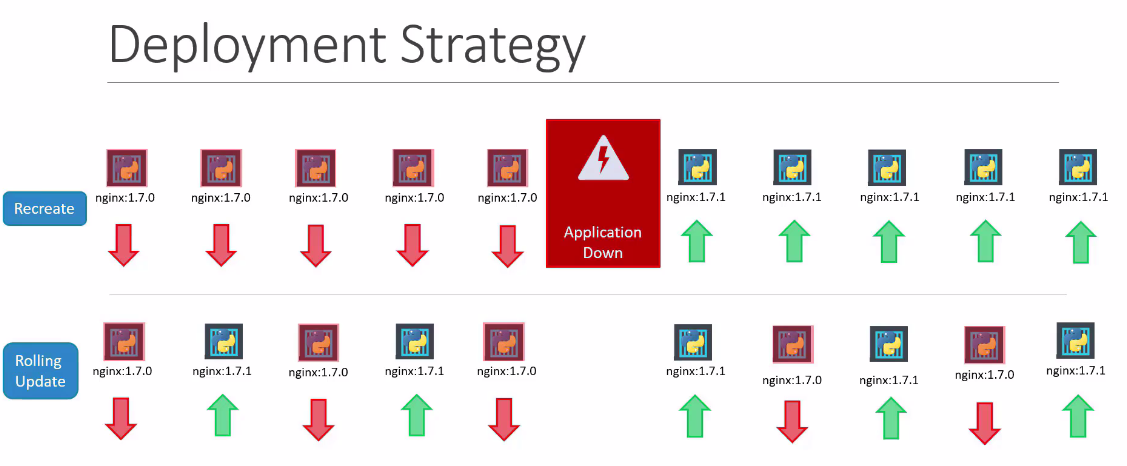
We can update several things:
- New image
- Labels
- Number of replicas
- Arguments
- Environment variables
- etc
The best way to do this is by reconfiguring the manifest file and using the command kubectl apply -f manifest.yaml, to keep a configuration file faithful to what is deployed in the cluster.
Through edit or the set image command as shown below:
k create deployment nginx --image nginx
deployment.apps/nginx created

# nginx is the image name
k set image deployment/nginx nginx=1.17
deployment.apps/nginx image updated

# Let's deploy a pod with two containers for example.
cat <<EOF | kubectl apply -f -
apiVersion: v1
kind: Pod
metadata:
  name: pod-com-dois-containers
spec:
  containers:
    - name: alpha
      image: nginx
      ports:
        - containerPort: 80
    - name: beta
      image: alpine
      command: ["/bin/sh", "-c"]
      args:
        - sleep 4800
EOF

# Let's update only the nginx image in the pod
kubectl set image pods/pod-com-dois-containers alpha=nginx:1.17
pod/pod-com-dois-containers image updated
See the difference in events that happen using these two strategies.
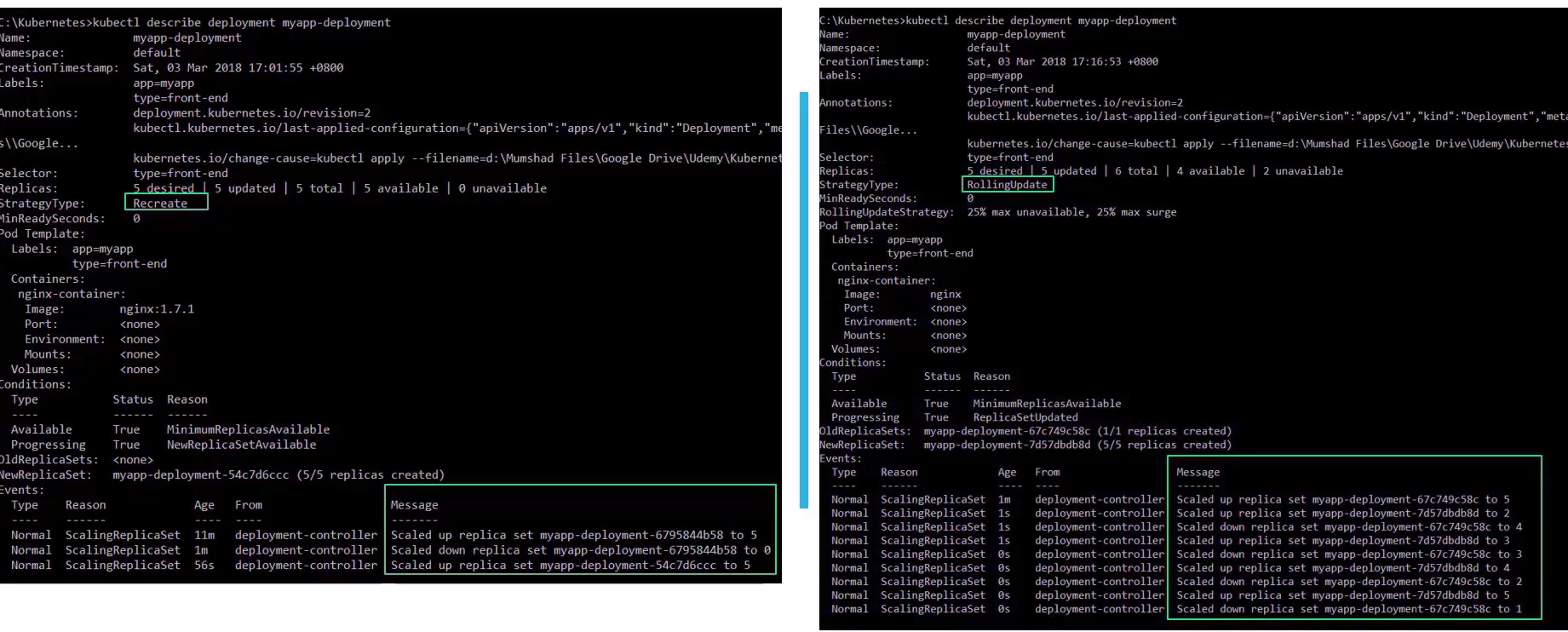
Recreate scaled to 0 and then back to 5, while RollingUpdate was gradually reducing and increasing.
The deployment creates the replicaset that deploys a set of pods. When we update the deployment, it will create another replicaset that will deploy new pods and keep the old one at zero, but still present.
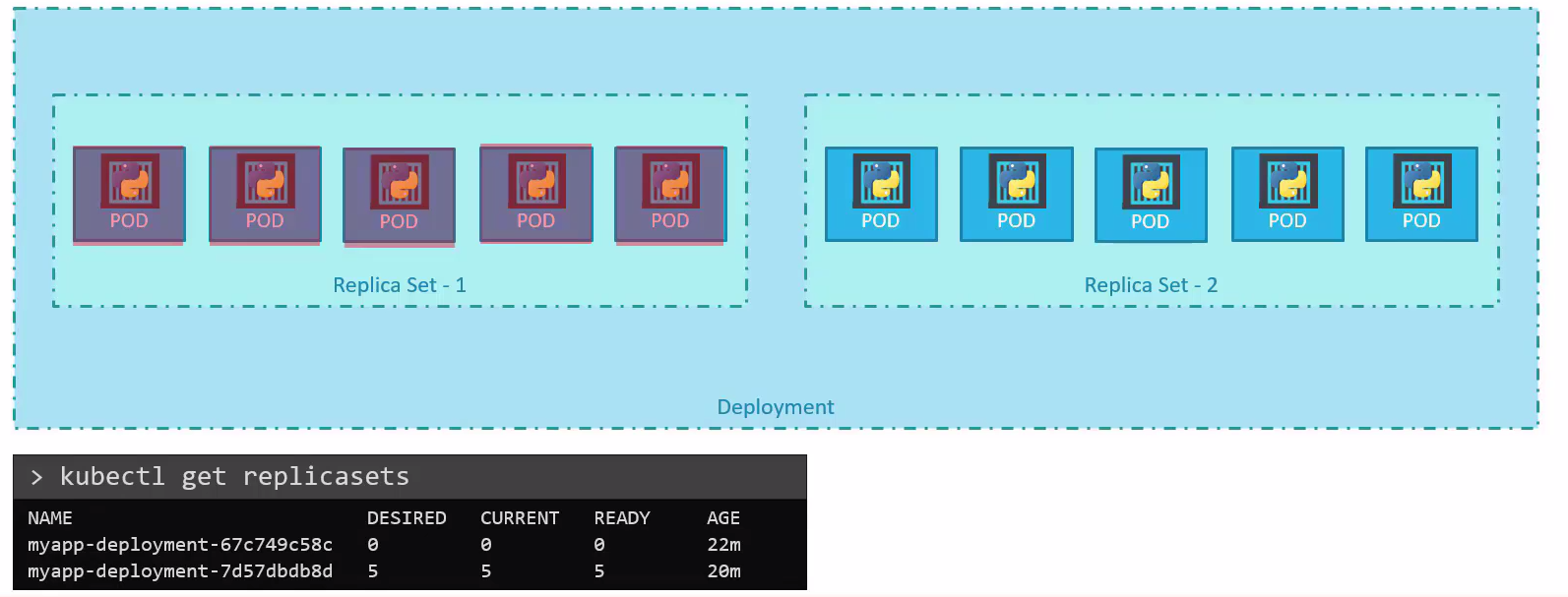
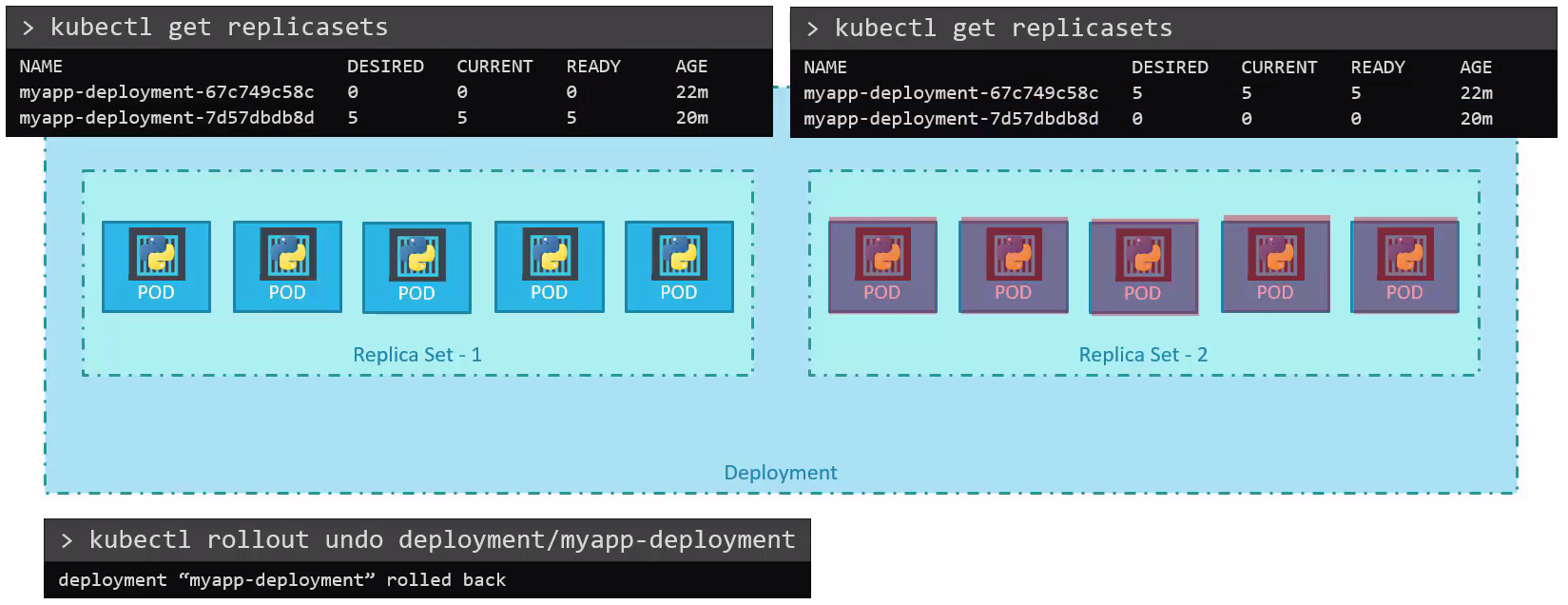
That's why we can rollback the application to the old replicaset if the new one has any problems.
The deployment creates revisions pointing to the correct replicasets and through this we can roll back with the rollout command.
kubectl create deployment nginx --image nginx:1.24 --replicas 2 -o yaml --dry-run=client > nginx.yaml

kubectl apply -f nginx1.24.yaml
deployment.apps/nginx created

kubectl get deploy
NAME    READY   UP-TO-DATE   AVAILABLE   AGE
nginx   2/2     2            2           11s

kubectl get rs
NAME               DESIRED   CURRENT   READY   AGE
nginx-69d846b5c6   2

# I created another file based on 1.24 but with the 1.25 image
kubectl apply -f nginx1.25.yaml
deployment.apps/nginx configured # Note that it was not created, only configured

kubectl describe deployments.apps nginx
Name:                   nginx
Namespace:              default
CreationTimestamp:      Sat, 30 Dec 2023 11:26:06 -0300
Labels:                 app=nginx
# uses annotations to define the revision
Annotations:            deployment.kubernetes.io/revision: 2
Selector:               app=nginx
Replicas:               2 desired | 2 updated | 2 total | 2 available | 0 unavailable
# Note that RollingUpdate is default and it kills 25% and brings up 25%
StrategyType:           RollingUpdate
MinReadySeconds:        0
RollingUpdateStrategy:  25% max unavailable, 25% max surge
Pod Template:
  Labels:  app=nginx
  Containers:
   nginx:
    Image:        nginx:1.25
    Port:         <none>
    Host Port:    <none>
    Environment:  <none>
    Mounts:       <none>
  Volumes:        <none>
Conditions:
  Type           Status  Reason
  ----           ------  ------
  Available      True    MinimumReplicasAvailable
  Progressing    True    NewReplicaSetAvailable
# See that it shows the previous replicaset and the new one
OldReplicaSets:  nginx-69d846b5c6 (0/0 replicas created)
NewReplicaSet:   nginx-7b8df77865 (2/2 replicas created)
Events:
  Type    Reason             Age   From                   Message
  ----    ------             ----  ----                   -------
  Normal  ScalingReplicaSet  2m9s  deployment-controller  Scaled up replica set nginx-69d846b5c6 to 2
  Normal  ScalingReplicaSet  30s   deployment-controller  Scaled up replica set nginx-7b8df77865 to 1
  Normal  ScalingReplicaSet  23s   deployment-controller  Scaled down replica set nginx-69d846b5c6 to 1 from 2
  Normal  ScalingReplicaSet  23s   deployment-controller  Scaled up replica set nginx-7b8df77865 to 2 from 1
  Normal  ScalingReplicaSet  16s   deployment-controller  Scaled down replica set nginx-69d846b5c6 to 0 from 1

kubectl rollout history deployment nginx
deployment.apps/nginx
REVISION  CHANGE-CAUSE
1         <none>
2         <none>

# The undo goes back to the previous revision, i.e. using the old-replica
# Rollout works for daemonset deployment statefulset
kubectl rollout undo deployment nginx
deployment.apps/nginx rolled back

kubectl describe deployments.apps nginx
Name:                   nginx
Namespace:              default
CreationTimestamp:      Sat, 30 Dec 2023 11:26:06 -0300
Labels:                 app=nginx
Annotations:            deployment.kubernetes.io/revision: 3
Selector:               app=nginx
Replicas:               2 desired | 2 updated | 2 total | 2 available | 0 unavailable
StrategyType:           RollingUpdate
MinReadySeconds:        0
RollingUpdateStrategy:  25% max unavailable, 25% max surge
Pod Template:
  Labels:  app=nginx
  Containers:
   nginx:
    Image:        nginx:1.24
    Port:         <none>
    Host Port:    <none>
    Environment:  <none>
    Mounts:       <none>
  Volumes:        <none>
Conditions:
  Type           Status  Reason
  ----           ------  ------
  Available      True    MinimumReplicasAvailable
  Progressing    True    NewReplicaSetAvailable
OldReplicaSets:  nginx-7b8df77865 (0/0 replicas created)
NewReplicaSet:   nginx-69d846b5c6 (2/2 replicas created)
Events:
  Type    Reason             Age    From                   Message
  ----    ------             ----   ----                   -------
  Normal  ScalingReplicaSet  10m    deployment-controller  Scaled up replica set nginx-69d846b5c6 to 2
  Normal  ScalingReplicaSet  8m22s  deployment-controller  Scaled up replica set nginx-7b8df77865 to 1
  Normal  ScalingReplicaSet  8m15s  deployment-controller  Scaled down replica set nginx-69d846b5c6 to 1 from 2
  Normal  ScalingReplicaSet  8m15s  deployment-controller  Scaled up replica set nginx-7b8df77865 to 2 from 1
  Normal  ScalingReplicaSet  8m8s   deployment-controller  Scaled down replica set nginx-69d846b5c6 to 0 from 1
  Normal  ScalingReplicaSet  6m54s  deployment-controller  Scaled up replica set nginx-69d846b5c6 to 1 from 0
  Normal  ScalingReplicaSet  6m52s  deployment-controller  Scaled down replica set nginx-7b8df77865 to 1 from 2
  Normal  ScalingReplicaSet  6m52s  deployment-controller  Scaled up replica set nginx-69d846b5c6 to 2 from 1
  Normal  ScalingReplicaSet  6m51s  deployment-controller  Scaled down replica set nginx-7b8df77865 to 0 from 1

kubectl get replicasets.apps
NAME               DESIRED   CURRENT   READY   AGE
nginx-69d846b5c6   2         2         2       10m
nginx-7b8df77865   0         0         0       9m6s

# Even though it goes back to using the first replicaset, it creates a new revision
❯ kubectl rollout history deployment nginx
deployment.apps/nginx
REVISION  CHANGE-CAUSE
2         <none>
3         <none>

# We could go back to a specific revision
kubectl rollout undo deployment nginx --to-revision 2
deployment.apps/nginx rolled bac

# It went back to revision 2 but created 4, because it always creates a revision, because what matters to it is the replicaset that will be used.
kubectl rollout history deployment nginx
deployment.apps/nginx
REVISION  CHANGE-CAUSE
3         <none>
4         <none>

# It discards old ones
kubectl rollout undo deployment nginx --to-revision 1
error: unable to find specified revision 1 in history
To keep more revisions we could define the revisionHistoryLimit tag.
For change causes to appear correctly, just use annotations
apiVersion: apps/v1
kind: Deployment
metadata:
  creationTimestamp: null
  labels:
    app: nginx
  name: nginx
  annotations:
      kubernetes.io/change-cause: "Image update to version 1.25"
spec:
  replicas: 2
  selector:
    matchLabels:
      app: nginx
  template:
    metadata:
      creationTimestamp: null
      labels:
        app: nginx
    spec:
      containers:
      - image: nginx:1.25
        name: nginx
        resources: {}
  # We could also change some parameters and define the strategies
  strategy:
    rollingUpdate:
      maxSurge: 1
      maxUnavailable: 1
    type: RollingUpdate
  revisionHistoryLimit: 10 # Like this