Kubeadm Installation
Let's perform a cluster installation using kubeadm.
The kubeadm tool helps us set up a multi-node cluster using Kubernetes best practices.
Just to recap, the Kubernetes cluster consists of several components, including kube-apiserver, etcd, controllers, etc.
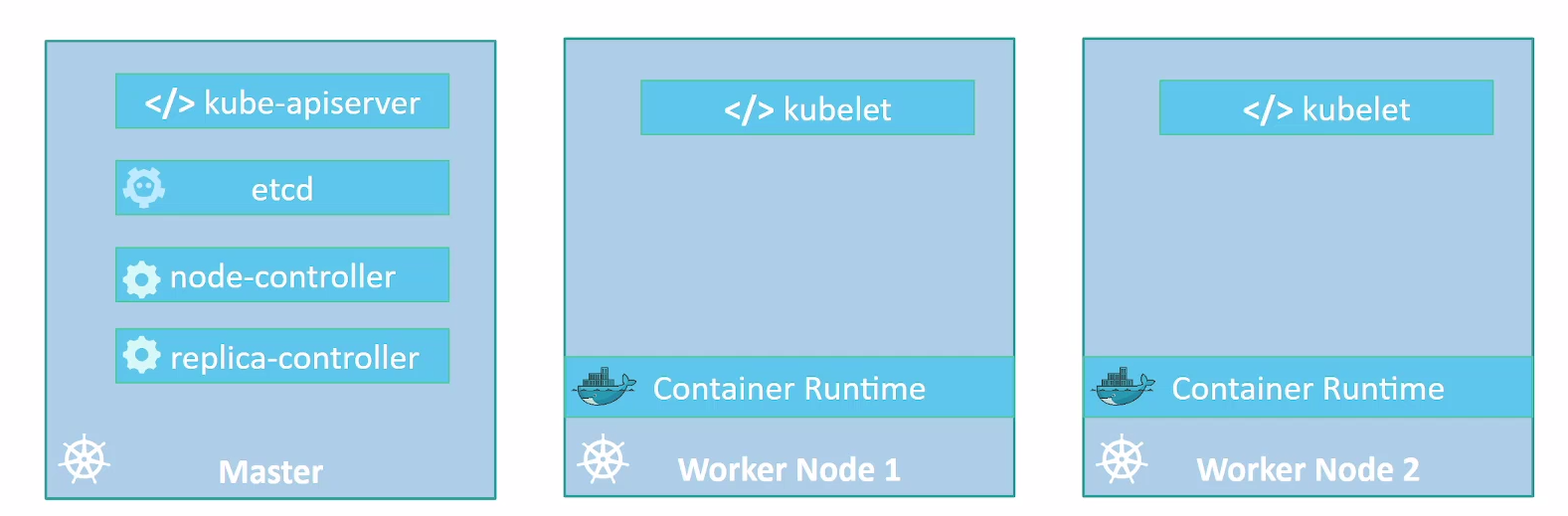
We've seen some of the requirements around security and certificates to enable communication between all components. Installing all these various components individually on different nodes and modifying all necessary configuration files to ensure all components point to each other and establish certificates so they work is a tedious task.
The kubeadm tool helps us by taking care of all these tasks.
First, you need to have several systems or VMs provisioned. So, we'll need a couple of nodes to form our Kubernetes cluster. These can be physical or virtual machines. Since this is a lab, we'll create virtual machines using VirtualBox and Vagrant.
With Vagrant, we can create a bootstrap after the machine comes up, placing necessary commands in a script.
The commands for nodes that will be masters are different from those that will be workers, but kubeadm will also help us with this task.
All nodes need a running container runtime. Kubeadm will run the controllers as static pods within our cluster.
Procedure for Kubernetes Cluster Deployment
-
Machine Provisioning (ALL): 1.1. Ensure machines meet minimum requirements, including:
- System operating system update
- Disable swap usage.
- Disable firewall or configure it correctly to allow necessary traffic.
-
Container Runtime Installation (ALL):
- Install containerd on all machines according to manufacturer instructions.
-
Kubeadm Installation (ALL):
- Install kubeadm on all machines, following official Kubernetes documentation instructions.
- https://kubernetes.io/docs/setup/production-environment/tools/kubeadm/install-kubeadm/
-
Master Configuration (MASTER1):
- On one of the master machines, we'll initialize the cluster using kubeadm as if it were single node.
-
CNI Deployment to create cluster network (MASTER1):
- We'll deploy a CNI solution to establish our cluster network.
-
Add other masters:
- On machines designated as masters, execute specific kubeadm commands to join the cluster with master function.
-
Adding Workers to Cluster:
- On machines designated as workers, execute specific kubeadm commands to join the cluster.
Requirements
We'll need Vagrant installed and VirtualBox. It's good to check the link https://github.com/kodekloudhub/certified-kubernetes-administrator-course
Create a folder for the project.
mkdir kubeadm-env
cd kubeadm-env
And let's create a file called Vagrantfile with this content:
NUM_EXTRA_MASTER_NODE = 2
NUM_WORKER_NODE = 2

IP_NW = "192.168.56."
MASTER_IP_START = 11
NODE_IP_START = 20

Vagrant.configure("2") do |config|

  config.vm.box = "ubuntu/jammy64"
  config.vm.boot_timeout = 900

  config.vm.box_check_update = false

  # Provision Master Nodes
  config.vm.define "kubemaster" do |node|
    node.vm.provider "virtualbox" do |vb|
      vb.name = "kubemaster01"
      vb.memory = 2048
      vb.cpus = 2
    end
    node.vm.hostname = "kubemaster01"
    node.vm.network :private_network, ip: IP_NW + "#{MASTER_IP_START}"
    node.vm.network "forwarded_port", guest: 22, host: "#{2710}"
  end

  # Provision Extra Masters
  (1..NUM_EXTRA_MASTER_NODE).each do |i|
    config.vm.define "kubemaster0#{i+1}" do |node|
      node.vm.provider "virtualbox" do |vb|
        vb.name = "kubemaster0#{i+1}"
        vb.memory = 2048
        vb.cpus = 2
      end
      node.vm.hostname = "kubemaster0#{i+1}"
      node.vm.network :private_network, ip: IP_NW + "#{MASTER_IP_START + i + 1}"
      node.vm.network "forwarded_port", guest: 22, host: "#{2710 + i + 1}"
    end
  end

  # Provision Worker Nodes
  (1..NUM_WORKER_NODE).each do |i|
    config.vm.define "kubenode0#{i}" do |node|
      node.vm.provider "virtualbox" do |vb|
        vb.name = "kubenode0#{i}"
        vb.memory = 1024
        vb.cpus = 1
      end
      node.vm.hostname = "kubenode0#{i}"
      node.vm.network :private_network, ip: IP_NW + "#{NODE_IP_START + i}"
      node.vm.network "forwarded_port", guest: 22, host: "#{2720 + i}"
    end
  end
end
This file will only bring up 5 VMs and won't execute anything inside them as bootstrap. Steps 1, 2, and 3 apply to all nodes, so let's create a script for general bootstrap.
#!/bin/bash

echo "##### Update System #####"
sudo apt-get update
sudo apt-get upgrade -y

## Following documentation https://kubernetes.io/docs/setup/production-environment/
## https://docs.docker.com/engine/install/ubuntu/container-runtimes/

echo "##### Disabling swap #####"
sed -i '/swap/d' /etc/fstab
swapoff -a

echo "##### Disabling firewall #####"
systemctl disable --now ufw >/dev/null 2>&1

echo "##### Enabling kernel modules required for containerd #####"
cat >>/etc/modules-load.d/containerd.conf<<EOF
overlay
br_netfilter
EOF
modprobe overlay
modprobe br_netfilter

echo "##### Module Fix #####"
cat <<EOF | sudo tee /etc/modules-load.d/k8s.conf
overlay
br_netfilter
EOF

sudo modprobe overlay
sudo modprobe br_netfilter

# sysctl params required by setup, params persist across reboots
cat <<EOF | sudo tee /etc/sysctl.d/k8s.conf
net.bridge.bridge-nf-call-iptables  = 1
net.bridge.bridge-nf-call-ip6tables = 1
net.ipv4.ip_forward                 = 1
EOF

# Apply sysctl params without reboot
sudo sysctl --system

# Verifying
sysctl net.bridge.bridge-nf-call-iptables net.bridge.bridge-nf-call-ip6tables net.ipv4.ip_forward

echo "##### Install Containerd #####"

sudo apt-get update
sudo apt-get install ca-certificates curl

echo "##### Install Containerd: Add Docker's official GPG key #####"

sudo install -m 0755 -d /etc/apt/keyrings
sudo curl -fsSL https://download.docker.com/linux/ubuntu/gpg -o /etc/apt/keyrings/docker.asc
sudo chmod a+r /etc/apt/keyrings/docker.asc

echo "##### Install Containerd: Add the repository to Apt sources #####"

echo \
  "deb [arch=$(dpkg --print-architecture) signed-by=/etc/apt/keyrings/docker.asc] https://download.docker.com/linux/ubuntu \
  $(. /etc/os-release && echo "$VERSION_CODENAME") stable" | \
  sudo tee /etc/apt/sources.list.d/docker.list > /dev/null

echo "##### Install Containerd: Install Packages #####"

sudo apt-get update
sudo apt-get install containerd.io -y

echo "##### Install Containerd: Verifying Service #####"
systemctl status containerd.service

echo "##### Install Containerd: Fix Cgroups Driver for systemd #####"

sudo mv /etc/containerd/config.toml /etc/containerd/config.toml.default

sudo tee /etc/containerd/config.toml  > /dev/null <<EOF
[plugins."io.containerd.grpc.v1.cri".containerd.runtimes.runc]
  [plugins."io.containerd.grpc.v1.cri".containerd.runtimes.runc.options]
    SystemdCgroup = true
EOF

sudo systemctl restart containerd.service
systemctl status containerd.service

#https://kubernetes.io/docs/setup/production-environment/tools/kubeadm/install-kubeadm/
echo "##### Install Kubeadm kubelet and kubectl #####"
sudo apt-get install -y apt-transport-https ca-certificates curl gpg

echo "##### Install Kubeadm kubelet and kubectl: Add Kubernetes's official GPG key"
curl -fsSL https://pkgs.k8s.io/core:/stable:/v1.29/deb/Release.key | sudo gpg --dearmor -o /etc/apt/keyrings/kubernetes-apt-keyring.gpg

echo "##### Install Kubeadm kubelet and kubectl: Add the repository to Apt sources"
echo 'deb [signed-by=/etc/apt/keyrings/kubernetes-apt-keyring.gpg] https://pkgs.k8s.io/core:/stable:/v1.29/deb/ /' | sudo tee /etc/apt/sources.list.d/kubernetes.list
sudo apt-get update

echo "##### Install Kubeadm kubelet and kubectl: Install Packages #####"
sudo apt-get install -y kubelet kubeadm kubectl
sudo apt-mark hold kubelet kubeadm kubectl
I've made all necessary comments in this script so you understand what we're going to do. Now let's add this script to all VMs.
Save this script in the same folder as the Vagrantfile with the name bootstrap.sh
ls -lha
total 20K
drwxrwxr-x 3 david-prata david-prata 4,0K fev 25 02:12 .
drwxrwxr-x 3 david-prata david-prata 4,0K fev 24 21:02 ..
-rw-rw-r-- 1 david-prata david-prata 3,0K fev 25 02:15 bootstrap.sh
-rw-rw-r-- 1 david-prata david-prata 1,7K fev 25 02:17 Vagrantfile
Let's add the lines below commented.
NUM_EXTRA_MASTER_NODE = 2
NUM_WORKER_NODE = 2

IP_NW = "192.168.56."
MASTER_IP_START = 11
NODE_IP_START = 20

Vagrant.configure("2") do |config|

  config.vm.box = "ubuntu/jammy64"
  config.vm.boot_timeout = 900

  config.vm.box_check_update = false

  # Provision Master Nodes
  config.vm.define "kubemaster" do |node|
    # Name shown in GUI
    node.vm.provider "virtualbox" do |vb|
      vb.name = "kubemaster01"
      vb.memory = 2048
      vb.cpus = 2
    end
    node.vm.hostname = "kubemaster01"
    node.vm.network :private_network, ip: IP_NW + "#{MASTER_IP_START}"
    node.vm.network "forwarded_port", guest: 22, host: "#{2710}"
    node.vm.provision "shell", path: "bootstrap.sh" ## ADDED
  end

  # Provision Extra Masters
  (1..NUM_EXTRA_MASTER_NODE).each do |i|
    config.vm.define "kubemaster0#{i+1}" do |node|
      node.vm.provider "virtualbox" do |vb|
        vb.name = "kubemaster0#{i+1}"
        vb.memory = 2048
        vb.cpus = 2
      end
      node.vm.hostname = "kubemaster0#{i+1}"
      node.vm.network :private_network, ip: IP_NW + "#{MASTER_IP_START + i + 1}"
      node.vm.network "forwarded_port", guest: 22, host: "#{2710 + i + 1}"
      node.vm.provision "shell", path: "bootstrap.sh" ## ADDED
    end
  end

  # Provision Worker Nodes
  (1..NUM_WORKER_NODE).each do |i|
    config.vm.define "kubenode0#{i}" do |node|
      node.vm.provider "virtualbox" do |vb|
        vb.name = "kubenode0#{i}"
        vb.memory = 1024
        vb.cpus = 1
      end
      node.vm.hostname = "kubenode0#{i}"
      node.vm.network :private_network, ip: IP_NW + "#{NODE_IP_START + i}"
      node.vm.network "forwarded_port", guest: 22, host: "#{2720 + i}"
     node.vm.provision "shell", path: "bootstrap.sh" ## ADDED
    end
  end
end
On each node, we'll then be ready to set up the cluster.
On the first master node, we need to initialize the cluster.
kubeadm init --apiserver-advertise-address=<MASTER IP> --pod-network-cidr=<NETWORK THAT PODS WILL HAVE>
We already know what the masters' IPs are. We defined the IPs automatically in the Vagrantfile.
| IPS | NODE |
|---|---|
| kubemaster01 | 192.168.56.11 |
| kubemaster02 | 192.168.56.12 |
| kubemaster03 | 192.168.56.13 |
| kubemaster01 | 192.168.56.21 |
| kubemaster01 | 192.168.56.22 |
Let's define the network that will be used by pods as 10.244.0.0/16, could be another, of course.
So the command would be:
kubeadm init --apiserver-advertise-address=192.168.56.11 --pod-network-cidr=10.244.0.0/16
We can automate this.
IP_ADDR=`ip -4 address show enp0s8 | grep inet | awk '{print $2}' | cut -d/ -f1`
POD_CIDR="10.244.0.0/16"

echo "##### Initializing cluster #####"
sudo kubeadm init --apiserver-advertise-address=$IP_ADDR --pod-network-cidr=$POD_CIDR

mkdir -p $HOME/.kube
sudo cp -i /etc/kubernetes/admin.conf $HOME/.kube/config
sudo chown $(id -u):$(id -g) $HOME/.kube/config
Let's talk a bit about this command. We don't have a load balancer in front of our cluster here. If we had one, we should pass some additional parameters in this command --control-plane-endpoint=<LB_IP:6443> --upload-certs.
The init command pulls some images that will be used automatically. If you want to pull these images before running the init command to be faster, it's possible, but not mandatory.
kubeadm config images pull.
Running the above script, we have the cluster with a single master node. In the console, it shows the necessary commands we should continue executing, see the output.
###
Your Kubernetes control-plane has initialized successfully!

To start using your cluster, you need to run the following as a regular user:

  mkdir -p $HOME/.kube
  sudo cp -i /etc/kubernetes/admin.conf $HOME/.kube/config
  sudo chown $(id -u):$(id -g) $HOME/.kube/config

Alternatively, if you are the root user, you can run:

export KUBECONFIG=/etc/kubernetes/admin.conf

You should now deploy a pod network to the cluster.
Run "kubectl apply -f [podnetwork].yaml" with one of the options listed at:
  https://kubernetes.io/docs/concepts/cluster-administration/addons/

Then you can join any number of worker nodes by running the following on each as root:

kubeadm join 192.168.56.11:6443 --token 9n1vty.afan7eb99kaxltcj \
        --discovery-token-ca-cert-hash sha256:6ebd7fd44972113263b6e85e8bdddd841774a39db9a48bd04d575c034c188247
The generated kubeconfig is at /etc/kubernetes/admin.conf. We need it for kubectl to work, so let's put the above commands inside our script. Another thing we need to do is install a CNI in the cluster. We'll also apply it to the cluster using kubectl that we just made work. We could use other CNI options, but let's choose Weavenet.
IP_ADDR=`ip -4 address show enp0s8 | grep inet | awk '{print $2}' | cut -d/ -f1`
POD_CIDR="10.244.0.0/16"

echo "##### Init Cluster #####"
sudo kubeadm init --apiserver-advertise-address=$IP_ADDR --pod-network-cidr=$POD_CIDR

echo "##### Copy kubeconfig #####"
mkdir -p $HOME/.kube
sudo cp -i /etc/kubernetes/admin.conf $HOME/.kube/config
sudo chown $(id -u):$(id -g) $HOME/.kube/config

##https://github.com/weaveworks/weave?tab=readme-ov-file
echo "##### Deploy CNI weavenet #####"
kubectl apply -f https://cloud.weave.works/k8s/net?k8s-version=$(kubectl version | base64 | tr -d '\n') >/dev/null 2>&1
kubeadm token create --certificate-key $(kubeadm init phase upload-certs --upload-certs | tail -1 ) --print-join-command > /join_masters.sh