Persistent Volume
In the previous session, we configured the volume inside the pod spec. All configuration for volume access is inside the pod.
When we have an environment with several deployments, we would need to configure volume parameters in all definitions.
To avoid this, we can manage the volume in a more centralized way where the administrator could create a pool of volumes at cluster level that could be used by users to deploy applications in the cluster.
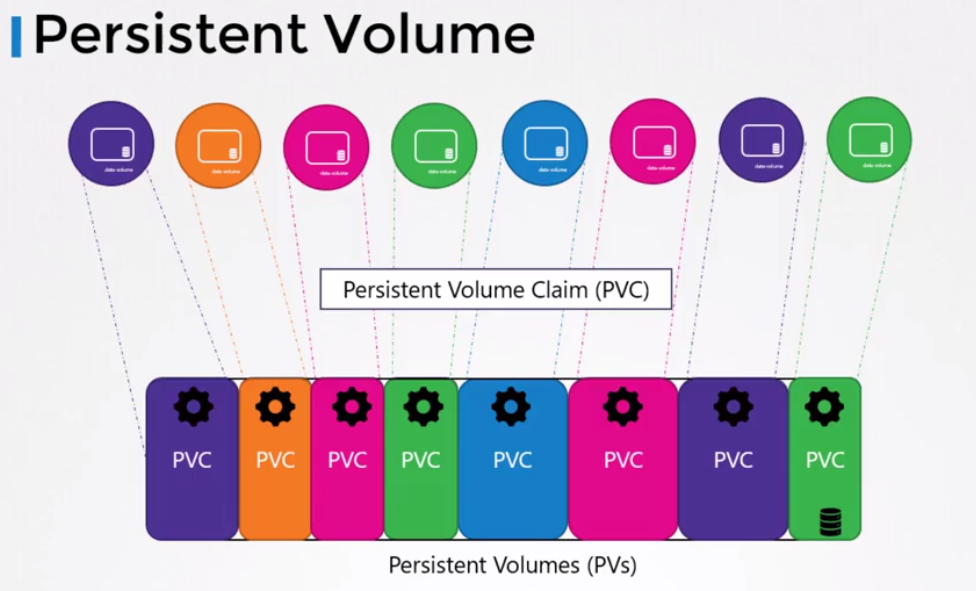
Each application creates a Persistent Volume Claim which is a volume request. Let's understand more later.
To create a Persistent Volume.
cat <<EOF | kubectl apply -f -
apiVersion: v1
kind: PersistentVolume
metadata:
  name: pv-vol1
spec:
  accessModes:
    - ReadWriteOnce
  capacity:
    storage: 1Gi
  hostPath:
    path: /tmp/data
EOF

kubectl get pv
NAME                                       CAPACITY   ACCESS MODES   RECLAIM POLICY   STATUS      CLAIM                                           STORAGECLASS   VOLUMEATTRIBUTESCLASS   REASON   AGE
pv-vol1                                    1Gi        RWO            Retain           Available                                                                  <unset>                          10s
This created PV doesn't have a Storage Class because it was provisioned manually. Keep this in mind.
AccessModes defines how the volume should be mounted ON ALL HOSTS. In the example above, we put it in /tmp which is a folder that has permission for this.
Could be:
- ReadOnlyMany
- ReadWriteOnce
- ReadWriteMany
Again, let's test this hostPath solution to see what happens.
This would be a more productive case.
apiVersion: v1
kind: PersistentVolume
metadata:
  name: pv-vol1
spec:
  accessModes:
    - ReadWriteOnce
  capacity:
    storage: 1Gi
  awsElasticBlockStore:
    volumeID: <volume-id>
    fsType: ext4
Let's get the concepts a bit clearer
PersistentVolume (PV):
- A PersistentVolume is a storage resource provisioned in the Kubernetes cluster.
- Exists independently of the Pods that use it.
- Are provisioned manually by the cluster administrator or dynamically through a storage provisioner (Storage Class).
- Represent the actual physical storage available in the cluster, which can be disks, network volumes, or any other type of supported storage.
- PVs have a specification that defines characteristics such as capacity, access mode (ReadWriteOnce, ReadWriteMany, ReadOnlyMany), among others.
PersistentVolumeClaim (PVC):
- Is a request made by a pod for persistent storage.
- A PVC requests a certain type of storage (for example, a certain capacity and access mode) and Kubernetes finds a suitable PV that satisfies this request.
- Are used by developers to request storage without needing to worry about specific details of how storage is provisioned and managed in the cluster.
- When a PVC is created and there are no corresponding PVs available, Kubernetes can provision a new PV automatically based on PVC specifications. This is known as dynamic provisioning.
- When a PVC is created and there is a suitable PV available, Kubernetes automatically binds the PVC to the corresponding PV.
A PVC only exists bound to a PV and a PV can only have one PVC when bound.
The PVC requests access to a PV, but which one? Based on matches and parameters. Just as we can select a node that meets certain requirements for a pod, the PVC requests a PV that meets its requirements.
We could have requirements:
- Sufficient Capacity
- Access Modes
- Volume Modes
- Storage Class
- Selector
In a volume's metadata, we can have labels to use matchLabels. It's generally good to use this because more than one PV can meet the PVC requirements.
All criteria need to be satisfied, but a PVC that only needs sufficient space of 1Gi can be bound to a 100Gi PV if there's no other option available. If it's just you, you go anyway.
If no PV satisfies the criteria, the PVC will remain Pending until a PV satisfies the criteria.
Let's create a PVC so the previous PV satisfies it.
cat <<EOF | kubectl apply -f -
apiVersion: v1
kind: PersistentVolumeClaim
metadata:
  name: myclaim
spec:
  accessModes:
    - ReadWriteOnce
  resources:
    requests:
      storage: 500Mi
EOF

kubectl get PVC
NAME      STATUS    VOLUME   CAPACITY   ACCESS MODES   STORAGECLASS   VOLUMEATTRIBUTESCLASS   AGE
myclaim   Pending

kubectl describe PVC myclaim
Name:          myclaim
Namespace:     default
StorageClass:  standard # <<< See this
Status:        Pending
Volume:
Labels:        <none>
Annotations:   <none>
Finalizers:    [kubernetes.io/PVC-protection]
Capacity:
Access Modes:
VolumeMode:    Filesystem
Used By:       <none>
Events:
  Type    Reason                Age                From                         Message
  ----    ------                ----               ----                         -------
  Normal  WaitForFirstConsumer  12s (x2 over 24s)  persistentvolume-controller  waiting for first consumer to be created before binding
We didn't define a Storage Class but it has one. When not defined, the default will be used.
kubectl get sc
NAME                 PROVISIONER             RECLAIMPOLICY   VOLUMEBINDINGMODE      ALLOWVOLUMEEXPANSION   AGE
standard (default)   rancher.io/local-path   Delete          WaitForFirstConsumer   false                  7d11h

kubectl describe sc standard
Name:            standard
IsDefaultClass:  Yes
Annotations:     kubectl.kubernetes.io/last-applied-configuration={"apiVersion":"storage.k8s.io/v1","kind":"StorageClass","metadata":{"annotations":{"storageclass.kubernetes.io/is-default-class":"true"},"name":"standard"},"provisioner":"rancher.io/local-path","reclaimPolicy":"Delete","volumeBindingMode":"WaitForFirstConsumer"}
,storageclass.kubernetes.io/is-default-class=true
Provisioner:           rancher.io/local-path
Parameters:            <none>
AllowVolumeExpansion:  <unset>
MountOptions:          <none>
ReclaimPolicy:         Delete
VolumeBindingMode:     WaitForFirstConsumer
Events:                <none>
If you observed well, the PVC didn't bind with the PV.
When a pod uses this PVC, the bind will be made. This is a configuration of the Storage Class (the provisioner) of my cluster. Since it's not possible to edit a Storage Class because it's immutable, I would need to create a Storage Class for this to see this bind happen without needing a pod.
Let's create another Storage Class then.
cat <<EOF | kubectl apply -f -
apiVersion: storage.k8s.io/v1
kind: StorageClass
metadata:
  name: fast
provisioner: rancher.io/local-path
reclaimPolicy: Delete
volumeBindingMode: Immediate
EOF

# Note that this Storage Class is not the system default, so to be used it needs to be pointed to.
kubectl get sc
NAME                 PROVISIONER             RECLAIMPOLICY   VOLUMEBINDINGMODE      ALLOWVOLUMEEXPANSION   AGE
fast                 rancher.io/local-path   Delete          Immediate              false                  5s
standard (default)   rancher.io/local-path   Delete          WaitForFirstConsumer   false                  6d18h

# Another PV pointing to the Storage Class
cat <<EOF | kubectl apply -f -
apiVersion: v1
kind: PersistentVolume
metadata:
  name: pv-vol2
spec:
  accessModes:
    - ReadWriteOnce
  capacity:
    storage: 1Gi
  hostPath:
    path: /tmp/data
  storageClassName: fast
EOF

kubectl get pv
NAME                                       CAPACITY   ACCESS MODES   RECLAIM POLICY   STATUS      CLAIM                                           STORAGECLASS   VOLUMEATTRIBUTESCLASS   REASON   AGE
pv-vol1                                    1Gi        RWO            Retain           Available                                                                  <unset>                          3h13m
pv-vol2                                    1Gi        RWO            Retain           Available                                                   fast           <unset>                          8s

# Another PVC but forcing it to be in the fast Storage Class
cat <<EOF | kubectl apply -f -
apiVersion: v1
kind: PersistentVolumeClaim
metadata:
  name: myclaim2
spec:
  accessModes:
    - ReadWriteOnce
  resources:
    requests:
      storage: 500Mi
  storageClassName: fast
EOF

# Seeing the bind
kubectl get PVC
NAME       STATUS    VOLUME    CAPACITY   ACCESS MODES   STORAGECLASS   VOLUMEATTRIBUTESCLASS   AGE
myclaim    Pending                                       standard       <unset>                 56m
myclaim2   Bound     pv-vol2   1Gi        RWO            fast           <unset>                 6s

kubectl get pv
NAME                                       CAPACITY   ACCESS MODES   RECLAIM POLICY   STATUS      CLAIM                                           STORAGECLASS   VOLUMEATTRIBUTESCLASS   REASON   AGE
pv-vol1                                    1Gi        RWO            Retain           Available                                                                  <unset>                          3h19m
pv-vol2                                    1Gi        RWO            Retain           Bound       default/myclaim2                                fast           <unset>                          5m59s
Let's create a PVC that would look for the fast Storage Class but wouldn't have a PV to associate with.
cat <<EOF | kubectl apply -f -
apiVersion: v1
kind: PersistentVolumeClaim
metadata:
  name: myclaim3
spec:
  accessModes:
    - ReadWriteOnce
  resources:
    requests:
      storage: 500Mi
  storageClassName: fast
EOF

kubectl get PVC
NAME       STATUS    VOLUME    CAPACITY   ACCESS MODES   STORAGECLASS   VOLUMEATTRIBUTESCLASS   AGE
myclaim    Pending                                       standard       <unset>                 63m
myclaim2   Bound     pv-vol2   1Gi        RWO            fast           <unset>                 6m22s
myclaim3   Pending                                       fast           <unset>                 2m26s

# Let's delete myclaim2 to release and see what happens
kubectl delete PVC myclaim2
persistentvolumeclaim "myclaim2" deleted

# Even so, it still hasn't found available
kubectl get PVC
NAME       STATUS    VOLUME   CAPACITY   ACCESS MODES   STORAGECLASS   VOLUMEATTRIBUTESCLASS   AGE
myclaim    Pending                                      standard       <unset>                 6h36m
myclaim3   Pending                                      fast           <unset>                 5h35m

kubectl get pv
NAME                                       CAPACITY   ACCESS MODES   RECLAIM POLICY   STATUS      CLAIM                                           STORAGECLASS   VOLUMEATTRIBUTESCLASS   REASON   AGE
pv-vol1                                    1Gi        RWO            Retain           Available                                                                  <unset>                          8h
pv-vol2                                    1Gi        RWO            Retain           Released    default/myclaim2                                fast           <unset>                          5h43m
What happens when we delete a PVC. By default, even losing the binding, the PV is not deleted. It happens that a PV has a data retention policy and the default is Retain.
persistentVolumeReclaimPolicy: Retain is the default
We didn't define this, so it kept Retain.
- Retain: Data remains and no other PVC can associate, NOT EVEN THE SAME?
- Recycle: the PV becomes available again when the PVC is destroyed and data will be erased when another PVC requests access.
- Delete: the PV will be destroyed when the PVC is destroyed.
If I create the same previous PVC, will it be associated with the PV?
cat <<EOF | kubectl apply -f -
apiVersion: v1
kind: PersistentVolumeClaim
metadata:
  name: myclaim2
spec:
  accessModes:
    - ReadWriteOnce
  resources:
    requests:
      storage: 500Mi
  storageClassName: fast

EOF
persistentvolumeclaim/myclaim2 created

kubectl get PVC
NAME       STATUS    VOLUME   CAPACITY   ACCESS MODES   STORAGECLASS   VOLUMEATTRIBUTESCLASS   AGE
myclaim    Pending                                      standard       <unset>                 6h45m
myclaim2   Pending                                      fast           <unset>                 6s
myclaim3   Pending                                      fast           <unset>                 5h44m

# Why hasn't it gone yet?
kubectl describe PVC myclaim2
Name:          myclaim2
Namespace:     default
StorageClass:  fast
Status:        Pending
Volume:
Labels:        <none>
Annotations:   volume.beta.kubernetes.io/storage-provisioner: rancher.io/local-path
               volume.kubernetes.io/storage-provisioner: rancher.io/local-path
Finalizers:    [kubernetes.io/PVC-protection]
Capacity:
Access Modes:
VolumeMode:    Filesystem
Used By:       <none>
Events:
  Type     Reason                Age                From                                                                                                Message
  ----     ------                ----               ----                                                                                                -------
  Normal   Provisioning          29s (x2 over 44s)  rancher.io/local-path_local-path-provisioner-7577fdbbfb-5dd24_6c93344f-2afb-45ff-b736-d7a5071e082a  External provisioner is provisioning volume for claim "default/myclaim2"
  Warning  ProvisioningFailed    29s (x2 over 44s)  rancher.io/local-path_local-path-provisioner-7577fdbbfb-5dd24_6c93344f-2afb-45ff-b736-d7a5071e082a  failed to provision volume with StorageClass "fast": configuration error, no node was specified
  Normal   ExternalProvisioning  7s (x4 over 44s)   persistentvolume-controller                                                                         Waiting for a volume to be created either by the external provisioner 'rancher.io/local-path' or manually by the system administrator. If volume creation is delayed, please verify that the provisioner is running and correctly registered.
#
No, not even creating an identical PVC will we get this PV.
TODO: Let's try a recovery attempt later and see the possible paths to get a pod to access this data again.
Let's now deploy a POD that uses a PVC and will dynamically create the PV. As I saw earlier, we created a PVC and a PV was not created, and below we'll use very similar code and it will work. The reason for this is that when we use a PVC inside the pod, it's at this moment that dynamic provisioning happens, at the moment it says attach the PVC to the pod.
cat << EOF | kubectl apply -f -
apiVersion: v1
kind: PersistentVolumeClaim
metadata:
  name: myclaim
spec:
  accessModes:
    - ReadWriteOnce
  resources:
    requests:
      storage: 500Mi
---
apiVersion: v1
kind: Pod
metadata:
  name: mypod
spec:
  containers:
    - name: myfrontend
      image: nginx
      volumeMounts:
      - mountPath: "/var/www/html"
        name: mypd
  volumes:
    - name: mypd
      persistentVolumeClaim:
        claimName: myclaim
EOF

kubectl get PVC
NAME      STATUS   VOLUME                                     CAPACITY   ACCESS MODES   STORAGECLASS   VOLUMEATTRIBUTESCLASS   AGE
myclaim   Bound    PVC-903f9ac6-ded9-4d1e-b5d3-2c277ce41f87   500Mi      RWO            standard       <unset>                 4s

kubectl get pod
NAME    READY   STATUS    RESTARTS   AGE
mypod   1/1     Running   0          12s

# We can see that the PV was dynamically created with Reclaim Policy Delete, meaning it will also be deleted when the PVC is deleted.
kubectl get pv
NAME                                       CAPACITY   ACCESS MODES   RECLAIM POLICY   STATUS   CLAIM                                           STORAGECLASS   VOLUMEATTRIBUTESCLASS   REASON   AGE
PVC-903f9ac6-ded9-4d1e-b5d3-2c277ce41f87   500Mi      RWO            Delete           Bound    default/myclaim                                 standard       <unset>                          19s

kubectl delete pod mypod
pod "mypod" deleted

kubectl get PVC
NAME      STATUS   VOLUME                                     CAPACITY   ACCESS MODES   STORAGECLASS   VOLUMEATTRIBUTESCLASS   AGE
myclaim   Bound    PVC-903f9ac6-ded9-4d1e-b5d3-2c277ce41f87   500Mi      RWO            standard       <unset>                 47s

kubectl delete PVC myclaim
persistentvolumeclaim "myclaim" deleted

kubectl get pv
NAME                                       CAPACITY   ACCESS MODES   RECLAIM POLICY   STATUS   CLAIM                                           STORAGECLASS   VOLUMEATTRIBUTESCLASS   REASON   AGE
TODO: I need to digest this a bit more
We've already seen that it's possible to reserve a PV for a specific PVC, but I need to be sure about READ WRITE ONCE and MANY and if what I did locally would have any problem.