Approaches
Generally, Confluent tends to be the best Kafka SaaS service. It has integration with many tools, is quite complete, worth checking out.
However, if we want to install self-managed Kafka, I strongly recommend using Kafka within Kubernetes. Although bare-metal installation with VMs is possible, why suffer? Do you want that responsibility? Who will maintain it? Think about it....
Requirements:
- docker or some other container runtime
- kind or some cluster with at least 3 worker nodes.
- kubectl
- helm
Zookeeper vs Kraft
The first approach we must understand is whether or not to use Zookeeper for cluster coordination that we'll set up.
First, we should understand Raft Consensus. Here on the site, there's an article about Raft Consensus to help better understand the concept.
If you want an article to understand why we should use kraft, here is a good read.
After reading, you should have understood that Kafka Raft has higher performance, less fault tolerance, and less write overhead. So if you're preparing an installation for Kafka today, use the new Kafka Raft standard.
Self-Managed or SaaS
If the Kafka cluster is very large, going for a SaaS solution like Confluent Cloud may make sense for several reasons:
- Automatic Scalability
- Managing hundreds or thousands of topics and partitions manually is complex.
- Confluent Cloud scales automatically as load increases, without needing to manually adjust brokers or partitions.
- Less Operational Overhead
- In a very large cluster, we need a dedicated team to manage: Kafka version updates, Load balancing, Security configuration (RBAC, ACLs, authentication), Monitoring and troubleshooting.
- In SaaS, all this is managed by Confluent, reducing team effort.
- High Availability and Disaster Recovery
- Maintaining highly available (HA) Kafka with disaster recovery requires multiple distributed clusters and replication between regions.
- Confluent already offers this ready and managed, with guaranteed SLAs.
- Security and Compliance
- Large companies need to ensure end-to-end security (encryption, IAM, audit logs).
- Confluent Cloud already comes with compliance support for GDPR, HIPAA, SOC 2, ISO 27001, etc.
- Costs vs. Team
- Maintaining a large Kafka cluster on Kubernetes (Strimzi or CFK) requires many resources: Powerful infrastructure (multiple brokers, storage), Specialized team to operate the cluster
- In SaaS, you pay for usage and eliminate operational costs, being able to focus on application development instead of managing infrastructure.
When does it make sense to go to SaaS?
- If the cluster grows quickly and you want to avoid operational pains.
- If you need high availability and disaster recovery without complication.
- If the company has rigorous security and compliance requirements.
- If you want to reduce infrastructure team and focus only on application.
If your infrastructure is small or moderate, a self-managed cluster is still worthwhile. However, it makes sense to consider a SaaS solution when the cost of maintaining your own Kafka (team + infrastructure) becomes excessive.
When the operation grows too much, we're not just paying for convenience, but also outsourcing challenges — and as a bonus, having someone to take responsibility when something goes wrong!
Installation on Kubernetes
In the past, the best way I knew to provide something close to what Confluent offers was to run several different helm charts: a bitnami helm chart for Kafka installation, a chart to run the schema-registry service (also from bitnami), a kafka UI service that gave me a dashboard, and several other services aggregated to kafka that were also installed via Helm chart and could be viewed through the UI (ksql, connects, rest, and control-center).
Fortunately, today we have a project in CNCF called Strimzi that greatly facilitates installing a kafka cluster within Kubernetes.

What's the advantage?
- Deploys and runs Kafka clusters
- Manages Kafka components
- Configures Kafka access
- Secures Kafka access
- Updates Kafka
- Manages brokers
- Creates and manages topics
- Creates and manages users
- Focuses on Kafka control, not on tools aggregated to it.
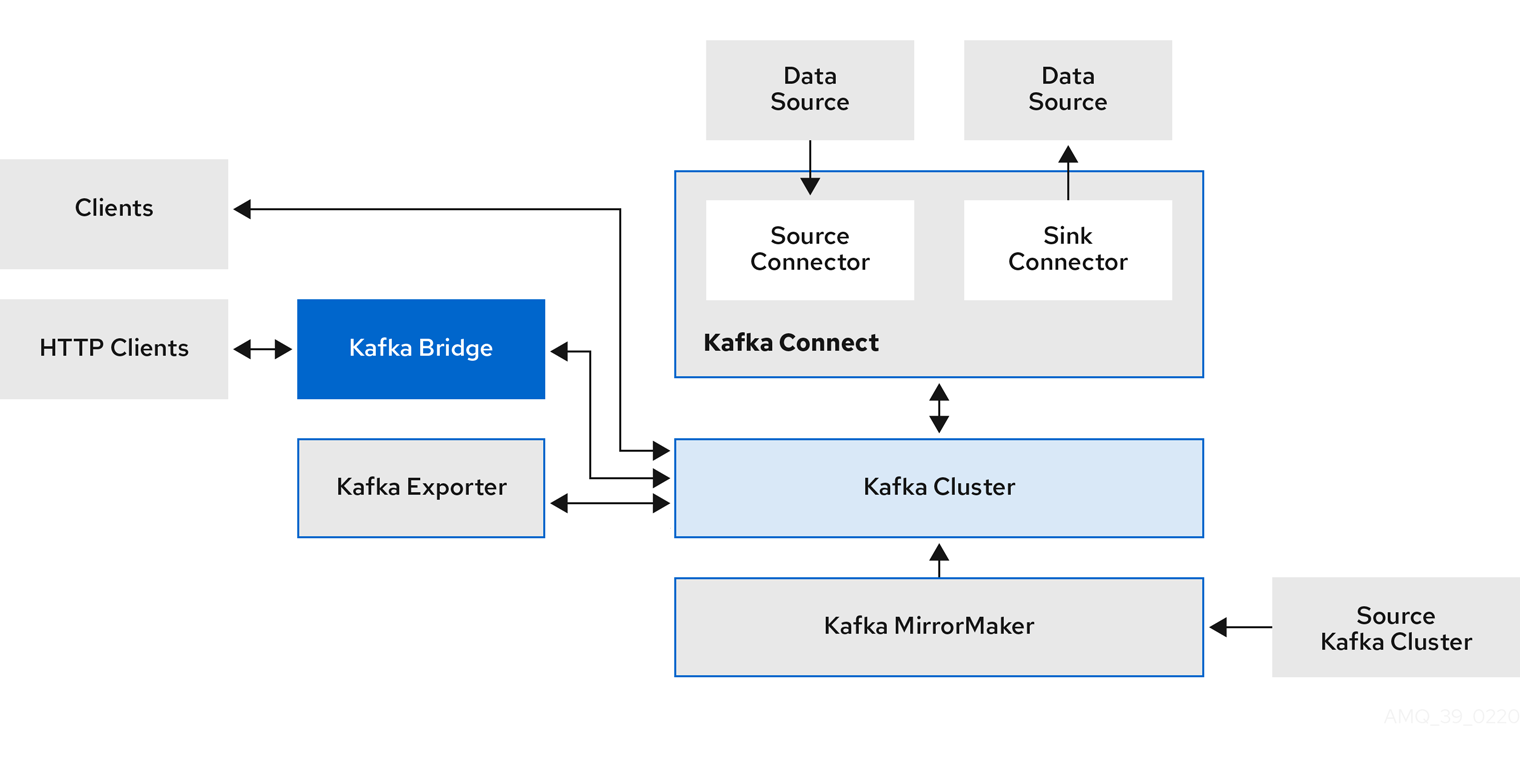
Here we have that architecture we already know from the study, but now we have some additional things.
-
Kafka Bridge (Already mentioned before as Kafka Rest) provides a RESTful interface that allows HTTP-based clients to interact with a Kafka cluster. It offers the advantages of an HTTP API connection with Strimzi so clients can produce and consume messages without needing to use Kafka's native protocol.
-
Kafka Exporter extracts data for analysis as Prometheus metrics, mainly data related to offsets, consumer groups, consumer lag, and topics. Consumer lag is the delay between the last message written to a partition and the message currently being collected from that partition by a consumer.
-
Kafka MirrorMaker (We won't use) replicates data between two Kafka clusters, in the same data center or at different locations.
A Kafka cluster is composed of multiple nodes operating as brokers that receive and store data. Topics are divided by partitions, where data is written. Partitions are replicated among brokers for fault tolerance. Kafka tends to be the backbone of everything when used, everything goes through it, so let's think about redundancy.
Strimzi vs Confluent for Kubernetes (CFK)
We can install a complete Kafka cluster using Strimzi or Confluent for Kubernetes (CFK). Both use the Operators concept, which work with Custom Resource Definitions (CRDs) in Kubernetes to facilitate installation and configuration of Kafka components.
Strimzi focuses exclusively on Kafka cluster management, offering support for brokers, Zookeeper, Kafka Connect, and MirrorMaker. However, it doesn't directly include components like Schema Registry, KSQL, and graphical interfaces. Perhaps this will change in the future, but currently these features need to be managed separately.
CFK already manages the entire Confluent ecosystem, including Kafka, Schema Registry, KSQL, and Control Center, all under a single Operator. However, it has two versions:
- Community – free, but with limited features.
- Enterprise – paid, with advanced features like RBAC, Multi-Tenancy, and Observability.
If the intention is to pay, perhaps it makes more sense to use Confluent's SaaS instead of deploying everything on Kubernetes.
Although it's possible to use only CFK to install Kafka, there are some disadvantages compared to Strimzi, which make it a better option:
- Pure Open Source Kafka
- Strimzi follows 100% open-source Apache Kafka, without dependency on a specific vendor.
- CFK installs Confluent's version of Kafka, which can bring limitations in the Community version and require licensing for certain features.
- Less Proprietary Software Dependency (Vendor Lock-in)
- With Strimzi, you maintain total control of your environment and can migrate or customize your Kafka cluster without restrictions.
- CFK can generate Confluent dependency, especially if you need features that only exist in the Enterprise version.
- Lightweight and Efficient
- Strimzi is leaner and focused exclusively on Kafka, without bringing unnecessary dependencies.
- CFK, on the other hand, manages Kafka + Schema Registry + KSQL + Control Center, which can be overkill if you only want to run Kafka.
- Better Kubernetes Integration
- Strimzi was created specifically for Kubernetes, following native Operators and CRDs standards.
- CFK also uses CRDs, but its greater focus is reproducing the Confluent ecosystem within Kubernetes, which can add unnecessary complexity.
- Active and Independent Community
- Strimzi is a CNCF (Cloud Native Computing Foundation) project, with community support and aligned with the Kubernetes ecosystem.
- CFK is maintained by Confluent, and its development is more tied to the company's commercial strategy.
Despite its disadvantages for managing Kafka, CFK facilitates installing Confluent Schema Registry, KSQL, and Control Center within Kubernetes. If you'll use any of these features, it makes sense to use it.
We won't use any of these CFK features for the following reason.
- If we use Confluent Schema Registry
With this hybrid approach, we get the best of both worlds:
- Strimzi to manage Kafka (lightweight, flexible, and no lock-in).
- CFK only for Schema Registry and other services (ease of deploy).
This way, we avoid unnecessary dependencies and keep Kafka lighter and more independent, while still taking advantage of the ease of deploying Confluent's additional components.
Schema Registry and KsqlDB
Since Strimzi doesn't provide a native Schema Registry in its feature set, it's necessary to choose an external tool.
We won't talk about Avro or Protobuf here, only a tool that enables you to register your schemas to serialize and deserialize messages.
If you plan to use Confluent's Schema Registry internally in your company, without offering services that compete with Confluent's SaaS products, then you can use these tools without paying for a license.
However, it's important to note that if you need advanced Schema Registry features like security or schema validation, these may require a Confluent Enterprise license. But for basic internal use, Confluent's Schema Registry can be used at no additional cost. The same applies to KsqlDB (formerly Ksql).
At another time, I'd like to talk more about schema registry and explore other alternatives, like Apicurio which apparently is currently the only schema registry in CNCF. As I mentioned earlier, if the Kafka cluster grows too much to the point where migration to Confluent Cloud is worthwhile, we'll already be using tools developed by them.