Kafka Ecosystem
Kafka Connectors
Kafka Connect is a data integration framework that facilitates moving information between Kafka and external systems like databases, storage services, and other data sources. It simplifies data import and export without needing to write custom code to consume or produce messages.
Kafka Connect uses connectors to communicate with different systems. There are two main types:
-
Source Connector → Captures data from external sources (databases, APIs, messaging systems) and publishes it to Kafka topics.
-
Sink Connector → Consumes data from Kafka topics and sends it to destinations like databases, analytics systems, and distributed storage.
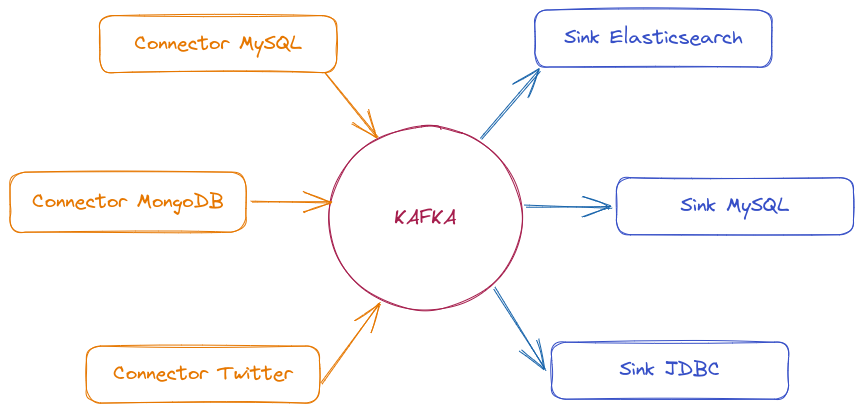
There are many connectors available to move data between Kafka and other popular data systems like S3, JDBC, Couchbase, S3, Golden Gate, Cassandra, MongoDB, Elasticsearch, Hadoop, and many more.
Advantages:
- Easy integration → Allows connecting different systems with minimal configuration.
- Scalable and fault-tolerant → Can run as a single process or in distributed mode.
- REST interface → Allows managing connectors via REST API without needing to touch code.
- Automatic offset management → Kafka Connect manages offsets automatically, avoiding message reprocessing issues.
- Batch and streaming data processing → Can handle both continuous flows and batch loads.
Kafka Connect is not part of the Kafka cluster. It's a separate service that facilitates data integration but runs independently from Kafka.
Not all connectors are free. Some are open-source, but others are maintained by companies and require licensing.
We can check this list to find what we need.
Kafka Rest Proxy
Kafka REST Proxy is a service that allows interacting with Kafka through a REST API, facilitating message production and consumption without needing to use Kafka-specific libraries or drivers.
When to use this?
- If your application doesn't have a compatible Kafka client, REST Proxy allows sending and consuming messages via HTTP.
- Ideal for systems already using REST APIs and not wanting to add Kafka-specific dependencies.
- When there's no need to manually manage a Producer/Consumer within the code.
Instead of using a Kafka library, you can send messages to a topic simply by making an HTTP request:
curl -X POST "http://localhost:8082/topics/my-topic" \
     -H "Content-Type: application/vnd.kafka.json.v2+json" \
     --data '{"records":[{"value":{"id":1, "message":"Hello DevSecOps!"}}]}'

## And to consume
curl -X GET "http://localhost:8082/consumers/my-group/instances/my-instance/records"
Advantages:
- No need to manage connections or configure complex consumers/producers.
- Works with any language supporting HTTP requests.
- Easier to test and send messages manually via curl or Postman.
Disadvantages
- Higher latency because HTTP requests have more overhead than native Kafka connections.
- Doesn't allow advanced adjustments like manual partitioning and specific consumer configurations.
- May not be ideal for high throughput systems.
Kafka Streams
Kafka Streams is a powerful Java library for real-time data processing and transformation.
To use Kafka Streams, a consumer developed in Java is required. It consumes data, applies desired transformations, and republishes it in the appropriate format.
Kafka Streams acts simultaneously as consumer and producer.
- "Exactly Once" delivery guarantee, avoiding duplicate messages.
- Scalable and fault-tolerant.
- Aggregation capability: allows operations like calculating averages, sums, and counts.
- Real-time processing
KSQL (Kafka SQL)
KSQL is a SQL-based language for processing and querying data directly in Kafka topics, without needing to write Java code or another programming language.
- Real-time queries allow filtering, transforming, and aggregating data directly in Kafka topics.
- Avoids needing to develop custom applications to process messages.
- Can maintain state of queries and aggregations without needing external databases.
- Works well with formats like AVRO, JSON, and Protobuf, ensuring data consistency.
KSQL treats Kafka topics as tables or continuous data streams, allowing operations like:
For example, if we were to filter the orders topic. Imagine we have these 3 messages in the topic:
{"id": 1, "customer": "John", "amount": 90}
{"id": 2, "customer": "Maria", "amount": 150}
{"id": 3, "customer": "Carlos", "amount": 200}
Executing the command:
SELECT * FROM orders WHERE amount > 100;
We would have the following output:
{"id": 2, "customer": "Maria", "amount": 150}
{"id": 3, "customer": "Carlos", "amount": 200}
If you want to persist this result in a new filtered topic, you could create a derived stream:
CREATE STREAM filtered_orders AS
SELECT * FROM orders WHERE amount > 100;
This creates a new topic filtered_orders where only events that pass the rule enter.
KSQL is powerful for data analysis and transformation without needing Java code or another language.
Other examples:
SELECT category, COUNT(*) FROM sales GROUP BY category;
SELECT orders.id, customers.name FROM orders JOIN customers ON orders.customer_id = customers.id;
This makes KSQL a powerful tool for real-time data analysis, event enrichment, and creating data pipelines without needing to write complex code.
If the message content is encrypted, KSQL couldn't be used.
Cruise Control (Intelligent Partition Balancing)
A typical cluster can become unevenly loaded over time. Partitions handling large amounts of message traffic may not be evenly distributed among available brokers. To rebalance the cluster, administrators must monitor load on brokers and manually reassign busy partitions to brokers with extra capacity.
Cruise Control is a tool developed by LinkedIn to automatically manage load and partition balancing in Apache Kafka. It allows optimizing data distribution among brokers, avoiding bottlenecks and ensuring more stable cluster performance.
It builds a workload model of resource utilization for the cluster — based on CPU, disk, and network load — and generates optimization proposals (which you can approve or reject) for more balanced partition assignments. A set of configurable optimization goals is used to calculate these proposals.
We can be very specific when generating optimization proposals.
- Full mode rebalances partitions across all brokers.
- We can do rebalancing whenever we add or remove a broker to accommodate changes.
When approving an optimization proposal, Cruise Control will apply it to the cluster.
Main Cruise Control Features:
- Constantly analyzes CPU, memory, disk, and network consumption on brokers.
- Redistributes partitions among brokers to optimize load.
- Allows testing new distributions before applying them.
- You can execute adjustments on demand or let Cruise Control do this autonomously.
- If a broker fails or is removed, Cruise Control redistributes partitions without significant impact.
- Interface for integration with other systems, allowing automation.
Cruise Control collects broker usage metrics and uses optimization algorithms to make decisions about partition balancing. It works with three main components:
- Metrics Monitor → Collects data from brokers via JMX and Kafka Metrics Reporter.
- Load Analyzer → Processes collected metrics and identifies usage patterns.
- Action Executor → Reallocates partitions based on analysis to maintain efficient balancing.
Communication with Cruise Control is done through REST APIs, allowing you to view cluster state and execute on-demand rebalancing.