Development with Kafka
Beyond the initial concepts, working with Kafka requires deepening our understanding of how it works. This will be a comprehensive view so we can better understand how to use it.
Steps in Message Production
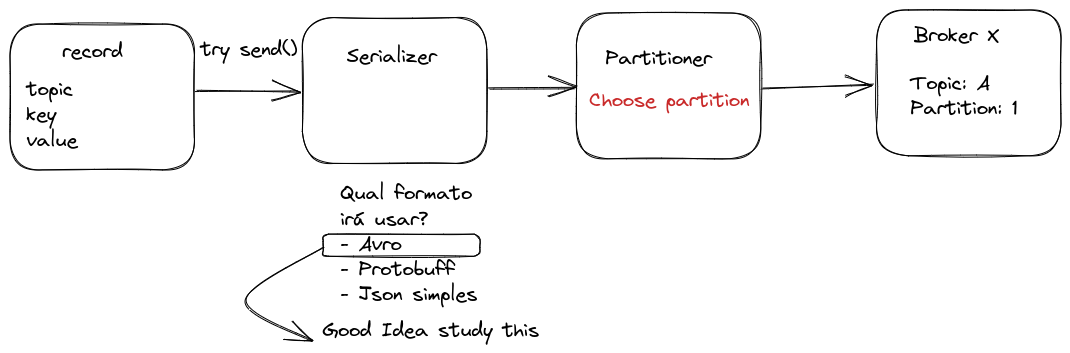
Once the topic is chosen, we have a value, and we've defined whether or not we'll use a key (optional to guarantee order), the object will need to go through a message serialization process, which is nothing more than transforming the structure into a byte sequence.
In many streaming systems, JSON is frequently used as a message format due to its simplicity and readability. However, for applications requiring greater control over data types, Apache Avro offers significant advantages. Unlike conventional JSON, AVRO implements a strongly typed schema system that accompanies serialized data. This eliminates common ambiguities in JSON, where, for example, a boolean value like true could be incorrectly interpreted as a string "true" by the consumer, causing unexpected and difficult-to-debug behaviors. Avro also provides better performance, more efficient compression, and supports schema evolution, making it a superior choice for production systems that need reliability and efficiency in data transmission.
You don't need to worry at this point about defining replicas for the topic and number of partitions, etc., because that's at topic creation time, not when sending the message.
It's possible to configure Kafka to automatically create topics with a default specification when a message is produced for a non-existent topic. However, I don't consider this a best practice, but it depends a lot on the project's objective.
Delivery Guarantee
There are 3 message delivery formats:
-
Send a message that can be lost along the way.
- Ex: Uber driver location. You can lose one or another because the message is sent every 2 seconds, so if we receive 8 out of 10, that's great.
- In this case,
ACK=0. Send the message and don't need delivery confirmation. - More speed at the cost of losses.
-
Send a message that can be read more than once without making a difference.
- ex: City temperature
- In this case,
ACK=1. Expects to receive at least one confirmation, even if it's more than one. - Moderate speed with delivery guarantee.
-
Guarantee that it was received only once.
- ex: bank deposit or withdrawal.
- In this case,
ACK=-1. The producer sends the message and waits for confirmation that it was replicated on all brokers that have replicas of the partition. Only after all replicas confirm receipt is the message considered "delivered" - Full guarantee at the cost of speed and performance.
Work with guarantee options using good sense!
Idempotence
There's a parameter called Idempotent that can be ON or OFF in the producer to guarantee exactly one delivery of the same message.
Kafka can discard duplicate messages using the timestamp and ensure correct order.
Consumer group
Kafka offers an elegant mechanism for parallel processing through consumer groups. When multiple consumers belong to the same group and read the same topic, Kafka automatically distributes partitions among them:
- With a topic of 3 partitions and a group of 3 consumers: each consumer processes exactly 1 partition.
- With a topic of 3 partitions and a group of 2 consumers: one consumer processes 2 partitions and the other processes 1 partition.
- With a topic of 2 partitions and a group of 3 consumers: only 2 consumers are active processing 1 partition each, while the third remains idle
Configuring a consumer in Kafka is remarkably simple. Just specify the consumer group the consumer belongs to, and Kafka automatically:
- Assigns appropriate partitions to the consumer
- Manages topic subscriptions
- Maintains control of consumed offsets
Kafka maintains high availability through automatic rebalancing. If a consumer fails, Kafka redistributes its partitions among remaining consumers, and if a new consumer is added, Kafka rebalances partition assignments. This process is transparent and requires no manual intervention.
For maximum efficiency, the ideal is to size the number of consumers to match the number of partitions, avoiding both idle and overloaded consumers.
Security
It's possible to encrypt all messages in transit between producer <--> Kafka <--> consumer, but by default, data is stored in partitions without encryption, exactly as produced. Kafka only guarantees encryption in transport, but messages are decrypted upon reaching the destination.
Starting from version 2.8.0, Kafka introduced Tiered Storage and added support for encryption of data at rest (Encryption at Rest) through integration with Key Management Systems (KMS), generally used in Kafka as a Service clusters.
If using a self-managed Kafka cluster, there are other approaches to ensure data security at rest:
-
Application-level encryption (End-to-End Encryption): The producer already sends the message encrypted, and only the consumer with the correct key can decrypt it. Since the message arrives encrypted, it will also be stored that way. This is the safest and easiest approach to implement.
-
Disk-level encryption: Configure LUKS (Linux Unified Key Setup) to encrypt the disk where Kafka logs are stored, ensuring data remains protected even if the disk is accessed directly.
Authentication and Authorization
The security flow has two stages:
- Authentication: The client (producer/consumer) proves its identity (via SASL, TLS, etc.).
- Authorization: Kafka verifies what the user can do (via ACLs or RBAC).
Authentication
Apache Kafka offers various authentication mechanisms that serve both human users and service accounts.
- PLAIN: Username and password
- OAuth/OAUTHBEARER: OAuth 2.0 support
- It's very common in large enterprises to use SSO for users, which can be done with services like Okta, AD, Keycloak, Auth0
- SSL/TLS: Certificate-based authentication
- SCRAM: Challenge-response authentication
- GSSAPI: Kerberos integration
For service accounts, which are used in applications, generally static API tokens are used in internal applications. For external use, we can create specific certificates for third-party service accounts, but it depends a lot on the scenario, team knowledge, and internal security of controlling these API tokens and certificate generation.
Authorization
Authorization (Permissions) for an account can be controlled through ACLs (Access Control Lists) or RBAC (Role-Based Access Control), depending on the need and the Kafka distribution we're using.
When to use ACLs?
- If using pure Apache Kafka (self-managed).
- If needing granular access control per user or service.
- If wanting a model based on individual permissions instead of roles.
When to use RBAC (Role-Based Access Control)?
RBAC is a role-based control model, available in enterprise Kafka distributions like Confluent Kafka. Instead of defining permissions for each user individually, you assign roles that already have predefined permissions.
- If using Confluent Kafka or another enterprise distribution that supports RBAC.
- If wanting a more scalable model, grouping users by role.
- If needing to integrate Kafka with corporate IAM (like LDAP, Okta, Active Directory).
With RBAC, you can define global permissions for administration, production, consumption, and cluster operations, which facilitates management in environments with many users.
I'll explain in more detail later about how to grant these permissions.
Data Compatibility
Kafka, in its essence, only transfers data in byte format. It performs no validation or verification of this data at the cluster level. In fact, Kafka doesn't even know what type of information is being sent or received.

Due to Kafka's decoupled nature, producers and consumers don't communicate directly. Instead, information exchange happens through Kafka topics. However, the consumer still needs to know the format of data sent by the producer to be able to deserialize it correctly. Now, imagine if the producer started sending invalid data or changed the data type without warning. This would cause consumers to stop consuming or even break if error handling doesn't exist. To avoid this problem, a mechanism is needed to ensure a common and standardized data type between producer and consumer.
This is where **Schema Registry** comes in. It's a service that works outside the Kafka cluster, responsible for distribution and management of data schemas. It stores a copy of schemas in its local cache, ensuring both producers and consumers follow the same structure.
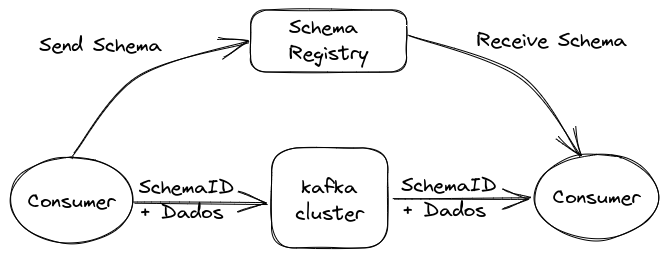
With Schema Registry running, the producer, before sending data to Kafka, checks if the corresponding schema is already registered. If not, it registers it in Schema Registry and stores it in cache. After obtaining the correct schema, the producer serializes the data according to it and sends it to Kafka in binary format, including a unique schema ID. When the consumer receives this message, it queries Schema Registry to retrieve the schema corresponding to the ID and performs data deserialization. If there's an incompatibility, Schema Registry will return an error, informing that the expected schema was violated.
What type of data serialization format should we use with Schema Registry? Some important points should be considered when choosing the appropriate format:
- Binary format:
- Is more efficient, reducing storage usage.
- Avoids numerical precision problems common in text formats like JSON.
- Using schemas to validate data structure.
- Allows ensuring written data is within the expected format, avoiding incompatibilities.
IDL (Interface Description Language) defines message standards
| Name | Binary | IDL | DEVELOPER | OBSERVATION |
|---|---|---|---|---|
| JSON | NO | YES | Not typed | |
| YAML | NO | NO | Not typed | |
| XML | NO | YES | W3C | Very Verbose |
| Kryo | NO | YES | Esoteric Software | Only works on JVM |
| AVRO | YES | YES | Apache | Confluent standard and steeper learning curve |
| Protocol Buffer | YES | YES | Easy to use | |
| Thrift | YES | YES | Almost the same as protocol buffer and harder to use |
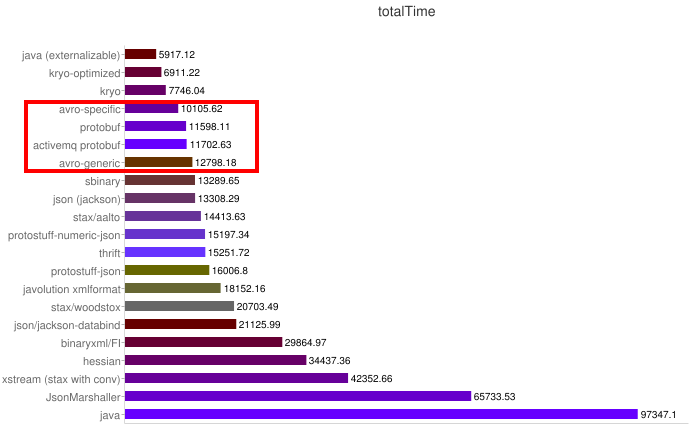
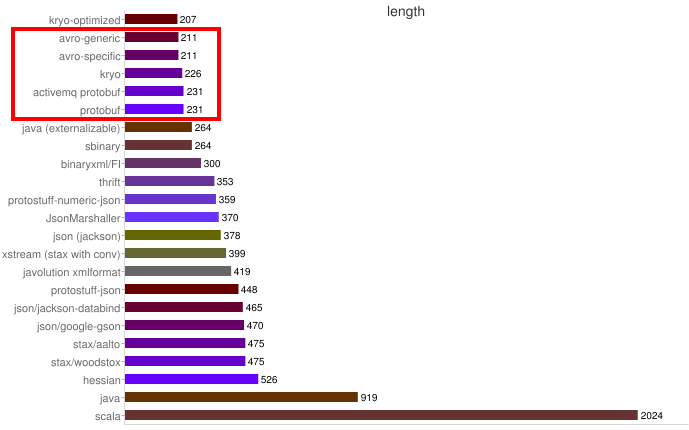
Some benchmarks:
Speed
Size
AVRO
An example of an AVRO schema:
{
  "namespace": "pnda.entity",
  "type": "record",
  "name": "event",
  "fields": [
    {"name": "timestamp", "type": "long"},
    {"name": "src", "type": "string"},
    {"name": "host_ip", "type": "string"},
    {"name": "rawdata", "type": "bytes"}
  ]
}
Characteristics:
- Data formats are described by writing Avro Schemas, which are in JSON.
- Data can be used generically as Generic Records or with compiled code.
- Data saved in files or transmitted over a network usually contains the schema itself.
Pros
- Efficient binary format that reduces record size.
- Reader and writer schemas are known, allowing major changes in data format.
- Very expressive language for writing schemas.
- No recompilation is needed to support new data formats.
Cons
- Avro Schema format is complex and requires study to learn. Check the site as at some point I'll talk about it.
- Avro libraries for serialization and deserialization are more complex to learn.
Useful when:
- It's very important to minimize data size.
- Data formats are constantly evolving or even something users can use.
- Generic solutions are needed for problems like data storage or data query systems.
Protocol Buffer
Characteristics:
- Data formats are described by writing proto files in a custom format.
- A protobuf compiler generates code in the chosen programming language.
- You create, serialize, and deserialize your data using the generated code.
Pros:
- Very efficient binary format that reduces bytes.
- Standard JSON representation.
- Strongly typed generated code to accelerate development.
Cons:
- Requires recompilation when formats change.
- Strict discipline is necessary to maintain backward compatibility when formats change.
Useful when:
- It's very important to minimize data size
- Data formats don't change very frequently.
I particularly prefer AVRO. Despite being more work, a compiler isn't necessary.