Architecture
Kafka is a distributed system composed of servers and clients that communicate via a high-performance TCP network protocol.
It can be deployed on bare-metal hardware, virtual machines, local containers, or cloud environments.
Servers
Kafka runs as a cluster of one or more servers that can span multiple datacenters or cloud regions. Some of these servers form the storage layer, called brokers. Other servers run Kafka Connect, which continuously imports and exports data as event streams, integrating Kafka with existing systems such as databases and other Kafka clusters. To ensure high availability and reliability, a Kafka cluster is highly scalable and fault-tolerant: if a server fails, others take over its workload, ensuring operational continuity without data loss.
Clients
Clients allow distributed applications and microservices to read, write, and process event streams in a parallel, scalable, and fault-tolerant manner, even in the face of network issues or machine failures. Kafka includes some native clients and has many implementations provided by the community.
Clients are available for Java and Scala, including the Kafka Streams library, plus support for Go, Python, C/C++, and other languages, as well as REST APIs.
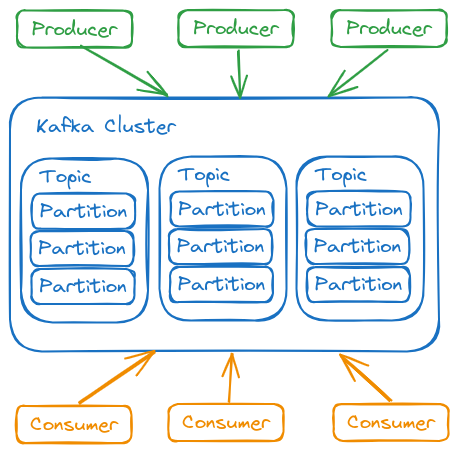
Ecosystem Components
- Kafka Brokers
- Each Kafka node is called a broker. A Kafka cluster has multiple brokers.
- It's possible to install multiple brokers on the same instance by changing only the port, or on different servers using the same port but with different IPs.
- Assigns a sequential number (offset) to messages.
- Stores messages on disk.
- Messages don't need to be consumed immediately.
- Allows recovery from consumer failures (software that reacts to an event).
- kafka client API
- kafka connect
- kafka streams
- kafka ksql
Event
An event records the fact that "something happened" in the world or in your business. When reading or writing data to Kafka, it's done in the form of events. Conceptually, an event has:
- A key
- A value
- A timestamp
- It's good practice to always use UTC time when producing events (producers), leaving the correct date/time adjustment to consumers if necessary.
- Optional metadata headers.
The event is the data itself, often known as payload
See an example of an event:
- Event key: "Alice"
- Event value: "Made a payment of $200 to Bob"
- Event timestamp: "June 25, 2020 at 2:06 PM"
Events are organized and stored durably in topics, much like in an internet forum. Anyone with permission can read events at any time.
Many rules can be defined for a topic, but generally the relationship is N to N.
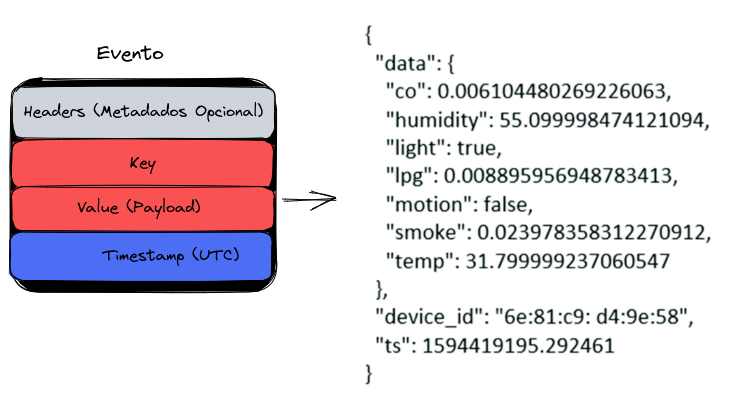
The key serves to separate context. It's possible to create an event for a topic that multiple consumers subscribe to.
A particular consumer can choose to read only messages from a topic with a specific key and discard the rest. For example, a TEMPERATURE topic where the key represents the city name.
Topic
A topic can have zero, one, or many producers writing events to it, as well as zero, one, or many consumers subscribing to those events.
There's no limit to the number of topics. They can be created as needed.
Events in a topic can be read as many times as necessary. Unlike traditional messaging systems, events aren't deleted after consumption. Instead, event retention time is configurable per topic. After this period, old events are discarded.
Kafka's performance is practically constant regardless of the volume of data stored. Therefore, keeping data for long periods is viable.
In many cases, an event needs to be processed by multiple consumers. For example, an event might record a deposit to a customer's account and simultaneously generate a notification informing of the received amount. To ensure all consumers process the message before it's discarded, conditional retention can be configured for the topic.
A topic works like a large log. Kafka keeps events for a configurable period (1 week by default), which can be adjusted for longer or even indefinitely.
In the case of the TEMPERATURE topic, where the key represents a city, we can retrieve only the last value for the city without processing the entire history. This feature is called compact log. Kafka stores all data, but consumers can retrieve only the most recent event.
Topic Partitions
Topics are divided into partitions, meaning their events are distributed across multiple brokers. This improves scalability by allowing clients to read and write data simultaneously to different brokers.
When a new event is published to a topic, it's appended to one of its partitions. Events with the same key are always written to the same partition, ensuring any consumer will read events in the same order they were produced.
Messages without a key are distributed across partitions in round-robin fashion.
Each partition works as a FIFO queue. Since events with the same key are always written to the same partition, this guarantees processing order. Each event has an offset, which identifies its position within the partition.
Offset 0 1 2 3 .. exists in all partitions of all topics. Because of these separate offsets, Kafka can track which next message each consumer should receive in the correct order. If a consumer fails, Kafka knows where it stopped.
The number of partitions for a topic should be defined at creation time and varies according to the expected event volume. More partitions mean greater parallel processing capacity.
Each partition can have replicas to ensure high availability. The replication factor defines how many copies of a partition will be maintained on different brokers. If a broker fails, a replica automatically takes over.
Reading always occurs from the leader partition, while replicas only synchronize data.
If a broker containing a leader partition fails, a replica is automatically promoted to leader.
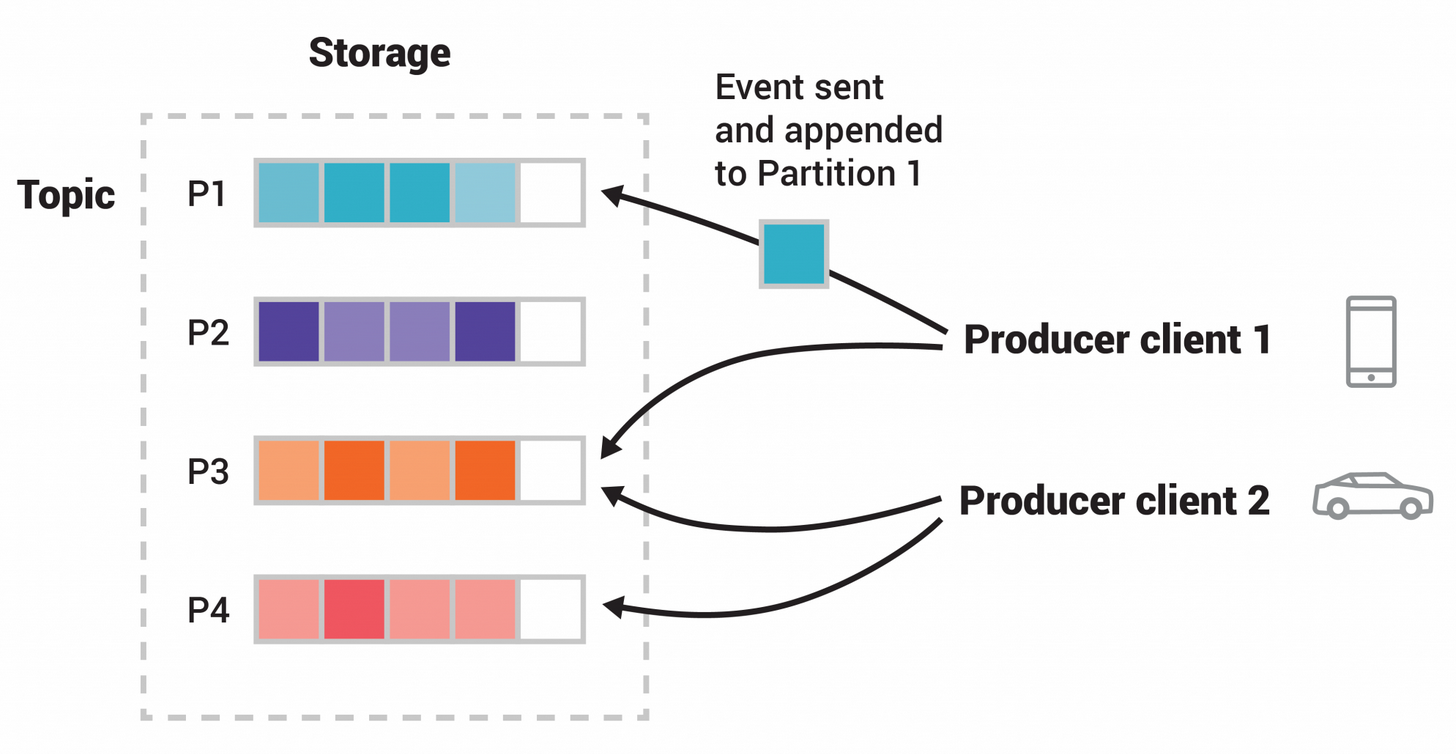
- A topic with 4 partitions
- Producers publish independently of each other
- Equal squares indicate events with the same ID, which is why they're written to the same partition.
It's possible to define a replication factor for each topic. If the factor is 1, the partition will be created on only one broker and, if that broker fails, data will be lost. In a 3-node cluster, for example, a replication factor of 3 would ensure copies on all brokers, increasing system resilience.
To ensure availability for critical data, at least 2 replicas per topic are recommended.
Each partition has a leader and replicas (followers). Reading always occurs from the leader partition, while replicas only synchronize data. If a broker with a leader partition fails, a replica is promoted to leader. Having more partitions doesn't speed up reading – in that case, increasing the number of consumers is the correct approach.
Partition Segments of a Topic
Each partition is divided into segments, which are physical files where events are stored. This division allows for efficient data retention management.
Producers and Consumers
Producers are client applications that publish (write) events to Kafka
Consumers are those that subscribe to (read and process) these events.
Nothing prevents a producer from also being a consumer. An event can generate other events.
In Kafka, producers and consumers are fully decoupled and agnostic to each other, which is a key design element for achieving the high scalability Kafka is known for.
For example, producers never need to wait for consumers. Kafka offers guarantees like exactly-once processing.
A consumer runs continuously, that is, in a while true, waiting for new messages.
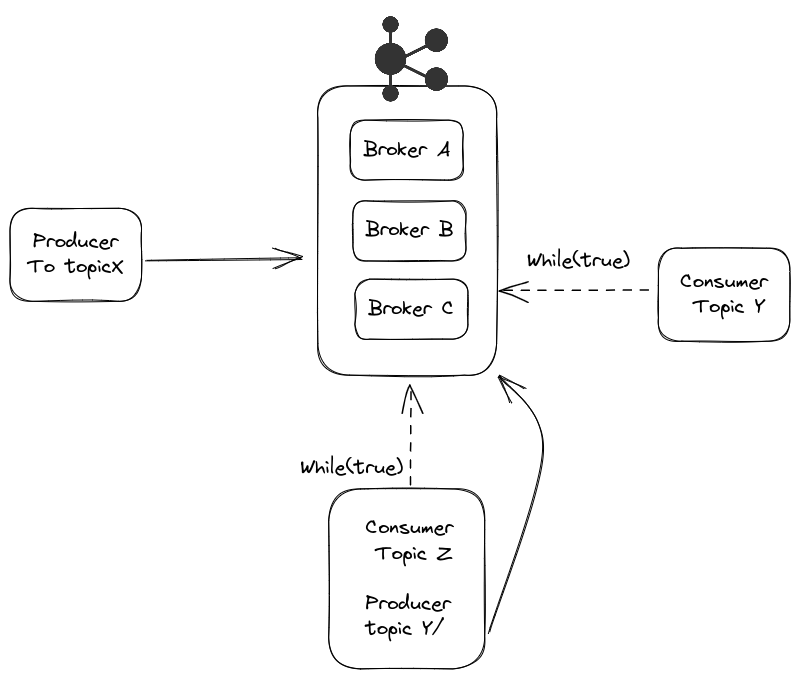
A consumer can subscribe to multiple topics simultaneously. Thus, a single while true can react to events from different topics.
Brokers in Kafka
A consumer can subscribe to multiple topics simultaneously. Thus, a single while true can react to events from different topics.
Each broker stores topic partitions on its local filesystem. These partitions are replicated among brokers to ensure high availability and fault tolerance. When a partition is replicated, one broker is designated as the leader for that partition, while other brokers maintain copies as followers (replicas).
To coordinate synchronization among brokers and manage partition distribution, Kafka uses Apache ZooKeeper (in older versions) or KRaft (Kafka Raft, in newer versions). This coordination mechanism:
- Elects leaders for partitions
- Manages cluster configuration
- Monitors each broker's status
- Maintains control of which partitions are assigned to which brokers
This distributed architecture allows Kafka to scale horizontally, adding more brokers to the cluster to increase processing and storage capacity without interrupting operations.
Best Practice
Timestamp Handling
Always store timestamps in UTC. UTC (Coordinated Universal Time) eliminates ambiguities related to time zones and daylight saving time. The responsibility for converting to local time zone should rest with the presentation layer, which will display the appropriate time to the end user.
Data Replication
In production environments with Apache Kafka, a recommended default configuration is to use a replication factor of 3. This means each partition of a topic will be replicated on three different brokers within the cluster.
This replication strategy:
- Ensures high data availability
- Provides fault tolerance (the system continues operating even with the failure of up to two brokers)
- Balances performance and reliability
Replication occurs at the partition level, allowing efficient load distribution and storage across cluster brokers.