Container Registries
Software is like any other product that follows a flow from production to the end user
- Material (tools)
- Manufacturing (Development)
- Assembly (Build, in the case of containers image creation)
- Distribution (CI|CD to the registry)
- Deployment (Deploy)
- Consumption (Browser)
We need to ensure that the product manufactured and distributed is in fact what will be consumed by the end user.
During the process of pulling an image distributed in a repository, this repository can be public or private. If it's public, no authentication is necessary to pull; the image is available there for anyone to use. If it's private, it's necessary to use the correct credentials for the pull to be allowed. Obviously business software containers from the company won't be public.
If we do a docker pull to a private registry, we'll get access denied.
By doing the docker login command, we'll access with a specific user and if this user has permission to pull a certain image, it will be possible.
❯ docker pull davidpuziol/nginx
Using default tag: latest
Error response from daemon: pull access denied for davidpuziol/nginx, repository does not exist or may require 'docker login': denied: requested access to the resource is denied

❯ docker login
Log in with your Docker ID or email address to push and pull images from Docker Hub. If you don't have a Docker ID, head over to https://hub.docker.com/ to create one.
You can log in with your password or a Personal Access Token (PAT). Using a limited-scope PAT grants better security and is required for organizations using SSO. Learn more at https://docs.docker.com/go/access-tokens/

Username: davidpuziol
Password:
WARNING! Your password will be stored unencrypted in /home/david/.docker/config.json.
Configure a credential helper to remove this warning. See
https://docs.docker.com/engine/reference/commandline/login/#credential-stores

Login Succeeded

❯ docker pull davidpuziol/nginx
Using default tag: latest
latest: Pulling from davidpuziol/nginx
c57ee5000d61: Extracting [==================================================>]  29.15MB/29.15MB
9b0163235c08: Download complete
f24a6f652778: Download complete
9f3589a5fc50: Download complete
f0bd99a47d4a: Waiting
398157bc5c51: Waiting
1ef1c1a36ec2: Waiting
context canceled
When using a private image in Kubernetes, it's necessary to pass the credentials, and how will we do this? By creating a secret with type docker-registry with the values below.
Let's filter the cluster to list all images we have used by pods.
# The output is usually all on one line, we replace spaces with \n to jump lines and since we have more than one pod using the same image, we can use uniq to not bring duplicate outputs.
docker.io/kubernetesui/dashboard-web:1.4.0root@cks-master:~# k get pod -A -o jsonpath="{..spec.containers[*].image}" | tr ' ' '\n' | uniq
nginx
openpolicyagent/gatekeeper:v3.17.0
registry.k8s.io/ingress-nginx/controller:v1.11.2@sha256:d5f8217feeac4887cb1ed21f27c2674e58be06bd8f5184cacea2a69abaf78dce
docker.io/calico/kube-controllers:v3.24.1
docker.io/calico/node:v3.24.1
quay.io/coreos/flannel:v0.15.1
docker.io/calico/node:v3.24.1
quay.io/coreos/flannel:v0.15.1
registry.k8s.io/coredns/coredns:v1.11.1
registry.k8s.io/etcd:3.5.15-0
registry.k8s.io/kube-apiserver:v1.31.0
registry.k8s.io/kube-controller-manager:v1.31.0
registry.k8s.io/kube-proxy:v1.31.0
registry.k8s.io/kube-scheduler:v1.31.0
docker.io/kubernetesui/dashboard-api:1.7.0
docker.io/kubernetesui/dashboard-auth:1.1.3
kong:3.6
docker.io/kubernetesui/dashboard-metrics-scraper:1.1.1
docker.io/kubernetesui/dashboard-web:1.4.0
We have the following pattern <REGISTRY>/<ACCOUNT>/<IMAGE_NAME>:<TAG>
We can observe that in this pattern we have the registries docker.io, registry.k8s.io, quay.io.
When we find the pattern <ACCOUNT>/<IMAGE_NAME>:<TAG> it's understood that it's also docker.io, for example openpolicyagent/gatekeeper:v3.17.0.
When we have the pattern <IMAGE_NAME>:<TAG> this means this image is official on dockerhub. This means it's in the library namespace, i.e., it's understood to be docker.io/library. Let's take nginx as an example. If it were nginx/nginx, this would indicate that the nginx image belongs to the nginx organization, which is not the case. Although the nginx team maintains this image, it has a special place.
# Let's pull using the complete path of nginx
root@cks-master:~# docker pull docker.io/library/nginx
Using default tag: latest
latest: Pulling from library/nginx
a2318d6c47ec: Pull complete
095d327c79ae: Pull complete
bbfaa25db775: Pull complete
7bb6fb0cfb2b: Pull complete
0723edc10c17: Pull complete
24b3fdc4d1e3: Pull complete
3122471704d5: Pull complete
Digest: sha256:01b9ff8541cd3f5503a081844cbcaa1faac6a74fb41328061ea1917d0b513533
Status: Downloaded newer image for nginx:latest
docker.io/library/nginx:latest

# Note that it already had all the layers and didn't even need to do more pulling and the digest is exactly the same.
root@cks-master:~# docker pull nginx
Using default tag: latest
latest: Pulling from library/nginx
Digest: sha256:01b9ff8541cd3f5503a081844cbcaa1faac6a74fb41328061ea1917d0b513533
Status: Image is up to date for nginx:latest
docker.io/library/nginx:latest
Let's analyze nginx for example, but it could be any other pod. I'll put the complete output. I'll remove some parts and leave only what matters.
root@cks-master:~# k get pod nginx -o yaml
apiVersion: v1
kind: Pod
metadata:
  annotations:
  #{
  # Blocks removed for easier reading
  #}
  labels:
    run: nginx
  name: nginx
  namespace: default
  #{
  # Blocks removed for easier reading
  #}
spec:
  automountServiceAccountToken: false
  containers:
  - image: nginx # Here we have the nginx image, but in status it will be converted
    imagePullPolicy: Always
    name: nginx
    resources:
      limits:
        cpu: 500m
        memory: 256Mi
      requests:
        cpu: 250m
        memory: 128Mi
    ...
status:
  conditions:
  - lastProbeTime: null
    lastTransitionTime: "2024-09-02T20:26:44Z"
    status: "True"
    type: PodReadyToStartContainers
  #{
  # Blocks removed for easier reading
  #}
  containerStatuses:
  - containerID: containerd://bbb1f84d332f3726b46040d020764d29acb7aa3c4538d1b6fad5eadcd4fe9162
    image: docker.io/library/nginx:latest # <<<<< complete path
    # And imageID was created converting the latest tag to the digest that references exactly the version being used.
    imageID: docker.io/library/nginx@sha256:01b9ff8541cd3f5503a081844cbcaa1faac6a74fb41328061ea1917d0b513533
    lastState: {}
    name: nginx
    ready: true
    restartCount: 0
    started: true
    state:
      running:
        startedAt: "2024-09-02T20:26:43Z"
  #{
  # Blocks removed for easier reading
  #}
root@cks-master:~#
It's necessary to always pay attention to tags and fix the version.
We can pull using the digest. We already have the image, this is just to show how it works.
root@cks-master:~# docker pull docker.io/library/nginx@sha256:01b9ff8541cd3f5503a081844cbcaa1faac6a74fb41328061ea1917d0b513533
docker.io/library/nginx@sha256:01b9ff8541cd3f5503a081844cbcaa1faac6a74fb41328061ea1917d0b513533: Pulling from library/nginx
Digest: sha256:01b9ff8541cd3f5503a081844cbcaa1faac6a74fb41328061ea1917d0b513533
Status: Image is up to date for nginx@sha256:01b9ff8541cd3f5503a081844cbcaa1faac6a74fb41328061ea1917d0b513533
docker.io/library/nginx@sha256:01b9ff8541cd3f5503a081844cbcaa1faac6a74fb41328061ea1917d0b513533
We can recreate the pod using exactly like this...
root@cks-master:~# k run nginx2 --image=docker.io/library/nginx@sha256:01b9ff8541cd3f5503a081844cbcaa1faac6a74fb41328061ea1917d0b513533

root@cks-master:~# k get pod nginx2 -o yaml
apiVersion: v1
kind: Pod
metadata:
   #{
  # Blocks removed for easier reading
  #}
  creationTimestamp: "2024-09-05T16:34:18Z"
  labels:
    run: nginx2
  name: nginx2
  namespace: default
spec:
  containers:
  - image: docker.io/library/nginx@sha256:01b9ff8541cd3f5503a081844cbcaa1faac6a74fb41328061ea1917d0b513533
    imagePullPolicy: IfNotPresent
    name: nginx2
    resources: {}
   #{
  # Blocks removed for easier reading
  #}
status:
  conditions:
   #{
  # Blocks removed for easier reading
  #}
  containerStatuses:
  - containerID: containerd://8e26697bfe9ca178e17aedc7cdada3bf09c8cf44e78ccbf05a00def5087f1521
    image: docker.io/library/nginx:latest # And the inverse process was done
    imageID: docker.io/library/nginx@sha256:01b9ff8541cd3f5503a081844cbcaa1faac6a74fb41328061ea1917d0b513533
   #{
  # Blocks removed for easier reading
  #}
Whitelist Images
To prevent images from being fetched from other repositories, we can make a restriction.
For this task, OPA needs to be installed.
Let's make a restriction for docker.io and registry.k8s.io. First we create the template and then the constraint.
root@cks-master:~# vim constraint-reg.yaml
root@cks-master:~# cat constraint-reg.yaml
apiVersion: templates.gatekeeper.sh/v1beta1
kind: ConstraintTemplate
metadata:
  name: k8strustedimages
spec:
  crd:
    spec:
      names:
        kind: K8sTrustedImages
  targets:
    - target: admission.k8s.gatekeeper.sh
      rego: |
        package k8strustedimages

        violation[{"msg": msg}] {
          image := input.review.object.spec.containers[_].image
          not startswith(image, "docker.io/")
          not startswith(image, "registry.k8s.io/")
          msg := "not trusted image!"
        }

root@cks-master:~# vim constraint-rule.yaml
root@cks-master:~# cat constraint-rule.yaml
apiVersion: constraints.gatekeeper.sh/v1beta1
kind: K8sTrustedImages
metadata:
  name: pod-trusted-images
spec:
  match:
    kinds:
      - apiGroups: [""]
        kinds: ["Pod"]
root@cks-master:~#

root@cks-master:~# k apply -f constraint-reg.yaml
constrainttemplate.templates.gatekeeper.sh/k8strustedimages created

root@cks-master:~# k apply -f constraint-rule.yaml
k8strustedimages.constraints.gatekeeper.sh/pod-trusted-images created

root@cks-master:~# k get constrainttemplate
NAME               AGE
k8strustedimages   87s

root@cks-master:~# k get constraint pod-trusted-images
NAME                 ENFORCEMENT-ACTION   TOTAL-VIOLATIONS
pod-trusted-images   deny                 8
The violation will happen if it doesn't start with docker.io or registry.k8s.io, making the request denied, valid from the moment the constraint is created.
We can observe that we have 8 violations because for example the image with just the name nginx wouldn't be accepted but docker.io/library/nginx would be.
In the rule we created, the OPA gatekeeper image also suffers the violation.
Testing...
root@cks-master:~# k run httpd --image=httpd
Error from server (Forbidden): admission webhook "validation.gatekeeper.sh" denied the request: [pod-trusted-images] not trusted image!
root@cks-master:~# k run httpd --image=docker.io/library/httpd
pod/httpd created
ImagePolicyWebhook
The default flow is this. If we enable ImagePolicyWebhook then the request will also be filtered by this plugin in addition to others that already exist.
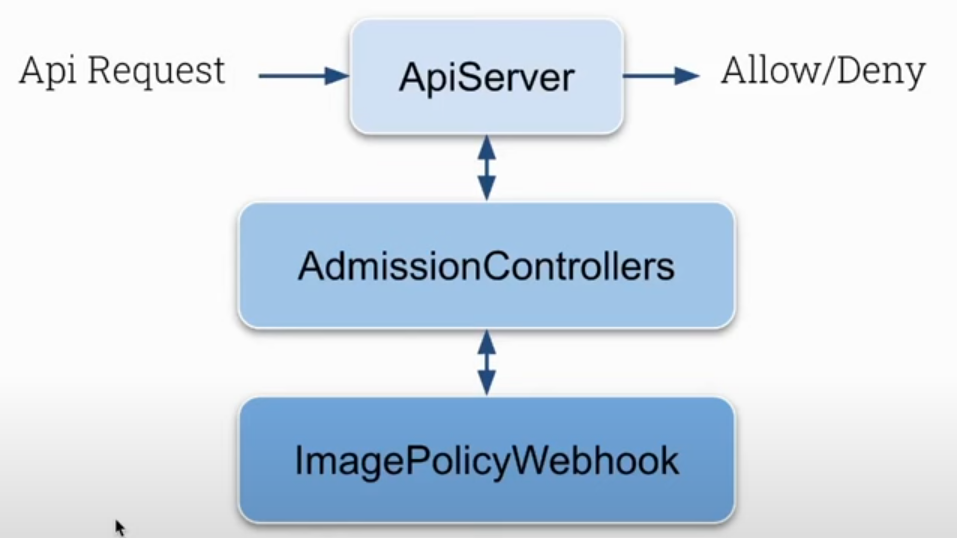
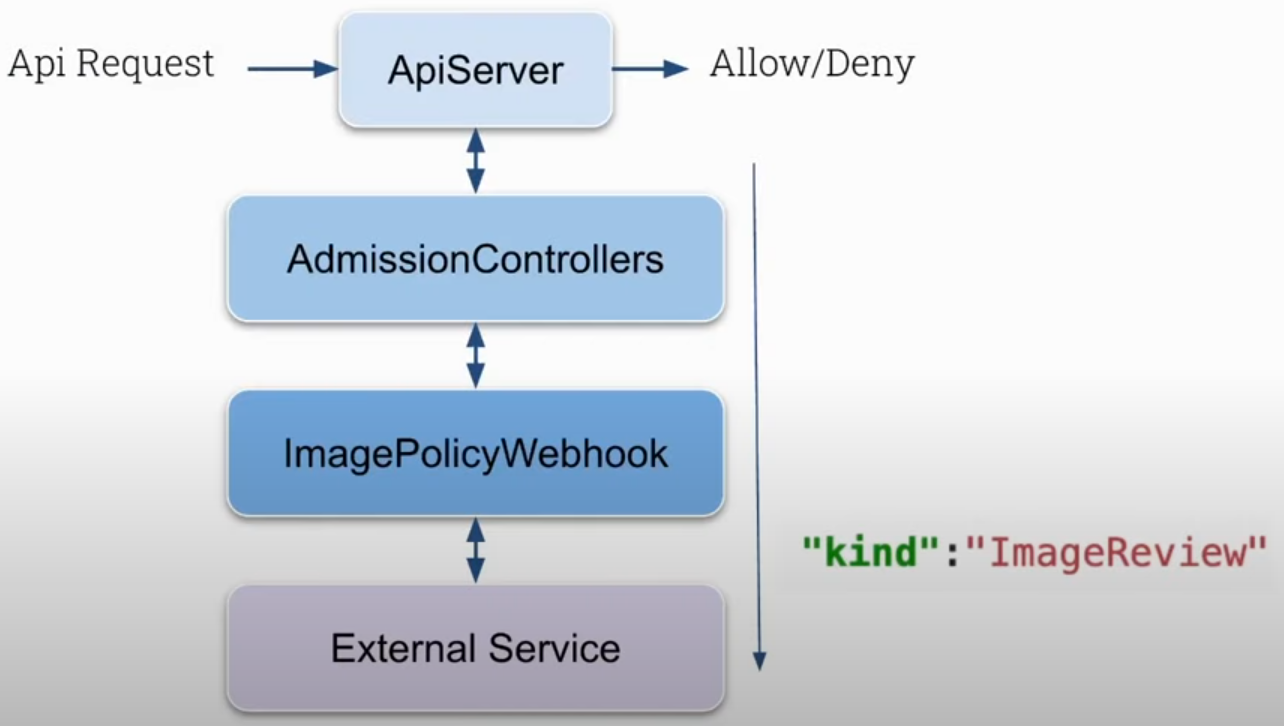
ImagePolicyWebhook will call an external service, outside of Kubernetes control. It's necessary to develop the solution and have it running to receive an ImageReview type object and this service will approve or deny.
The object is something like this.
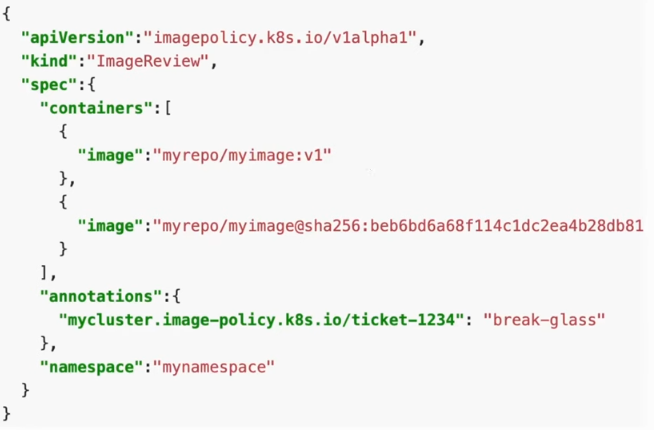
The solution can be developed in any language, it doesn't matter, the important thing is to follow the object definitions. The flow then becomes like this.
Let's simulate this idea, but first delete the constraints created with OPA to avoid problems.
It's necessary to enable the plugin in kube-apiserver.
# we only have NodeRestriction enabled, so edit and add
# - --enable-admission-plugins=NodeRestriction
root@cks-master:~# k get -n kube-system pod kube-apiserver-cks-master -o yaml| grep admission
    - --enable-admission-plugins=NodeRestriction,ImagePolicyWebhook
root@cks-master:~#