Security Images
Do a brief review on cka container and images.
A very important thing to understand is that containers are a group of layers, and only the top layer is writable. The previous layers are read-only.
Most of the time we create an image from another image as a base. We're importing all the layers it has and adding new layers.
Not every command in the Dockerfile creates a layer, only the RUN, COPY, and ADD commands. Every time we add a new layer, we're increasing the image size.
FROM ubuntu  # IMPORTING THE LAYERS THAT EXIST IN THIS IMAGE

RUN apt-get update & apt-get install -y golang-go # ADDING THIS LAYER

CMD ["sh"]
How to reduce the size of an image?
Let's imagine we want to install curl and use the nginx image as a base.
What we have is this...
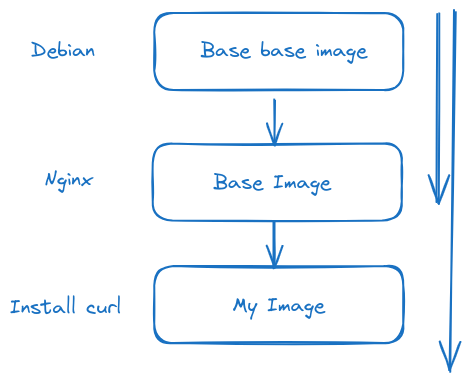
Let's start from the following Dockerfile and the app.go that would be a possible application.
root@cks-master:~# mkdir app && cd app
root@cks-master:~/app# vim Dockerfile
root@cks-master:~/app# cat Dockerfile
FROM ubuntu
ARG DEBIAN_FRONTEND=noninteractive
RUN apt-get update && apt-get install -y golang-go
COPY app.go .
RUN CGO_ENABLED=0 go build app.go
CMD ["./app"]
root@cks-master:~/app# vim app.go
root@cks-master:~/app# cat app.go
package main

import (
    "fmt"
    "time"
    "os/user"
)

func main () {
    user, err := user.Current()
    if err != nil {
        panic(err)
    }

    for {
        fmt.Println("user: " + user.Username + " id: " + user.Uid)
        time.Sleep(1 * time.Second)
    }
}
root@cks-master:~/app#
It's a simple app with an infinite loop printing user, id, and userid.
If we build this and run, look at the image size; let's run and see what we have.
root@cks-master:~/app# docker build -t myapp .
...
 ---> Running in fd1ca9051d2c
Removing intermediate container fd1ca9051d2c
 ---> a16027a62703
Step 6/6 : CMD ["./app"]
 ---> Running in b41a8913eb93
Removing intermediate container b41a8913eb93
 ---> f6cb7eeab29a
Successfully built f6cb7eeab29a
Successfully tagged myapp:latest

# An image of 667MB to run this?
root@cks-master:~/app# docker image ls myapp
REPOSITORY   TAG       IMAGE ID       CREATED          SIZE
myapp        latest    f6cb7eeab29a   20 minutes ago   667MB

# This would be the base image we're using before adding our layers.
root@cks-master:~/app# docker image ls ubuntu
REPOSITORY   TAG       IMAGE ID       CREATED       SIZE
ubuntu       latest    edbfe74c41f8   4 weeks ago   78.1MB


root@cks-master:~/app# docker run myapp
user: root id: 0
user: root id: 0
user: root id: 0
user: root id: 0
Analyzing the Dockerfile we have, we're installing Go to build the application. The binary generated by Go doesn't need Go.
FROM ubuntu
ARG DEBIAN_FRONTEND=noninteractive
RUN apt-get update && apt-get install -y golang-go
COPY app.go .
RUN CGO_ENABLED=0 go build app.go
CMD ["./app"]
What we can do to reduce is use only the binary generated by this image in another much smaller image.
FROM ubuntu # from=0 is stage 0
ARG DEBIAN_FRONTEND=noninteractive
RUN apt-get update && apt-get install -y golang-go
COPY app.go .
RUN CGO_ENABLED=0 go build app.go
##CMD ["./app"] # We're not executing anything here

FROM alpine # from=1 is stage 1
COPY --from=0 /app . # from=0 equals first from
CMD ["./app"]
If we want to name the stages we can.
FROM ubuntu AS builder
ARG DEBIAN_FRONTEND=noninteractive
RUN apt-get update && apt-get install -y golang-go
COPY app.go . # Copying to /
RUN CGO_ENABLED=0 go build app.go # generated the binary app in /

FROM alpine
COPY --from=builder /app . # We're copying
CMD ["./app"]
Just to contextualize what I said about where the binaries were generated.
root@cks-master:~/app# docker run -d myapp
8d9643b4a460a90ca42bf747785675f8f24fb1db93b4c7f43b453388d3fa6e3f
root@cks-master:~/app# docker exec -it 8d9643b4a460a90ca42bf747785675f8f24fb1db93b4c7f43b453388d3fa6e3f bash
root@8d9643b4a460:/# ls
app  app.go  bin  boot  dev  etc  home  lib  lib64  media  mnt  opt  proc  root  run  sbin  srv  sys  tmp  usr  var
# look at app and app.go there
Now let's build using this multi-stage Dockerfile.
root@cks-master:~/app# cat Dockerfile
FROM ubuntu AS builder
ARG DEBIAN_FRONTEND=noninteractive
RUN apt-get update && apt-get install -y golang-go
COPY app.go .
RUN CGO_ENABLED=0 go build app.go

FROM alpine
COPY --from=builder /app .
CMD ["./app"]
root@cks-master:~/app# docker build -t myapp2 .
DEPRECATED: The legacy builder is deprecated and will be removed in a future release.
            Install the buildx component to build images with BuildKit:
            https://docs.docker.com/go/buildx/

Sending build context to Docker daemon  3.072kB
Step 1/8 : FROM ubuntu AS builder
 ---> edbfe74c41f8
Step 2/8 : ARG DEBIAN_FRONTEND=noninteractive
 ---> Using cache
 ---> cc17dfd2ebce
Step 3/8 : RUN apt-get update && apt-get install -y golang-go
 ---> Using cache
 ---> a7ba366efacb
Step 4/8 : COPY app.go .
 ---> Using cache
 ---> 3456ce02a619
Step 5/8 : RUN CGO_ENABLED=0 go build app.go
 ---> Using cache
 ---> a16027a62703
Step 6/8 : FROM alpine
latest: Pulling from library/alpine
c6a83fedfae6: Already exists
Digest: sha256:0a4eaa0eecf5f8c050e5bba433f58c052be7587ee8af3e8b3910ef9ab5fbe9f5
Status: Downloaded newer image for alpine:latest
 ---> 324bc02ae123
Step 7/8 : COPY --from=builder /app .
 ---> df3957b29a0a
Step 8/8 : CMD ["./app"]
 ---> Running in 6082a17dad37
Removing intermediate container 6082a17dad37
 ---> df7ab2f5df67
Successfully built df7ab2f5df67
Successfully tagged myapp2:latest

# the size difference is brutal
root@cks-master:~/app# docker image ls | grep myapp
myapp2               latest    df7ab2f5df67   40 seconds ago   9.82MB
myapp                latest    f6cb7eeab29a   41 minutes ago   667MB

root@cks-master:~/app# docker run myapp2
user: root id: 0
user: root id: 0
user: root id: 0
Alpine is a very small distribution with only the necessary installed, being ideal for running containers, greatly reducing the attack surface in addition to decreasing the resources used and increasing startup speed.
But we have more things to improve at the security level
- We're running as root and we don't need to; our application doesn't require that.
- We didn't fix any tags for alpine and ubuntu, meaning we're always running on the latest tag which is always being replaced with new improvements that may contain issues not yet detected. Another important point is keeping these layers in cache ensuring better speed in creating images in a pipeline, for example. Another crucial point is that we can use third-party tools to map CVEs on these specific tags and only then will we need to change this. This is the correct workflow from a security point of view.
- Remove write permissions on the filesystem. We can do this in Kubernetes with the security context, but ensuring this in the image in advance is a welcome redundancy. Identify directories that don't need to be written to and remove write permission.
- Remove access to shells. Having a shell in the container is often not necessary and will only benefit an attacker. It's another method to reduce the attack surface.
Having that in mind, what can we do?
root@cks-master:~/app# vim Dockerfile

root@cks-master:~/app# cat Dockerfile
FROM ubuntu:24.04 AS builder
ARG DEBIAN_FRONTEND=noninteractive
RUN apt-get update && apt-get install -y golang-go
COPY app.go .
RUN CGO_ENABLED=0 go build app.go

# Fixed Tags
FROM alpine:3.20.2
# Removed write permission on this directory
RUN chmod a-w /etc
# Creating a user to not use root, needs to be done before the command below otherwise we wouldn't have these commands available
RUN addgroup -S appgroup && adduser -S appuser -G appgroup -h /home/appuser
# Removing shells and other bins
RUN rm -rf /bin/*
# Copying now directly to user folder
COPY --from=builder /app /home/appuser
# Changing user and directory
USER appuser
WORKDIR /home/appuser
CMD ["./app"]

root@cks-master:~/app# docker build -t myappfinal .
DEPRECATED: The legacy builder is deprecated and will be removed in a future release.
            Install the buildx component to build images with BuildKit:
            https://docs.docker.com/go/buildx/

Sending build context to Docker daemon  3.072kB
Step 1/13 : FROM ubuntu:24.04 AS builder
 ---> edbfe74c41f8
Step 2/13 : ARG DEBIAN_FRONTEND=noninteractive
 ---> Using cache
 ---> cc17dfd2ebce
Step 3/13 : RUN apt-get update && apt-get install -y golang-go
 ---> Using cache
 ---> a7ba366efacb
Step 4/13 : COPY app.go .
 ---> Using cache
 ---> 3456ce02a619
Step 5/13 : RUN CGO_ENABLED=0 go build app.go
 ---> Using cache
 ---> a16027a62703
Step 6/13 : FROM alpine:3.20.2
 ---> 324bc02ae123
Step 7/13 : RUN chmod a-w /etc
 ---> Running in 8a24da54d744
Removing intermediate container 8a24da54d744
 ---> 604937bb81e5
Step 8/13 : RUN addgroup -S appgroup && adduser -S appuser -G appgroup -h /home/appuser
 ---> Running in c4ccb98c16d3
Removing intermediate container c4ccb98c16d3
 ---> fd90a03bb0b2
Step 9/13 : RUN rm -rf /bin/*
 ---> Running in f6176856d71f
Removing intermediate container f6176856d71f
 ---> 68d85c673d6f
Step 10/13 : COPY --from=builder /app /home/appuser
 ---> c6bb7b7bb63f
Step 11/13 : USER appuser
 ---> Running in ac35ed24aa9c
Removing intermediate container ac35ed24aa9c
 ---> d860506721f3
Step 12/13 : WORKDIR /home/appuser
 ---> Running in 95b18e9db7e1
Removing intermediate container 95b18e9db7e1
 ---> 26d6d41d0de0
Step 13/13 : CMD ["./app"]
 ---> Running in 3bf244665fbd
Removing intermediate container 3bf244665fbd
 ---> 3cf77037f319
Successfully built 3cf77037f319
Successfully tagged myappfinal:latest
root@cks-master:~/app# docker run myappfinal
user: appuser id: 100
user: appuser id: 100
Extra
Let's think about an Ubuntu image installing things.
FROM ubuntu:24.04
ARG DEBIAN_FRONTEND=noninteractive

# Layer 1
RUN apt-get update && \
    apt-get install -y \
    golang-go \
    python3 \
    curl \
    vim

# Layer 2
RUN apt-get clean && rm -rf /var/list/apt/lists/*

# Layer 3
# Removed write permission on this directory
RUN chmod a-w /etc

# Layer 4
# Creating a user to not use root, needs to be done before the command below otherwise we wouldn't have these commands available
RUN groupadd appgroup && useradd -g appgroup -d /home/appuser -m appuser

# Changing user and directory
USER appuser
WORKDIR /home/appuser