Components
We've already seen a little about how components work but let's go deeper into it.
In OpenAPI, the components section serves to make standardized and reusable objects, such as data model definitions, parameters, responses, security and others.
The main objective of this structure is:
- Avoid repeating definitions in various parts of the OpenAPI document
- Facilitate maintenance
- Improve organization and facilitate reading
- Improve collaboration and development experience
- Improve specification quality
- Reduce specification size
An initial overview of components.
components:
  schemas:        # Reusable data models
  ## ...
  parameters:     # Reusable parameters
  ## ...
  requestBodies:  # Reusable requestBodies
  ## ...
  responses:      # Reusable responses
  ## ...
  headers:        # Reusable headers
  ## ...
  securitySchemes: # Reusable security schemes
  ## ...
  links:           # Links between operations
  ## ...
  callbacks:       # Callback definitions (asynchronous notifications)
  ## ...
  pathItems:       # PathItems definitions
  ## ...
  examples:        # Example objects for input and output data
  ## ...
If we have 5 endpoints that use the same object we can just use a reference to the object instead of defining it in each of the endpoints. This will prevent a change from needing to be made everywhere and will avoid errors beyond code reduction.
We use $ref to point where the definitions of what we need are. These definitions can be in the specification itself, in other files and we can even use links referencing a url.
When the specification starts to get very large, separating some things can help with organization.
Here we are referencing a pet schema inside components inside the specification itself. #/ means the root of the document and then components.schemas.Pet.
$ref: '#/components/schemas/Pet'
A file with what we need in the same directory.
$ref: 'Pet.json'
Using a url to point to the file
$ref: 'https://example.com/api/schemas/Pet.json'
If #/ represents the root of the document, then below we are looking in Owner from the root. It is the same logic in the same file, but now pointing to another before this one.
$ref: 'https://example.com/api/schemas/Pet.json#/Owner'
# $ref: 'Pet.json#/Owner' <<<<< Would be the same idea
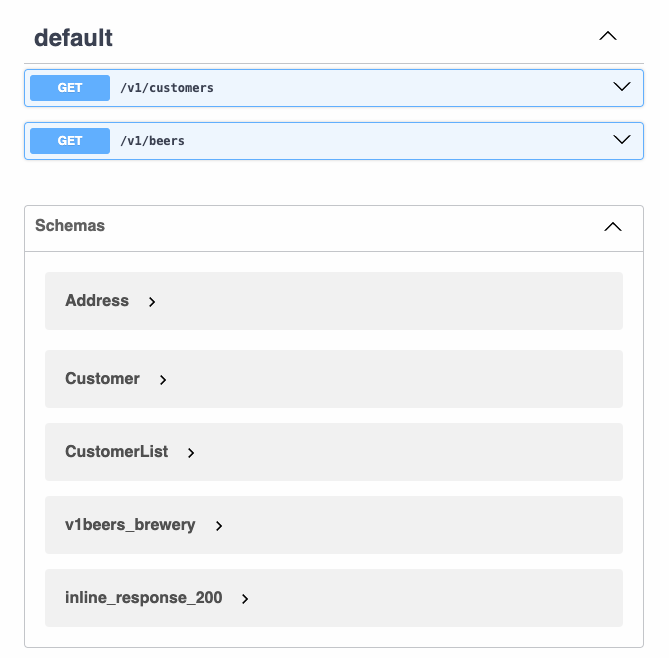
Let's start from this example and comment inside the code.
openapi: 3.0.2
info:
  title: OpenAPI Course
  description: Specification for OpenAPI Course
  termsOfService: http://example.com/terms/
  contact:
    name: John Thompson
    url: https://springframework.guru
    email: [email protected]
  license:
    name: Apache 2.0
    url: https://www.apache.org/licenses/LICENSE-2.0.html
  version: "1.0"
servers:
- url: https://dev.example.com
  description: Development Server
- url: https://qa.example.com
  description: QA Server
- url: https://prod.example.com
  description: Production Server
paths:
  /v1/customers:
    get:
      responses:
        200:
          description: List of Customers
          content:
            application/json:
              schema:
                $ref: '#/components/schemas/CustomerList' # We will bring from components
  /v1/beers:
    get:
      responses:
        200:
          description: List of Beers
          content:
            application/json:
              schema:
                type: array
                items:
                  $ref: '#/components/schemas/inline_response_200'
        404:
          description: No Beers Found
components:
  schemas:
    #####
    # Here define an address
    Address: # The convention says to create these schemas starting with uppercase letter
      type: object
      properties:
        line1:
          type: string
          example: 123 main
        city:
          type: string
          example: St Pete
        stateCode:
          maxLength: 2
          minLength: 2
          type: string
          description: 2 Letter State Code
          enum:
          - AL
          - AK
          - AZ
          - AR
          - CA
        zipCode:
          type: string
          example: "33701"
    #####

    #####
    # Here we define a customer that besides its definitions has an address
    Customer:
      type: object
      properties:
        id:
          type: string
          format: uuid
        firstName:
          maxLength: 100
          minLength: 2
          type: string
          example: John
        lastName:
          maxLength: 100
          minLength: 2
          type: string
          example: Thompson
        address:
          ## Observe that the reference is always from the root. It is not possible to reference with relative paths
          $ref: '#/components/schemas/Address' #<<<< Will bring everything that has inside Address. That is, it will receive the entire object.
      description: customer object
    #####
    CustomerList:
      maxItems: 100
      minItems: 1
      type: array
      description: List of Customers
      items:
        $ref: '#/components/schemas/Customer' # Can you imagine if we needed to redefine the entire customer item to define the item?
    ####
    v1beers_brewery: # Outside the convention this name (Works but goes outside the standard)
      type: object
      properties:
        name:
          type: string
        location:
          type: string
    ####
    inline_response_200:
      type: object
      properties:
        beerName:
          type: string
        style:
          type: string
          enum:
          - ALE
          - PALE_ALE
          - IPA
          - WHEAT
          - LAGER
        price:
          type: number
          format: float
        quantityOnHand:
          type: integer
          format: int32
        brewery:
          $ref: '#/components/schemas/v1beers_brewery' # We use the brewery object again.
      description: Beer Object
Note that we define objects only once. An object does not have another object inside, when this occurs we create a reference to isolate and reuse it.
We can see the structure of schemas using the editor.
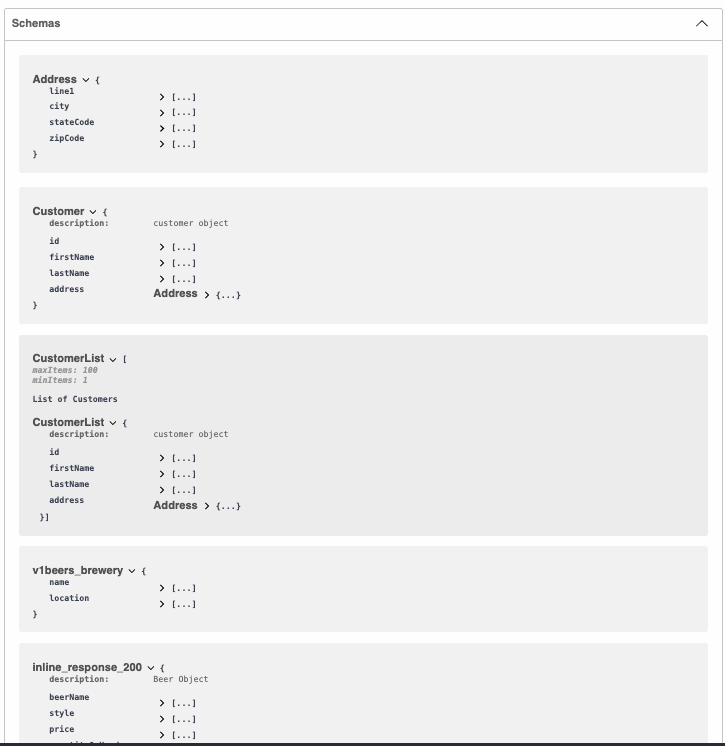
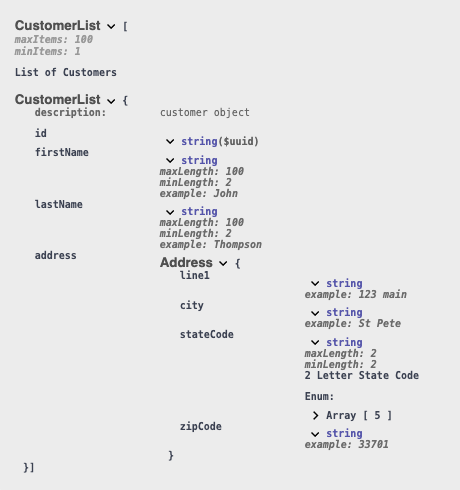
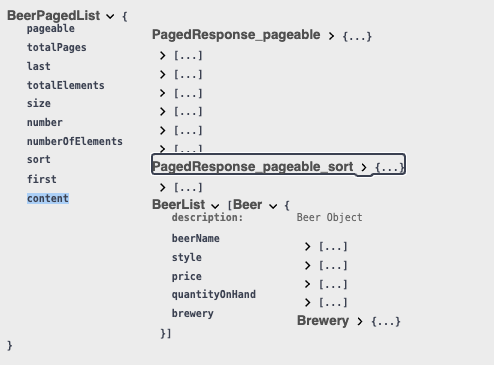
Inheritance
We can inherit the properties of another object and extend further. It is very useful to create an object from several objects. This is a very powerful resource already explored in object-oriented languages that we can reuse the concept in OpenAPI.
components:
  schemas:
  ## ...
###
    BeerList:
      type: array
      items:
        $ref: '#/components/schemas/Beer'

### Here we are creating a new object that will inherit from PageResponse, but we will include a property called content that will be a beer list.
###
    BeerPagedList:
      type: object
      properties: # What we will extend
        content:
          $ref: '#/components/schemas/BeerList'
      # other:
      #   $ref: '#/components/schemas/Other'
      allOf: # the list of what we will inherit from other objects
      - $ref: '#/components/schemas/PagedResponse'
    # - $ref: '#/components/schemas/Other'
    PagedResponse:
      type: object
      properties:
        pageable:
          $ref: '#/components/schemas/PagedResponse_pageable'
        totalPages:
          type: integer
          format: int32
        last:
          type: boolean
        totalElements:
          type: integer
          format: int32
        size:
          type: integer
          format: int32
        number:
          type: integer
          format: int32
        numberOfElements:
          type: integer
          format: int32
        sort:
          $ref: '#/components/schemas/PagedResponse_pageable_sort'
        first:
          type: boolean
    PagedResponse_pageable_sort:
      type: object
      properties:
        sorted:
          type: boolean
        unsorted:
          type: boolean
    PagedResponse_pageable:
      type: object
      properties:
        sort:
          $ref: '#/components/schemas/PagedResponse_pageable_sort'
        offset:
          type: integer
          format: int32
        pageNumber:
          type: integer
          format: int32
        pageSize:
          type: integer
          format: int32
        paged:
          type: boolean
        unpaged:
          type: boolean