Data Types
The OpenAPI specification tries to stay as close as possible to JSON Schema but it is not 100%.
Let's return some value for our get call to /v1/customers. The content will be an array and the items of this array will be of type string.
A schema in APIs, especially in specifications like OpenAPI, is a definition of the format and rules of the data that will be sent or received. It serves as a contract that defines how the data should be structured, what the expected types are, and the validations that should be applied.
Let's run a little and then walk back.
paths:
  /v1/customers:
    get:
      responses:
        '200':
          description: List of Customers
          content:
            application/json: # We are indicating that it will be in JSON format
              schema: # Here we are defining what the data format will be.
                type: array
                items:
                  description: Customer Name
                  type: string
                  minLength: 2
                  maxLength: 100
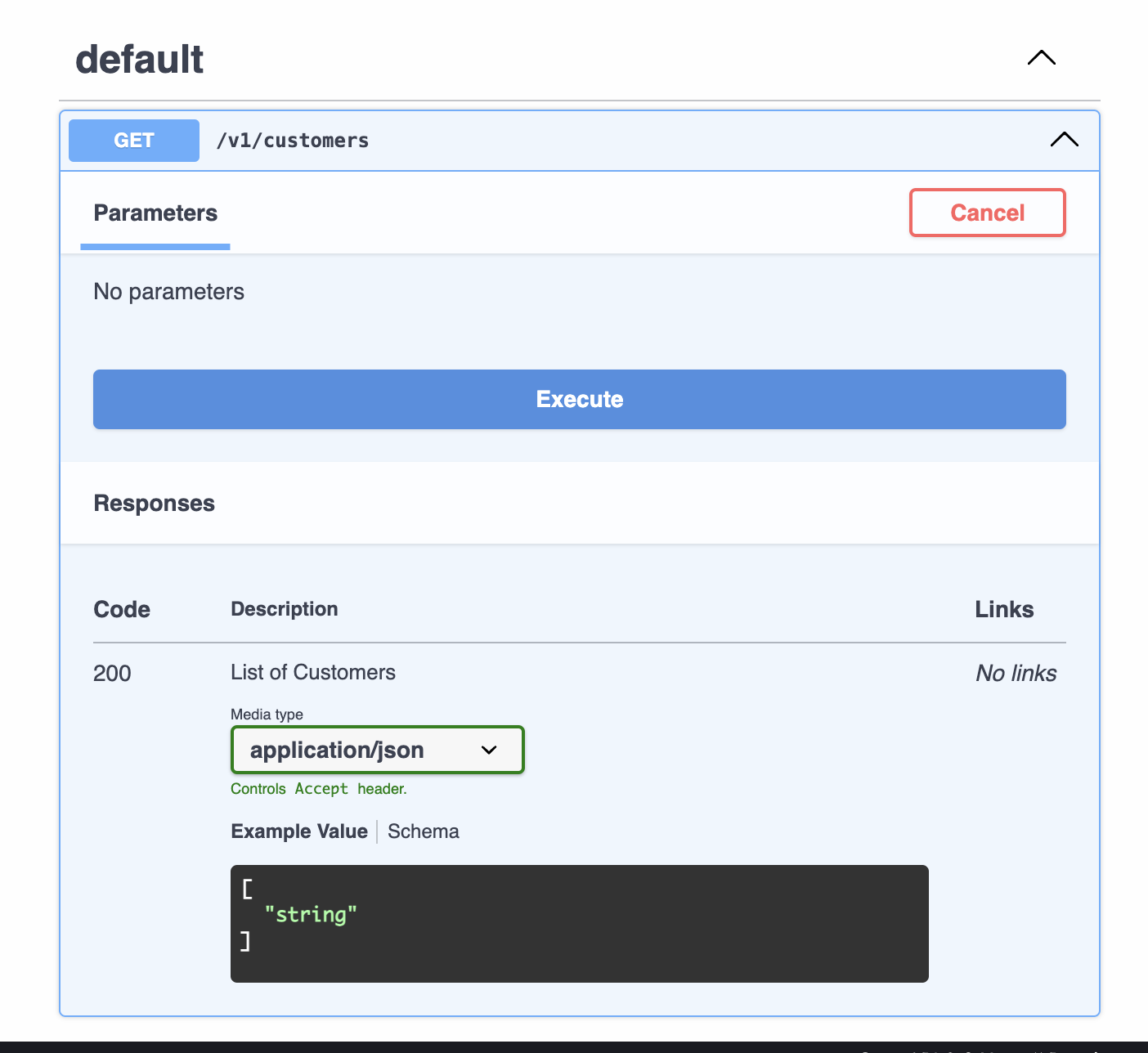
Before proceeding let's understand what we can have in content.
Content
The application/json is essentially a formal indication of the format of the exchanged data, allowing the client and server to understand how to process the information. Emphasis was given to this object because it is the most common, but we could have other formats:
-
application/xml<customer>
<name>John Doe</name>
<age>30</age>
</customer> -
application/yamlortext/yaml: For data in YAML format.name: John Doe
age: 30 -
application/x-ndjson: For JSON in separate lines format (Newline Delimited JSON).{"name": "John Doe", "age": 30}
{"name": "Jane Smith", "age": 25} -
application/x-www-form-urlencoded: Used in HTML forms to send data in key-value pair format.name=John+Doe&age=30 -
text/plain: For plain text without formatting.Hello, World! -
text/csv: For tabular data in CSV format (comma-separated values).name,age
John Doe,30
Jane Smith,25 -
image/jpeg,image/png,image/gif: Used to transfer images. -
application/octet-stream: For transferring generic binary files like .exe or .zip.
See what we have at https://datatracker.ietf.org/doc/html/rfc6838 to learn more about the possible accepted ones. There you will find categories like:
- application
- audio
- image
- text
- video
- others
There is a negotiation between the client and the server so that they understand what information they will exchange both in the request and in the response. It is perfectly possible to send data in one format and receive in another.
Don't pay attention to the example, just see that it is possible.
paths:
  /v1/createcustomer:
    post:
      summary: "Create a new customer"
      requestBody:
        content:
          application/json:   # Sending data in JSON format
            schema:
              type: object
              properties:
                name:
                  type: string
                email:
                  type: string
      responses:
        '200':
          description: "Customer created successfully"
          content:
            application/yaml:  # Response in YAML format
              schema:
                type: object
                properties:
                  name:
                    type: string
                  email:
                    type: string
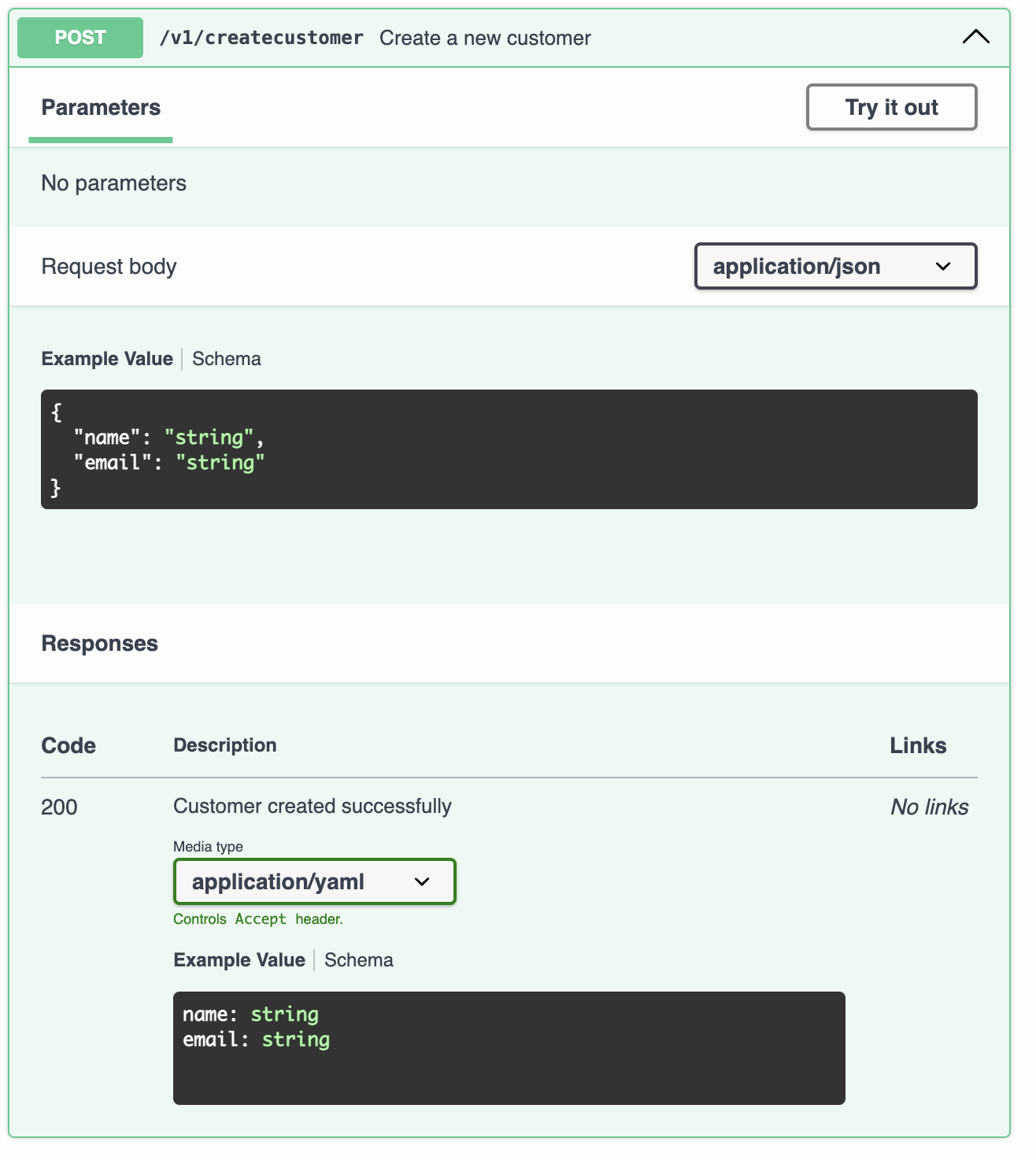
Generally we expect a schema to be an object because inside an object we can have properties with various parameters enabling growth. We could define it only as a specific type instead of object (we will explore more below), but putting this inside the object will give us greater margin for changes. Always using objects brings us:
- Flexibility and Extensibility: You can add new properties in the future without breaking compatibility with existing consumers. Start with a name field and later add email, birthdate, etc., without changing the main structure.
- Scalability: You can better organize complex data, adding sub-objects or arrays if necessary.
- Clarity and Reading: An object is more intuitive for developers, as it better reflects real-world structures (entities with attributes).
- Maintenance: If a field is removed or changed, consumers can adjust their implementations in a more predictable way.
Primitive Types
We saw there words like object and string. In the case above we have a response type object with internal parameters name of type string and email also of type string.
We can use it to declare the type of the schema itself, the types of object properties, etc.
We could expect in a request only the number despite what I just taught above about using objects.
            application/json:
              schema:
                type: integer
                example: 42 # The example works as part of the documentation to help better understand the expected data.
The OpenAPI specification offers many options to describe your types, but also many options to describe them loosely. It is good practice to choose types precisely (using the formats defined by OpenAPI) to improve documentation, avoid ambiguity for end users and if you are using some code generator it will avoid problems.
The OpenAPI specification accepts most of the primitive data already used in other languages that you probably already know.
string
It is a very flexible type used to represent many things.
- Can be used to represent other types
("true", "100", "{\"some\": \"object\"}"). - Supports a series of formats that impose restrictions on the type of data represented being useful to map to types in various languages.
- Many formats can be used, such as email, uuid, uri, hostname, ipv4, ipv6, etc. A table with examples:
| Type | Format | Explanation | Example |
|---|---|---|---|
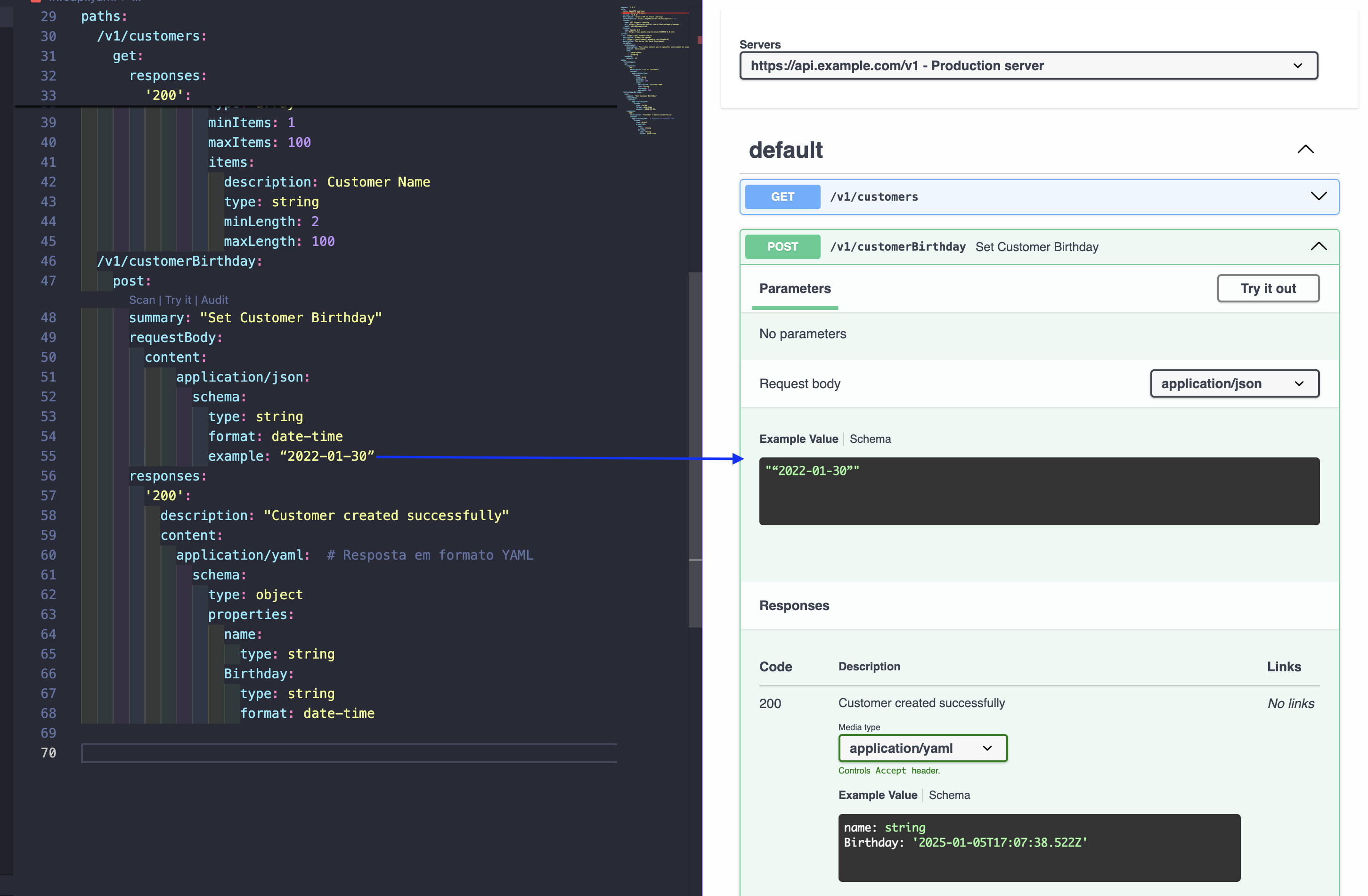
| string | date | Respecting RFC3339 standards for date formatting | "2022-01-30" |
| string | date-time | Respecting RFC3339 standards for date-time formatting | "2019-10-12T07:20:50.52Z" |
| string | password | Warns that it has sensitive data | "mySecretWord1234" |
| string | byte | Data encoded in base64 | "U3BlYWtlYXN5IG1ha2VzIHdvcmtpbmcgd2l0aCBBUElzIGZ1biE=" |
| string | binary | Used to represent binary sequence | "01010101110001" |
        ## Without formatting, expecting a simple string
        application/json:
          schema:
            type: string
            example: "We don't have any type of format!"
        ## With formatting, expecting a string with a date-time
        application/json:
          schema:
            type: string
            format: date
            example: "2022-01-30"
The example will help the user understand what is expected from the field.
We can use regular expressions (regex) in a string to validate data instead of format. The format practically are ready-made regex, but in specific cases we use pattern.
        application/json:
          schema:
            type: string
            pattern: ^[a-zA-Z0-9_]*$ # Accepts lowercase letters, uppercase letters, numbers and _
Some validations can be done using string.
- minLength: Defines the minimum length for a string
- maxLength: Defines the maximum length for a string
- enum: Specifies a set of accepted values
integer/number
A number can be of various formats just like a string. Defining the format of a number is specifying what we are expecting from that number.
If we are going to work with integers we use the integer type and can vary how large that number can be. For this we define the format of this number to int32 or int64.
The same thing we have with number. If we define a type number we are expecting to work with decimal numbers (floating point) and not an integer number. For this we specify that the format should be float or double.
It is not mandatory to define the format for integer or number. The definition serves for restriction. Defining an integer without format we expect any size number, int32 or int64 the same applies to number, being able to receive a float (32 bits) or a double (float with 64 bits).
- integer
- int32
- int64
- number
- float
- double
It is recommended that you be explicit with the format of your number type and always fill in the format attribute.
Some validations can be done on these values.
- minimum
- maximum
- exclusiveMinimum
- exclusiveMaximum
- multipleOf
          schema:
              type: integer
              format: int32
              # The value must be greater than or equal to the specified number.
              minimum: 10 # 10 is allowed that is it is <=
              example: 15
          schema:
              type: integer
              format: int32
              # The value must be greater than or equal to the specified number.
              minimum: 10 # 10 is NOT allowed because exclusiveMinimum is true remove the =, being allowed only > (greater)
              exclusiveMinimum: true
              example: 15
          schema:
              type: number
              format: float
              # We expect values between 0 and 1. 0.89 passes, 1.2 does not pass.
              minimum: 0
              maximum: 1 # Defining a maximum number
          schema:
              type: number
              format: double
              # Less than 100, Cannot be equal.
              maximum: 100
              exclusiveMaximum: true
          schema:
              type: integer
              format: int64
              multipleOf: 5
boolean
It is the usual one, only allows true or false not accepting zero or one.
          schema:
            type: boolean
            # default can be used for any type if the value is not provided this will be assumed.
            default: false
array
An array is a list of items of the same type. We must necessarily define what will be an item of the array.
          # string array
          schema:
              type: array
              items:
                  type: string
          # object array. Each object of the array will have a name and age
          schema:
            type: array
            items:
                type: object
                properties:
                    name:
                        type: string
                    age:
                        type: integer
We can also do validations on arrays.
- minItems:
- maxItems
- uniqueItems
          schema:
              type: array
              items:
                  type: number
                  format: float
              minItems: 1
          schema:
              type: array
              items:
                  type: string
              maxItems: 10

          # Must have exactly 3 items.
          schema:
              type: array
              items:
                  type: boolean
              minItems: 3
              maxItems: 3

          # Does not accept duplicate items in the array.
          schema:
              type: array
              items:
                  type: string
              uniqueItems: true
objects
It is the most flexible object type. Allows dictionaries and free-form objects, along with a series of attributes to control validation.
To summarize this, an object can contain other objects inside (nested), simple types, arrays, and anything else you want.
          schema:
            type: object
            properties:
              name:
                type: string
              age:
                type: integer
                format: int32
              active:
                type: boolean
              address: # Object inside the object
                type: object
                properties:
                  street:
                    type: string
                  city:
                    type: string
                  state:
                    type: string
                  country:
                    type: string
                  zip:
                    type: string
              children: # Array inside the object
                type: array
                items:
                  type: string
                description: List of children's names
We would be expecting something like this if it were in json.
{
  "name": "David Puziol",
  "age": 30,
  "active": true,
  "address": {
    "street": "123 Main St",
    "city": "Vila Velha",
    "state": "ES",
    "county": "Brazil",
    "zip": "62701"
  },
  "children": ["Marina", "Catarina"]
}
Of course we could have validations on each of the fields of each of the objects and arrays which would make the example extensive.
Objects with properties have access to some additional attributes that allow objects to be validated in various ways:
required
The required key is used to indicate which properties of an object are mandatory.
These properties must be included in the object when sent in a request (in the case of requestBody) or when expected in a response (in the case of response).
We are saying that an object can be complex enough but we don't need to receive or send all the fields.
Let's think that in a POST method to register a user we need the minimum necessary will be name and age but address would also be interesting if it were passed.
schema:
  type: object
  required:
    - name
    - age
  properties:
    name:
      type: string
    age:
      type: integer
    address: # (Optional)
      type: string
Usage example: Define an object where name and age are required properties, while address is optional.
We can use required both in the request and in the response. On input we generally understand the reason, but in the response it is a little more difficult. Wouldn't it be interesting to return all the fields always?
Sometimes we don't know if the value was set by the system or by the user previously, especially if it's a default value. Another detail is that the system performance could be affected. We are not here to judge what is or is not better to do, but what is possible to do.
readOnly (A property that is only available in a response)
A property that is only available in a response, that is, it should not be included in a request.
Usage example: A property like an ID that is generated on the server and cannot be sent by the client, but is returned in the response.
        schema:
          type: object
          properties:
            id:
              type: string
              readOnly: true
            name:
              type: string
Generally this is used when we reuse schemas doing code reusability. We create a schema that can be used in the request and in the response at the same time but there are fields that are used in one and in another.
Just to illustrate until the right time to learn this comes. We use a reference to the schema.
# ...
paths:
  /users:
    post:
      summary: Create a new user
      description: Creates a new user and returns the `id` generated by the system.
      requestBody:
        content:
          application/json:
            schema:
              $ref: '#/components/schemas/User'
      responses:
        '201':
          description: User created successfully
          content:
            application/json:
              schema:
                $ref: '#/components/schemas/User'

components:
  schemas:
    User:
      type: object
      properties:
        id:
          type: string
          readOnly: true
          description: ID automatically generated for the user
        name:
          type: string
          description: User name
      required:
        - name
writeOnly (A property that is only available in a request)
A property that is only available in a request, that is, it should not be included in a response.
Usage example: Passwords or other sensitive information that should not be returned after sending.
    schema:
      type: object
        required:
        - password
        - email
      properties:
        password: # key
          type: string
          writeOnly: true
        email:
          type: string
Objects can be used to represent dictionaries or maps, key-value collections. Keys are usually of type string, and values can be of any type that can be described by the OpenAPI specification, such as string, integer, array, boolean, among others.
- Keys: Are always of type string, that is, the key name is a string.
- Values: Can be of any type that OpenAPI allows, such as numbers, strings, arrays, nested objects, etc.
The object type can also be used to describe dictionaries/maps/etc. that use strings for keys and support any value type that can be described by the OpenAPI specification.
        schema:
          type: object
          # Name will exist and will still be required
          properties:
            name:
              type: string # Must match type of additionalProperties
          required:
            - name
            # others besides name can exist as long as they are strings
          additionalProperties:
            type: string
          # BOTH CASES BELOW WOULD ALLOW IT TO BE ANYTHING.
          # additionalProperties: true
          # additionalProperties: {}
          minProperties: 1 # Warns that there will be another property besides name.
Other validations can be done, regardless of using additionalProperties or not.
- minProperties: The minimum number of properties allowed in the object.
- maxProperties: The maximum number of properties allowed in the object.
Enums
It is used to define a fixed set of valid values, but the client or system must choose only one of these values. In other words: Enum is single choice when used alone, not multiple.
Let's go straight to the example already using components to get familiar.
paths:
  /v1/customers:
    get:
      responses:
        200:
          description: List of Customers
          content:
            application/json:
              schema:
                # Used to illustrate string properties
                maxItems: 100
                minItems: 1
                type: array
                description: List of Customers
                items: # here we will use the reference, it would be the same thing as including everything here inside.
                  $ref: '#/components/schemas/inline_response_200'
  /v1/beers:
    get:
      responses:
        200:
          description: List of Beers
        404:
          description: No Beers Found
components:
  schemas:
    v1customers_address:
      type: object
      properties:
        line1:
          type: string
          example: 123 main
        city:
          type: string
          example: St Pete
        stateCode:
          # Once we fixed the values using enum this would be redundant
          # Defining the maximum and minimum could stay for informative reasons only.
          maxLength: 2
          minLength: 2
          type: string
          description: 2 Letter State Code
          ## Single choice as example
          enum:
          - AL
          - AK
          - AZ
          - AR
          - CA
        zipCode:
          type: string
          example: "33701"
    inline_response_200:
      type: object
      properties:
        id:
          type: string
          format: uuid
        firstName:
          maxLength: 100
          minLength: 2
          type: string
          example: John
        lastName:
          maxLength: 100
          minLength: 2
          type: string
          example: Thompson
        address:
          $ref: '#/components/schemas/v1customers_address'
      description: customer object
How to Simulate Multiple Choice in OpenAPI?
If you want to allow multiple values, you can use the array type combined with enum to define valid values within the array:
type: array
items:
  type: string
  enum:
    - red
    - green
    - blue
Expected behavior:
Allows sending an array containing one or more valid values.
- Valid values:
- ["red"]
- ["red", "green"]
- ["green", "blue"]
- Invalid values:
- ["red", "yellow"] (because yellow is not in the enum)
- "red, green" (because it is not an array, but a single string).