HTTP Protocol (HyperText Transfer Protocol)
HTTP (HyperText Transfer Protocol) is the protocol that defines how messages are formatted and transmitted between clients and servers on the web. It's the foundation for data communication on the Internet and works on a request-response model. HTTP was created by Tim Berners-Lee in 1989. The solution proposed by Berners-Lee was a globally distributed hypertext system, which he called the World Wide Web. HTTP was developed as a communication protocol to enable the transfer of hypertext documents between servers and clients on the Web. The first HTTP specification, known as HTTP/0.9, was a simple protocol that only allowed requesting and responding with hypertext documents. In 1996, version HTTP/1.0 was released, introducing significant improvements over HTTP/0.9.
Text-based: Messages are sent in plain text, which makes understanding and debugging easier.Client-server model: The client (usually a browser or application) sends a request to the server, which responds with the requested data (e.g., HTML pages, images, etc.).Stateless: Each request is independent and the server doesn't maintain information about previous requests. If state needs to be maintained, cookies, sessions or other techniques are used.Application layer protocol in the OSI model. HTTP generally uses TCP as transport, but can be combined with others.Extensible: Supports custom headers, additional methods and other extensions.
A bit of HTTP evolution just for quick knowledge.
-
From HTTP/1.0 to HTTP/1.1: 1.0 improved version 0.9 by allowing the transfer of various types of content, such as images and videos, in addition to text. It also introduced the ability to send additional information in the form of metadata headers, improving client-server communication, but had a performance problem. Version 1.1 was released in 1997 introducing persistent connection, which allowed multiple requests and responses on the same connection, decreasing latency and improving performance. -
HTTP/2.0 (released in 2015): Focused mainly on performance and efficiency improvements, such as stream multiplexing and header compression, but also helped in adopting secure connections through TLS (Transport Security Layer). -
HTTP/3.0- Was formally standardized and released in June 2022. Today, in 2024, most web browsers already offer HTTP/3 support. The main change is replacing the TCP protocol in the transport layer with the QUIC (Quick UDP Internet Connections) protocol. QUIC no longer allows plain text transmission, only encrypted, requiring the use of TLS 1.3 forcing the use ofhttps://.
To better understand QUIC, knowledge about the TCP and UDP transport protocols is necessary. TCP sends a data packet and also receives confirmation of receipt of these packets while the UDP protocol simply sends without worrying if the other side received it or not and in case of error pretends nothing happened. TCP focuses on reliability and integrity while UDP on speed and latency.
When we send files we use TCP to ensure file integrity, because we don't want a file missing pieces.
When we want speed and latency is a factor, such as video streaming, VoIP, etc., we end up using UDP and accepting some losses to improve the quality of experience and fluidity.
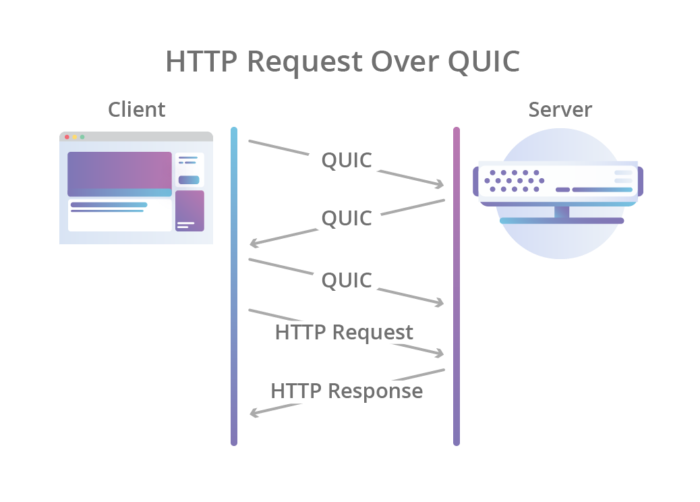
QUIC, which is based on the UDP protocol to guarantee latency, promises to guarantee reliability and security of connections. It adds an extra layer to UDP with features like packet retransmission, congestion control and other TCP characteristics, while maintaining speed. With this, a packet sent through QUIC will always be received by the other end, sooner or later.
An example of the QUIC flow.
Request vs Response
Let's show a request structure and a response to understand how it works.
HTTP Request Structure
-
Request line: Contains the HTTP method, the requested resource and the protocol version.
GET /index.html HTTP/1.1 -
Headers: Additional information, such as expected content type or authentication data.
Host: www.example.com
User-Agent: Mozilla/5.0 -
Request body: Used in methods like POST or PUT to send data (e.g., forms, JSON).
HTTP Response Structure
-
Status line: Contains the protocol version, status code and textual description. 200 is success, and we'll talk more about these statuses later.
HTTP/1.1 200 OK -
Headers: Information like content type, response size or cache settings.
Content-Type: text/html
Content-Length: 123 -
Response body: The requested content (e.g., an HTML page, image or JSON data).
HTTP Methods
We saw GET above, but other methods exist so let's learn a bit about them.
Methods are used to define an action on a resource. Most of the time when we are browsing web pages we are using the GET method.
-
GET: Retrieves data from a resource without modifying the server.GET /products -
POST: Sends data to the server to create a resource.POST /users with data { "name": "Alice" } -
PUT: Updates or creates a resource on the server.PUT /users/1 -
DELETE: Removes a resource on the server.DELETE /users/1 -
Less used but supported
HEAD: Same as GET, but only returns headers.OPTIONS: Returns available methods for a resource.PATCH: Partially updates a resource.TRACE: Used to perform a diagnostic loopback, that is, it allows the client (like the browser or a tool) to receive back what was sent in the HTTP request. This method is useful for debugging purposes and to verify how request data is being processed and manipulated along the way, until reaching the server.CONNECT: Establishes a communication tunnel with a server, allowing the client to send data in encrypted form (in the case of HTTPS) or transparently, without intervention in the communication content.
GET, HEAD, OPTIONS and TRACE are considered safe methods because they don't cause changes on the server.
PUT and DELETE are expected to be idempotent methods, but must be applied by developers. POST is not idempotent.
Not all methods need to pass parameters, that is, pass a body. Requesting a simple URL page we don't need to pass anything, just ask.
| METHOD | Request Body | Response Body | Safe | Idempotent | Cachable |
|---|---|---|---|---|---|
| GET | No | Yes | Yes | Yes | Yes |
| HEAD | No | No | Yes | Yes | Yes |
| POST | Yes | Yes | No | No | Yes |
| PUT | Yes | Yes | No | Yes | No |
| DELETE | No | Yes | No | Yes | No |
| CONNECT | Yes | Yes | No | No | No |
| OPTIONS | Optional | Yes | Yes | Yes | No |
| TRACE | No | Yes | Yes | Yes | No |
| PATCH | Yes | Yes | No | No | Yes |
HTTP Status Codes
We also saw 200 in the response as a success status.
Status codes indicate the result of a request. They are divided into 5 main categories, each representing a type of response. Let's explore all the main codes and their meanings:
It's not necessary to memorize all this, I'll keep it here for reference.
1xx: Informational- Indicate that the request was received and is being processed.- 100 Continue: The server received the headers and the client can continue sending the request body.
- 101 Switching Protocols: The server agrees to change the communication protocol, such as from HTTP to WebSocket.
- 102 Processing (WebDAV): The server received the request, but it's still being processed.
2xx: Success- Indicate that the request was successful.- 200 OK: The request was successful, and the content is returned (or the action confirmed).
- 201 Created: A resource was created on the server.
- 202 Accepted: The request was accepted, but is still being processed.
- 203 Non-Authoritative Information: Response is valid, but was obtained from an intermediate server.
- 204 No Content: Successful request, but no content to return.
- 205 Reset Content: Successful request, the client should reset the display.
- 206 Partial Content: Part of the content was delivered (used in partial downloads).
- 207 Multi-Status (WebDAV): Multiple responses for different sub-items of a request.
3xx: Redirects- Indicate that it's necessary to follow another URL.- 300 Multiple Choices: Multiple options exist for the requested resource.
- 301 Moved Permanently: The resource was permanently moved to a new URL.
- 302 Found: The resource was temporarily moved to another URL.
- 303 See Other: The client should use another URL to access the resource.
- 304 Not Modified: The resource hasn't been modified since the last access (used in cache).
- 307 Temporary Redirect: Temporary redirect, with the same request method.
- 308 Permanent Redirect: Permanent redirect, with the same request method.
4xx: Client errors- Indicate problems with the request made by the client.- 400 Bad Request: The request is malformed or invalid.
- 401 Unauthorized: The client needs to authenticate.
- 402 Payment Required: Reserved for future implementations related to payments.
- 403 Forbidden: The client doesn't have permission to access the resource.
- 404 Not Found: The requested resource was not found.
- 405 Method Not Allowed: The HTTP method used is not allowed for the resource.
- 406 Not Acceptable: The resource is not available in the requested format.
- 407 Proxy Authentication Required: The client must authenticate with the proxy.
- 408 Request Timeout: The client took too long to send the request.
- 409 Conflict: Conflict in the resource state (example: conflicting versions).
- 410 Gone: The requested resource is no longer available and will not be restored.
- 411 Length Required: The Content-Length header is mandatory.
- 412 Precondition Failed: A precondition in the header failed.
- 413 Payload Too Large: The payload size exceeds the allowed limit.
- 414 URI Too Long: The URI is too long to be processed.
- 415 Unsupported Media Type: The media type is not supported.
- 416 Range Not Satisfiable: The client requested a data range that cannot be delivered.
- 417 Expectation Failed: The server couldn't meet the Expect field of the request.
- 418 I'm a Teapot: HTTP protocol joke standard.
- 421 Misdirected Request: The server is not configured to respond.
- 422 Unprocessable Entity (WebDAV): The server understands the content, but can't process it.
- 423 Locked (WebDAV): The resource is locked.
- 424 Failed Dependency (WebDAV): A dependency failed.
- 425 Too Early: The server refuses to process a request that can be repeated.
- 426 Upgrade Required: The client must switch to another protocol.
- 428 Precondition Required: The server requires conditions to be sent in the request.
- 429 Too Many Requests: The client exceeded the request limit.
- 431 Request Header Fields Too Large: The header fields are too large.
- 451 Unavailable For Legal Reasons: The resource was blocked for legal reasons.
5xx: Server errors- Indicate problems on the server side.- 500 Internal Server Error: The server encountered an unexpected error.
- 501 Not Implemented: The server doesn't support the requested functionality.
- 502 Bad Gateway: The server received an invalid response from an upstream server.
- 503 Service Unavailable: The server is temporarily unavailable.
- 504 Gateway Timeout: The server didn't receive a response in time from another server.
- 505 HTTP Version Not Supported: The HTTP version is not supported.
- 506 Variant Also Negotiates: Server configuration error.
- 507 Insufficient Storage (WebDAV): Insufficient space on the server.
- 508 Loop Detected (WebDAV): Infinite loop in a request.
- 510 Not Extended: Necessary extensions were not met.
- 511 Network Authentication Required: The client needs to authenticate to access the network.
Let's do an experiment using telnet to open a connection and then enter what we want.
telnet google.com 80
Trying 142.251.135.142...
Connected to google.com.
Escape character is '^]'.
GET /about/ # Typed
HTTP/1.0 301 Moved Permanently # Response and redirection
Location: https://about.google/
Content-Type: text/html; charset=UTF-8
X-Content-Type-Options: nosniff
Date: Thu, 02 Jan 2025 01:05:38 GMT
Expires: Thu, 02 Jan 2025 01:35:38 GMT
Cache-Control: public, max-age=1800
Server: sffe
Content-Length: 218
X-XSS-Protection: 0

<HTML><HEAD><meta http-equiv="content-type" content="text/html;charset=utf-8">
<TITLE>301 Moved</TITLE></HEAD><BODY>
<H1>301 Moved</H1>
The document has moved
<A HREF="https://about.google/">here</A>.
</BODY></HTML>
Connection closed by foreign host.
Let's try google.com and request / which is the main page. If we use port 80 it will automatically redirect to port 443.
telnet google.com 80
Trying 142.251.135.142...
Connected to google.com.
Escape character is '^]'.
GET / # We type this and from here on we have the response
HTTP/1.0 200 OK
#...
In the end, the browser makes this easy for us so we don't see it.
Although HTTP status codes are a widely accepted and recommended standard, in practice, many API and server implementations don't use or follow these specifications rigorously. This happens for several reasons:
- Many developers tend to use only the most common codes like 200 OK, 400 Bad Request, 404 Not Found, and 500 Internal Server Error, ignoring other more specific ones.
- Not all developers are familiar with the entire range of available statuses. This leads to simplified or even inadequate implementations.
- Some organizations or frameworks create their own status standards or even encapsulate responses, always returning 200 OK with a "status" field in the response body to indicate errors. Although it works, this goes against RESTful practices.
- For small applications or those without many requirements, using a complete range of status codes can be seen as "overkill".
- Some frameworks or libraries don't offer easy support for the entire range of HTTP codes, which leads developers to adapt implementations.
- In some cases, developers choose to ignore standards to simplify development or due to lack of time.
How to solve this?
- Promote understanding about the importance of HTTP statuses and create internal guides on API best practices.
- Code reviews ensuring that correct statuses are used according to standards.
- Tools like linters and modern frameworks can help standardize.
Header and Content
A header is a set of additional information sent at the beginning of an HTTP request or response. It consists of key-value pairs and serves to transmit metadata, such as information about:
The client or server. The content format. Authentication rules. Cache settings, among others.
The content is the actual data.
POST /api/users HTTP/1.1
Host: api.example.com
Authorization: Bearer abc123
Content-Type: application/json
Content-Length: 47

{
    "username": "david puziol",
    "email": "[email protected]"
}
Which part is Header which is Content?
- Header
Host: api.example.com
Authorization: Bearer abc123
Content-Type: application/json
Content-Length: 47
- Content
{
    "username": "david puziol",
    "email": "[email protected]"
}
There are always headers in a request whether you specify them or not. Many headers are automatically injected. We can use headers to pass values that are not the real data, but sometimes necessary in addition to those that are already defined by default.
Some Headers you'll see around.
-
Host: Allows the server to know which domain/process to serve, in case it's hosting several.
-
Connection: Defines what should happen with the connection after the request/response. Saves network resources and improves performance by allowing multiple requests/responses on the same connection.
- Common values:
- keep-alive: Keeps the connection open for reuse, but the client and server need to support it.
- close: Closes the connection after the response.
In REST, each request is independent (stateless), but this doesn't mean that the physical network connection needs to be opened and closed with each request. REST focuses on how requests are structured and the data being transferred, not on the physical connection. Persistent connection with keep-alive is a network optimization, and doesn't affect REST design principles, which are based on client-server separation.
- Common values:
-
User-Agent: Informs the server which client (browser, application or library) is making the request which allows the server to adapt content for different clients and record analytical information about traffic. Values we usually see are:
- Mozilla/5.0 (Windows NT 10.0; Win64; x64)
- AppleWebKit/537.36 (KHTML, like Gecko)
- Chrome/91.0.4472.124 Safari/537.36
-
Accept: Specifies the types of content that the client accepts in the response (application/json is an example). It's mainly used when the server can return the response in different formats.
-
Accept-Encoding: Indicates the compression methods the client accepts to save bandwidth (gzip, deflate, br).
-
Accept-Language: The server can use this information to personalize the response (en-US).
-
Content-Type: Specifies the type of data sent in the request or response body (application/json, text/html, etc).
-
Content-Length: Indicates the size (in bytes) of the request or response body. It's automatically calculated by most clients and servers to know when the message body ends and avoid read errors.
-
Authorization: Contains credentials to authenticate the client on the server. It's used in requests that require login or tokens (Bearer abc123)
-
Cookie: Sends cookies stored in the client to the server for information like login sessions or user preferences (Cookie: session_id=xyz123; theme=dark)