Parameters
We've used parameters before to define what the request should send and validate them.
Parameters can be for:
path- Used together with Path Templating, where the parameter value is actually part of the operation's URL. This does not include the host or the base path of the API. For example, in/items/{itemId}, the path parameter is itemId.query- Parameters that are appended to the URL. For example, in /items?id=###, the query parameter is id.header(rarely used) - Custom headers that are expected as part of the request.cookie(rarely used) - Passes a specific cookie value to the API.
It's worth knowing that header and cookie exist, but we won't focus on this because you will rarely see it and you will forget it quickly. When necessary deepen the study on this.
Don't confuse query here with SQL query, it's not the same thing.
What is mandatory in each parameter?
in(string) - The type of parameter and can be query, path, header or cookie.name(string, case sensitive) - Needs to be the same name used in the Path object.required(boolean) if in is path it must necessarily be true. If it's the others it can be optional with default being false.
We have other things that are not mandatory to inform but can be useful.
description(string) a brief description of the parameter.deprecated(boolean) default is false.allowEmptyValue(boolean) and will be removed in the future.
We can have additional properties applied to parameters regarding how serialization is done, but they are also very little used. Generally keeping things simple ends up being the best choice and it's easier to maintain. The day that the basics are not sufficient look for what there is to help.
Query Parameters
These are the parameters that come after the path after the ?.
I will initially put the spec that we will work with and make comments inside it for learning.
Let's specify 2 parameters in /v1/customers.
openapi: 3.0.2
info:
####
 # Removed to reduce code
####
paths:
  /v1/customers:
    get:
      # When accessing this path we are expecting two parameters
      parameters:
        - name: pageNumber
          in: query
          description: Page number
          schema: # ATTENTION TO WHAT I WILL SAY BELOW.
            type: integer
            format: int32
            default: 1
            # Here required is also false, but there is a default value 1
        - name: pageSize
          in: query
          required: false # this is already the default
          schema:
            type: integer
            format: int32
### ...
components:
### ...
The schema is not mandatory, but it is highly recommended. If you omit the schema, the OpenAPI documentation will not have information about the expected data type for the parameter, which can confuse API consumers. This can generate wrong assumptions, like sending a string to a parameter that should be a number.
If we were to consume this path we would need to pass something like https://dev.example.com/v1/customers?pageNumber=5. If we didn't pass anything https://dev.example.com/v1/customers it would be the same as doing https://dev.example.com/v1/customers?pageNumber=1
We could pass both parameters https://dev.example.com/v1/customers?pageNumber=4&pageSize=10.
Query parameters are separated by
&.
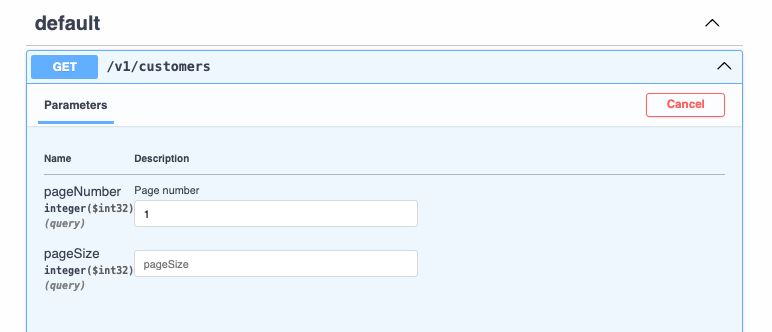
So now let's improve and reuse this and do it for beer too, so we would have this.
paths:
  /v1/customers:
    get:
      parameters:
        - name: pageNumber
          in: query
          description: Page number
          schema:
            type: integer
            format: int32
            default: 1
        - name: pageSize
          in: query
          required: false # this is already the default
          schema:
            type: integer
            format: int32
      responses:
        200:
          description: List of Customers
          content:
            application/json:
              schema:
                $ref: '#/components/schemas/CustomerPagedList'
  /v1/beers:
    get:
      parameters:
        - name: pageNumber
          in: query
          description: Page number
          schema: # ATTENTION TO WHAT I WILL SAY BELOW.
            type: integer
            format: int32
            default: 1
            # Here required is also false, but there is a default value 1
        - name: pageSize
          in: query
          required: false # this is already the default
          schema:
            type: integer
            format: int32
See that we have duplicate code there and we could shorten this. So let's use components!. See the complete spec.
openapi: 3.0.2
info:
  title: OpenAPI Course
  description: Specification for OpenAPI Course
  termsOfService: http://example.com/terms/
  contact:
    name: John Thompson
    url: https://springframework.guru
    email: [email protected]
  license:
    name: Apache 2.0
    url: https://www.apache.org/licenses/LICENSE-2.0.html
  version: "1.0"
servers:
- url: https://dev.example.com
  description: Development Server
- url: https://qa.example.com
  description: QA Server
- url: https://prod.example.com
  description: Production Server
paths:
  /v1/customers:
    get:
      parameters:
      # This parameter will be what we have in this reference at the end of the specification
        - $ref: "#/components/parameters/PageNumber"
        - $ref: "#/components/parameters/PageSize"
      responses:
        200:
          description: List of Customers
          content:
            application/json:
              schema:
                $ref: '#/components/schemas/CustomerPagedList'
  /v1/beers:
    get:
      parameters:
        - $ref: "#/components/parameters/PageNumber"
        - $ref: "#/components/parameters/PageSize"
      responses:
        200:
          description: List of Beers
          content:
            application/json:
              schema:
                $ref: '#/components/schemas/BeerPagedList'
        404:
          description: No Beers Found
components:
  schemas:
    Address:
      type: object
      properties:
        line1:
          type: string
          example: 123 main
        city:
          type: string
          example: St Pete
        stateCode:
          maxLength: 2
          minLength: 2
          type: string
          description: 2 Letter State Code
          enum:
          - AL
          - AK
          - AZ
          - AR
          - CA
        zipCode:
          type: string
          example: "33701"
    Customer:
      type: object
      properties:
        id:
          type: string
          format: uuid
        firstName:
          maxLength: 100
          minLength: 2
          type: string
          example: John
        lastName:
          maxLength: 100
          minLength: 2
          type: string
          example: Thompson
        address:
          $ref: '#/components/schemas/Address'
      description: customer object
    CustomerList:
      maxItems: 100
      minItems: 1
      type: array
      description: List of Customers
      items:
        $ref: '#/components/schemas/Customer'
    CustomerPagedList:
      type: object
      properties:
        content:
          $ref: '#/components/schemas/CustomerList'
      allOf:
      - $ref: '#/components/schemas/PagedResponse'
    Brewery:
      type: object
      properties:
        name:
          type: string
        location:
          type: string
    Beer:
      type: object
      properties:
        beerName:
          type: string
        style:
          type: string
          enum:
          - ALE
          - PALE_ALE
          - IPA
          - WHEAT
          - LAGER
        price:
          type: number
          format: float
        quantityOnHand:
          type: integer
          format: int32
        brewery:
          $ref: '#/components/schemas/Brewery'
      description: Beer Object
    BeerList:
      type: array
      items:
        $ref: '#/components/schemas/Beer'
    BeerPagedList:
      type: object
      properties:
        content:
          $ref: '#/components/schemas/BeerList'
      allOf:
      - $ref: '#/components/schemas/PagedResponse'
    PagedResponse:
      type: object
      properties:
        pageable:
          $ref: '#/components/schemas/PagedResponse_pageable'
        totalPages:
          type: integer
          format: int32
        last:
          type: boolean
        totalElements:
          type: integer
          format: int32
        size:
          type: integer
          format: int32
        number:
          type: integer
          format: int32
        numberOfElements:
          type: integer
          format: int32
        sort:
          $ref: '#/components/schemas/PagedResponse_pageable_sort'
        first:
          type: boolean
    PagedResponse_pageable_sort:
      type: object
      properties:
        sorted:
          type: boolean
        unsorted:
          type: boolean
    PagedResponse_pageable:
      type: object
      properties:
        sort:
          $ref: '#/components/schemas/PagedResponse_pageable_sort'
        offset:
          type: integer
          format: int32
        pageNumber:
          type: integer
          format: int32
        pageSize:
          type: integer
          format: int32
        paged:
          type: boolean
        unpaged:
          type: boolean
  ############
  parameters:
    PageNumber: # Convention starts with uppercase
     # HERE!
      name: pageNumber # but here we work starting with lowercase
      in: query
      description: Page number
      schema:
        type: integer
        format: int32
        default: 1
    PageSize:
      name: pageSize
      in: query
      required: false
      schema:
        type: integer
        format: int32
It is possible to overwrite what we import from the ref.
  /v1/customers:
    get:
      parameters:
      - name: customPageNumber  # Name overwritten here
        in: query
        description: Page number
        schema:
          type: integer
          format: int32
          default: 1
      - $ref: "#/components/parameters/PageSize"  # Here, without overwriting
      responses:
        200:
          description: List of Customers
          content:
            application/json:
              schema:
                $ref: '#/components/schemas/CustomerPagedList'
Tip, keep the same in name to avoid confusion and if necessary overwrite as shown above.
Try to keep a standard for your nomenclatures. For example if we wanted to do #/components/parameters/pageSize" we could also to know that this will be the same name received.
Path Parameters (URL Parameters)
We can specify a resource within the URI itself by defining from the path. Obviously if this variable is part of the URI then it needs to be passed and therefore must be required: true.
The parameters defined in the path must be indicated within braces ex:
{itemId}and thename of the parameter object must be exactly the same
paths:
  /v1/customers:
    get:
      parameters:
        - $ref: "#/components/parameters/PageNumber"
        - $ref: "#/components/parameters/PageSize"
      responses:
        200:
          description: List of Customers
          content:
            application/json:
              schema:
                $ref: '#/components/schemas/CustomerPagedList'
  /v1/customers/{customerId}:
    get:
      parameters:
        - name: customerId # Note that it is the same name
          in: path # <<<<
          required: true
          description: Customer Id
          schema:
            type: string
            # We will use a formatting for this string using uuid
            # uuid is something like this: a48da5c1-9311-44a4-8d2a-bf4eeeb4cf04
            format: uuid
      responses:
        '200':
          description: Found Customer
          content:
            application/json:
              schema:
                # we reuse the customer not the list.
                $ref: '#/components/schemas/Customer'
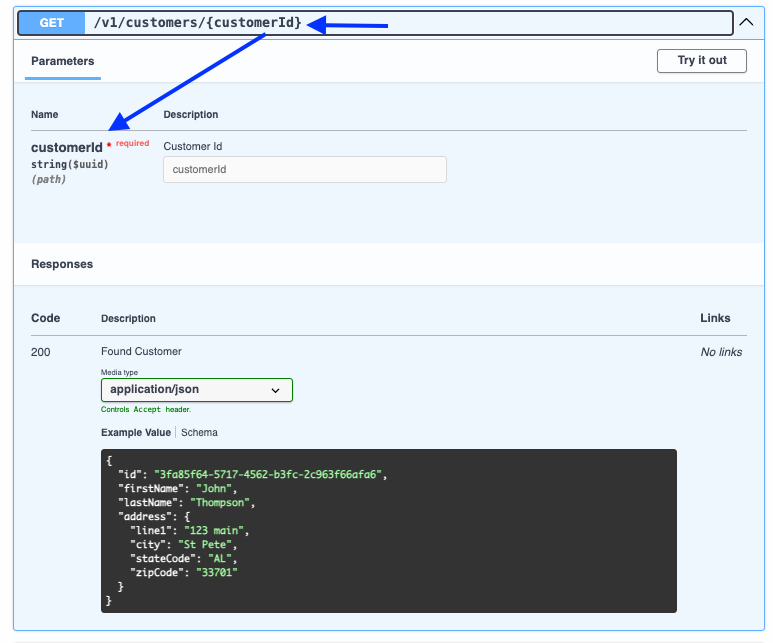
Now let's improve this and create for beer too and put it in components. Instead of using beerId and CustomerId we will use only ID.
openapi: 3.0.2
info:
# ...
paths:
  /v1/customers/{Id}:
    get:
      parameters:
        - $ref: '#/components/parameters/Id'
      responses:
        '200':
          description: Found Customer
          content:
            application/json:
              schema:
                $ref: '#/components/schemas/Customer'

  /v1/beer/{Id}:
    get:
      parameters:
        - $ref: '#/components/parameters/Id' # but this will bring the name Id
      responses:
        '200':
          description: Found Beer
          content:
            application/json:
              schema:
                $ref: '#/components/schemas/Beer'
components:
  schemas:
  # ...
  parameters:
  # ...
    Id:
      name: Id
      in: path
      required: true
      description: UUID for Id
      schema:
        type: string
        format: uuid