Backup and Restore
We know that:
- Applications should be defined in their respective manifest files that can be applied generating only the difference.
- However, sometimes we can use imperative declarations and don't have a copy of the manifests. Not all team members usually follow the correct method and many times when putting out fires they resort to faster and more desperate methods.
- We cannot share these differences applied via imperative methods and we always need to look in the cluster and check.
- We should always version our manifests in a git repository to be maintained by the team
- The kube-apiserver has all manifest declarations whether made imperatively or not.
- The cluster stores all its data in the ETCD cluster whether it's deployed together with master nodes or another way.
- Application data is stored in persistent volumes
Kube-ApiServer
Let's retrieve the manifests that kube-apiserver has.
kubectl get all --all-namespaces -o yaml > all_manifests.yaml
However, the command above is only for a small group of objects and there are many others that should be considered. Therefore, retrieving manifests this way is not the best path.
There are tools for this purpose such as Velero, but it should not be used in the exam.
ETCD
Instead of backing up kube-apiserver we can backup the ETCD cluster which stores kube-apiserver data and all resources created in the cluster.
Sometimes in a cloud-managed environment we don't have access to etcd so this solution wouldn't help. Therefore backing up using kube-apiserver is the best way.
ETCD has its own cluster that can be external or not, but they are usually hosted inside master nodes.
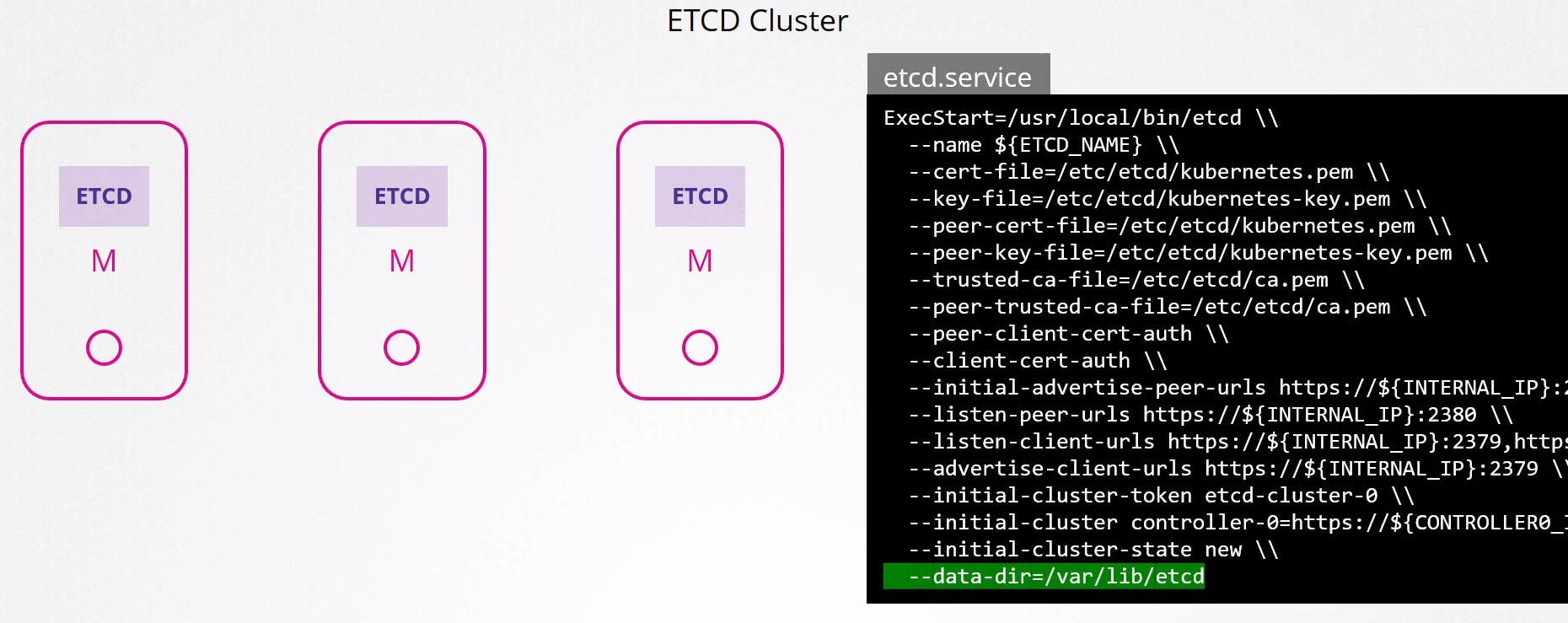
In the etcd installation, we have specified the location where all data is stored and we can use this directory for a backup tool.
If etcd is running as a pod, it's usually a static pod that has manifests in /etc/kubernetes/manifests
If we analyze the manifest of these static pods if etcd is deployed this way
#cat /etc/kubernetes/manifests/etcd.yaml
apiVersion: v1
kind: Pod
metadata:
  annotations:
    kubeadm.kubernetes.io/etcd.advertise-client-urls: https://192.12.50.3:2379
  creationTimestamp: null
  labels:
    component: etcd
    tier: control-plane
  name: etcd
  namespace: kube-system
spec:
  containers:
  - command:
    - etcd
    - --advertise-client-urls=https://192.12.50.3:2379
    - --cert-file=/etc/kubernetes/pki/etcd/server.crt # certificate used
    - --client-cert-auth=true
    - --data-dir=/var/lib/etcd
    - --experimental-initial-corrupt-check=true
    - --experimental-watch-progress-notify-interval=5s
    - --initial-advertise-peer-urls=https://192.12.50.3:2380
    - --initial-cluster=controlplane=https://192.12.50.3:2380
    - --key-file=/etc/kubernetes/pki/etcd/server.key
    - --listen-client-urls=https://127.0.0.1:2379,https://192.12.50.3:2379
    - --listen-metrics-urls=http://127.0.0.1:2381
    - --listen-peer-urls=https://192.12.50.3:2380
    - --name=controlplane
    - --peer-cert-file=/etc/kubernetes/pki/etcd/peer.crt
    - --peer-client-cert-auth=true
    - --peer-key-file=/etc/kubernetes/pki/etcd/peer.key # cert key used
    - --peer-trusted-ca-file=/etc/kubernetes/pki/etcd/ca.crt
    - --snapshot-count=10000
    - --trusted-ca-file=/etc/kubernetes/pki/etcd/ca.crt # CA used
    image: registry.k8s.io/etcd:3.5.7-0
    imagePullPolicy: IfNotPresent
    livenessProbe:
      failureThreshold: 8
      httpGet:
        host: 127.0.0.1
        path: /health?exclude=NOSPACE&serializable=true
        port: 2381
        scheme: HTTP
      initialDelaySeconds: 10
      periodSeconds: 10
      timeoutSeconds: 15
    name: etcd
    resources:
      requests:
        cpu: 100m
        memory: 100Mi
    startupProbe:
      failureThreshold: 24
      httpGet:
        host: 127.0.0.1
        path: /health?serializable=false
        port: 2381
        scheme: HTTP
      initialDelaySeconds: 10
      periodSeconds: 10
      timeoutSeconds: 15
    volumeMounts: # See the volumes
    - mountPath: /var/lib/etcd
      name: etcd-data
    - mountPath: /etc/kubernetes/pki/etcd
      name: etcd-certs
  hostNetwork: true
  priority: 2000001000
  priorityClassName: system-node-critical
  securityContext:
    seccompProfile:
      type: RuntimeDefault
# These host volumes are being mapped inside the pod on the same paths
  volumes:
  - hostPath:
      path: /etc/kubernetes/pki/etcd
      type: DirectoryOrCreate
    name: etcd-certs
  - hostPath:
      path: /var/lib/etcd
      type: DirectoryOrCreate
    name: etcd-data
status: {}
Also observe that we also have the path of certificates being passed using the reference of the volumes that was mounted.
The etcdctl command needs a variable to recognize whether it's api v2 or v3.
etcdctl --version
etcdctl version: 3.3.13
API version: 2

# this command doesn't exist in v2
etcdctl version
No help topic for 'version'

# This is the variable that needs to be defined to know the version by passing to v3 we have other commands and version works here as well as snapshot which we don't have in v2
export ETCDCTL_API=3

etcdctl version
etcdctl version: 3.3.13
API version: 3.3
ETCD also comes with a builtin solution that can take a snapshot of the database in v3.
If etcd is under tls we need to pass the command below with the pointed certificates.
etcdctl snapshot save --endpoints=127.0.0.1:2379 --cacert=/etc/kubernetes/pki/etcd/ca.crt --cert=/etc/kubernetes/pki/etcd/server.crt --key=/etc/kubernetes/pki/etcd/server.key /opt/snapshot-pre-boot.db
# In this case I installed etcd on my own machine so I didn't need to pass certificates

etcdctl snapshot save snapshot.db  # pass the full path of the file if you want.
{"level":"info","ts":1704447228.7458081,"caller":"snapshot/v3_snapshot.go:119","msg":"created temporary db file","path":"snapshot.db.part"}
{"level":"info","ts":"2024-01-05T06:33:48.747-0300","caller":"clientv3/maintenance.go:200","msg":"opened snapshot stream; downloading"}
{"level":"info","ts":1704447228.747063,"caller":"snapshot/v3_snapshot.go:127","msg":"fetching snapshot","endpoint":"127.0.0.1:2379"}
{"level":"info","ts":"2024-01-05T06:33:48.748-0300","caller":"clientv3/maintenance.go:208","msg":"completed snapshot read; closing"}
{"level":"info","ts":1704447228.7492132,"caller":"snapshot/v3_snapshot.go:142","msg":"fetched snapshot","endpoint":"127.0.0.1:2379","size":"20 kB","took":0.003339672}
{"level":"info","ts":1704447228.7493641,"caller":"snapshot/v3_snapshot.go:152","msg":"saved","path":"snapshot.db"}
Snapshot saved at snapshot.db

# To see the status of the backup
etcdctl snapshot status snapshot.db
bfa20374, 0, 3, 20 kB
To recover data using this snapshot.
sudo systemctl stop etcd.service

sudo systemctl status etcd.service
○ etcd.service - etcd - highly-available key value store
     Loaded: loaded (/lib/systemd/system/etcd.service; enabled; preset: enabled)
     Active: inactive (dead) since Fri 2024-01-05 06:38:00 -03; 31s ago
   Duration: 4min 30.235s
       Docs: https://etcd.io/docs
             man:etcd
    Process: 50148 ExecStart=/usr/bin/etcd $DAEMON_ARGS (code=killed, signal=TERM)
   Main PID: 50148 (code=killed, signal=TERM)
        CPU: 2.152s

Jan 05 06:33:30 david-laptop etcd[50148]: enabled capabilities for version 3.4
Jan 05 06:33:48 david-laptop etcd[50148]: sending database snapshot to client 20 kB [20480 bytes]
Jan 05 06:33:48 david-laptop etcd[50148]: sending database sha256 checksum to client [32 bytes]
Jan 05 06:33:48 david-laptop etcd[50148]: successfully sent database snapshot to client 20 kB [20480 bytes]
Jan 05 06:38:00 david-laptop systemd[1]: Stopping etcd.service - etcd - highly-available key value store...
Jan 05 06:38:00 david-laptop etcd[50148]: received terminated signal, shutting down...
Jan 05 06:38:00 david-laptop etcd[50148]: skipped leadership transfer for single voting member cluster
Jan 05 06:38:00 david-laptop systemd[1]: etcd.service: Deactivated successfully. #<<<


# The restore command will take the snapshot and put it in a specific directory that will need to be used later

sudo etcdctl snapshot restore snapshot.db --data-dir /var/lib/etcd-from-backup
{"level":"info","ts":1704447747.1907465,"caller":"snapshot/v3_snapshot.go:296","msg":"restoring snapshot","path":"snapshot.db","wal-dir":"/var/lib/etcd-from-backup/member/wal","data-dir":"/var/lib/etcd-from-backup","snap-dir":"/var/lib/etcd-from-backup/member/snap"}
{"level":"info","ts":1704447747.195053,"caller":"membership/cluster.go:392","msg":"added member","cluster-id":"cdf818194e3a8c32","local-member-id":"0","added-peer-id":"8e9e05c52164694d","added-peer-peer-urls":["http://localhost:2380"]}
{"level":"info","ts":1704447747.1978393,"caller":"snapshot/v3_snapshot.go:309","msg":"restored snapshot","path":"snapshot.db","wal-dir":"/var/lib/etcd-from-backup/member/wal","data-dir":"/var/lib/etcd-from-backup","snap-dir":"/var/lib/etcd-from-backup/member/snap"}
Now we need to configure the etcd service again to use this directory.
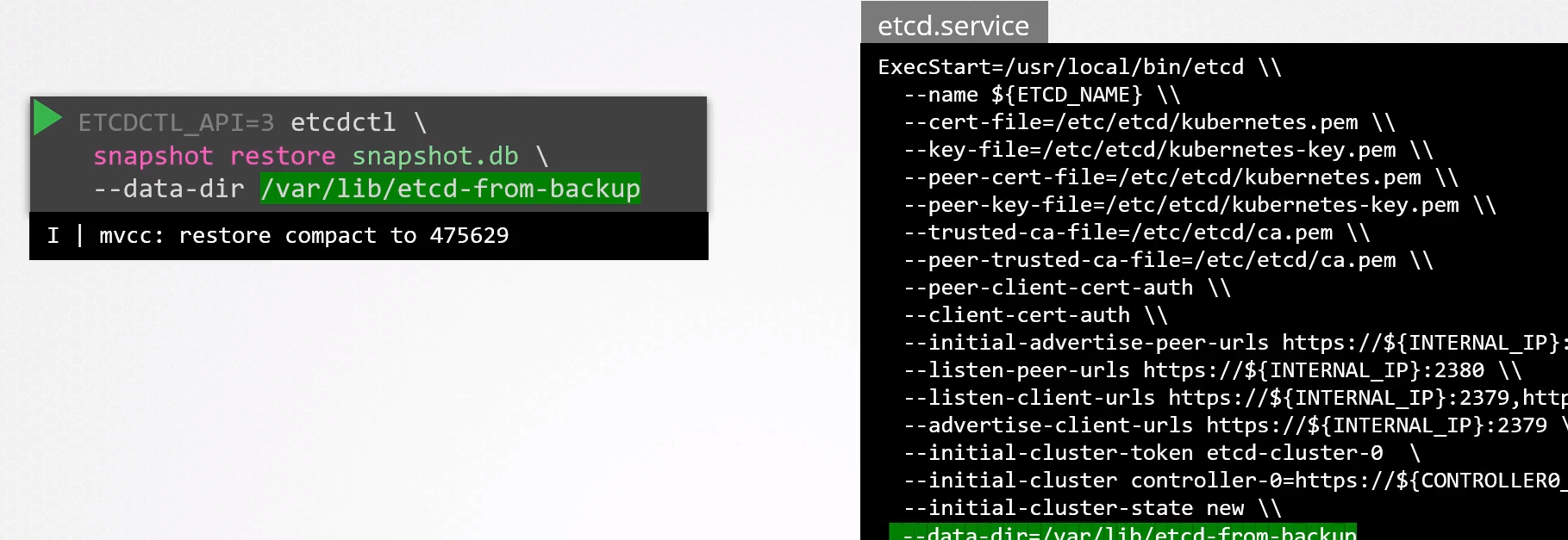
And then we can reload the service and start it again.
systemctl daemon-reload
systemctl restart etcd-service
In an external etcd cluster it's necessary that the etcd data directory belongs to the etcd user
# to set permission when necessary
chown etcd:etcd -R /var/lib/etcd