Operating System Upgrade
Let's imagine the following scenario.

Blue pods are defined by a ReplicaSet and the others are simply pods without ReplicaSets.
What happens if node 1 stops?
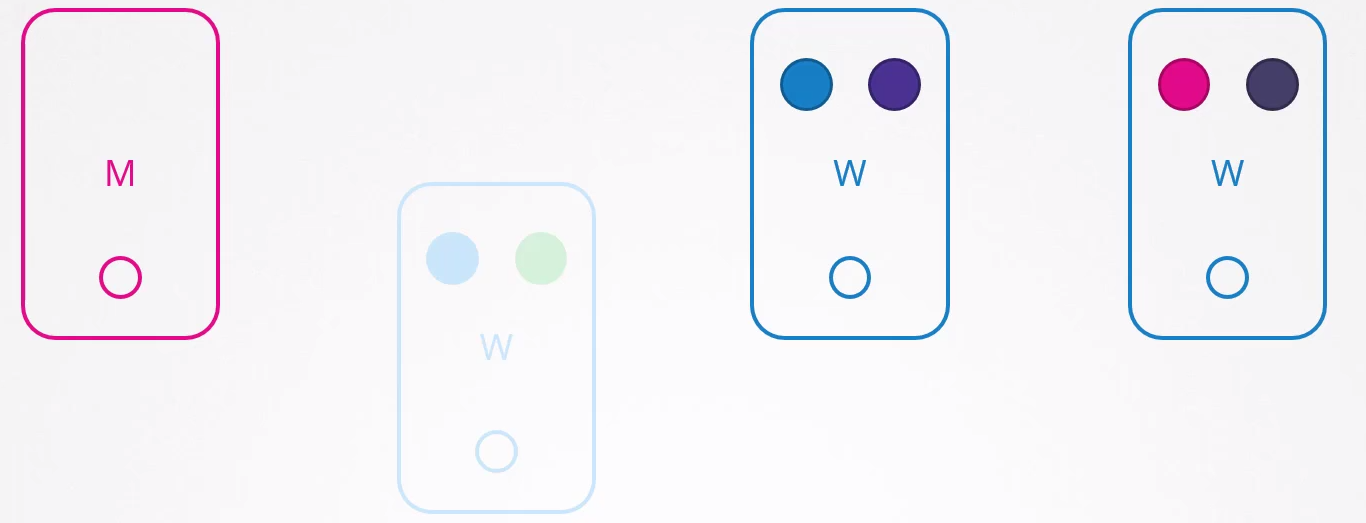
Users who need access to the green app will be impacted, but those accessing the blue one won't. If both blue pods were on the same node, they would be impacted.
How does Kubernetes behave by default if a node stops responding?
If it stops responding and returns immediately, the Kubelet starts with the pods online. However, if the node is inaccessible for more than 5 minutes, the pods are terminated from this node and attempt to be scheduled to other possible nodes. Kubernetes considers the pods that were on the node that stopped responding as terminated.
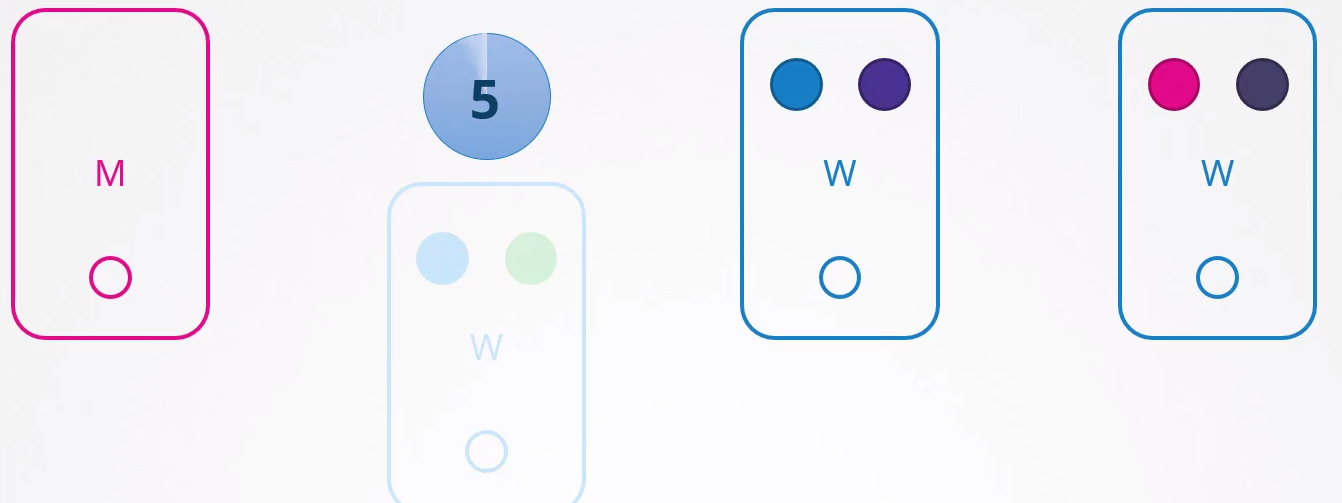
ReplicaSet and DaemonSet ensure that the pods they manage are always active, distributing them to other nodes when necessary. However, if a pod is not associated with a controller like a ReplicaSet, after five minutes it will not be relocated to other nodes. This demonstrates the impracticality of having loose pods without a ReplicaSet binding. For this reason, it's common to create Deployments, DaemonSets, among other controllers, to manage pods efficiently.
To configure the pod eviction timeout to 5 minutes in kube-controller after cluster creation, you can use the --pod-eviction-timeout option followed by the desired value in seconds. For example:
kube-controller-manager --pod-eviction-timeout=5m0s
When a node comes back online after 5 minutes, it appears empty with no pods inside.
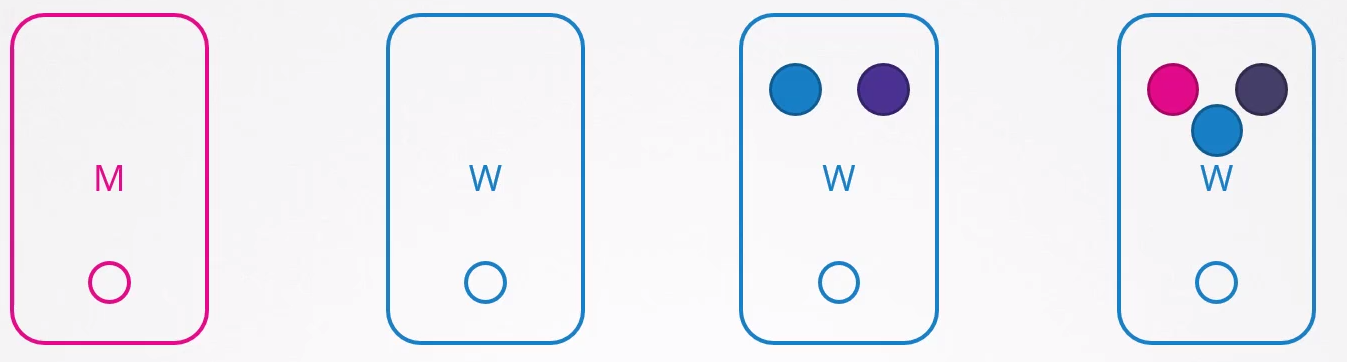
In the case of the green application, it wouldn't come back because it doesn't have a controller.
A proposed scenario would be:
- All pods should have at least 2 replicas on different nodes.
- The upgrade will take less than 5 minutes to restart.
This would be the scenario where certainty exists, but that certainty is always uncertain :D. You never know how long an operating system upgrade or applying a patch to the node could take.
An effective approach is to intentionally remove pods from these nodes and relocate them to other available nodes. This can be done using a technique known as "draining" pods from a specific node.
kubectl get nodes
NAME                       STATUS   ROLES                  AGE    VERSION
k3d-k3s-default-agent-1    Ready    <none>                 2d7h   v1.27.4+k3s1
k3d-k3s-default-agent-0    Ready    <none>                 2d7h   v1.27.4+k3s1
k3d-k3s-default-server-0   Ready    control-plane,master   2d7h   v1.27.4+k3s1

kubectl get pods -o wide
NAME                     READY   STATUS    RESTARTS       AGE    IP          NODE                      NOMINATED NODE   READINESS GATES
nginx-7b8df77865-gt6fd   1/1     Running   1 (2d5h ago)   2d6h   10.42.1.9   k3d-k3s-default-agent-1   <none>           <none>
nginx-7b8df77865-95qhp   1/1     Running   1 (2d5h ago)   2d6h   10.42.0.8   k3d-k3s-default-agent-0   <none>           <none>

# We can observe in this scenario that we have pods running on nodes agent-0 and agent-1
# This command would drain the workloads present on the node, but since I'm running this on a local kubernetes, I need to add some ignores
kubectl drain k3d-k3s-default-agent-0 # <<<
node/k3d-k3s-default-agent-0 already cordoned
error: unable to drain node "k3d-k3s-default-agent-0" due to error:[cannot delete DaemonSet-managed Pods (use --ignore-daemonsets to ignore): kube-system/svclb-traefik-15becd31-mrzbx, cannot delete Pods with local storage (use --delete-emptydir-data to override): kube-system/metrics-server-648b5df564-lbdhk], continuing command...
There are pending nodes to be drained:
 k3d-k3s-default-agent-0
cannot delete DaemonSet-managed Pods (use --ignore-daemonsets to ignore): kube-system/svclb-traefik-15becd31-mrzbx
cannot delete Pods with local storage (use --delete-emptydir-data to override): kube-system/metrics-server-648b5df564-lbdhk

# Notice that this node was drained and there are no pods running on it, besides it was marked with a NoSchedule taint to prevent new pods from being scheduled on it

kubectl drain k3d-k3s-default-agent-0 --ignore-daemonsets --delete-emptydir-data # <<<
node/k3d-k3s-default-agent-0 already cordoned
Warning: ignoring DaemonSet-managed Pods: kube-system/svclb-traefik-15becd31-mrzbx
evicting pod kube-system/metrics-server-648b5df564-lbdhk
evicting pod default/nginx-7b8df77865-95qhp
evicting pod kube-system/local-path-provisioner-957fdf8bc-ksx6w
pod/nginx-7b8df77865-95qhp evicted
pod/metrics-server-648b5df564-lbdhk evicted
pod/local-path-provisioner-957fdf8bc-ksx6w evicted
node/k3d-k3s-default-agent-0 drained

kubectl describe nodes k3d-k3s-default-agent-0
Name:               k3d-k3s-default-agent-0
Roles:              <none>
Labels:             beta.kubernetes.io/arch=amd64
                    beta.kubernetes.io/instance-type=k3s
                    beta.kubernetes.io/os=linux
                    kubernetes.io/arch=amd64
                    kubernetes.io/hostname=k3d-k3s-default-agent-0
                    kubernetes.io/os=linux
                    node.kubernetes.io/instance-type=k3s
Annotations:        flannel.alpha.coreos.com/backend-data: {"VNI":1,"VtepMAC":"f6:bd:b2:c3:69:1d"}
                    flannel.alpha.coreos.com/backend-type: vxlan
                    flannel.alpha.coreos.com/kube-subnet-manager: true
                    flannel.alpha.coreos.com/public-ip: 172.18.0.3
                    k3s.io/hostname: k3d-k3s-default-agent-0
                    k3s.io/internal-ip: 172.18.0.3
                    k3s.io/node-args: ["agent"]
                    k3s.io/node-config-hash: GNY45P4EZT4AMDLCADCGJR3BA5KIFTXTP7YACNXMTZAVYI2VMO7A====
                    k3s.io/node-env:
                      {"K3S_KUBECONFIG_OUTPUT":"/output/kubeconfig.yaml","K3S_TOKEN":"********","K3S_URL":"https://k3d-k3s-default-server-0:6443"}
                    node.alpha.kubernetes.io/ttl: 0
                    volumes.kubernetes.io/controller-managed-attach-detach: true
CreationTimestamp:  Sat, 30 Dec 2023 10:59:09 -0300
Taints:             node.kubernetes.io/unschedulable:NoSchedule # <<<<<
Unschedulable:      true #<<<<
Lease:
  HolderIdentity:  k3d-k3s-default-agent-0
  AcquireTime:     <unset>
  RenewTime:       Mon, 01 Jan 2024 18:37:28 -0300
Conditions:
  Type             Status  LastHeartbeatTime                 LastTransitionTime                Reason                       Message
  ----             ------  -----------------                 ------------------                ------                       -------
  MemoryPressure   False   Mon, 01 Jan 2024 18:34:32 -0300   Sat, 30 Dec 2023 10:59:09 -0300   KubeletHasSufficientMemory   kubelet has sufficient memory available
  DiskPressure     False   Mon, 01 Jan 2024 18:34:32 -0300   Sat, 30 Dec 2023 10:59:09 -0300   KubeletHasNoDiskPressure     kubelet has no disk pressure
  PIDPressure      False   Mon, 01 Jan 2024 18:34:32 -0300   Sat, 30 Dec 2023 10:59:09 -0300   KubeletHasSufficientPID      kubelet has sufficient PID available
  Ready            True    Mon, 01 Jan 2024 18:34:32 -0300   Sat, 30 Dec 2023 10:59:09 -0300   KubeletReady                 kubelet is posting ready status
Addresses:
  InternalIP:  172.18.0.3
  Hostname:    k3d-k3s-default-agent-0
Capacity:
  cpu:                24
  ephemeral-storage:  1055762868Ki
  hugepages-1Gi:      0
  hugepages-2Mi:      0
  memory:             7996960Ki
  pods:               110
Allocatable:
  cpu:                24
  ephemeral-storage:  1027046117185
  hugepages-1Gi:      0
  hugepages-2Mi:      0
  memory:             7996960Ki
  pods:               110
System Info:
  Machine ID:
  System UUID:
  Boot ID:                    8e6ef727-43a3-47b4-b08f-6f51e384394c
  Kernel Version:             5.15.133.1-microsoft-standard-WSL2
  OS Image:                   K3s dev
  Operating System:           linux
  Architecture:               amd64
  Container Runtime Version:  containerd://1.7.1-k3s1
  Kubelet Version:            v1.27.4+k3s1
  Kube-Proxy Version:         v1.27.4+k3s1
PodCIDR:                      10.42.0.0/24
PodCIDRs:                     10.42.0.0/24
ProviderID:                   k3s://k3d-k3s-default-agent-0
Non-terminated Pods:          (1 in total) ## <<< WE STILL HAVE THIS POD INSIDE
  Namespace                   Name                            CPU Requests  CPU Limits  Memory Requests  Memory Limits  Age
  ---------                   ----                            ------------  ----------  ---------------  -------------  ---
  kube-system                 svclb-traefik-15becd31-mrzbx    0 (0%)        0 (0%)      0 (0%)           0 (0%)         2d7h
Allocated resources:
  (Total limits may be over 100 percent, i.e., overcommitted.)
  Resource           Requests  Limits
  --------           --------  ------
  cpu                0 (0%)    0 (0%)
  memory             0 (0%)    0 (0%)
  ephemeral-storage  0 (0%)    0 (0%)
  hugepages-1Gi      0 (0%)    0 (0%)
  hugepages-2Mi      0 (0%)    0 (0%)
Events:
  Type    Reason              Age    From     Message
  ----    ------              ----   ----     -------
  Normal  NodeNotSchedulable  4m10s  kubelet  Node k3d-k3s-default-agent-0 status is now: NodeNotSchedulable #<<<<

## Let's compare with another node that has pods

kubectl describe nodes k3d-k3s-default-agent-1
Name:               k3d-k3s-default-agent-1
Roles:              <none>
Labels:             beta.kubernetes.io/arch=amd64
                    beta.kubernetes.io/instance-type=k3s
                    beta.kubernetes.io/os=linux
                    kubernetes.io/arch=amd64
                    kubernetes.io/hostname=k3d-k3s-default-agent-1
                    kubernetes.io/os=linux
                    node.kubernetes.io/instance-type=k3s
Annotations:        flannel.alpha.coreos.com/backend-data: {"VNI":1,"VtepMAC":"36:e0:49:2e:af:f7"}
                    flannel.alpha.coreos.com/backend-type: vxlan
                    flannel.alpha.coreos.com/kube-subnet-manager: true
                    flannel.alpha.coreos.com/public-ip: 172.18.0.2
                    k3s.io/hostname: k3d-k3s-default-agent-1
                    k3s.io/internal-ip: 172.18.0.2
                    k3s.io/node-args: ["agent"]
                    k3s.io/node-config-hash: GNY45P4EZT4AMDLCADCGJR3BA5KIFTXTP7YACNXMTZAVYI2VMO7A====
                    k3s.io/node-env:
                      {"K3S_KUBECONFIG_OUTPUT":"/output/kubeconfig.yaml","K3S_TOKEN":"********","K3S_URL":"https://k3d-k3s-default-server-0:6443"}
                    node.alpha.kubernetes.io/ttl: 0
                    volumes.kubernetes.io/controller-managed-attach-detach: true
CreationTimestamp:  Sat, 30 Dec 2023 10:59:08 -0300
Taints:             <none>
Unschedulable:      false
Lease:
  HolderIdentity:  k3d-k3s-default-agent-1
  AcquireTime:     <unset>
  RenewTime:       Mon, 01 Jan 2024 18:42:16 -0300
Conditions:
  Type             Status  LastHeartbeatTime                 LastTransitionTime                Reason                       Message
  ----             ------  -----------------                 ------------------                ------                       -------
  MemoryPressure   False   Mon, 01 Jan 2024 18:41:25 -0300   Sat, 30 Dec 2023 10:59:08 -0300   KubeletHasSufficientMemory   kubelet has sufficient memory available
  DiskPressure     False   Mon, 01 Jan 2024 18:41:25 -0300   Sat, 30 Dec 2023 10:59:08 -0300   KubeletHasNoDiskPressure     kubelet has no disk pressure
  PIDPressure      False   Mon, 01 Jan 2024 18:41:25 -0300   Sat, 30 Dec 2023 10:59:08 -0300   KubeletHasSufficientPID      kubelet has sufficient PID available
  Ready            True    Mon, 01 Jan 2024 18:41:25 -0300   Sat, 30 Dec 2023 10:59:09 -0300   KubeletReady                 kubelet is posting ready status
Addresses:
  InternalIP:  172.18.0.2
  Hostname:    k3d-k3s-default-agent-1
Capacity:
  cpu:                24
  ephemeral-storage:  1055762868Ki
  hugepages-1Gi:      0
  hugepages-2Mi:      0
  memory:             7996960Ki
  pods:               110
Allocatable:
  cpu:                24
  ephemeral-storage:  1027046117185
  hugepages-1Gi:      0
  hugepages-2Mi:      0
  memory:             7996960Ki
  pods:               110
System Info:
  Machine ID:
  System UUID:
  Boot ID:                    8e6ef727-43a3-47b4-b08f-6f51e384394c
  Kernel Version:             5.15.133.1-microsoft-standard-WSL2
  OS Image:                   K3s dev
  Operating System:           linux
  Architecture:               amd64
  Container Runtime Version:  containerd://1.7.1-k3s1
  Kubelet Version:            v1.27.4+k3s1
  Kube-Proxy Version:         v1.27.4+k3s1
PodCIDR:                      10.42.1.0/24
PodCIDRs:                     10.42.1.0/24
ProviderID:                   k3s://k3d-k3s-default-agent-1
#################################################################################################################
# See that we have nginx here
Non-terminated Pods:          (4 in total)
  Namespace                   Name                                      CPU Requests  CPU Limits  Memory Requests  Memory Limits  Age
  ---------                   ----                                      ------------  ----------  ---------------  -------------  ---
  default                     nginx-7b8df77865-gt6fd                    0 (0%)        0 (0%)      0 (0%)           0 (0%)         2d7h #<<<
  kube-system                 traefik-64f55bb67d-x8d4f                  0 (0%)        0 (0%)      0 (0%)           0 (0%)         2d7h
  kube-system                 svclb-traefik-15becd31-6qjqz              0 (0%)        0 (0%)      0 (0%)           0 (0%)         2d7h
  kube-system                 local-path-provisioner-957fdf8bc-rdr26    0 (0%)        0 (0%)      0 (0%)           0 (0%)         6m46s
#################################################################################################################
Allocated resources:
  (Total limits may be over 100 percent, i.e., overcommitted.)
  Resource           Requests  Limits
  --------           --------  ------
  cpu                0 (0%)    0 (0%)
  memory             0 (0%)    0 (0%)
  ephemeral-storage  0 (0%)    0 (0%)
  hugepages-1Gi      0 (0%)    0 (0%)
  hugepages-2Mi      0 (0%)    0 (0%)
Events:              <none>

## Where did the other pod go?
kubectl get pods -o wide
NAME                     READY   STATUS    RESTARTS       AGE     IP           NODE                       NOMINATED NODE   READINESS GATES
nginx-7b8df77865-gt6fd   1/1     Running   1 (2d5h ago)   2d7h    10.42.1.9    k3d-k3s-default-agent-1    <none>           <none>
nginx-7b8df77865-rkvvp   1/1     Running   0              8m17s   10.42.2.13   k3d-k3s-default-server-0   <none>           <none>
# The poor thing went to the server, which is not a good idea, but it went because in this local cluster, the masters don't have taints.

kubectl taint node k3d-k3s-default-server-0 nodeType=master:NoExecute
node/k3d-k3s-default-server-0 tainted

# Now we have everything on agent-1 which would be the only one possible to receive.
kubectl get pods -o wide
NAME                     READY   STATUS    RESTARTS       AGE    IP           NODE                      NOMINATED NODE   READINESS GATES
nginx-7b8df77865-gt6fd   1/1     Running   1 (2d5h ago)   2d7h   10.42.1.9    k3d-k3s-default-agent-1   <none>           <none>
nginx-7b8df77865-g5z2d   1/1     Running   0              6s     10.42.1.31   k3d-k3s-default-agent-1   <none>           <none>

kubectl describe nodes k3d-k3s-default-agent-1
...
ProviderID:                   k3s://k3d-k3s-default-agent-1
Non-terminated Pods:          (7 in total)
  Namespace                   Name                                      CPU Requests  CPU Limits  Memory Requests  Memory Limits  Age
  ---------                   ----                                      ------------  ----------  ---------------  -------------  ---
  default                     nginx-7b8df77865-gt6fd                    0 (0%)        0 (0%)      0 (0%)           0 (0%)         2d7h #<<<<
  kube-system                 traefik-64f55bb67d-x8d4f                  0 (0%)        0 (0%)      0 (0%)           0 (0%)         2d7h
  kube-system                 svclb-traefik-15becd31-6qjqz              0 (0%)        0 (0%)      0 (0%)           0 (0%)         2d7h
  kube-system                 local-path-provisioner-957fdf8bc-rdr26    0 (0%)        0 (0%)      0 (0%)           0 (0%)         14m
  default                     nginx-7b8df77865-g5z2d                    0 (0%)        0 (0%)      0 (0%)           0 (0%)         83s #<<<<
  kube-system                 coredns-77ccd57875-mmlgl                  100m (0%)     0 (0%)      70Mi (0%)        170Mi (2%)     83s
  kube-system                 metrics-server-648b5df564-tb7ks           100m (0%)     0 (0%)      70Mi (0%)        0 (0%)         83s
Allocated resources:

# And we have both running on the same node
When we drain a node, it's marked with a taint and the pods are removed. Some pods are not removed because they are daemonsets as seen above and must run 1 per node. Probably in the case of that traefik there, it must have a toleration for NoSchedule which is why it's still present.
No pod can be scheduled to this node unless you remove the taint with the restriction.
The drain command doesn't necessarily move the pods, but kills the pod and it goes back to the queue to be scheduled. When it returns to the filtering stage, the node it was on won't be chosen.
From now on we could work on this node and do the necessary upgrades safely.
To remove the specific taint created by drain, we use the uncordon command.
kubectl uncordon k3d-k3s-default-agent-0
node/k3d-k3s-default-agent-0 uncordoned

kubectl describe nodes k3d-k3s-default-agent-0
Name:               k3d-k3s-default-agent-0
...
CreationTimestamp:  Sat, 30 Dec 2023 10:59:09 -0300
Taints:             <none> #<<<<
Unschedulable:      false
...
Non-terminated Pods:          (1 in total)
  Namespace                   Name                            CPU Requests  CPU Limits  Memory Requests  Memory Limits  Age
  ---------                   ----                            ------------  ----------  ---------------  -------------  ---
  kube-system                 svclb-traefik-15becd31-mrzbx    0 (0%)        0 (0%)      0 (0%)           0 (0%)         2d7h
Allocated resources:
  (Total limits may be over 100 percent, i.e., overcommitted.)
  Resource           Requests  Limits
  --------           --------  ------
  cpu                0 (0%)    0 (0%)
  memory             0 (0%)    0 (0%)
  ephemeral-storage  0 (0%)    0 (0%)
  hugepages-1Gi      0 (0%)    0 (0%)
  hugepages-2Mi      0 (0%)    0 (0%)
Events:
  Type    Reason              Age   From     Message
  ----    ------              ----  ----     -------
  Normal  NodeNotSchedulable  23m   kubelet  Node k3d-k3s-default-agent-0 status is now: NodeNotSchedulable
  Normal  NodeSchedulable     19s   kubelet  Node k3d-k3s-default-agent-0 status is now: NodeSchedulable #<<<<
When a node comes back, Kubernetes doesn't try to redistribute the load, it simply becomes available for new pods. This would only happen if the pod terminated and a controller tried to find a new node for it.
The cordon command marks a node as unschedulable but doesn't kill the pods. The drain does both.
kubectl cordon k3d-k3s-default-agent-1
node/k3d-k3s-default-agent-1 cordoned

kubectl describe nodes k3d-k3s-default-agent-1 | grep Unschedulable
Unschedulable:      true

kubectl describe nodes k3d-k3s-default-agent-1
Name:               k3d-k3s-default-agent-1
...
CreationTimestamp:  Sat, 30 Dec 2023 10:59:08 -0300
Taints:             node.kubernetes.io/unschedulable:NoSchedule
Unschedulable:      true
Non-terminated Pods:          (7 in total)
  Namespace                   Name                                      CPU Requests  CPU Limits  Memory Requests  Memory Limits  Age
  ---------                   ----                                      ------------  ----------  ---------------  -------------  ---
  default                     nginx-7b8df77865-gt6fd                    0 (0%)        0 (0%)      0 (0%)           0 (0%)         2d7h
  kube-system                 traefik-64f55bb67d-x8d4f                  0 (0%)        0 (0%)      0 (0%)           0 (0%)         2d8h
  kube-system                 svclb-traefik-15becd31-6qjqz              0 (0%)        0 (0%)      0 (0%)           0 (0%)         2d8h
  kube-system                 local-path-provisioner-957fdf8bc-rdr26    0 (0%)        0 (0%)      0 (0%)           0 (0%)         28m
  default                     nginx-7b8df77865-g5z2d                    0 (0%)        0 (0%)      0 (0%)           0 (0%)         15m
  kube-system                 coredns-77ccd57875-mmlgl                  100m (0%)     0 (0%)      70Mi (0%)        170Mi (2%)     15m
  kube-system                 metrics-server-648b5df564-tb7ks           100m (0%)     0 (0%)      70Mi (0%)        0 (0%)         15m
...
  Normal  NodeNotSchedulable  16s   kubelet  Node k3d-k3s-default-agent-1 status is now: NodeNotSchedulable

# Now let's scale this nginx to 10 and see where it goes
kubectl scale deployment nginx --replicas 10
deployment.apps/nginx scaled

# Everything went to node agent-0
kubectl get pods -o wide
NAME                     READY   STATUS    RESTARTS       AGE    IP           NODE                      NOMINATED NODE   READINESS GATES
nginx-7b8df77865-gt6fd   1/1     Running   1 (2d5h ago)   2d7h   10.42.1.9    k3d-k3s-default-agent-1   <none>           <none>
nginx-7b8df77865-g5z2d   1/1     Running   0              17m    10.42.1.31   k3d-k3s-default-agent-1   <none>           <none>
nginx-7b8df77865-j4tn4   1/1     Running   0              7s     10.42.0.15   k3d-k3s-default-agent-0   <none>           <none>
nginx-7b8df77865-tnnkc   1/1     Running   0              7s     10.42.0.12   k3d-k3s-default-agent-0   <none>           <none>
nginx-7b8df77865-hlq69   1/1     Running   0              7s     10.42.0.14   k3d-k3s-default-agent-0   <none>           <none>
nginx-7b8df77865-5h7bx   1/1     Running   0              7s     10.42.0.11   k3d-k3s-default-agent-0   <none>           <none>
nginx-7b8df77865-w6wxz   1/1     Running   0              7s     10.42.0.13   k3d-k3s-default-agent-0   <none>           <none>
nginx-7b8df77865-5vjv4   1/1     Running   0              7s     10.42.0.16   k3d-k3s-default-agent-0   <none>           <none>
nginx-7b8df77865-hvwpn   1/1     Running   0              7s     10.42.0.17   k3d-k3s-default-agent-0   <none>           <none>
nginx-7b8df77865-vgrrz   1/1     Running   0              7s     10.42.0.18   k3d-k3s-default-agent-0   <none>           <none>