SAML
SAML (Security Assertion Markup Language) is an open standard for user authentication and authorization. It allows one system (typically a website or application) to delegate login to another trusted system (such as a company's corporate login).
LDAP and SAML appear to cover the same ground, but they solve different and complementary problems.
LDAP (Lightweight Directory Access Protocol) is a directory query protocol. It's used to authenticate users (e.g., login with username/password) and retrieve information (e.g., groups, permissions), but it operates at a lower level, meaning an app using LDAP needs to know how to connect, authenticate, handle sessions and passwords, etc.
| Feature | LDAP | SAML |
|---|---|---|
| Type | Directory protocol | Identity federation protocol |
| Transport | TCP (client → server) | Browser (redirects via HTTP) |
| Authentication | Direct (username/password) | Indirect (via IdP assertion) |
| Integration | Each app needs to speak LDAP | Apps only need to accept SAML |
| SSO (Single Sign-On) | Not native | Yes, designed for it |
| Password | Application sees and handles password | Password never reaches the application |
What Does SAML Solve That LDAP Doesn't?
SSO (Single Sign-On): LDAP has no concept of single login. Each app using LDAP needs to request username and password every time. With SAML, a single login works for multiple apps.Less password exposure: With LDAP, the app needs the password to authenticate the user. With SAML, no password is sent to the app — only a signed assertion.Federate identity across domains: With SAML, you can log into third-party apps (e.g., Salesforce, AWS, etc.) using your corporate login. LDAP doesn't scale well for this.Browser-based: SAML is designed to run 100% via browser. Ideal for modern web apps. LDAP needs libraries, binds, TCP connections, etc.
LDAP is like a user database that you query and authenticate yourself.
SAML is like a "declaration of trust" that comes from a trusted authority (the IdP), saying "this person is authenticated".
HTTP Redirects
This is the basic idea of how SAML works.
Let's imagine we have a Web Application 1 that needs to communicate with another Web Application 2, but Web Application 1 is inside the company's intranet while Application 2 is outside and doesn't have access to Web Application 1.
We can leverage the browser to do this if it has access to both. The user's machine is on the company's VPN and can access the application. If Web Application 2 needs to communicate with Application 1, it can send a request for the browser to make the request on its behalf. The same can happen with Web Application 1 trying to communicate with Application 2.
All this redirection happens via HTTP request with forwards in the request header.
Authentication Flow
Here's the flow of how identity proof works using SAML.
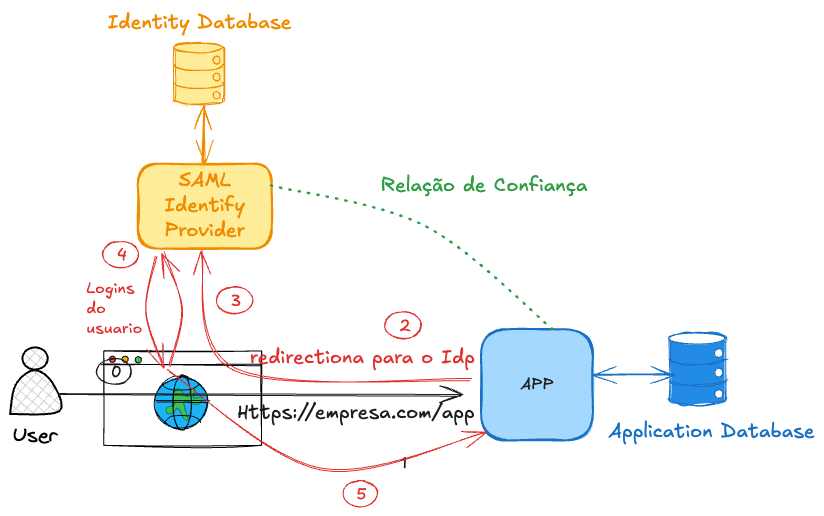
In step 4, if the user is already logged in, it reuses the login instead of requesting new authentication, improving the flow and reducing the number of calls. If the browser already has an active and valid session cookie, it won't ask for login again. It generates the SAML response (SAMLResponse) and redirects you back to the SP.
Even if the session cookie is valid, the login still happens, but transparently and much faster. The IdP actually makes the request to the IdP in step 3. The IdP checks the cookie in the request and with a valid cookie doesn't show the login screen but generates the SAMLResponse in step 4 redirecting back to the SP.
The SAMLResponse is the heart of SAML SSO — it's where the IdP proves to the SP that you're authenticated. It's a digitally signed XML, containing something like this.
<samlp:Response>
  <saml:Issuer>https://idp.example.com</saml:Issuer>
  <samlp:Status>...</samlp:Status>
  <saml:Assertion>
    <saml:Subject>
      <saml:NameID>[email protected]</saml:NameID>
      ...
    </saml:Subject>
    <saml:Conditions>...</saml:Conditions>
    <saml:AuthnStatement>...</saml:AuthnStatement>
    <saml:AttributeStatement>
      <saml:Attribute Name="email">...</saml:Attribute>
      <saml:Attribute Name="role">...</saml:Attribute>
    </saml:AttributeStatement>
  </saml:Assertion>
</samlp:Response>
| Field | What it does |
|---|---|
Issuer | Who generated the response (the IdP) |
Status | Whether authentication succeeded |
Assertion | Proof that the user is authenticated |
NameID | User identifier (usually email or username) |
AuthnStatement | When and how the user authenticated |
AttributeStatement | Additional info (e.g., name, email, groups, role, etc.) |
Conditions | Response validity, authorized SP, etc. |
Signature | Digital signature that guarantees integrity and authenticity |
What does the SP do with this?
- Verifies the signature.
- Checks if the Issuer is trusted.
- Reads the NameID and attributes.
- Creates a local session for the user.
SAMLResponse = complete response from the IdP.
SAML Assertion = the part of the response that contains the user's identity and attributes.
"SAML token" = another name for this Assertion (sometimes called "SAML token" because it's what "proves" the identity).
<samlp:Response>
  ...
  <saml:Assertion>  ← THIS is the "SAML token"
    <saml:Subject>...</saml:Subject>
    <saml:AuthnStatement>...</saml:AuthnStatement>
    <saml:AttributeStatement>...</saml:AttributeStatement>
  </saml:Assertion>
</samlp:Response>
How can we be sure that the SAMLResponse actually came from the IdP and wasn't forged?
For this, we use digital signature + prior certificate exchange.
When configuring the application, it's necessary to establish a trust relationship with the IdP.
The IdP has an X.509 certificate (containing its public key), which must be known by the SP. This certificate can be provided manually or via XML metadata. Normally, the IdP makes this metadata (including the certificate) available at a public endpoint, allowing the SP to automatically update the information if changes occur. This data is not sensitive, so it can be publicly exposed.
When the SAMLResponse arrives at the SP, it uses the IdP's public key to verify the digital signature contained in the response. This ensures that the content wasn't altered or forged during transit.
If needed, read more about this in TLS.
With all this, we can centralize users in a single place and work with Single Sign-On (SSO).
These users become federated, meaning their identities are managed by a central provider (IdP) and can be used by multiple applications within the organization. This allows all systems to share the same identity securely and in a standardized way.
What Are SAML's Limitations?
Despite being a widely used standard, especially in enterprises, SAML has some important limitations:
-
Complexity: The protocol is verbose (heavy XML, namespaces, digital signature, etc.). Implementing it correctly requires a lot of attention to technical details. -
Performance: Based on XML and data exchange via HTTP redirects + base64, which can be slower compared to modern solutions like OAuth2/OIDC. -
Limited to Web: It was created for browsers and web applications. It doesn't work well in APIs or mobile apps. It doesn't handle bearer tokens like JWT well. -
Session managed by IdP: The SP depends on the IdP for everything related to the session. This limits the control the SP has over logout, expiration, etc. -
More difficult integrations: Configuring SAML between SP and IdP is usually manual and tedious (metadata exchange, certificates, endpoints). Few services offer a simple SDK like OAuth2/OIDC. -
Common implementation failures: Because it's complex, many devs make mistakes in signature verification, replay attacks, or accept expired assertions.
SAML is still useful, especially in legacy corporate environments, but is gradually being replaced by OIDC/OAuth2, which are lighter, more modern, and versatile.