Home Assistant: Centralize and Automate Your Smart Home

Hi everyone,
Having a smart home is amazing, but when you start adding devices, you quickly notice a problem: multiple IoT technologies that don't talk to each other. You have Zigbee devices forming a mesh network, others connected via Wi-Fi, some using Matter, others Z-Wave, Bluetooth... each protocol working in isolation within its own ecosystem. This is where Home Assistant comes in as the great integrator, making all these technologies communicate and work together. I've been using this platform for a long time and today I want to share how it transformed my smart home into a truly unified system.
What is Home Assistant?

Home Assistant is an open source home automation platform that works as a central hub for all your smart devices. It allows you to integrate, control and automate virtually any IoT device, regardless of brand or communication protocol.
There are other solutions on the market, such as SmartThings, Apple HomeKit, Hubitat, Alexa and Google Home. However, these alternatives generally suffer from significant limitations: closed or semi-closed ecosystems, dependency on proprietary cloud services, specific hardware costs, limited support for third-party devices and less flexibility in automations.
The great advantage of Home Assistant? Everything in one place, without depending on dozens of different apps or each manufacturer's cloud, with total control and freedom.
Why I Chose Home Assistant
When I started adding smart devices at home, I quickly noticed the problems:
- Fragmentation: Each group of devices had its own app, each company with its interface
- Internet dependency: Many devices stop working if the internet goes down or the manufacturer's server goes offline
- Privacy: My usage data was being sent to third-party servers
- Limitations: Each ecosystem had its own limitations and they didn't communicate with each other
Home Assistant solves all these problems:
✅ Universal integration - Thousands of integrations with different brands and protocols
✅ Local control - Runs on a local server on your network, works even without internet
✅ Privacy - Your data stays on your network, under your control
✅ Powerful automations - Create complex rules connecting any device
✅ Open source - Open code, active community, constantly updated
✅ Customizable interface - Fully customizable dashboard your way
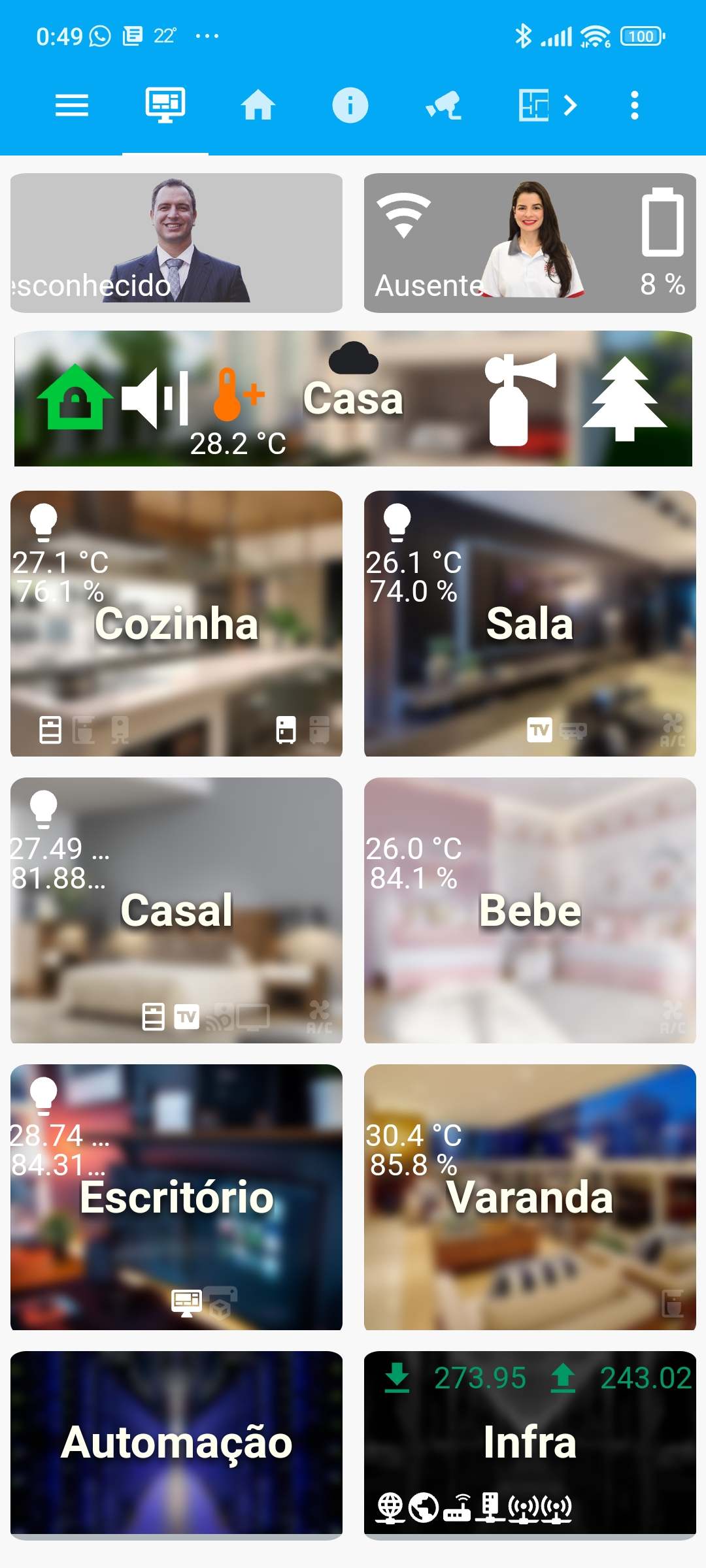
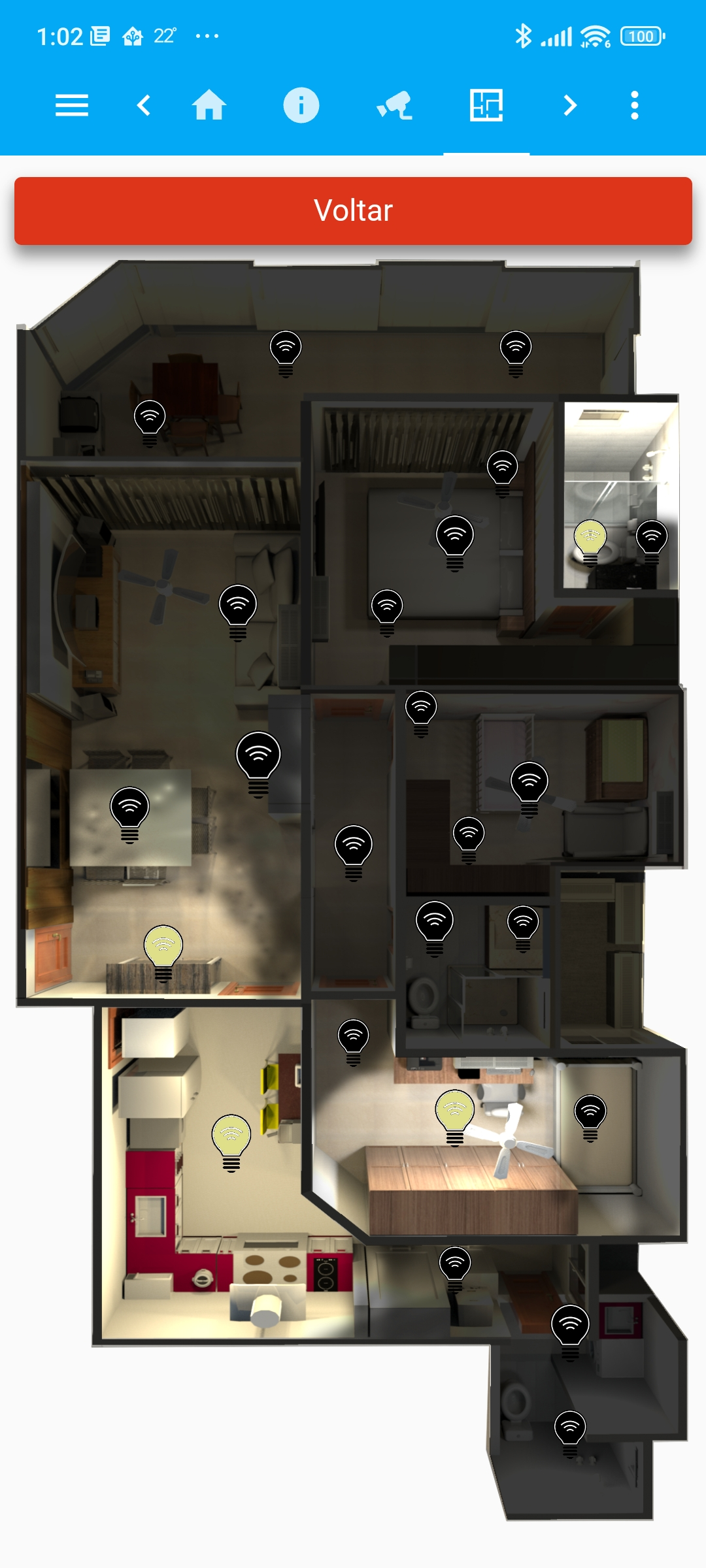
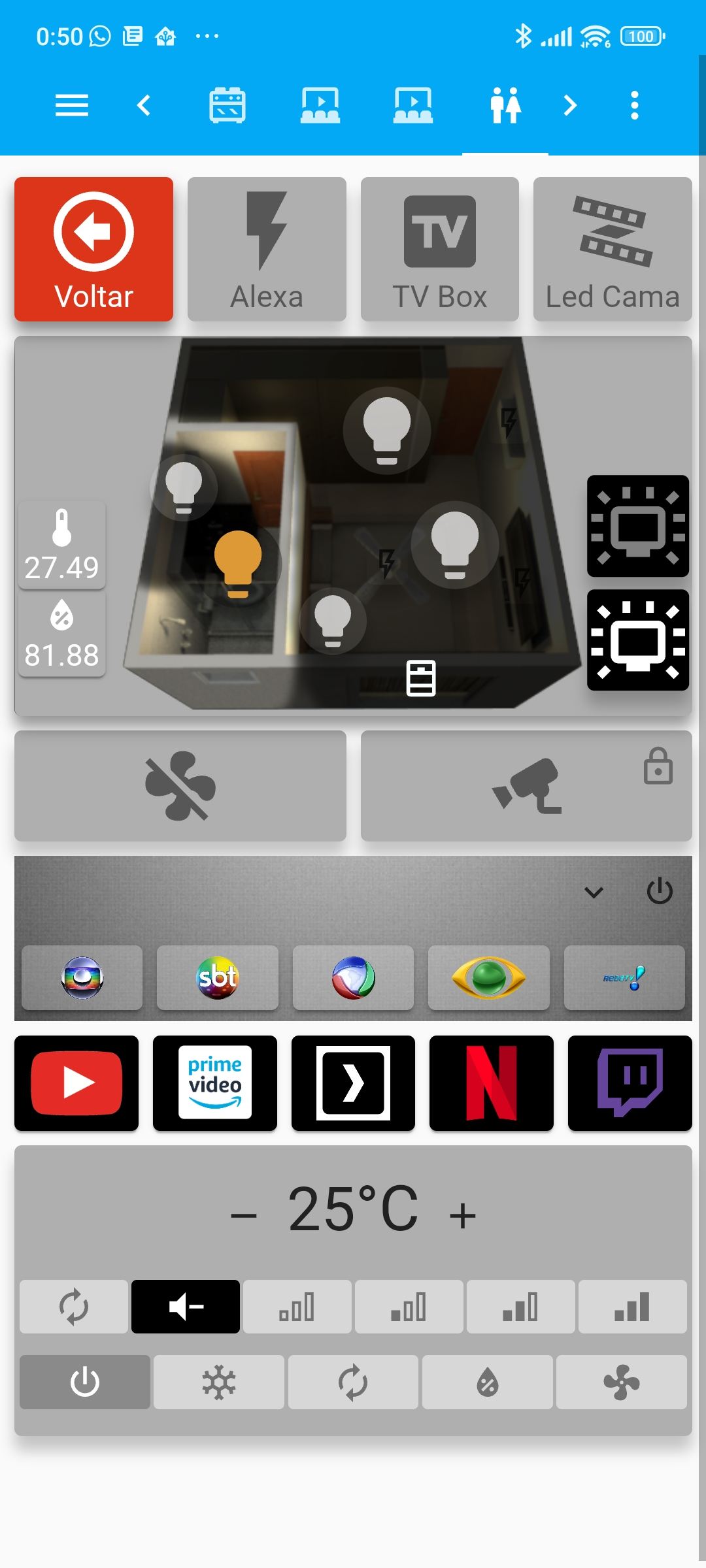
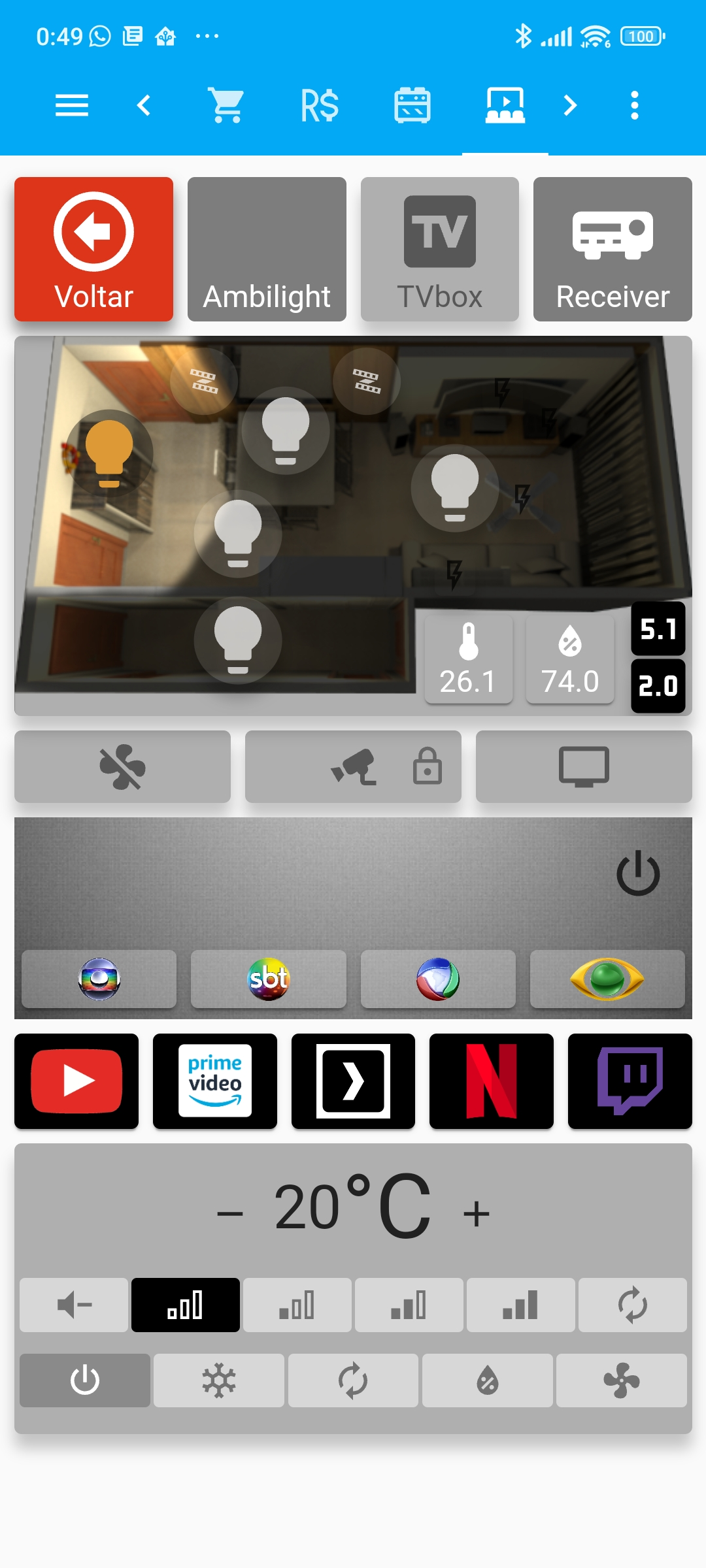
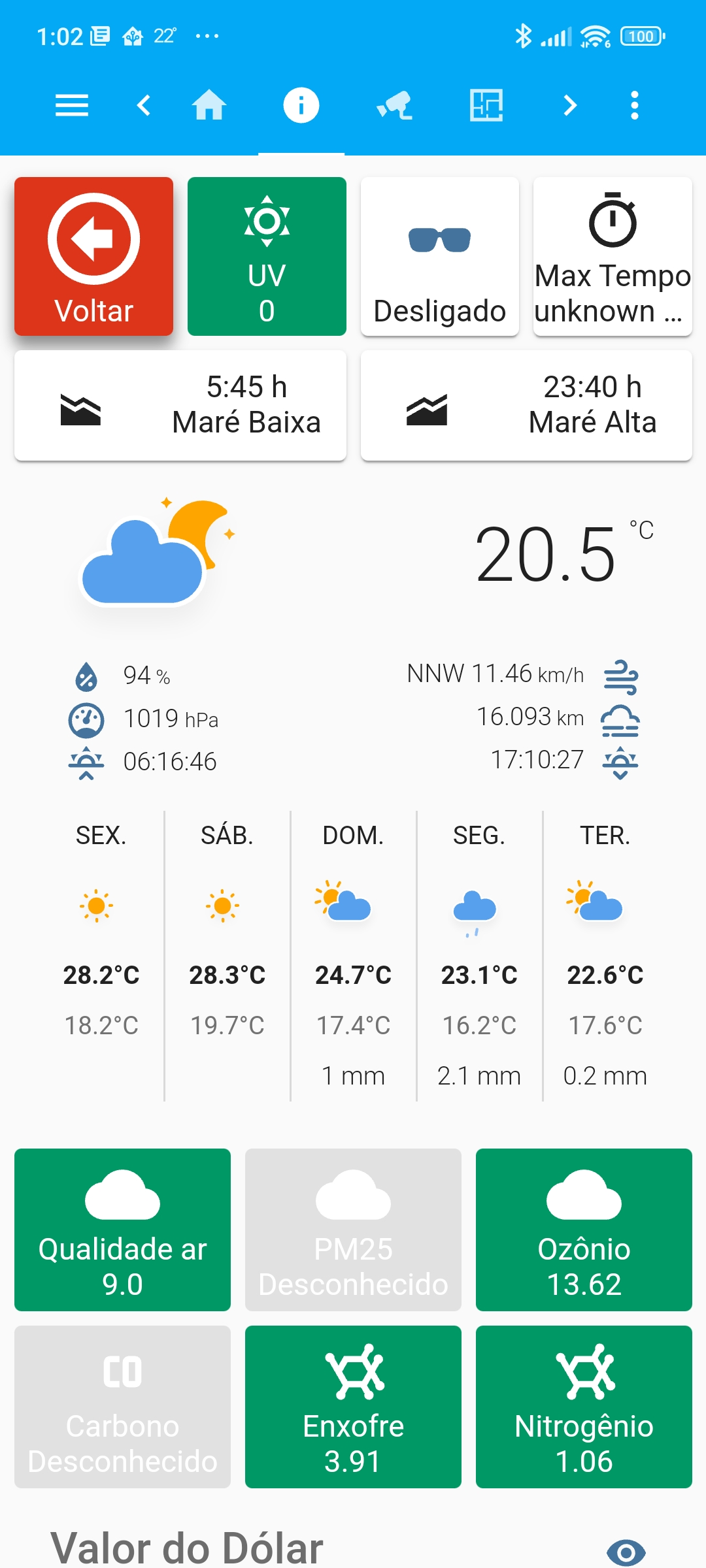
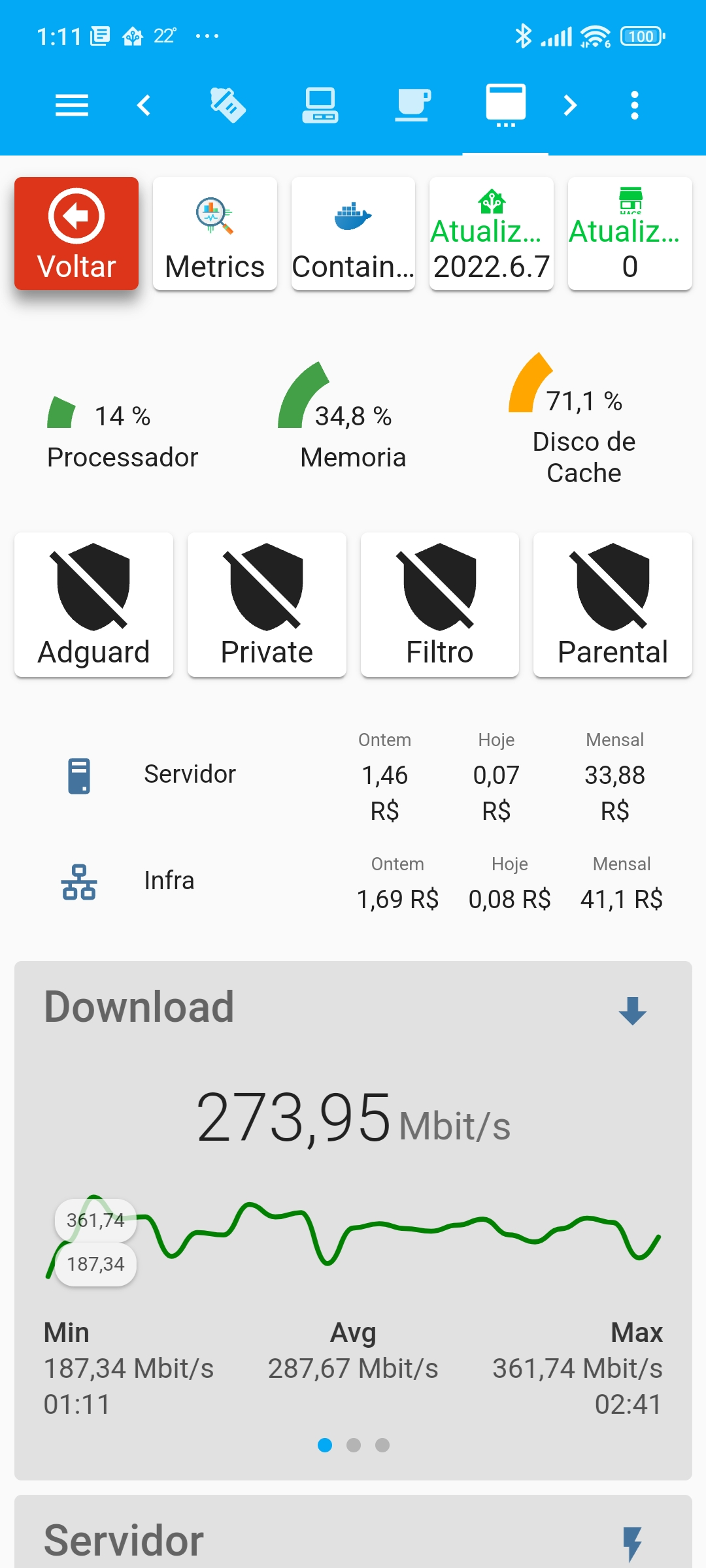
Here are some quick images, as I have more than 40 screens. I developed a layout thinking only about using the Home Assistant dashboard on mobile.
Ecosystem and Community
One of the biggest differentiators of Home Assistant is not just the software itself, but the entire vibrant ecosystem around it:
Active and Collaborative Community: The Home Assistant community is extremely engaged, always willing to help new users and share knowledge. Forums, Discord and Reddit are full of people sharing solutions, automations and integrations.
Complete and Updated Documentation: The official website maintains extensive, clear and constantly updated documentation. Each integration has its own page with practical examples and detailed configuration guides.
Abundance of Tutorials: There is an immense amount of video tutorials, blogs and step-by-step guides created by the community. Regardless of your technical level, you will find quality material to learn.
Continuous Development: Thousands of developers actively contribute to the project, creating new features, improving performance and adding support for new devices every month. The pace of evolution is impressive.
Market Relevance: Home Assistant has become so relevant that home automation companies care about developing official integrations for the platform. Why? Because today, when you go looking for a new device for your home, one of the first things you check is whether the platform you're using supports that device. This relevance forces manufacturers to ensure compatibility with Home Assistant.
Hardware and Technical Requirements
Before talking about hardware or technical knowledge, let's get to the most important requirement: willingness to learn. This is the number 1 factor for using Home Assistant successfully.
You don't need to be an expert in networking, programming or Linux. What you need is to be willing to:
- Adopt the DIY (Do It Yourself) philosophy: Get your hands dirty, test, fail and learn from the process
- Be curious: Explore the documentation, watch tutorials, participate in the community
- Be patient: Understand that setting up your smart home is a journey, not a race
- Enjoy learning: If you like to understand how things work, you'll love it
Hardware: Several Options
As for hardware, there are several options depending on your scenario:
- Raspberry Pi 4 (4GB or 8GB RAM) - The most popular option, most economical and with lowest power consumption (important since the system runs 24/7). Especially for beginners who want to start with the minimum. It's a good starting point mainly for those who can't spend much. Important to remember to use a quality microSD card.
- Mini PCs - For a slightly higher investment you get much more processing power, RAM and storage. In addition, you can run other services simultaneously, such as camera recording, Jellyfin, Adguard, Bitwarden and much more. For those who want a more robust, scalable and versatile solution from the start, this is the most relevant option.
- Existing server - Can run in containers along with other services, but in my experience, this complicates backups and it's better to isolate home automation on dedicated hardware
- Virtual machines - Great option to test on your desktop, but the ideal is to run Home Assistant in a VM inside the Mini PC using some type 1 hypervisor like ProxMox, Unraid or similar
There are still official hardware with Home Assistant pre-installed if you want a ready-made solution:
-
Home Assistant Green: Compact and affordable device, ideal for those who want to start without complication. But if you don't even want to learn how to install, honestly I think you shouldn't even start. So in my opinion it's a disposable option.
-
Home Assistant Yellow: More advanced hardware with native Zigbee and Thread support and expansion via modules. Offers more flexibility and processing power, being ideal for larger installations or for those who already know they will have many Zigbee devices. Personally I think with the amount spent here we can build something much better.
Both are official products from the Home Assistant project and all profit from the sale goes to the development of the open source project.
You can even start with that old PC that no longer works for desktop use - it will handle Home Assistant perfectly and have a new useful life. If you have a Home Lab install it on a virtual machine and be happy!.
What's important isn't having the most expensive or powerful hardware, but rather having the mindset to experiment, configure and customize your system. If you're curious, like technology and are willing to invest time learning, Home Assistant is for you.
Home Assistant Architecture
Home Assistant Core is pure Home Assistant. When I say pure, I mean without any kind of add-on, but it wasn't by running only this Core that I found my happiness with the system.
There is Home Assistant OS, which is a minimalist Linux operating system based on Alpine Linux, optimized specifically to run all Home Assistant services. This system runs the Core and several other services also as containers, using the Supervisor to control them. This makes it possible to add other add-ons, which are new containers managed along with the entire system, delivering all maintenance, service availability and updates from within the system itself. This facilitates backup and isolates the system.
Home Assistant OS is always being updated and I've never had any problems with updates during the years I've been using the system.
It's important to understand that there are two types of updates when you use Home Assistant OS:
-
Home Assistant Core Update: This is the most frequent update (usually monthly), which updates only the main Home Assistant application with new features, bug fixes and new integrations. This update is fast and can be done directly through the web interface.
-
Home Assistant OS Update: This is the base operating system update (Alpine Linux), which occurs less frequently. This update brings security improvements, performance optimizations and updates to operating system components themselves, such as kernel, drivers and base services.
Both updates are done through the Home Assistant web interface with just a few clicks, making the process extremely simple and safe. The system manages everything automatically, including backups before critical updates.
This is, without a doubt, the simplest and most complete way to run Home Assistant. That's exactly why I chose it and recommend it.
The step-by-step installation of Home Assistant for different scenarios can be found here
To install on a virtual machine use this guide.
It's not worth me doing an installation tutorial since there are many videos available about it, but I can give many tips for success using Home Assistant.
My Setup
Since I have a Home Lab running on Unraid, I use KVM to virtualize Home Assistant OS. I allocate 4GB of RAM and 2 vCPUs for Home Assistant, and it's always been more than enough.
Other services that are not related to home automation (such as Jellyfin, Bitwarden, AdGuard, etc.) run on the same physical server, but not as Home Assistant add-ons. They consume resources directly from the Unraid server as separate VMs or containers, keeping Home Assistant isolated and lightweight.
Unraid is an operating system for home servers that combines NAS storage, virtualization and Docker container management in a simple web interface. It's perfect for those who want a multifunctional server without complication, but it has a paid license.
If I were to set up a new Home Lab today, I would probably consider ProxMox, which is free and open source, focused on virtualization. However, since my Unraid setup is stable and running perfectly for years, I don't plan to touch it anytime soon.
If you want to check out my configuration, visit Home Lab.
HACS - Home Assistant Community Store
HACS (Home Assistant Community Store) is one of the most important tools in the Home Assistant ecosystem. It's a community store that allows you to install and manage custom integrations, themes, interface plugins and scripts created by the community. If you use Home Assistant, HACS is practically indispensable. It's one of the first things I install in any new configuration.
While Home Assistant has thousands of official integrations, HACS further expands these possibilities with components developed by the community that have not yet been officially incorporated into the project. Some of these integrations are extremely popular and widely used.
Important attention: Before installing any integration or custom card, check if the repository is active and has a community collaborating. Look at the date of the last commit, number of open issues and frequency of updates. Avoid components that may be abandoned.
HACS integrations and components I use and recommend:
Integrations:
- Alexa Media Player: Control of Amazon Alexa devices via unofficial API
- SmartIR: Management of air conditioners, TVs, fans and lights using IR/RF controls (compatible with Broadlink, Xiaomi, MQTT)
- Frigate: Integration with camera system with AI object detection
- Remote Home-Assistant: Connects multiple Home Assistant instances (I use it because I have a Home Assistant instance at the country house)
- Simple Icons: Icon library to use in Home Assistant
Dashboard Cards:
- button-card: Customizable button card for Lovelace (This is the main card I use, I practically customized most of my interface with it).
- card-mod: Adds custom CSS styles to virtually any card
- layout-card: Greater control over card positioning
- Advanced Camera Card: Complete card for camera viewing
- mini-graph-card: Minimalist graphs for interface
- Swipe Card: Allows sliding between multiple cards
- auto-entities: Automatically populates entity lists in cards
- Mini Media Player: Minimalist card for media control
- Multiple Entity Row: Shows multiple states and attributes in one line
Themes:
- Google Light Theme: Theme inspired by Google app in light mode
How to install HACS:
Installation is simple and can be done directly through the Home Assistant web interface. Just follow the official installation guide which takes just a few minutes.
HACS Advantages:
- Additional integrations: Access to hundreds of custom integrations not yet in the core
- Custom themes: Completely personalize the appearance of your interface
- Easy updates: Manages updates for all installed integrations in one place
- Active community: Components maintained and updated by the community
Add-ons
Add-ons are complementary applications that run as isolated containers, managed by the Supervisor. In practice, they are extra services that you install directly in Home Assistant OS to expand functionality without needing to configure anything outside the system.

Important: Remember that you will be adding components to a system that already runs Home Assistant Core. Therefore, be careful when choosing what to install - each add-on consumes resources (CPU, RAM, storage). Prefer to install only what you really need.
Essential add-ons I use and recommend:
- Mosquitto Broker: MQTT server for communication with IoT devices
- Node-RED: Visual editor to create complex automations graphically
- ESPHome: Integration with custom ESP32/ESP8266 devices. This is only if you like to create things with these boards. I did some things when I had time, but today I prefer to buy something ready-made.
- Studio Code Server: VS Code directly in the browser to edit configurations
- Terminal & SSH: Command line access to the system
- Samba Share: File sharing on local network
- Log Viewer: Facilitated visualization of system logs
- Zigbee2MQTT: Bridge between Zigbee devices and MQTT
- Chrony: Precise time synchronization (NTP)
Add-ons are one of the great advantages of Home Assistant OS, allowing you to expand functionality without leaving the interface and without having to manage containers manually.
Attention about Add-ons vs External Services:
Many of the add-ons available in the official Home Assistant store I use, but running outside Home Assistant OS, directly on my server as separate containers or VMs. For example:
- Grafana: Dashboards and metrics visualization
- Tailscale: Mesh VPN for remote access
- Uptime Kuma: Availability monitoring
- Bitwarden: Password manager
- AdGuard Home: DNS blocking and filtering
- InfluxDB: Time series database
- And several other infrastructure services
Why? These are services I use daily, but which have no direct relation to home automation. Running them as Home Assistant add-ons would only increase VM resource consumption, make backups larger and slower, and mix responsibilities. I prefer to keep Home Assistant focused exclusively on automation, lightweight and with fast backups.
Tips
Invest in a good home network. A good network doesn't mean gigantic internet speed, but rather stability and reliability. A good router and quality access points will make all the difference - it's essential to have a stable Wi-Fi signal throughout the residence.
For most people, a good mesh network already solves it. I only like to give my opinion on what I've already used, so I can say that TP-Link Deco S7 is a good choice, with 2 or 3 points depending on the size of the residence.
In my house, I have something more professional due to the number of devices I use and the type of work I do. Today I use a UDM Pro (Ubiquiti appliance) with a PoE switch and 2 access points, supporting cameras and about 200 devices connected simultaneously.
Security is fundamental. If you have knowledge in networks, divide your network using VLANs to isolate IoT devices from others. Expose as little as possible to the internet. For secure remote access, use Cloudflare Tunnel or configure a VPN to access your residence. Never expose Home Assistant directly on the internet without adequate protection.
Monitor and control your IoT devices. Use a DNS solution like AdGuard Home or Pi-hole to monitor device traffic and block unwanted communications with the internet. This increases your privacy and allows total control over what your devices are doing. Alternatively, you can configure firewall rules directly on the router to block specific traffic.
If using Raspberry Pi, avoid microSD cards. There are methods to use external SSDs via USB, and this makes all the difference. MicroSD cards corrupt easily, and when we talk about home automation, you won't want your system presenting problems constantly. Another tip is to use a power bank to power the Raspberry Pi, working as a mini UPS.
For camera integration, there are add-ons that support recording within Home Assistant itself. Frigate is an excellent option with AI object detection, but it has heavy processing. Personally, I prefer to run this outside Home Assistant in a separate container on the server. If you choose to run as an add-on, you'll need to allocate more CPUs and RAM to the system.
Stay updated. Follow channels, communities and stay alert to market news. The home automation ecosystem evolves rapidly - every so often a new device emerges, a simpler integration or a better way to do something that already worked. Therefore, treat these configurations as a starting point, not as absolute truths. The official Home Assistant community and subreddit r/homeassistant are great places to learn and stay updated.
Research before buying. Before acquiring any device for your smart home, always look in communities if it's easily integrable with Home Assistant and if you'll be able to configure it. Not all devices have native integration, and some may require advanced configurations. Check the official integrations list or ask in the community before investing in something that may not work as expected. That's why I left a lot of things documented and written in code.
Node-RED: Next-Level Automations
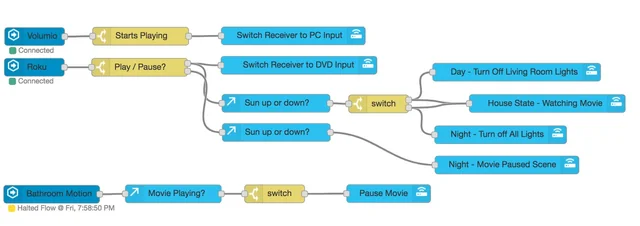
Although Home Assistant has a very good native automation system, when you start creating complex automations, Node-RED is simply superior. It's a visual programming tool based on flows that allows you to create much more elaborate automations intuitively.
Why is Node-RED better for complex automations?
- Visual editor: You connect blocks (nodes) graphically, visualizing the entire automation flow clearly
- Advanced logic: Implementing complex conditions, loops, delays, variables and custom JavaScript functions is much simpler
- Facilitated debugging: You can see data flowing between nodes in real time, making it easier to find problems
- Reusability: Create reusable subflows for logics you use frequently
- Native integration with Home Assistant: There is an official add-on and specific nodes that connect perfectly to HA
- Giant ecosystem: Thousands of ready-made nodes to integrate with APIs, databases, MQTT, HTTP, and virtually anything
Perfect integration:
The integration between Node-RED and Home Assistant is native and complete. You install Node-RED as an add-on, and it already comes with Home Assistant nodes configured. You can read states of any entity, call services, trigger events and create custom sensors - all visually.
My personal experience: I have practically NOTHING automated through the native Home Assistant interface - everything is in Node-RED. And I don't regret it one bit. In years of use, I've never had problems, the automations are easy to understand and modify, and I can do things that would be extremely complex or impossible in YAML. If you're starting out, don't waste your time, go straight to Node-RED.
Communication Protocols: My Experience
After years using different technologies, I can share my experience:
Wi-Fi: Wi-Fi devices have never given me problems and are excellent. The connection is direct, simple and reliable. However, I don't recommend them for sensors. Wi-Fi sensors consume a lot of energy and need larger batteries or frequent recharges. For devices that are already powered by electricity (bulbs, switches and smart outlets), Wi-Fi works perfectly, as consumption is not a problem.
Zigbee: I chose Zigbee mainly for sensors due to very low power consumption - a battery can last months or even years. Another advantage is that each device powered by electricity works as a repeater, creating a mesh network. However, attention: Zigbee only works well when you have enough devices spread around the house. My Zigbee mesh only became really stable after I placed at least 1 device powered by electricity (bulbs, outlets, switches) in each room working as a repeater. Battery devices generally don't repeat signal to save energy. With few devices, the experience can be frustrating.
Z-Wave: I have some Z-Wave devices that I bought at the time to test. They work perfectly and have never given me problems, but I wouldn't buy again. It's a very closed technology, with few devices available on the market and generally expensive. For those starting today, Wi-Fi and Zigbee offer much more options with better cost-benefit.
About Matter and Thread technologies I haven't had experience, because when they launched I already had everything automated, what should and shouldn't be, for a long time. I'm not going to touch what's working.
If it's working, don't touch it.
Conclusion
Home Assistant completely transformed the smart home experience here at home. What was once fragmented, internet-dependent and limited, is now unified, local and incredibly powerful.
I've been following Home Assistant for more than 8 years and I've seen this project grow impressively. The dedication of the people involved - both the core developers and the community - is something that makes me very confident and calm using it. It's not just any open source project, it's a community committed to delivering a home automation solution that respects your privacy and gives you total control.
If you're considering building a smart home or already have devices scattered around, definitely try Home Assistant. It's a project worth every minute invested, and you'll have total control over your environment, your privacy and your automations.