Node Selector and Node Affinity
Node Selector
The nodeSelector uses Labels to specify which Nodes we want to target. We can also group Nodes using Labels and define Pods to be deployed only on Nodes that have those corresponding Labels.
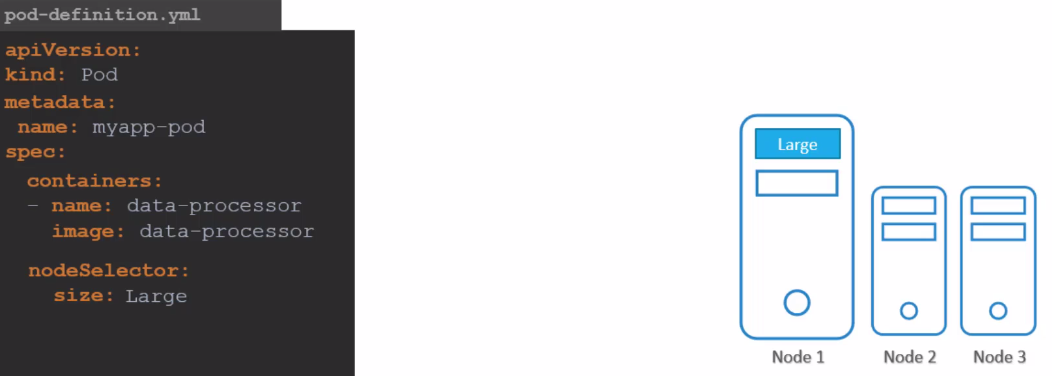
To add a Label to a Node.
kubectl label nodes k3d-k3d-cluster-agent-1 size=large
node/k3d-k3d-cluster-agent-1 labeled

kubectl describe node k3d-k3d-cluster-agent-1
Name:               k3d-k3d-cluster-agent-1
Roles:              <none>
Labels:             beta.kubernetes.io/arch=amd64
                    beta.kubernetes.io/instance-type=k3s
                    beta.kubernetes.io/os=linux
                    kubernetes.io/arch=amd64
                    kubernetes.io/hostname=k3d-k3d-cluster-agent-1
                    kubernetes.io/os=linux
                    node.kubernetes.io/instance-type=k3s
                    size=large

kubectl get node k3d-k3d-cluster-agent-1 --show-labels
NAME                      STATUS   ROLES    AGE   VERSION        LABELS
k3d-k3d-cluster-agent-1   Ready    <none>   70d   v1.27.4+k3s1   beta.kubernetes.io/arch=amd64,beta.kubernetes.io/instance-type=k3s,beta.kubernetes.io/os=linux,kubernetes.io/arch=amd64,kubernetes.io/hostname=k3d-k3d-cluster-agent-1,kubernetes.io/os=linux,node.kubernetes.io/instance-type=k3s,size=large

kubectl label nodes k3d-k3d-cluster-agent-1 size-
node/k3d-k3d-cluster-agent-1 unlabeled
However, nodeSelector isn't always sufficient to solve our problems when requirements are more complex.
Node Affinity
In this context, we face a limitation of nodeSelector, which cannot handle complexities such as the need to select Nodes of a certain size, like large or medium, but avoid small ones. With nodeSelector, it's not possible to create 'one or another' expressions or even negate a specific condition.
With great power comes great complexity.
This nodeSelector and this affinity do the same thing!
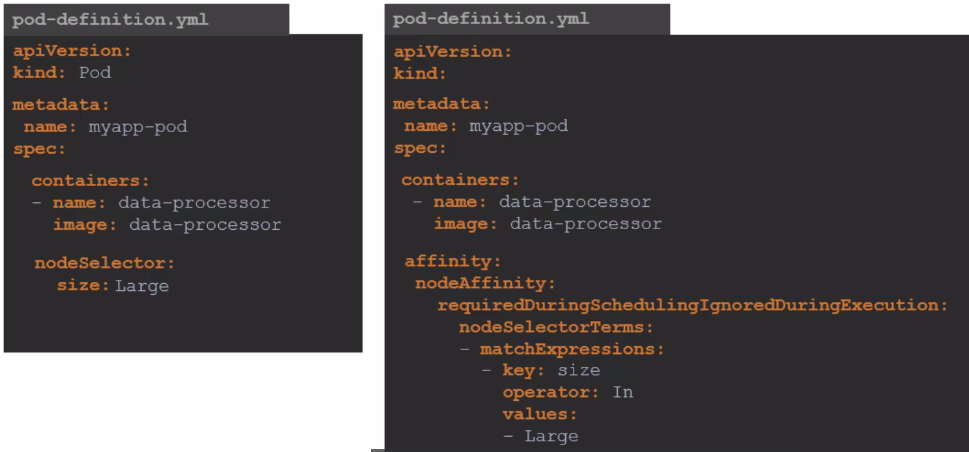
Every affinity expression comes under the affinity: key
There are affinities for Nodes and Pods, so we have the possible initials:
These values are not defined but can be set.
apiVersion: v1
...
spec:
  containers:
  ....
  affinity:
    nodeAffinity: null
    podAffinity: null
    podAntiAffinity: null
The nodeAffinity will define an affinity for the Pod to be scheduled to a Node.
The podAffinity and podAntiAffinity define affinity between Pods. For example, we can configure a Pod to be placed where another specific Pod exists (podAffinity) or avoid being placed where Pods of a specific type exist (podAntiAffinity). A practical example would be ensuring that Pods A and B are always on the same Node, not just on the same group of Nodes with the same Label, to minimize network traffic and improve performance.
Within these affinity types, we can have these expressions:
-
requiredDuringSchedulingIgnoredDuringExecution: Defines MANDATORY rules for the Scheduler. If a Node doesn't meet these rules, the Pod won't be scheduled on it, but if it's already scheduled, it doesn't need to be removed from the Node if a Label is removed for example. -
preferredDuringSchedulingIgnoredDuringExecution: Same as the previous rule but after trying as much as possible, if it can't and there's a way to be scheduled elsewhere, it can go there, as it's not mandatory. -
requiredDuringSchedulingRequiredDuringExecution: The difference in not ignoring is that if conditions change, for example if a Label is removed, it will also remove the Pod. IT'S NOT POSSIBLE TO HAVE THIS EXPRESSION TOGETHER WITH OTHERS-
STILL DOESN'T WORK WITH nodeAffinity
-
-
preferredDuringSchedulingRequiredDuringExecution: This expression is also possible. IT'S NOT POSSIBLE TO HAVE THIS EXPRESSION TOGETHER WITH OTHERS-
STILL DOESN'T WORK WITH nodeAffinity
-
This would be possible.
apiVersion: v1
...
spec:
  containers:
  ....
  affinity:
    nodeAffinity:
      requiredDuringSchedulingIgnoredDuringExecution:
        block
      preferredDuringSchedulingIgnoredDuringExecution:
        block
    podAffinity:
      requiredDuringSchedulingIgnoredDuringExecution:
        block
      preferredDuringSchedulingIgnoredDuringExecution:
        block
    podAntiAffinity:
      requiredDuringSchedulingIgnoredDuringExecution:
        block
      preferredDuringSchedulingIgnoredDuringExecution:
        block
This would be possible, but doesn't work yet.
apiVersion: v1
...
spec:
  containers:
  ....
  affinity:
    nodeAffinity:
      requiredDuringSchedulingRequiredDuringExecution: # In particular, this expression can't be used yet, it's an issue under development in Kubernetes
        block
    podAffinity:
      requiredDuringSchedulingRequiredDuringExecution:
        block
    podAntiAffinity:
      requiredDuringSchedulingRequiredDuringExecution:
        block
This would still be possible
apiVersion: v1
...
spec:
  containers:
  ....
  affinity:
    nodeAffinity:
      requiredDuringSchedulingRequiredDuringExecution: # In particular, this expression can't be used yet, it's an issue under development in Kubernetes
        block
    podAffinity:
      requiredDuringSchedulingIgnoredDuringExecution:
        block
      preferredDuringSchedulingIgnoredDuringExecution:
        block
    podAntiAffinity:
      requiredDuringSchedulingRequiredDuringExecution:
        block
But this is not possible
apiVersion: v1
...
spec:
  containers:
  ....
  affinity:
    nodeAffinity:
      requiredDuringSchedulingRequiredDuringExecution: # In particular, this expression can't be used yet, it's an issue under development in Kubernetes
        block
    podAffinity:
      requiredDuringSchedulingIgnoredDuringExecution:
        block
      requiredDuringSchedulingRequiredDuringExecution: # RequiredDuringExecution doesn't combine with anyone
        block
    podAntiAffinity:
      requiredDuringSchedulingRequiredDuringExecution:
        block
Now let's focus on the Block:
The block can be nodeSelectorTerms if using nodeAffinity or podSelectorTerms if using podAffinity or podAntiAffinity
nodeSelectorTerms and podSelectorTerms enable the possible
OR. Either one expression, or another expression, or another, etc. Could matchExpressions be placed directly in the block without being inside the terms blocks? Yes it could. If you keep it, it doesn't hurt and it's BETTER.
So let's go to the block.
apiVersion: v1
kind: Pod
...
spec:
  containers:
  ....
  affinity:
    nodeAffinity:
      requiredDuringSchedulingRequiredDuringExecution:
        nodeSelectorTerms:
        - matchExpressions:
          - key: key1
            operator: In
            values:
            - value1
            - value2
        # OR Rule 2
        - matchFields:
          - key: metadata.name
            operator: In
            values:
            - node-1
Now to better understand what I said, the two affinities below are the same thing.
  affinity:
    nodeAffinity:
      requiredDuringSchedulingRequiredDuringExecution:
        nodeSelectorTerms:
        - matchExpressions:
          - key: key1
            operator: In
            values:
            - value1
            - value2

# BUT IN THIS AFFINITY YOU LOST THE OR OPTION SO ALWAYS USE THE ONE ABOVE
  affinity:
    nodeAffinity:
      requiredDuringSchedulingRequiredDuringExecution:
        matchExpressions:
        - key: key1
          operator: In
          values:
          - value1
          - value2
Now let's understand the possible operators we can use.
In: Will compare if the key values are IDENTICALNotIn: Will compare if the key values are DIFFERENTExists: Only wants to know if the key exists regardless of valueDoesNotExist: Only wants to know if the key DOESN'T EXIST regardless of valueGt: Greater than, like the In operator but will compare numbers even if they're stringsLt: Less than
In the case of Exists and DoesNotExist, an example
  affinity:
    nodeAffinity:
      requiredDuringSchedulingRequiredDuringExecution:
        matchExpressions:
        - key: key1
          operator: Exists
If both are applied to a Pod nodeSelector takes precedence over affinity.
apiVersion: v1
kind: Pod
metadata:
  name: example-pod
spec:
  affinity:
    nodeAffinity:
      requiredDuringSchedulingIgnoredDuringExecution:
        nodeSelectorTerms:
        - matchExpressions:
          - key: key1
            operator: In
            values:
            - value1
            - value2
  nodeSelector:
    key2: value3
  containers:
  - name: my-container
    image: my-image
Moral of the story... If you master affinity, you don't need nodeSelector, but it's good to know.