Resource Requirements and Limits
Pods always consume physical resources like memory and CPU from the Nodes they're running on. The Scheduler cannot direct a Pod to a Node that doesn't have sufficient resources to run it. However, more than one Node may have sufficient resources to run a Pod, and it's up to the Scheduler to decide where it goes.
To filter which possible Nodes, first the following is taken into consideration:
-
- taints and tolerations
-
- nodeSelector
-
- Affinity
-
- resources
The first three will filter the possible Nodes that could receive the Pods. Among the possibilities, the Scheduler will create a score for each of them based on available resources to choose which is best to receive the Pod.
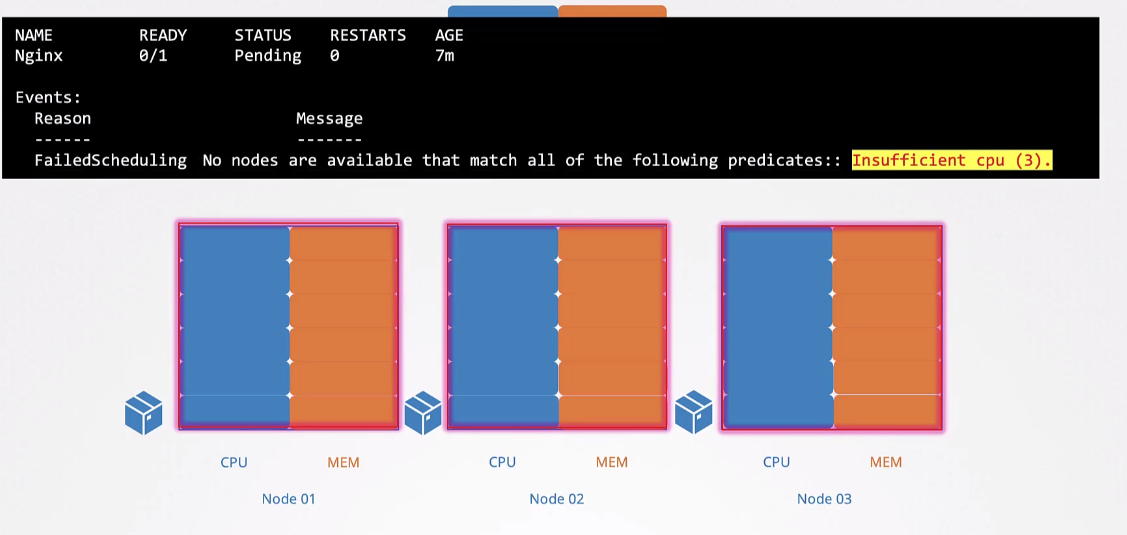
If no Node has resources to receive the Pod, it will remain with Pending status.
An important observation is that each Container within a Pod can have its resources defined individually. Resources are not assigned to the Pod as a whole, but to each Container that runs inside the Pod. When we add up the resources of all Containers within a Pod, we get the Pod's total resources. However, it's the Kubernetes Scheduler that performs this resource allocation, considering the needs of each Container.
In fact, it wouldn't make sense to assign resources directly to the Pod, as the Scheduler needs to understand and distribute resources appropriately among the different Containers that make up the Pod.
By default, a Container has no defined limit, meaning it CAN CONSUME AN ENTIRE NODE.
apiVersion: v1
kind: Pod
...
spec:
  containers:
  - name: busybox
    image: busybox
    resources:
      ## requests are the guaranteed resources for the container
      requests:
        memory: "32Mi"
        cpu: "100m"
    ## Limits is how far a container can extend
      limits:
        memory: "128Mi"
        cpu: "500m"
  - name: nginx
    image: nginx
    resources:
    # If requests is not defined, it will equal limits
      limits:
        memory: "128Mi"
        cpu: "500m"
Understanding the values.
The smallest value for cpu is 0.1 = 100m (m=milli) 1 would represent 1 vcpu, meaning one cpu core.
For memory, we can see the table for knowledge, but what interests us is M (Megabytes) and G (Gigabyte) Using G we're using the decimal base while Gi uses the binary base.
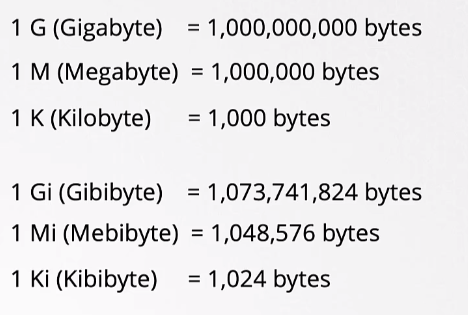
1.074G would be equal to 1Gi 1.048M would be equal to 1Mi
An aspect to consider is that a container doesn't constantly operate at its maximum capacity. The demand for resources like memory and CPU can vary over time as the process executed by the container needs more or fewer resources.
When additional resources are available, the process can take advantage of them to optimize its performance. However, this approach can lead to a situation where other processes on the node, including those from the node's own operating system and containers from other pods, end up being harmed due to excessive resource allocation by the container in question.
To avoid this, we can define limits to curb this growth.
In the case of CPU, the node is able to effectively limit the container's consumption to not exceed the necessary amount. However, regarding memory, this limit enforcement is not as effective. If a container tries to exceed the established memory limit, the action is usually to terminate the pod to prevent it from continuing to grow and affecting the performance of other resources, resulting in an "Out of Memory" (OOM) event.
Scenarios:
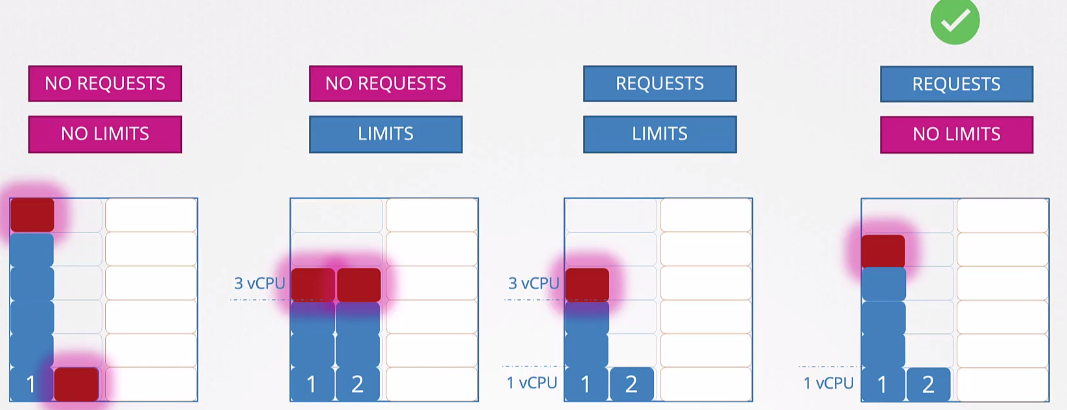
- Running without requests and without limits is not a best practice and allows suffocation.
- Running with limits without requests would be the same as underutilizing available resources if they exist.
- Running with requests and limits gives you control but we'll still underutilize resources if they're available.
- Running with requests guarantees the minimum for the pod and allows it to grow. But in this case, if all pods have the request defined, they have a minimum resource guarantee. This is the ideal scenario.
We usually use limits to avoid misuse of infrastructure.
How to define a default value for all containers of all pods within a namespace?
A LimitRange provides constraints that can:
- Enforce minimum and maximum compute resource usage per pod or container in a namespace.
- Enforce minimum and maximum storage request per PersistentVolumeClaim in a namespace.
- Enforce a ratio between request and limit for a resource in a namespace.
- Set default request/limits for compute resources in a namespace and automatically inject them into containers at runtime.
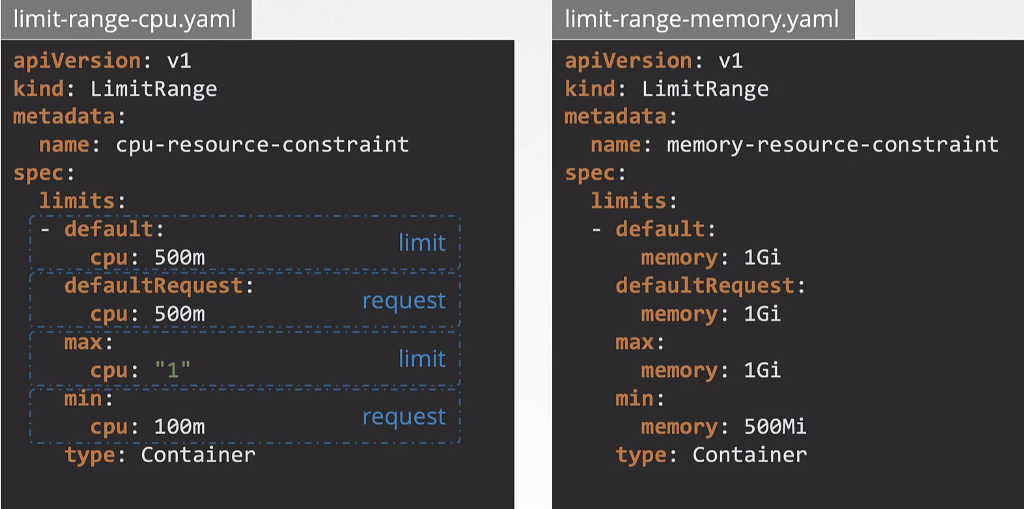
If pods are already running and a LimitRange is created later, only new pods will have these values set automatically.
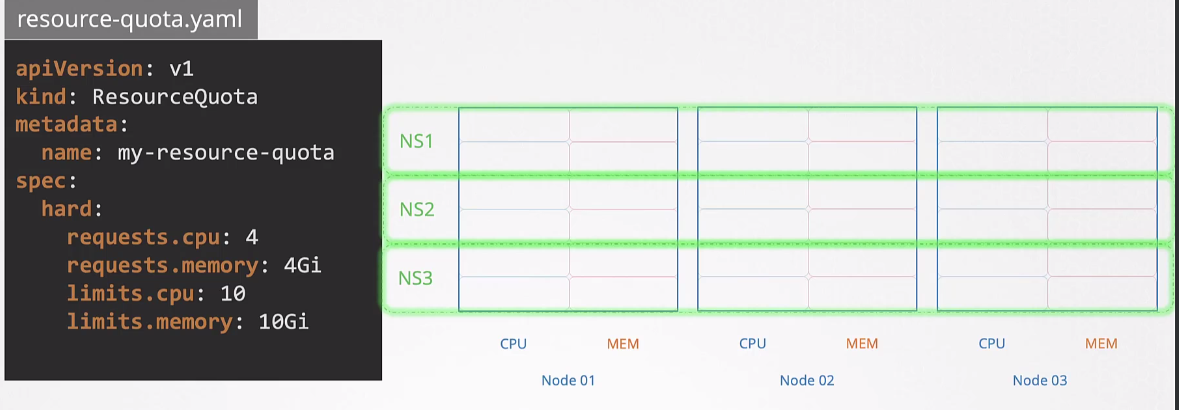
If we want to limit an entire namespace's resources across the cluster, we would use ResourceQuotas.