Multiple Schedulers
We can have different Schedulers in the cluster. What we need to do is specify which Scheduler we want to use in the Pod. This Scheduler will be responsible for reading the Pod configuration and choosing the correct Node.
It's necessary that Schedulers have different names.
Let's take any Pod we have in our cluster.
k get pods busybox -o yaml
apiVersion: v1
kind: Pod
metadata:
  creationTimestamp: "2024-03-18T03:06:56Z"
  labels:
    run: busybox
  name: busybox
  namespace: default
  resourceVersion: "2879304"
  uid: b055b81d-96d4-4fe7-8666-635a9d03f4bf
spec:
  containers:
  - command:
    - sleep
    - "1000"
    image: busybox
    imagePullPolicy: Always
    name: busybox
    resources: {}
    terminationMessagePath: /dev/termination-log
    terminationMessagePolicy: File
    volumeMounts:
    - mountPath: /var/run/secrets/kubernetes.io/serviceaccount
      name: kube-api-access-xxwlk
      readOnly: true
  dnsPolicy: ClusterFirst
  enableServiceLinks: true
  nodeName: cka-cluster-worker3
  preemptionPolicy: PreemptLowerPriority
  priority: 0
  restartPolicy: Always
  schedulerName: default-scheduler #<<<
  ...
We can see that even though a Scheduler wasn't defined, we have the default-scheduler. We could pass another Scheduler in the spec.
The simplest way to create a Scheduler is by deploying another one.
The kind cluster creates the Scheduler as a Pod instead of a service, what can we do? Create another one, but passing specific configurations.
Let's analyze the kube-scheduler configuration. This is the Scheduler that kind itself created with kubeadm.
kubectl get pods -n kube-system kube-scheduler-cka-cluster-control-plane -o=jsonpath='{.spec.containers[*].command}' | jq
[
  "kube-scheduler",
  "--authentication-kubeconfig=/etc/kubernetes/scheduler.conf",
  "--authorization-kubeconfig=/etc/kubernetes/scheduler.conf",
  "--bind-address=127.0.0.1",
  "--kubeconfig=/etc/kubernetes/scheduler.conf",
  "--leader-elect=true"
]
We can add another Scheduler and pass --config with the configuration file we'll create.
If we're going to create this Scheduler on all masters, we need to define --leader-elect=true. We could create the Scheduler using Static Pods by going inside the master and placing the manifest in /etc/kubernetes/manifest.
In the documentation, we have a model using the official Scheduler itself.
In this set of manifests we have:
- Service account
- 2 ClusterRoleBindings that will give permission to the ServiceAccount in the same group as kube-scheduler
system:kube-schedulerand insystem:volume-scheduler - 1 RoleBinding that will give permission to the ServiceAccount in
extension-apiserver-authentication-reader - The ConfigMap that will be mounted as a volume to provide a configuration file. With this, we can put all parameters inside it and reduce the number of entries above.
Create a file with the content below and apply it to the cluster.
apiVersion: v1
kind: ServiceAccount
metadata:
  name: my-scheduler
  namespace: kube-system
---
apiVersion: rbac.authorization.k8s.io/v1
kind: ClusterRoleBinding
metadata:
  name: my-scheduler-as-kube-scheduler
subjects:
- kind: ServiceAccount
  name: my-scheduler
  namespace: kube-system
roleRef:
  kind: ClusterRole
  name: system:kube-scheduler
  apiGroup: rbac.authorization.k8s.io
---
apiVersion: rbac.authorization.k8s.io/v1
kind: ClusterRoleBinding
metadata:
  name: my-scheduler-as-volume-scheduler
subjects:
- kind: ServiceAccount
  name: my-scheduler
  namespace: kube-system
roleRef:
  kind: ClusterRole
  name: system:volume-scheduler
  apiGroup: rbac.authorization.k8s.io
---
apiVersion: rbac.authorization.k8s.io/v1
kind: RoleBinding
metadata:
  name: my-scheduler-extension-apiserver-authentication-reader
  namespace: kube-system
roleRef:
  kind: Role
  name: extension-apiserver-authentication-reader
  apiGroup: rbac.authorization.k8s.io
subjects:
- kind: ServiceAccount
  name: my-scheduler
  namespace: kube-system
---
## Here we can define a ConfigMap that will be mounted as a volume to deliver this file
apiVersion: v1
kind: ConfigMap
metadata:
  name: my-scheduler-config
  namespace: kube-system
data:
  my-scheduler-config.yaml: |
    apiVersion: kubescheduler.config.k8s.io/v1beta2
    kind: KubeSchedulerConfiguration
    profiles:
      - schedulerName: my-scheduler
    leaderElection:
      leaderElect: true  # Was false, changed to true to test with 3 replicas
---
apiVersion: apps/v1
kind: Deployment
metadata:
  labels:
    component: scheduler
    tier: control-plane
  name: my-scheduler
  namespace: kube-system
spec:
  selector:
    matchLabels:
      component: scheduler
      tier: control-plane
  replicas: 3 # Was 1, changed to 3
  template:
    metadata:
      labels:
        component: scheduler
        tier: control-plane
        version: second
    spec:
      serviceAccountName: my-scheduler
      containers:
      - command:
        - /usr/local/bin/kube-scheduler
        - --config=/etc/kubernetes/my-scheduler/my-scheduler-config.yaml
        image: registry.k8s.io/kube-scheduler:v1.29.1 # Changed because we don't have the previous image
        livenessProbe:
          httpGet:
            path: /healthz
            port: 10259
            scheme: HTTPS
          initialDelaySeconds: 15
        name: kube-second-scheduler
        readinessProbe:
          httpGet:
            path: /healthz
            port: 10259
            scheme: HTTPS
        resources:
          requests:
            cpu: '0.1'
        securityContext:
          privileged: false
        volumeMounts:
          - name: config-volume
            mountPath: /etc/kubernetes/my-scheduler
      hostNetwork: false
      hostPID: false
      volumes:
        - name: config-volume
          configMap:
            name: my-scheduler-config
kubectl apply -f my-scheduler.yaml
serviceaccount/my-scheduler created
clusterrolebinding.rbac.authorization.k8s.io/my-scheduler-as-kube-scheduler created
clusterrolebinding.rbac.authorization.k8s.io/my-scheduler-as-volume-scheduler created
rolebinding.rbac.authorization.k8s.io/my-scheduler-extension-apiserver-authentication-reader created
configmap/my-scheduler-config created
deployment.apps/my-scheduler created

k get pods -n kube-system | grep my-scheduler
my-scheduler-8ffc64976-449zr                        1/1     Running   0              92s
my-scheduler-8ffc64976-6hn6t                        1/1     Running   0              92s
my-scheduler-8ffc64976-nj8xp                        1/1     Running   0              92s
Some things we can analyze:
- The master has Taints and we didn't define any Toleration for it to go to the master. It won't go.
- We didn't define any nodeAffinity or podAntiAffinity for it to distribute the 3 replicas on different Nodes. If it happens, it's mere coincidence.
- The default Scheduler that scheduled these Pods!
Now let's use this Scheduler to create a Pod
cat <<EOF | kubectl apply -f -
apiVersion: v1
kind: Pod
metadata:
  name: nginx
spec:
  containers:
  - name: nginx
    image: nginx
  schedulerName:  my-scheduler
EOF

k describe pod nginx |  grep scheduler
  Normal  Scheduled  56s   my-scheduler  Successfully assigned default/nginx to cka-cluster-worker3
Scheduler Profiles
A Scheduler has a queue to schedule Pods. If they all have the same priority, then they enter at the end of the queue and follow the flow. First come, first served to be scheduled.
It's possible to configure different priorities and link a Pod to this priority. This way, it's possible for high-priority Pods to jump the queue. This is quite useful if a service really can't wait.
To define a priority, we can create as defined below. This is not a namespace-level resource, but cluster-level. A Scheduler looks at all Pods regardless of namespace.
apiVersion: scheduling.k8s.io/v1
kind: PriorityClass
metadata:
  name: high-priority
value: 1000000
globalDefault: false # Whether it will be the default or not
description: "This priority class should be used for XYZ service pods only."
There are already two defined in the cluster.
k get priorityclasses.scheduling.k8s.io -o wide
NAME                      VALUE        GLOBAL-DEFAULT   AGE
system-cluster-critical   2000000000   false            18d
system-node-critical      2000001000   false            18d
When it's the Pod's turn to be scheduled, it goes to the filtering stage. Nodes that can't receive the Pod, either due to lack of resources or user choice using nodeSelector, affinities, Taints and Tolerations will be eliminated, and only those that passed filtering can schedule the Pod.
Finally, we have the scoring stage. This stage will select which of the remaining Nodes is best to start the Pod. How is this score defined? If a Pod needs 2 CPUs and we have two possible Nodes, the first with 2 available CPUs and the second with 6, obviously the one with 6 already has a higher score. In this case, both would have sufficient memory to run the Pod, otherwise they wouldn't have passed the filtering stage.
Finally, we have the binding process which is when the Node is actually defined and the kubelet of that Node will be responsible for starting the Pod.
The stages are:
- Scheduling Queue
- Filtering
- Scoring
- Binding
All these operations are performed with certain plugins.
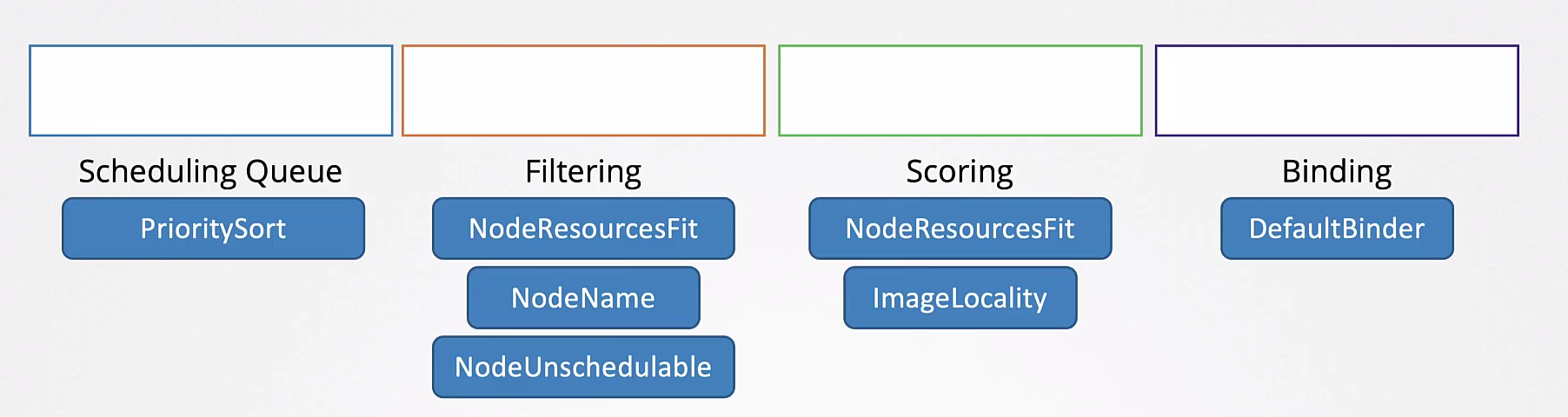
A plugin can be associated with more than one stage.
A curiosity is that in the scoring stage, we have a plugin called ImageLocality. A Node that already has the image available may have a higher score.
These stages can be further subdivided using different plugins that analyze in different ways.
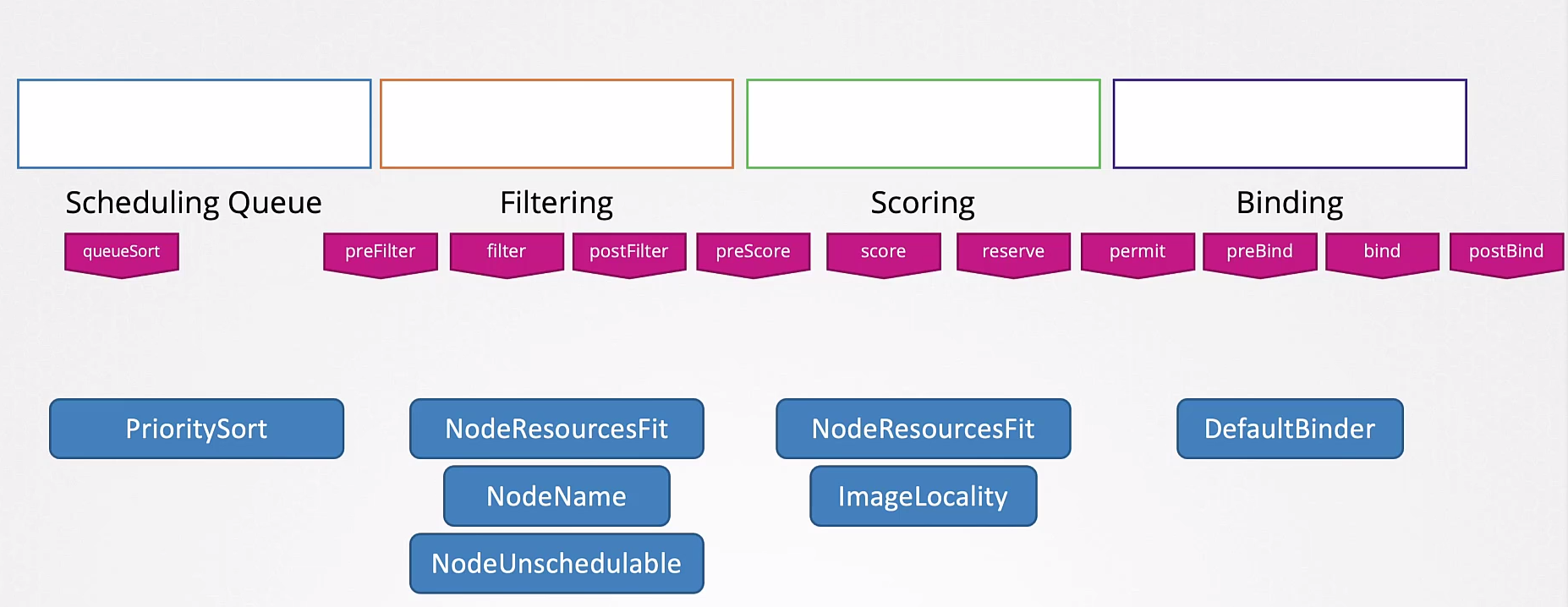
You can write your own Scheduler methods.
A situation that can occur when having several different Schedulers is that each can have completely different rules, reading and interpreting Nodes differently, creating a race condition.
To avoid this, it's interesting to have one Scheduler with multiple profiles. This way, the same binary would be used for everyone.
    apiVersion: kubescheduler.config.k8s.io/v1beta2
    kind: KubeSchedulerConfiguration
    profiles:
      - schedulerName: my-scheduler
        plugins:
          score:
            disabled:
            - name: TaintToleration
            enabled:
            - name: MyCustomPluginA
            - name: MyCustomPluginB
      - schedulerName: my-scheduler2
        plugins:
          preScore:
            disabled:
            - name: '*'
      - schedulerName: my-scheduler3
    leaderElection:
      leaderElect: true  # Was false, changed to true to test with 3 replicas