Taints and Tolerations
Taints are applied to Nodes and Tolerations are applied to Pods.
Taints work on Nodes to prevent Pods from entering those Nodes, but if a Pod has a Toleration for this Taint, it can be scheduled to Nodes with the respective Taint.
Let's think of a Taint as repellent for the Node and Pods as different types of insects. We have repellents that work for some insects but not for others. If an insect (Pod) is immune (tolerates) to this repellent, it can reach (bite) the Nodes that use the repellent (Taint).
Another analogy we can make is that Taints are locks and only Pods that have the keys (Tolerations) can open and enter. This lock has nothing to do with security or intrusion, it's just a restriction between Pods and Nodes.
A Pod that has a Toleration for a Taint is
possibleto be scheduled to the Node with this Taint, but this doesn't guarantee it will happen. If there's another Node without any Taint that's better suited to receive the Pod, that one might be chosen.It would only be guaranteed for a Pod to enter a Node with a Taint if all Nodes in the cluster had different Taints and the Pod had the Toleration for the specific Node. Other resources exist to configure this guarantee.
We can use Taints to separate:
- Nodes by environments
- Nodes by application type, for example, applications that require graphics processing would be better executed on Nodes with graphics cards.
Taints can have any key-value set on the Node, just like Labels, but if a Taint exists, it needs to have an effect of what happens to a Pod if it doesn't have the Toleration, and there are 3 possible values:
NoSchedule: If a Taint has this effect, new Pods should only be scheduled to this Node if they have the respective Toleration for the Taint.PreferNoSchedule: Makes a preference not to schedule, but if there's no space on other Nodes for a Pod, it can be scheduled.NoExecute: Any Pod that doesn't have this Toleration should not be scheduled and Pods that are on the Node without the Toleration should be removed.
To apply a Taint to a Node, we need to execute the command kubectl taint nodes node_name key=values:taint-effect.
# Create Taint
kubectl taint node k3d-k3d-cluster-server-0 app=test:NoSchedule
# Remove Taint is the same command with - at the end
kubectl taint node k3d-k3d-cluster-server-0 app=test:NoSchedule-
A BEST PRACTICE, AND RECOMMENDED, IS NOT TO DEPLOY APPLICATIONS ON MASTER NODES. THEREFORE, IT'S IMPORTANT THAT MASTER NODES HAVE A TAINT THAT NO POD TOLERATES WITH THE NoExecute EFFECT.
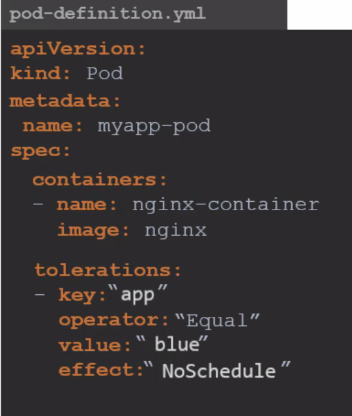
In the Pod, to apply a Toleration, it's necessary to include the desired configurations within the tolerations field in the Pod specification.
apiVersion: v1
kind: Pod
metadata:
  name: nginx
spec:
  containers:
  - name: nginx
    image: nginx
  tolerations:
  - key: app
    operator: Equal
    value: test
    effect: NoSchedule
For the example above, no Node has a Taint, but the Pod will have a Toleration.
kubectl apply -f pod-toleration.yaml
pod/nginx created

## In this sequence below, once it was created on the server, another time on agent2, meaning it doesn't change anything
kubectl get pods -o wide
NAME    READY   STATUS    RESTARTS   AGE     IP          NODE                       NOMINATED NODE   READINESS GATES
nginx   1/1     Running   0          4m20s   10.42.3.3   k3d-k3d-cluster-server-0   <none>           <none>

kubectl delete pod nginx
pod "nginx" deleted

kubectl apply -f pod-toleration.yaml
pod/nginx created

kubectl get pods -o wide
NAME    READY   STATUS              RESTARTS   AGE   IP       NODE                      NOMINATED NODE   READINESS GATES
nginx   1/1     Running   0          4m20s   10.42.3.3   k3d-k3d-cluster-agent-1   <none>           <none>

kubectl delete pod nginx
pod "nginx" deleted

NAME                       STATUS   ROLES                  AGE   VERSION        INTERNAL-IP   EXTERNAL-IP   OS-IMAGE   KERNEL-VERSION     CONTAINER-RUNTIME
k3d-k3d-cluster-agent-2    Ready    <none>                 70d   v1.27.4+k3s1   172.18.0.2    <none>        K3s dev    6.2.0-39-generic   containerd://1.7.1-k3s1
k3d-k3d-cluster-server-0   Ready    control-plane,master   70d   v1.27.4+k3s1   172.18.0.4    <none>        K3s dev    6.2.0-39-generic   containerd://1.7.1-k3s1
k3d-k3d-cluster-agent-1    Ready    <none>                 70d   v1.27.4+k3s1   172.18.0.3    <none>        K3s dev    6.2.0-39-generic   containerd://1.7.1-k3s1
k3d-k3d-cluster-agent-0    Ready    <none>                 70d   v1.27.4+k3s1   172.18.0.5    <none>        K3s dev    6.2.0-39-generic   containerd://1.7.1-k3s1

## Let's apply Taints to the server Node, agent0, agent1, but not the same ones as the Pod's Toleration
kubectl taint node k3d-k3d-cluster-server-0 run=test:NoSchedule
node/k3d-k3d-cluster-server-0 tainted
kubectl taint node k3d-k3d-cluster-agent-0 run=test:NoSchedule
node/k3d-k3d-cluster-agent-0 tainted
kubectl taint node k3d-k3d-cluster-agent-1 run=test:NoSchedule
node/k3d-k3d-cluster-agent-1 tainted

# Note that it went to agent2
kubectl get pods -o wide
NAME    READY   STATUS    RESTARTS   AGE   IP           NODE                      NOMINATED NODE   READINESS GATES
nginx   1/1     Running   0          7s    10.42.2.48   k3d-k3d-cluster-agent-2   <none>           <none>

# Applying a Taint to agent2 to not schedule and already remove those without the Toleration
kubectl taint node k3d-k3d-cluster-agent-2 run=test:NoExecute
node/k3d-k3d-cluster-agent-2 tainted

kubectl get pods -o wide
No resources found in default namespace. # The Pod disappeared and didn't come back because it doesn't have a ReplicaSet

kubectl apply -f pod-toleration.yaml
pod/nginx created
kubectl get pods -o wide
NAME    READY   STATUS    RESTARTS   AGE   IP       NODE     NOMINATED NODE   READINESS GATES
nginx   0/1     Pending   0          56s   <none>   <none>   <none>           <none>

kubectl describe pods nginx
Name:             nginx
Namespace:        default
Priority:         0
Service Account:  default
Node:             <none>
Labels:           <none>
Annotations:      <none>
Status:           Pending
IP:
IPs:              <none>
Containers:
  nginx:
    Image:        nginx
    Port:         <none>
    Host Port:    <none>
    Environment:  <none>
    Mounts:
      /var/run/secrets/kubernetes.io/serviceaccount from kube-api-access-2nh84 (ro)
Conditions:
  Type           Status
  PodScheduled   False
Volumes:
  kube-api-access-2nh84:
    Type:                    Projected (a volume that contains injected data from multiple sources)
    TokenExpirationSeconds:  3607
    ConfigMapName:           kube-root-ca.crt
    ConfigMapOptional:       <nil>
    DownwardAPI:             true
QoS Class:                   BestEffort
Node-Selectors:              <none>
Tolerations:                 app=test:NoSchedule
                             node.kubernetes.io/not-ready:NoExecute op=Exists for 300s
                             node.kubernetes.io/unreachable:NoExecute op=Exists for 300s
## See that there's no available Node
Events:
  Type     Reason            Age    From               Message
  ----     ------            ----   ----               -------
  Warning  FailedScheduling  3m22s  default-scheduler  0/4 nodes are available: 4 node(s) had untolerated taint {run: test}. preemption: 0/4 nodes are available: 4 Preemption is not helpful for scheduling..

## Now let's apply to agent1 the Taint that the Pod has the Toleration for
files git:(main) ✗ kubectl taint node k3d-k3d-cluster-agent-1 app=test:NoSchedule
node/k3d-k3d-cluster-agent-1 tainted

# And why didn't it enter and is still pending? Because it would need to tolerate both Taints, so let's remove the first one
kubectl get pods -o wide
NAME    READY   STATUS    RESTARTS   AGE     IP       NODE     NOMINATED NODE   READINESS GATES
nginx   0/1     Pending   0          5m19s   <none>   <none>   <none>           <none>

# Removing the Taint that the Pod doesn't support
kubectl taint node k3d-k3d-cluster-agent-1 run=test:NoSchedule-
node/k3d-k3d-cluster-agent-1 untainted

kubectl get pods -o wide
NAME    READY   STATUS    RESTARTS   AGE     IP           NODE                      NOMINATED NODE   READINESS GATES
nginx   1/1     Running   0          6m36s   10.42.1.36   k3d-k3d-cluster-agent-1   <none>           <none>
Of course, we could have added one more Toleration since it's a list in the Pod, but this was just to illustrate.
DaemonSets are specified to place one Pod on each Node, but a DaemonSet also respects Taints. If it doesn't support the Taints, it won't enter the Node.