Static Pods
Before we begin, let's understand that kubelet runs Pods on any Node, whether master or worker type.
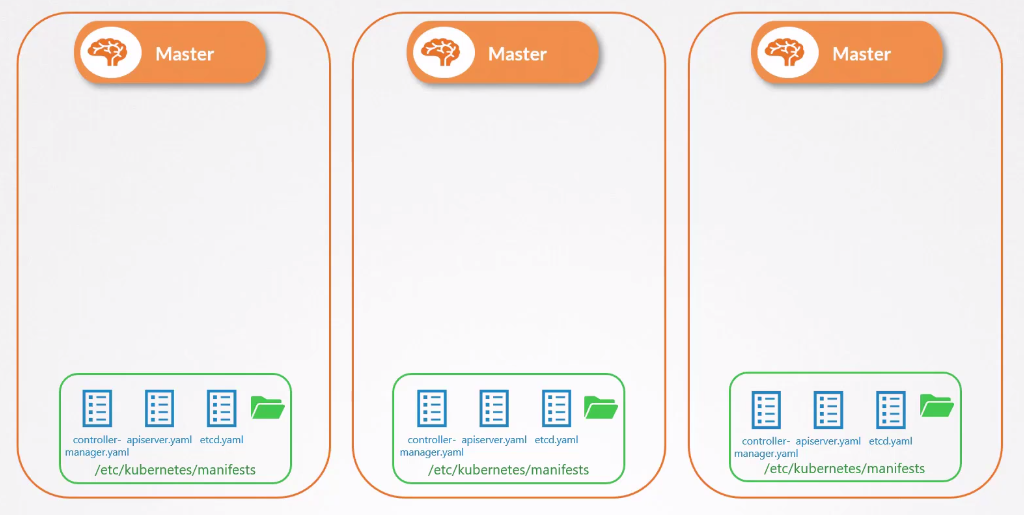
Some Kubernetes installations don't have kubelet on masters because they run the kube-apiserver, kube-controller, etcd, and kube-scheduler components through services on the operating system. However, some installations run cluster components as Pods inside the master itself, so they need kubelet running.
Kubelet only understands manifests to run Pods and nothing else. All other Kubernetes objects like Deployments, ReplicaSets, Services, etc. are not understood by kubelet.
In a normal Kubernetes cluster configuration, kubelet waits for instructions from the kube-apiserver about which Pods should be loaded on the Node, but the decision was made by kube-scheduler and the data stored in etcd.
What would happen if we had the following scenario?
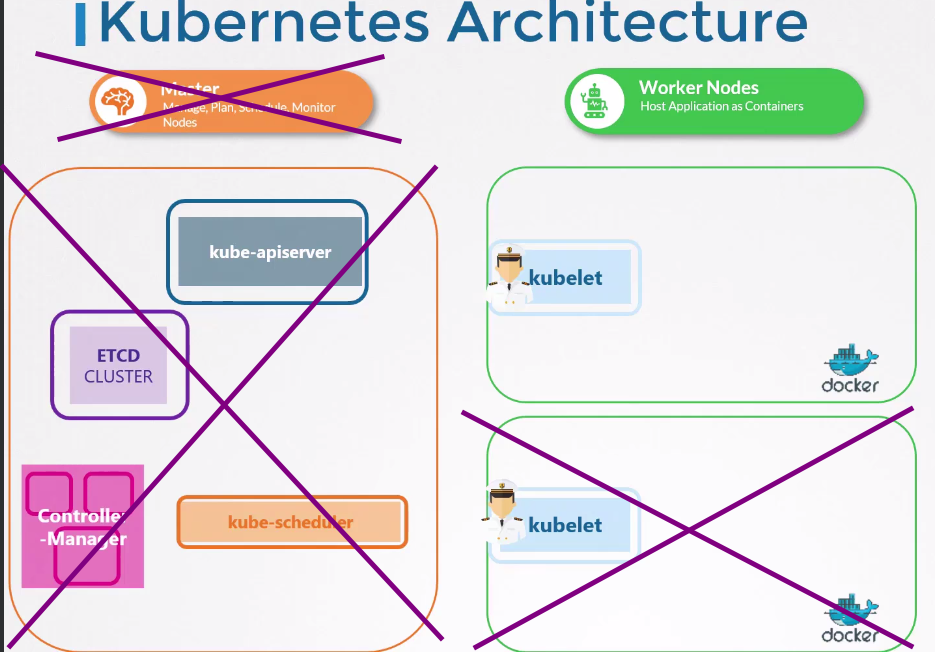
Here comes the question, how to run a Pod if there's no api-server, if there's no etcd, if there's nothing?
How could we provide Pod configurations to kubelet without kube-apiserver?
We can inject Pods with YAML Pod definition files in a folder that kubelet is configured to read periodically. Any change in this folder, kubelet will recreate the Pods to execute the changes, and if the files are removed, the Pod will be automatically deleted. Obviously, we need a container runtime that kubelet can execute. These Pods that have no kube-apiserver intervention are called Static Pods.
It could be any system directory as long as kubelet is configured to read this directory.
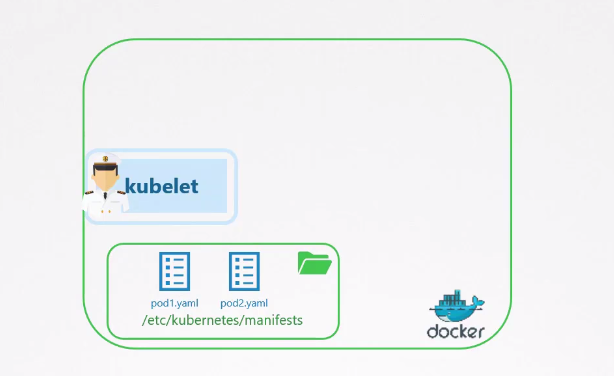
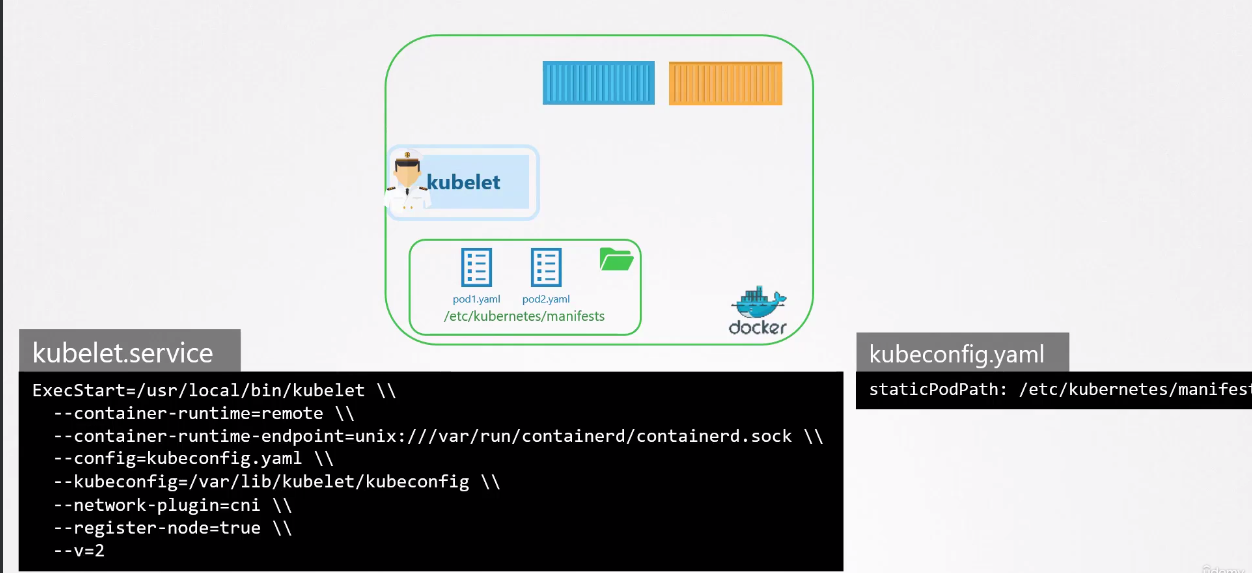
You can run a Pod on your own machine if you install kubelet. It will take care of the process of keeping this Pod running on your local machine, but we won't have ReplicaSets, Deployments, meaning each Pod like any container.
You'll be able to see the Pod running with
docker psornerdctl psorcrictl psfor example inside the cluster, but not withkubectl get pods, because remember kubectl works with kube-apiserver.
Kubelet has two ways to execute Pods:
- By file, as we showed
- By an endpoint that's used by kube-apiserver to provide input
If we're creating a static Pod by manually placing the file on a Node, can we see it through the kubectl get pods command? Yes we can, because kubelet creates a mirror object in kube-apiserver, but it's not editable or manipulable through kubectl, meaning it can't be deleted but can be viewed.
As mentioned earlier, Static Pods are widely used for Kubernetes services themselves, and this is how kubeadm creates cluster components.
Kube-scheduler has no effect on Static Pods.
However, one of Kubernetes requirements is to have swap disabled.
sudo apt-get install kubelet -y

sudo swapoff -a

sudo systemctl enable kubelet --now

❯ sudo systemctl status kubelet
● kubelet.service - kubelet: The Kubernetes Node Agent
     Loaded: loaded (/lib/systemd/system/kubelet.service; enabled; preset: enabled)
     Active: active (running) since Thu 2023-12-28 15:41:50 -03; 1s ago
       Docs: https://kubernetes.io/docs/home/
   Main PID: 64784 (kubelet)
      Tasks: 21 (limit: 18778)
     Memory: 26.0M
        CPU: 173ms
     CGroup: /system.slice/kubelet.service
             └─64784 /usr/bin/kubelet

## If any problem occurs, do a checkup
journalctl -xeu kubelet
Kubelet installations create the kubelet.service service on the system, so let's find where it is.
sudo find / -type f -name kubelet.service 2>/dev/null

/usr/lib/systemd/system/kubelet.service
/var/lib/systemd/deb-systemd-helper-enabled/multi-user.target.wants/kubelet.service

cat /etc/systemd/system/multi-user.target.wants/kubelet.service
[Unit]
Description=kubelet: The Kubernetes Node Agent
Documentation=https://kubernetes.io/docs/home/
Wants=network-online.target
After=network-online.target

[Service]
ExecStart=/usr/bin/kubelet
Restart=always
StartLimitInterval=0
RestartSec=10

[Install]
WantedBy=multi-user.target
This kubelet is still missing some configurations, as it doesn't know where there are Pod manifests, doesn't know who the container runtime is, knows nothing, so let's adjust.
Edit the file for this if you have docker installed on your machine.
Note that I passed the container runtime, the endpoint, and the path where there will be Pods.
[Unit]
Description=kubelet: The Kubernetes Node Agent
Documentation=https://kubernetes.io/docs/home/
Wants=network-online.target
After=network-online.target

[Service]
ExecStart=/usr/bin/kubelet \
  --container-runtime-endpoint=unix:///var/run/containerd/containerd.sock \
  --pod-manifest-path=/etc/kubernetes/manifests \
  --v=2
Restart=always
StartLimitInterval=0
RestartSec=10

[Install]
WantedBy=multi-user.target
### Restart the service and see if it applied the configurations
sudo systemctl daemon-reload
sudo systemctl restart kubelet.service
sudo systemctl status kubelet.service
● kubelet.service - kubelet: The Kubernetes Node Agent
     Loaded: loaded (/lib/systemd/system/kubelet.service; enabled; preset: enabled)
     Active: active (running) since Thu 2023-12-28 16:43:37 -03; 55s ago
       Docs: https://kubernetes.io/docs/home/
   Main PID: 186026 (kubelet)
      Tasks: 28 (limit: 18778)
     Memory: 28.4M
        CPU: 791ms
     CGroup: /system.slice/kubelet.service