Structured Data
And how are we going to take advantage of all this?
# help commands is our man inside nushell, let's navigate through it to understand some basic concepts already.
help commands
╭─────┬──────────────────────────┬─────────────┬──────────────┬──────────────────────────────────────────────────────────────┬─────╮
│   # │           name           │  category   │ command_type │                         description                          │ ... │
├─────┼──────────────────────────┼─────────────┼──────────────┼──────────────────────────────────────────────────────────────┼─────┤
│   0 │ alias                    │ core        │ keyword      │ Alias a command (with optional flags) to a new name.         │ ... │
│   1 │ all                      │ filters     │ built-in     │ Test if every element of the input fulfills a predicate      │ ... │
│     │                          │             │              │ expression.                                                  │     │
│   2 │ ansi                     │ platform    │ built-in     │ Output ANSI codes to change color and style of text.         │ ... │
│   3 │ ansi gradient            │ platform    │ built-in     │ Add a color gradient (using ANSI color codes) to the given   │ ... │
│     │                          │             │              │ string.                                                      │     │
│   4 │ ansi link                │ platform    │ built-in     │ Add a link (using OSC 8 escape sequence) to the given        │ ... │
│     │                          │             │              │ string.                                                      │     │
### Output too large we have more than 400 lines, I cut...
To enter one of these lines we need to point to which one we want. If we want the first one we can just do this.
~> help commands | first
╭────────────────────────┬─────────────────────────────────────────────────────────────────────────────────────────────────────────╮
│ name                   │ alias                                                                                                   │
│ category               │ core                                                                                                    │
│ command_type           │ keyword                                                                                                 │
│ description            │ Alias a command (with optional flags) to a new name.                                                    │
│                        │ ╭───┬───────────────┬────────────────┬──────────┬───────────────────────────────────────────╮           │
│ params                 │ │ # │     name      │      type      │ required │                description                │           │
│                        │ ├───┼───────────────┼────────────────┼──────────┼───────────────────────────────────────────┤           │
│                        │ │ 0 │ name          │ string         │ true     │ Name of the alias.                        │           │
│                        │ │ 1 │ initial_value │ "=" expression │ true     │ Equals sign followed by value.            │           │
│                        │ │ 2 │ --help(-h)    │ switch         │ false    │ Display the help message for this command │           │
│                        │ ╰───┴───────────────┴────────────────┴──────────┴───────────────────────────────────────────╯           │
│                        │ ╭───┬─────────┬─────────╮                                                                               │
│ input_output           │ │ # │  input  │ output  │                                                                               │
│                        │ ├───┼─────────┼─────────┤                                                                               │
│                        │ │ 0 │ nothing │ nothing │                                                                               │
│                        │ ╰───┴─────────┴─────────╯                                                                               │
│ search_terms           │ abbr, aka, fn, func, function                                                                           │
│ is_const               │ false
But we can point to the one we want directly using get. I already saw that ls is on line 201 so...
~> help commands | get 201
╭──────────────┬───────────────────────────────────────────────────────────────────────────────────────────────────────────────────╮
│ name         │ ls                                                                                                                │
│ category     │ filesystem                                                                                                        │
│ command_type │ built-in                                                                                                          │
│ description  │ List the filenames, sizes, and modification times of items in a directory.                                        │
│              │ ╭───┬───────────────────┬──────────────────────┬──────────┬─────────────────────────────────────────────────────╮ │
│ params       │ │ # │       name        │         type         │ required │                     description                     │ │
│              │ ├───┼───────────────────┼──────────────────────┼──────────┼─────────────────────────────────────────────────────┤ │
│              │ │ 0 │ ...pattern        │ one_of(glob, string) │ false    │ The glob pattern to use.                            │ │
│              │ │ 1 │ --help(-h)        │ switch               │ false    │ Display the help message for this command           │ │
│              │ │ 2 │ --all(-a)         │ switch               │ false    │ Show hidden files                                   │ │
│              │ │ 3 │ --long(-l)        │ switch               │ false    │ Get all available columns for each entry (slower;   │ │
│              │ │   │                   │                      │          │ columns are platform-dependent)                     │ │
│              │ │ 4 │ --short-names(-s) │ switch               │ false    │ Only print the file names, and not the path         │ │
│              │ │ 5 │ --full-paths(-f)  │ switch               │ false    │ display paths as absolute paths                     │ │
│              │ │ 6 │ --du(-d)          │ switch               │ false    │ Display the apparent directory size ("disk usage")  │ │
│              │ │   │                   │                      │          │ in place of the directory metadata size             │ │
│              │ │ 7 │ --directory(-D)   │ switch               │ false    │ List the specified directory itself instead of its  │ │
│              │ │   │                   │                      │          │ contents                                            │ │
│              │ │ 8 │ --mime-type(-m)   │ switch               │ false    │ Show mime-type in type column instead of 'file'     │ │
│              │ │   │                   │                      │          │ (based on filenames only; files' contents are not   │ │
│              │ │   │                   │                      │          │ examined)                                           │ │
│              │ │ 9 │ --threads(-t)     │ switch               │ false    │ Use multiple threads to list contents. Output will  │ │
│              │ │   │                   │                      │          │ be non-deterministic.                               │ │
│              │ ╰───┴───────────────────┴──────────────────────┴──────────┴─────────────────────────────────────────────────────╯ │
│              │ ╭───┬─────────┬────────╮                                                                                          │
│ input_output │ │ # │  input  │ output │                                                                                          │
│              │ ├───┼─────────┼────────┤                                                                                          │
│              │ │ 0 │ nothing │ table  │                                                                                          │
│              │ ╰───┴─────────┴────────╯                                                                                          │
│ search_terms │ dir                                                                                                               │
│ is_const     │ false                                                                                                             │
╰──────────────┴─────────────────────
But we could also filter by name, which would give us a single line and then use first with the command help commands | where name == ls | first. It would be the same output as above.
We can observe that we have structured data too and we can already navigate through them using get.
~> help commands | where name == ls | first | get description
List the filenames, sizes, and modification times of items in a directory.

# Or even the params which already have greater complexity.
~> help commands | where name == ls | first | get params
╭───┬───────────────────┬──────────────────────┬──────────┬────────────────────────────────────────────────────────────────────────╮
│ # │       name        │         type         │ required │                              description                               │
├───┼───────────────────┼──────────────────────┼──────────┼────────────────────────────────────────────────────────────────────────┤
│ 0 │ ...pattern        │ one_of(glob, string) │ false    │ The glob pattern to use.                                               │
│ 1 │ --help(-h)        │ switch               │ false    │ Display the help message for this command                              │
│ 2 │ --all(-a)         │ switch               │ false    │ Show hidden files                                                      │
│ 3 │ --long(-l)        │ switch               │ false    │ Get all available columns for each entry (slower; columns are          │
│   │                   │                      │          │ platform-dependent)                                                    │
│ 4 │ --short-names(-s) │ switch               │ false    │ Only print the file names, and not the path                            │
│ 5 │ --full-paths(-f)  │ switch               │ false    │ display paths as absolute paths                                        │
│ 6 │ --du(-d)          │ switch               │ false    │ Display the apparent directory size ("disk usage") in place of the     │
│   │                   │                      │          │ directory metadata size                                                │
│ 7 │ --directory(-D)   │ switch               │ false    │ List the specified directory itself instead of its contents            │
│ 8 │ --mime-type(-m)   │ switch               │ false    │ Show mime-type in type column instead of 'file' (based on filenames    │
│   │                   │                      │          │ only; files' contents are not examined)                                │
│ 9 │ --threads(-t)     │ switch               │ false    │ Use multiple threads to list contents. Output will be                  │
│   │                   │                      │          │ non-deterministic.                                                     │
╰───┴───────────────────┴──────────────────────┴──────────┴────────────────────────────────────────────────────────────────────────╯
The commands below are equivalent and will produce the same output mentioned previously. It's worth mentioning these alternatives to improve understanding of how to access data differently in Nushell. It would be like navigating inside the object in the params session (object.params).
help commands | where name == ls | first | get params
#object.params
(help commands | where name == ls | first).params
If yaml is structured data, let's test Nushell's power with a simple kubernetes deployment manifest that we'll create now.
# Command used to create a deployment file in kubernetes which is a yaml structure.
kubectl create deployment nginx --image nginx --dry-run=client -oyaml > deploy.yaml

# We have here our deployment manifest.
~> cat deploy.yaml
apiVersion: apps/v1
kind: Deployment
metadata:
  creationTimestamp: null
  labels:
    app: nginx
  name: nginx
spec:
  replicas: 1
  selector:
    matchLabels:
      app: nginx
  strategy: {}
  template:
    metadata:
      creationTimestamp: null
      labels:
        app: nginx
    spec:
      containers:
      - image: nginx
        name: nginx
        resources: {}
status: {}

# And how do we see this deployment structure in Nushell?
# How does it understand this? See that it interprets the data and creates the structure for us.

~> open deploy.yaml
╭────────────┬──────────────────────────────────────────────────────────────────────────────────────────╮
│ apiVersion │ apps/v1                                                                                  │
│ kind       │ Deployment                                                                               │
│            │ ╭───────────────────┬─────────────────╮                                                  │
│ metadata   │ │ creationTimestamp │                 │                                                  │
│            │ │                   │ ╭─────┬───────╮ │                                                  │
│            │ │ labels            │ │ app │ nginx │ │                                                  │
│            │ │                   │ ╰─────┴───────╯ │                                                  │
│            │ │ name              │ nginx           │                                                  │
│            │ ╰───────────────────┴─────────────────╯                                                  │
│            │ ╭──────────┬───────────────────────────────────────────────────────────────────────────╮ │
│ spec       │ │ replicas │ 1                                                                         │ │
│            │ │          │ ╭─────────────┬─────────────────╮                                         │ │
│            │ │ selector │ │             │ ╭─────┬───────╮ │                                         │ │
│            │ │          │ │ matchLabels │ │ app │ nginx │ │                                         │ │
│            │ │          │ │             │ ╰─────┴───────╯ │                                         │ │
│            │ │          │ ╰─────────────┴─────────────────╯                                         │ │
│            │ │ strategy │ {record 0 fields}                                                         │ │
│            │ │          │ ╭──────────┬────────────────────────────────────────────────────────────╮ │ │
│            │ │ template │ │          │ ╭───────────────────┬─────────────────╮                    │ │ │
│            │ │          │ │ metadata │ │ creationTimestamp │                 │                    │ │ │
│            │ │          │ │          │ │                   │ ╭─────┬───────╮ │                    │ │ │
│            │ │          │ │          │ │ labels            │ │ app │ nginx │ │                    │ │ │
│            │ │          │ │          │ │                   │ ╰─────┴───────╯ │                    │ │ │
│            │ │          │ │          │ ╰───────────────────┴─────────────────╯                    │ │ │
│            │ │          │ │          │ ╭────────────┬───────────────────────────────────────────╮ │ │ │
│            │ │          │ │ spec     │ │            │ ╭───┬───────┬───────┬───────────────────╮ │ │ │ │
│            │ │          │ │          │ │ containers │ │ # │ image │ name  │     resources     │ │ │ │ │
│            │ │          │ │          │ │            │ ├───┼───────┼───────┼───────────────────┤ │ │ │ │
│            │ │          │ │          │ │            │ │ 0 │ nginx │ nginx │ {record 0 fields} │ │ │ │ │
│            │ │          │ │          │ │            │ ╰───┴───────┴───────┴───────────────────╯ │ │ │ │
│            │ │          │ │          │ ╰────────────┴───────────────────────────────────────────╯ │ │ │
│            │ │          │ ╰──────────┴────────────────────────────────────────────────────────────╯ │ │
│            │ ╰──────────┴───────────────────────────────────────────────────────────────────────────╯ │
│ status     │ {record 0 fields}                                                                        │
╰────────────┴──────────────────────────────────────────────────────────────────────────────────────────╯

## And we can extract whatever we want just by looking at the structure above.

~> open deploy.yaml | get spec.template.spec.containers
╭───┬───────┬───────┬───────────────────╮
│ # │ image │ name  │     resources     │
├───┼───────┼───────┼───────────────────┤
│ 0 │ nginx │ nginx │ {record 0 fields} │
╰───┴───────┴───────┴───────────────────╯
~> open deploy.yaml | get spec.template.spec.containers | first
╭───────────┬───────────────────╮
│ image     │ nginx             │
│ name      │ nginx             │
│ resources │ {record 0 fields} │
╰───────────┴───────────────────╯
If you work with YAML and JSON, you know that using Jsonpath, although effective, can be laborious. Tools like jq and yq already simplify this process, but with Nushell, you'll discover an even more intuitive and efficient approach to manipulating structured data.
Help
To find the help for each of these commands just type help command_name.
> help explore
Explore acts as a table pager, just like `less` does for text.

Press `:` then `h` to get a help menu.

Usage:
  > explore {flags}

Flags:
  -h, --help: Display the help message for this command
  --head <bool>: Show or hide column headers (default true)
  -i, --index: Show row indexes when viewing a list
  -t, --tail: Start with the viewport scrolled to the bottom
  -p, --peek: When quitting, output the value of the cell the cursor was on

Input/output types:
  ╭───┬───────┬────────╮
  │ # │ input │ output │
  ├───┼───────┼────────┤
  │ 0 │ any   │ any    │
  ╰───┴───────┴────────╯

Examples:
  Explore the system host information record
  > sys host | explore

  Explore the output of `ls` without column names
  > ls | explore --head false

  Explore a list of Markdown files' contents, with row indexes
  > glob *.md | each {|| open } | explore --index

  Explore a JSON file, then save the last visited sub-structure to a file
  > open file.json | explore --peek | to json | save part.json
For example the explore command helps us navigate in generated data.
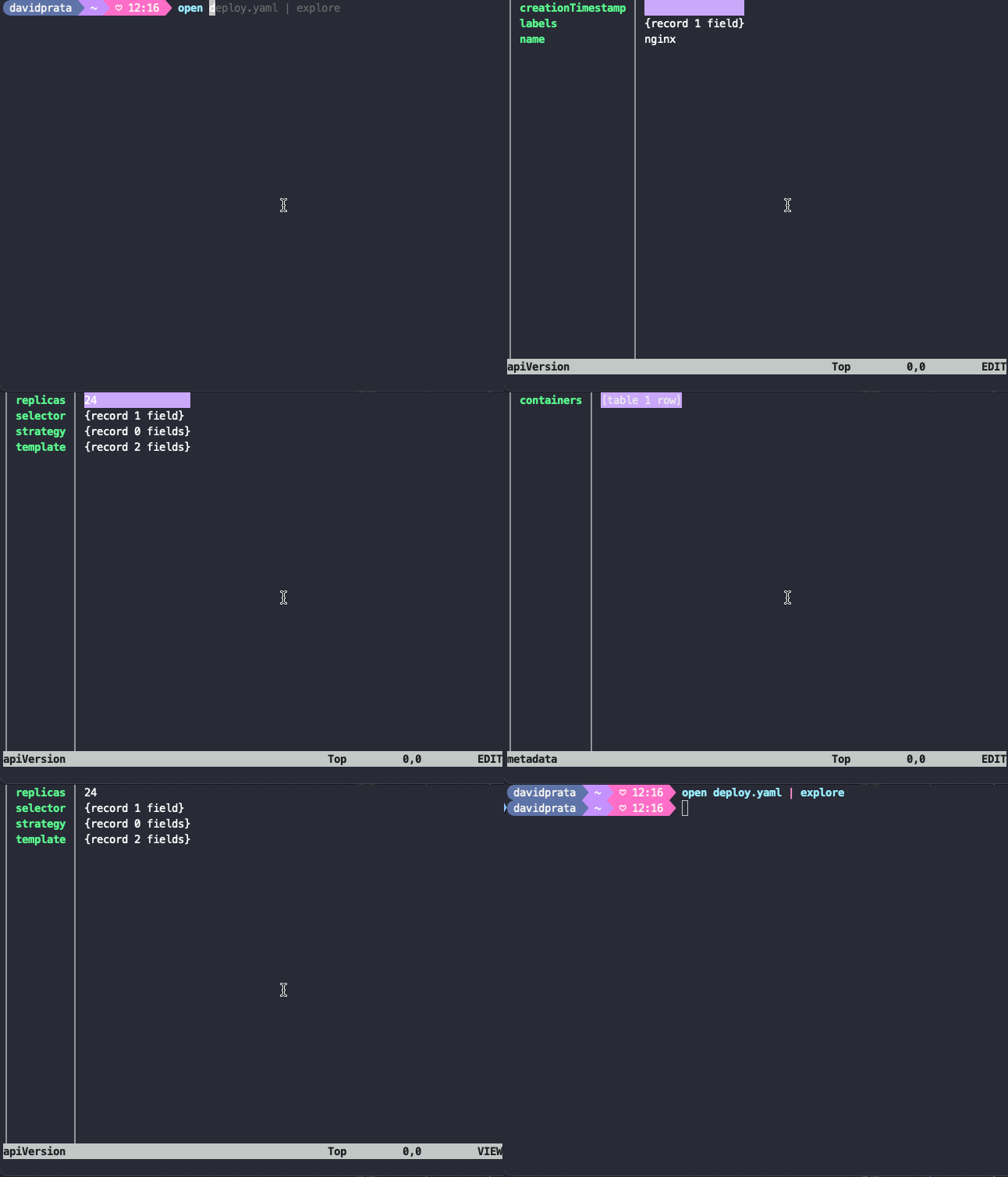
If we can use the explorer to navigate in structured data then we can do this help commands | explore to have interactivity in searching for what we want.
A detail is that the help command has these possible inputs.
> help
help            Display help information about different parts of Nushell.
help aliases    Show help on nushell aliases.
help commands   Show help on nushell commands.
help escapes    Show help on nushell string escapes.
help externs    Show help on nushell externs.
help modules    Show help on nushell modules.
help operators  Show help on nushell operators.
For example a history command how to use?
> help history
Get the command history.

Usage:
  > history {flags}

Subcommands:
  history import - Import command line history
  history session - Get the command history session.

Flags:
  -h, --help: Display the help message for this command
  -c, --clear: Clears out the history entries
  -l, --long: Show long listing of entries for sqlite history

Input/output types:
  ╭───┬─────────┬────────╮
  │ # │  input  │ output │
  ├───┼─────────┼────────┤
  │ 0 │ nothing │ any    │
  ╰───┴─────────┴────────╯

Examples:
  Get current history length
  > history | length

  Show last 5 commands you have ran
  > history | last 5

  Search all the commands from history that contains 'cargo'
  > history | where command =~ cargo | get command

# If history will give us the command column then let's filter in it

history | where command =~ "kubectl describe pod"
╭─────┬────────────────────────────────────────────────────────────────────────╮
│   # │                                command                                 │
├─────┼────────────────────────────────────────────────────────────────────────┤
│ 282 │ kubectl describe pods -n kube-system kube-scheduler-kind-control-plane │
│ 283 │ kubectl describe pods -n kube-system kube-scheduler-kind-control-plane │
│     │  | detect
╰─────┴────────────────────────────────────────────────────────────────────────

# Now the first column is command... so let's get it

history | where command =~ "kubectl describe pod" | get command
╭────┬─────────────────────────────────────────────────────────────────────────╮
│  0 │ kubectl describe pods -n kube-system kube-scheduler-kind-control-plane  │
│  1 │ kubectl describe pods -n kube-system kube-scheduler-kind-control-plane  │
│    │ | detect
╰────┴─────────────────────────────────────────────────────────────────────────╯