Creating Spans Manually
So far, spans (intervals) have been created automatically when we use the OpenTelemetry SDK, but know that it's possible to create spans in any part of the code, increasing granularity and allowing us to:
- Measure specific operations within a function.
- Isolate critical parts of the code for better analysis, improving debugging.
- See exactly where the most time is being spent.
- Broaden understanding of the application flow.
- Create custom metrics for each span.
To create spans in our NodeJS application, we'll need to install the opentelemetry/api package.
In our code we have a part that inserts data into redis and we can now place it inside a new span.
import opentelemetry from '@opentelemetry/api'

async function init() {
            redis.set('todo:1', JSON.stringify({ name: 'Configure OpenTelemetry' })),
            redis.set('todo:2', JSON.stringify({ name: 'Implement tracing' })),
            redis.set('todo:3', JSON.stringify({ name: 'Add metrics' })),
            redis.set('todo:4', JSON.stringify({ name: 'Configure exporters' }))

        ]);
}

async function init() {
    // Create span and call the init function
    opentelemetry.trace.getTracer('init redis').startActiveSpan('Set Default Items', async (span) => {
        // Our init function
        await Promise.all([
            redis.set('todo:1', JSON.stringify({ name: 'Configure OpenTelemetry' })),
            redis.set('todo:2', JSON.stringify({ name: 'Implement tracing' })),
            redis.set('todo:3', JSON.stringify({ name: 'Add metrics' })),
            redis.set('todo:4', JSON.stringify({ name: 'Configure exporters' }))

        ]);//
        span.end(); // End of span
    })
}

init().catch(console.error);
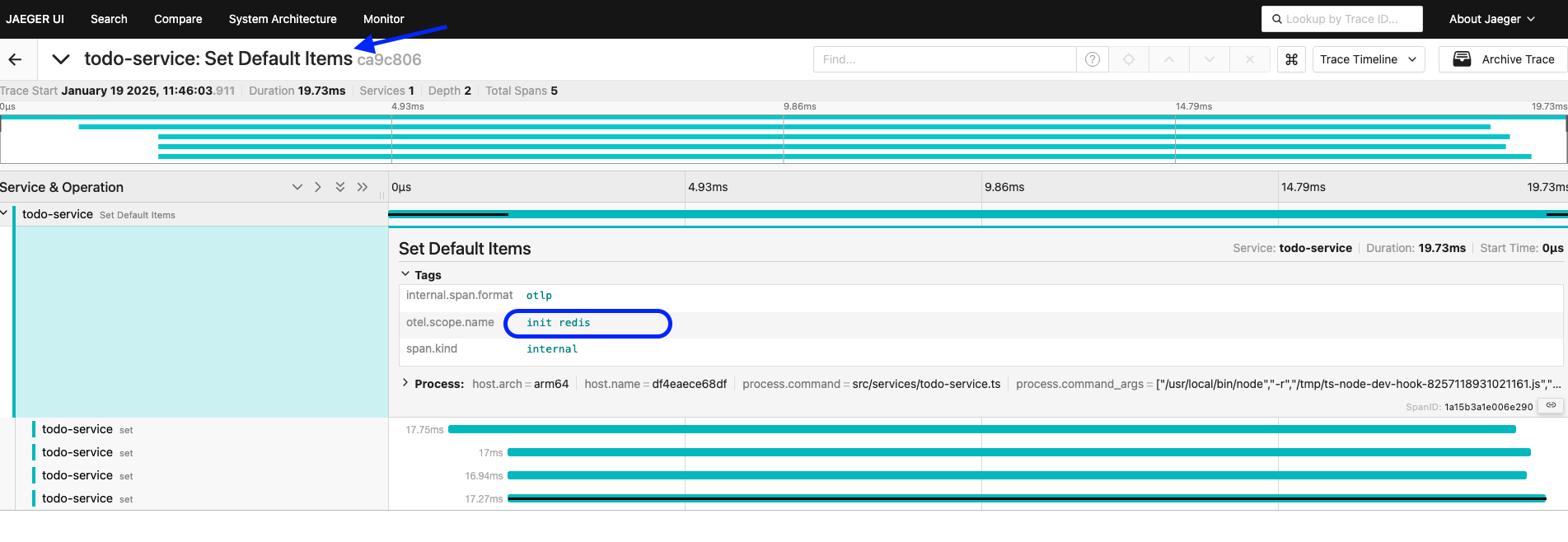
So if we make a curl to make a call and check what we have in tracing.
curl http://localhost:8081/todos
{"todos":[{"name":"Implement tracing"},{"name":"Configure OpenTelemetry"},{"name":"Add metrics"},{"name":"Configure exporters"}],"user":{"username":"David Prata"}}
We'll have 4 children, meaning the 4 redis.set calls we made above within this span.