Resources
These are data found in a span that is not an attribute.
Attributes are particular to each span, therefore the attributes of an HTTP call, a call to Redis, Kafka, database, etc., will be different.
When talking about resources, we are describing the environment in which we are running. All spans of the same process, we're not talking about trace, will probably have the same resources.
Resources could be:
- Cloud provider (azure, aws, gcp ...)
- Environment (staging, develop, production ...)
- Deploy number
- Pod ID
- Container ID
- Region (us-east-2, ca-central-1)
- Availability zone (A, B, C ...)
- Cluster Name
- Node Type
Resources will help us with metadata and the environment, and how can we set this?
Actually, we've already set 1 of them.
import { Resource } from "@opentelemetry/resources";

// code...
function start(serviceName: string) {
  const resource = new Resource({
    [ATTR_SERVICE_NAME]: serviceName,
  });
// code...
  const sdk = new NodeSDK({
    resource, // And we pass it here.
    traceExporter,
    instrumentations,
  });
  // code...
}
// code...
We have two options:
- Manually defined as we did above
- Pre-defined
What we did above was to modify a pre-defined one. Let's use autodetect to fill in those that already exist and are detected from some specific and well-defined sources:
OTEL_ environment variables:
- OTEL_SERVICE_NAME
- OTEL_RESOURCE_ATTRIBUTES
Execution environment variables:
- HOSTNAME
- NODE_ENV
- DEPLOYMENT_ENVIRONMENT
Cloud environment specific variables:
- AWS: EC2, ECS, EKS metadata
- GCP: GCE, GKE metadata
- Azure: Azure VM, AKS metadata
Container/orchestration variables:
- Kubernetes: namespace, pod name, container name
- Docker: container ID, container name
For this, in our docker compose the todos and auth services will now set some environment variables.
The possible environment variables are available at https://opentelemetry.io/docs/specs/otel/configuration/sdk-environment-variables/. Several things that we will need to define within OTEL_RESOURCE_ATTRIBUTES that follow a convention
Let's change our compose for this.
## Code....
  auth:
    build:
      context: .
      dockerfile: docker/Dockerfile.auth
    volumes:
      - .:/usr/src/app:rw
      - /usr/src/app/node_modules
    ports:
      - 8080:8080
      - 9464:9464
    environment:
      - OTEL_LOG_LEVEL=ERROR
      - OTEL_SERVICE_NAME=auth-service
      - OTEL_RESOURCE_ATTRIBUTES=service.namespace=tutorial,service.version=1.0,deployment.environment=study

    depends_on:
      - redis
      - prometheus
      - jaeger

  todo:
    build:
      context: .
      dockerfile: docker/Dockerfile.todo
    volumes:
      - .:/usr/src/app:rw
      - /usr/src/app/node_modules
    ports:
      - 8081:8080
      - 9465:9464
    environment:
      - OTEL_LOG_LEVEL=ERROR
      - OTEL_SERVICE_NAME=todo-service
      - OTEL_RESOURCE_ATTRIBUTES=service.namespace=tutorial,service.version=1.0,deployment.environment=study

    depends_on:
      - redis
      - prometheus
      - jaeger
# Code...
In addition to these, we'll create others manually for our interest. Just to illustrate, let's change it like this.
function start(serviceName: string) {
  // Define a resource with the service name - will be used for both traces and metrics
  const resource = new Resource({
    'team.ownner': "devsecops-team",
    'repository': 'https://gitlab.com/davidpuziol/opentelemetry-project',
    'site': 'https://devsecops.puziol.com.br',
  });
  // Code....
  const sdk = new NodeSDK({
    resource,
    autoDetectResources: true, // added to look for the patterns
    traceExporter,
    instrumentations,
  });
}
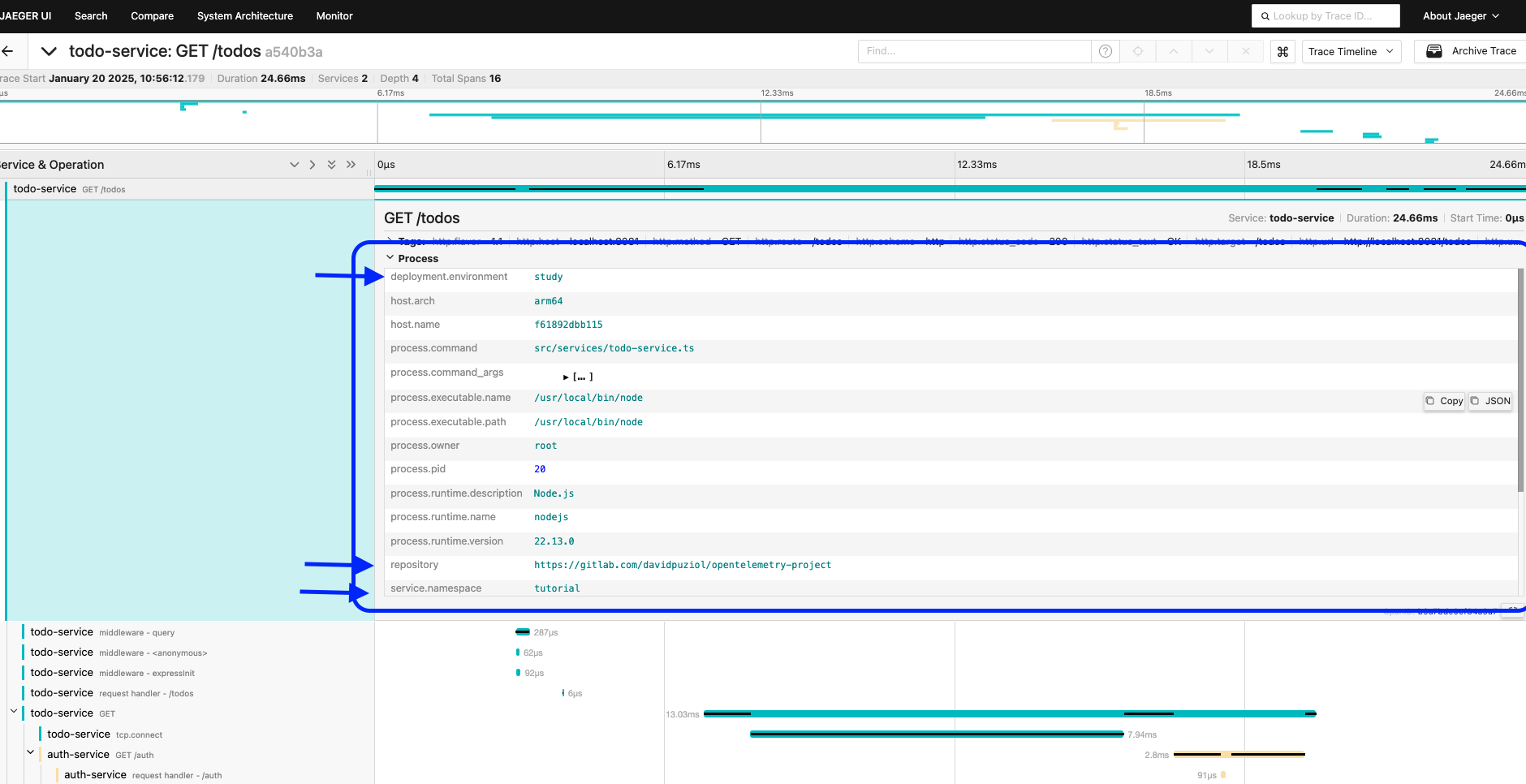
In this case, autodetect will look in the environment variables and set them for us. I tried to follow the official documentation, but there is a semantic convention being approved to create a naming standard for variables that we will pass in OTEL_RESOURCE_ATTRIBUTES. Some I was able to find, others are still in the approval phase. Don't take how I did it as truth, just take the idea as a reference. Inside Jaeger these things are shown in process instead of tags.
Important Environment Variables
OTEL_LOG_LEVEL: can receive NONE, ERROR, WARN, INFO, DEBUG, VERBOSE, ALL with the default being INFO.
If you want to disable OpenTelemetry, OTEL_SDK_DISABLE should receive true
Many configurations we made here could be passed only as environment variables.
Depending on the language used, environment variables can be more or less powerful.