OWASP
OWASP is the acronym for Open Worldwide Application Security Project. Previously, the "W" in OWASP stood for "Web", but it was changed to "Worldwide" to reflect a broader scope.
It is a global online non-profit community dedicated to improving software security. OWASP produces and makes freely available a wide range of resources, including:
- Articles and Documentation: Guides, manuals, and information on various aspects of application security.
- Methodologies: Approaches and processes to integrate security into the software development lifecycle - SDLC.
- Tools: Open-source software to assist in security testing, vulnerability detection, and other security-related tasks.
- Technologies: Standards and frameworks for secure development.
Note that there are tools beyond documentation, so it's worth exploring them.
Main Objectives
- Awareness: Educate developers, security professionals, and organizations about risks and best practices in application security.
- Providing Open Resources: All OWASP materials and tools are free and open source, accessible to anyone interested in improving software security.
- Community and Collaboration: OWASP has hundreds of local chapters worldwide and promotes collaboration among security experts and enthusiasts.
- Projects: The foundation maintains several important projects, the most well-known being the OWASP Top 10.
Main Projects
Here we have some main projects, but it's worth commenting on some.
OWASP Top Ten
One of the group's works is to update a report with the top 10 biggest security risks in a web application. It is updated every few years to reflect the evolution of threats and serves as an essential starting point for any software security initiative.
It is the industry de facto standard for understanding and prioritizing the most common vulnerabilities. It is a reference in training, security policies, and development contracts.
- Focus on WEB applications
- Generic for most systems
Note that in 2017 the Injection failure type fell to 3rd position in 2021 and Access Control rose to first. We can also observe some grouping changes.
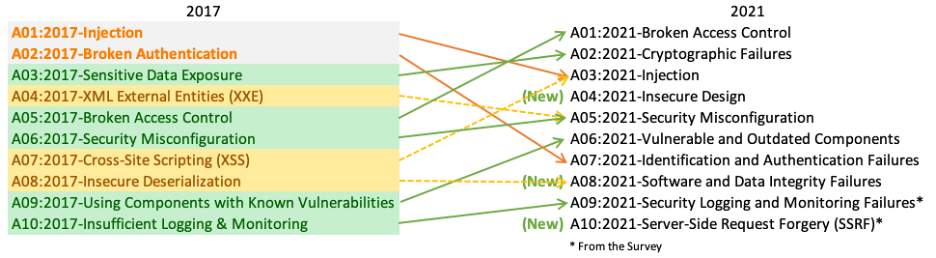
When studying the subject, focus on the current year to search for the top 10. We will see the Top 10 separately later.
How to Use OWASP
To effectively apply OWASP projects and frameworks, you don't need to be an expert hacker, but you need to have a solid foundation in some key concepts.
We can organize the necessary knowledge into three fundamental pillars:
Pillar 1: Understanding Application Security Concepts (AppSec)
Before using the tools, you need to "speak the language" of security. The most important thing here is:
-
Know the OWASP Top 10: This is the mandatory starting point. The Top 10 is not just a list, it's a document that explains the 10 most critical vulnerability categories in web applications. You need to understand what SQL Injection is, a Cross-Site Scripting (XSS), or a Broken Access Control, etc. Read the most recent OWASP Top 10 document. Try to understand not only what the failure is, but why it happens and what its business impact is.
-
Differentiate DAST, SAST, and SCA: These are three types of testing tools and approaches that OWASP promotes.
- DAST (Dynamic Application Security Testing): Tests the application "from outside in" while it's running, simulating an attack. (Ex: OWASP ZAP).
- SAST (Static Application Security Testing): Analyzes the application's source code "from inside out", looking for insecure code patterns.
- SCA (Software Composition Analysis): Analyzes your project's dependencies (third-party libraries and frameworks) to find known vulnerabilities. (Ex: OWASP Dependency-Check).
-
Understand the "Shift Left" Concept: The philosophy of "shifting security left" means bringing security concerns to the beginning of the development lifecycle (SDLC), rather than leaving them to the end. Understanding this is crucial to know where and when to apply each OWASP tool.
Pillar 2: Know Your Own Development Environment (SDLC)
OWASP doesn't exist in a vacuum. Its tools and frameworks need to fit into your process.
-
Map your SDLC: You need to know how software is made in your company today. What is your methodology?
- Is it Agile (Scrum/Kanban)? If so, you can integrate OWASP tools into your ceremonies (Planning, Definition of Done, etc.).
- Is it Waterfall? You can allocate a specific phase for security testing with OWASP tools.
- Do you use DevOps with CI/CD pipelines (Continuous Integration/Continuous Delivery)? This is the ideal scenario to automate tools like ZAP and Dependency-Check.
-
Know your Technologies (Tech Stack): What programming languages (Java, Python, JavaScript)? What frameworks (React, .NET, Spring)? What databases? Knowing this is fundamental to choosing the right tools. OWASP Dependency-Check, for example, needs to be configured for your language's dependency ecosystem.
Pillar 3: Have a Strategic and Incremental Mindset
Especially for frameworks like OWASP SAMM, the approach is more important than deep technical knowledge.
-
Know that the Goal is Progress, not Perfection: No system is 100% secure. OWASP's goal is to help intelligently manage risks and continuously improve. It's crucial to have this mindset to not get frustrated.
-
Understand that Security is Everyone's Responsibility: OWASP promotes the idea that security is not just the task of a "security team", but of developers, testers, and management. Having this vision helps engage the right people in implementing the projects.
Starting with the OWASP Top 10, you already build the necessary foundation to understand the "why" behind all other tools and frameworks.
OWASP Application Security Verification Standard (ASVS)
While the Top 10 focuses on risks, ASVS focuses on verification requirements. It is a detailed framework for testing an application's security controls and defining security requirements it must meet. It is divided into three verification levels, depending on application criticality.
It is the definitive guide for "what" to test. It provides a comprehensive checklist that goes far beyond the Top 10, being fundamental for detailed security audits and to guide secure development.
OWASP Cheat Sheet Series
This is a collection of short, direct guides that offer practical recommendations for developers on how to avoid specific vulnerabilities. Each "cheat sheet" addresses a topic, such as "Cross-Site Scripting Prevention", "Password Handling", or "Input Validation".
Why is it main? It is an extremely practical resource. Developers can quickly consult it during coding to ensure they are implementing a feature securely, without needing to read extensive documentation.
OWASP Tools vs Market
OWASP offers fantastic tools, especially for being free and open source, which makes them an ideal starting point for any application security program (AppSec)
However, the security market is vast and there are commercial alternatives and also other open-source ones that stand out for offering more features, better integration, specialized support, or a more friendly interface.
Below is a comparative table showing the main OWASP tools and some notable market alternatives, divided by category.
| Category | OWASP Tool | What It Does | Commercial Alternatives (Best in Market) | Open Source Alternatives (Popular) |
|---|---|---|---|---|
| DAST (Dynamic Testing) | OWASP ZAP | Analyzes the application while running, simulating attacks to find vulnerabilities (e.g., SQL Injection, XSS). | Burp Suite: Professional/Enterprise: The tool preferred by professional pentesters. More powerful, with more extensions and advanced automation. Invicti (Netsparker): Focused on automation, with "Proof-Based Scanning" technology to confirm vulnerabilities. Veracode Dynamic Analysis | ZAP is the king of open-source DAST. Burp Suite has a Community version, but it's limited. |
| SCA (Component Analysis) | OWASP Dependency-Check | Scans third-party libraries and frameworks in your project to find known vulnerabilities. | Snyk: Market leader. Offers great integration with the development environment (IDE) and pipelines, with clear fix recommendations. Veracode SCA / Sonatype Nexus Lifecycle: Robust tools for large enterprises, focused on governance and component usage policies. | Trivy: Very popular tool, especially in the container and Kubernetes world, to scan vulnerabilities in images and dependencies. Grype: Another excellent tool to scan container images and file systems. |
| SAST (Static Testing) | (OWASP doesn't have a leading SAST tool like ZAP is for DAST) | Analyzes "static" source code to find insecure coding patterns. | Checkmarx: Complete and powerful platform, with support for a wide range of languages and great integration with SDLC. Veracode Static Analysis: One of the market pioneers, offers accurate analyses with low false positive rates. SonarQube (paid version): Focused on continuous code quality and security. | SonarQube (Community Edition): The free version is already excellent for code quality analysis and some security checks. Semgrep: Modern, fast, and highly customizable tool. Allows writing custom rules simply. |
| IAST (Interactive Testing) | (OWASP doesn't have an IAST tool) | Observes the application "from the inside" while it's being tested (usually by a DAST), using instrumentation to identify the exact vulnerable code line. | Checkmarx IAST: Integrates perfectly with other Checkmarx solutions. Synopsys Seeker: Offers deep visibility into the application's data flow to identify complex vulnerabilities. | (Area dominated by commercial solutions) |
| Practical Training | OWASP Juice Shop / WebGoat | Intentionally vulnerable applications to train developers and security professionals to find and exploit failures. | Secure Code Warrior: Gamified training platform that teaches developers to write secure code. Hack The Box / TryHackMe: Broader cybersecurity training platforms, with many web security challenges. | Damn Vulnerable Web Application (DVWA): Another classic, intentionally vulnerable web application, for learning purposes. |