Build
The first thing we need is to execute our project's build, and for that we'll use stages to divide the steps. Remember that the order of stages matters.
To build we need to install the dependencies, just like we did to run the project, meaning everything in the same sequence, as if running the project locally.
There are two methods to install dependencies.
- `npm install`: will install dependencies according to what's in package.json
- `npm ci`: installs dependencies using the package-lock.json file without making any changes, respecting exactly the defined versions and ensures we have a replicable build. Additionally, using npm ci is faster than npm install
In our scenario, since it's a small project, anything would work, but it's good to know best practices. So let's use `npm ci`.
default:
  tags:
    - general

stages:
  - build

build:
  image: node:22-slim
  script:
    - node --version
    - npm --version
    # - npm install # Dependency installation
    - npm ci # Dependency installation will generate the node_modules folder
    - npm run build # Will generate the build folder
The folders that will be generated will be lost at the end of the job, so we need to save what interests us for future use, for example creating a docker image or anything else.
The only folder we'll use is the build folder generated in the project. The node_modules folder isn't important for this scenario.
Artifacts Advanced
Let's dive a bit deeper into artifacts now before continuing. If we don't provide a name for the artifact generated by this job, it will receive the default name.
-
We can pass a specific file or even entire folders using paths and we can use wildcards to filter what we'll pass.
...
  artifacts:
  name: "job1-artifacts-file"
  paths:
    - build/ # entire folder
    - arquivo # a specific file
- teste/*xyz/* # everything inside the teste folder, but only folders ending with xyz -
But we don't always want to pass everything in a folder and we don't need to pass path by path. If there's something specific we want to exclude, it's possible using exclude.
...
  artifacts:
    paths:
      - binaries/ # Entire binaries folder
    exclude:
      - binaries/**/*.o # But files ending in .o won't, at any level, because of **
-
We can define a time for this artifact to be deleted using `expire_in`. If not defined, the default time is 30 days. Below are some examples with various options of how to use it. We can use only minutes if we want and put 720 minutes instead of 12 hours.
expire_in: 1 week # singular
expire_in: 2 weeks # plural
expire_in: 5 days # plural
expire_in: 1 day # singular
expire_in: 7 hours # plural
expire_in: 30 minutes
expire_in: 1 week 2 hours
expire_in: 1 day 1 hour 30 minutes # Day and hour in singular for 1.
expire_in: 1 month # singular
expire_in: 2 months # plural -
It's not possible to limit access to a user or group for these artifacts. This is a repository-level configuration, not pipeline-level.
...
  artifacts:
    name: "build-artifacts"
    paths:
    ...
when Value Description on_success Generate artifacts only if the job succeeds (default value). always Generate artifacts regardless of job success or failure. on_failure Generate artifacts only if the job fails. manual Generate artifacts only when the job is executed manually. - always: Useful for generating diagnostic artifacts (like logs) even when the job fails.
- on_failure: Ideal for capturing artifacts that are only useful when the job fails, like error logs or failure reports.
Artifacts Paths vs Artifact Reports
The reports in GitLab CI/CD is a special functionality that allows associating artifacts with specific types of reports so GitLab treats these files in a special way, offering additional functionalities. This is particularly useful when you want GitLab to know that a certain artifact has a specific meaning, like test coverage reports, security reports or environment variables, and you want these files to be processed and visualized in a structured way. We define these types of things here
  artifacts:
    when: on_success # Already the default
    expire_in: "1 hour"
    paths:
      ...
    reports: # We'll see more later.
      ...
The only thing I think we can inject into our pipeline and explore for now are environment variables that we can (don't have to), test in the future.
In the middle of our pipeline we'll generate an environment variable that will then be loaded in another job and we'll test it.
So for an initial point I think the build pipeline could be like this.
default:
  tags:
    - general

stages:
  - build

build:
  image: node:22-slim
  script:
    - node --version
    - npm --version
    - npm ci # Dependency installation
    - npm run build # Will generate the .build folder
    - echo "ACCESS_TOKEN=abc123" > test.env # Just a test for reports
  artifacts:
    when: on_success # Already the default
    expire_in: "1 hour"
    paths:
      - build/ # The entire folder without exclusions
    reports:
      dotenv: test.env # Inside this file we have ACCESS_TOKEN=abc123
About reports, we're not loading an environment variable in this job, but future jobs that depend on these artifacts should come with the ACCESS_TOKEN variable loaded in the terminal. We'll talk more about variables later.
❯ git checkout -b pipe/build
❯ git add .gitlab-ci.yml
❯ git cm "add build"
❯ git push origin pipe/build
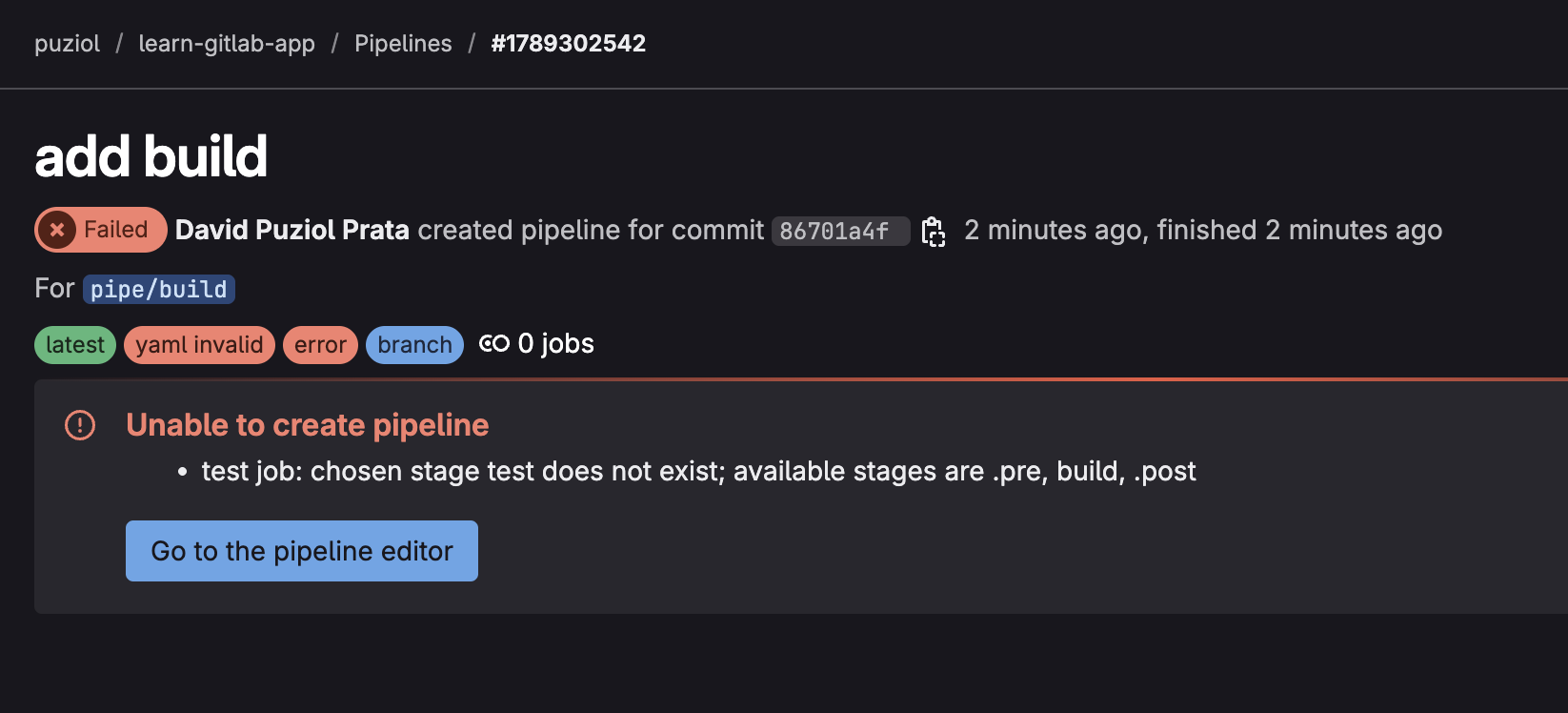
If we have a job and stages, the job needs to have its stage defined.
default:
  tags:
    - general

stages:
  - build

build:
  stage: build #### <<<<<
  image: node:22-slim
  script:
    - node --version
    - npm --version
    - npm ci # Dependency installation
    - npm run build # Will generate the .build folder
    - echo "ACCESS_TOKEN=abc123" > .env # Just a test for reports
  artifacts:
    when: on_success # Already the default
    expire_in: "1 hour"
    paths:
      - build/ # The entire folder without exclusions
    reports:
      dotenv: .env
Redoing the commit.
❯ git checkout -b pipe/build
❯ git add .gitlab-ci.yml
❯ git cm "add build"
❯ git push origin pipe/build


And here's the entire build process.
Running with gitlab-runner 17.11.0 (0f67ff19)
  on general-debian jyvyfkmfg, system ID: r_szdZCOX2meST
Preparing the "docker" executor
00:09
Using Docker executor with image node:22-slim ...
Using locally found image version due to "if-not-present" pull policy
Using docker image sha256:a7bca975c7f3a862dc60f3d8aaa3862fce3208066dd3567f060381b506f38402 for node:22-slim with digest node@sha256:157c7ea6f8c30b630d6f0d892c4f961eab9f878e88f43dd1c00514f95ceded8a ...
Preparing environment
00:01
Running on runner-jyvyfkmfg-project-69186599-concurrent-0 via 1d8224d47375...
Getting source from Git repository
00:02
Fetching changes with git depth set to 20...
Reinitialized existing Git repository in /builds/puziol/learn-gitlab-app/.git/
Created fresh repository.
Checking out 36c04930 as detached HEAD (ref is pipe/build)...
Skipping Git submodules setup
Executing "step_script" stage of the job script
00:14
Using docker image sha256:a7bca975c7f3a862dc60f3d8aaa3862fce3208066dd3567f060381b506f38402 for node:22-slim with digest node@sha256:157c7ea6f8c30b630d6f0d892c4f961eab9f878e88f43dd1c00514f95ceded8a ...
$ node --version # Our first commands
v22.15.0
$ npm --version
10.9.2
$ npm ci # Package installation
added 440 packages, and audited 441 packages in 10s
152 packages are looking for funding
  run \`npm fund\` for details
found 0 vulnerabilities
$ npm run build
> [email protected] build
> vite build
vite v6.3.2 building for production...
transforming...
✓ 31 modules transformed.
rendering chunks...
computing gzip size... # See below the folders that were generated.
build/index.html                   0.47 kB │ gzip:  0.30 kB
build/assets/react-CHdo91hT.svg    4.13 kB │ gzip:  2.05 kB
build/assets/index-n_ryQ3BS.css    1.39 kB │ gzip:  0.71 kB
build/assets/index-BcKvuBhg.js   147.40 kB │ gzip: 47.66 kB
✓ built in 1.47s
$ echo "ACCESS_TOKEN=abc123" > .env
Uploading artifacts for successful job
00:04
Uploading artifacts... # Build upload
build/: found 7 matching artifact files and directories
Uploading artifacts as "archive" to coordinator... 201 Created  id=9845340606 responseStatus=201 Created token=eyJraWQiO
Uploading artifacts... # .env upload
.env: found 1 matching artifact files and directories
Uploading artifacts as "dotenv" to coordinator... 201 Created  id=9845340606 responseStatus=201 Created token=eyJraWQiO
Cleaning up project directory and file based variables
00:01
Job succeeded
When we download on the pipeline page we always receive an artifact.zip file. This is because we didn't declare the name of our artifact. We'll do this later, when we understand specific gitlab-ci variables.
  artifacts:
    name: artifacts-[job_name]-[commit_sha] # this would be a good name... but we don't know how to do this yet, so wait for scenes from the next chapters.
It's worth mentioning that multiple pipelines can be running at the same time on this same code and each one has its specific artifacts.