Job Dependencies
We've already been able to generate some type of dependency so far using different stages, but all jobs are executing in parallel and when we want one job to execute after another we end up moving to another stage.
Dependency between jobs in GitLab CI works based on stages and keys like needs and dependencies.
Needs
With needs we create direct dependency between jobs, regardless of the stage they're in.
Allows jobs from different stages to run out of stage order if necessary, but only after the specified jobs finish. What do I mean by this?
stages:
  - build
  - test

job_a:
  stage: build
  script: echo "Build"

job_b:
  stage: test
  script: echo "Test"
  # It's a list of jobs that need to finish for this to execute.
  needs: [job_a] # job_b depends on job_a, but can start right after job_a finishes, without waiting for the entire stage
With this we can gain speed in the pipeline. One very important thing is that it's not possible for a job in an earlier stage to depend on a job in a later stage.
stages:
  - build
  - test

job_a:
  stage: build # stage 1
   needs: [job_b] # Will it depend on something that hasn't started?
  script: echo "Build"

job_b:
  stage: test # stage 2
  script: echo "Test"
Even if the flow is possible, like this example below we can't execute this, because the rule is clear in GitLab CI "A job can only need jobs from earlier or the same stage".
stages:
  - check
  - build
  - test

job_a:
  stage: check # stage 1
  script: echo "check"

job_b:
  stage: build # stage 2
  needs: [job_d]
  script: echo "build"

job_c:
  stage: test # stage 3
  script: echo "Test"

job_d:
  stage: test # stage 4
  needs: [job_a] # In theory this job would execute right after job_a, before job_b which depends on it.
  script: echo "Test"
Another detail that is important for performance is to put an empty needs (needs: []) to start. This ensures it executes right at the beginning of the pipeline.
When using needs GitLab CI creates explicit dependencies between jobs. The artifacts: parameter inside needs controls whether the current job will or will not download the artifacts from the dependent job. When you don't need the artifact disable it to help gain speed. The default is artifacts: true (or omitted, which is the default) → downloads the artifacts.
stages:
  - build
  - test

job_a:
  stage: build
  script: echo "Build"
  artifact:
  #... push a file for example

job_b:
  stage: test
  script: echo "Test"
  needs:
    - job: job_a
      artifacts: false # Will not pull job_a artifacts
Dependencies
Just for the record besides needs there's dependencies.
- It was only used to pull artifacts from other jobs, without controlling execution.
- It didn't influence the order of jobs nor did it release parallelism.
- Replaced by needs, which does all this and better.
- Dependencies only gets artifacts from jobs in previous stages and doesn't allow parallel execution, since all jobs from a previous stage need to finish.
- Needs is more flexible: you can use it to get artifacts from jobs in any previous stage or the same stage, and allows parallelism, executing jobs as soon as the necessary dependency is completed.
If GitLab itself emphasizes to use needs it's better to use it because that's how something starts to be deprecated. In the official documentation itself we have the following sentence.
"To fetch artifacts from a job in the same stage, you must use needs:artifacts. You should not combine dependencies with needs in the same job."
Now let's put some needs in our project pipeline.
Just to remember this is our stage.
stages:
  - check # Analyses that don't need the build/ folder
  - build # build + image build
  - deploy # still fake
We'll make two needs here. The build job inside the build stage can start together with the checks even in the later stage so we can gain speed and for this we use needs: []. In image creation we'll wait for the build job to finish.
We have this for our build stage.
.rules-only-main-mr: # AT THIS MOMENT I'LL KEEP THIS RULE JUST TO MAKE IT EASY TO UNDERSTAND, BUT WE'LL CHANGE IT LATER.
  rules:
    - if: '$CI_MERGE_REQUEST_TARGET_BRANCH_NAME == "main"'
      when: always

build:
  stage: build
  needs: [] # Doesn't depend on jobs from previous stages, so executes right away
  extends: [.rules-only-main-mr]
  script:
    - node --version
    - npm --version
    - npm ci
    - npm run build
  artifacts:
    when: on_success
    expire_in: "1 hour"
    paths:
      - build/

image-build:
  stage: build
  needs: [build] # Only depends on the build job above.
  extends: [.rules-only-main-mr] # Attention here... Explained below
  image:
    name: gcr.io/kaniko-project/executor:v1.23.2-debug
    entrypoint: [""]
  script:
    - /kaniko/executor
      --context "${CI_PROJECT_DIR}"
      --dockerfile "${CI_PROJECT_DIR}/Dockerfile"
      --no-push
      --verbosity info
If image-build didn't have the same rule as the build rule, we would have problems. This job would be launched without the job it depends on and we would have this error.

See the build job being executed at the same time as the check stage jobs.
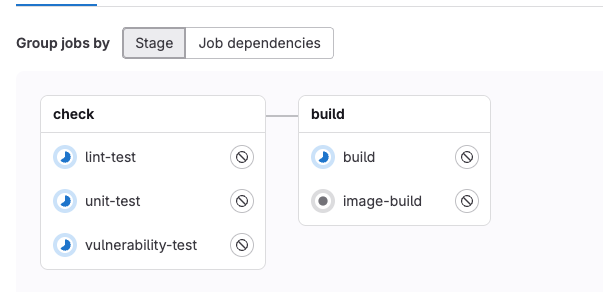
Now let's fix some things at build time so it uses the build folder generated by the previous job and let's put it in a separate file called Dockerfile.release. In pipelines we'll use this Dockerfile.release and locally we can use the Dockerfile.
The difference is that using the Dockerfile instructions it will build the project using a container and then, with the files already generated by that container, it will build another one using files from the first. In our study we need to take the build folder generated by the build process and that's why another Dockerfile.release was provided to leverage the artifact generated by the build.
Create a Dockerfile.release in the project root with the following content.
#Dockerfile.release
FROM node:22-alpine

RUN npm install -g serve

WORKDIR /app

COPY build/ ./build

EXPOSE 3000

CMD ["serve", "-s", "build", "-l", "3000"]
We're still going to improve this in the future to gain performance.
Using Kaniko, we could do the build and at the same time push in a single command, but we'll separate these responsibilities to create more dependencies between jobs and explore the study concepts.
To build the image we don't need access to Docker Hub, but to push we do. Both in development (develop branch) and in production (main branch) we'll use the artifact generated by the build, but we'll push with different tags.
- The develop branch will generate the image with the latest tag
- The main branch will generate the image with stable tag
- The image push should only be done if the merge request is accepted.
We'll use the latest tag in dev and stable in prod. Not for real life!
The flow will be as follows:
- In the merge request we'll execute the entire check stage.
- When accepting the merge we'll execute the entire build stage and in the future deploy.
- The main branch should only accept merge request coming from develop: This should be a GitLab policy, not the pipeline. Using CI to block wrong merges works, but has limitations and risks.
- The person has already opened the merge request, maybe already started review or even approved. Only fails in the pipeline.
- Someone with permission can ignore failures, disable the job or force the merge.
- Only prevents the pipeline from passing, but doesn't avoid the error at the source, which is the MR itself.
For this last case how should we act? Using Merge request branch workflow in settings > merge requests. However this feature is only available for now in GitLab's paid plan. With this feature we can define rules to open the merge request. Generally large companies tend to pay to use GitLab because it has other advantages!.
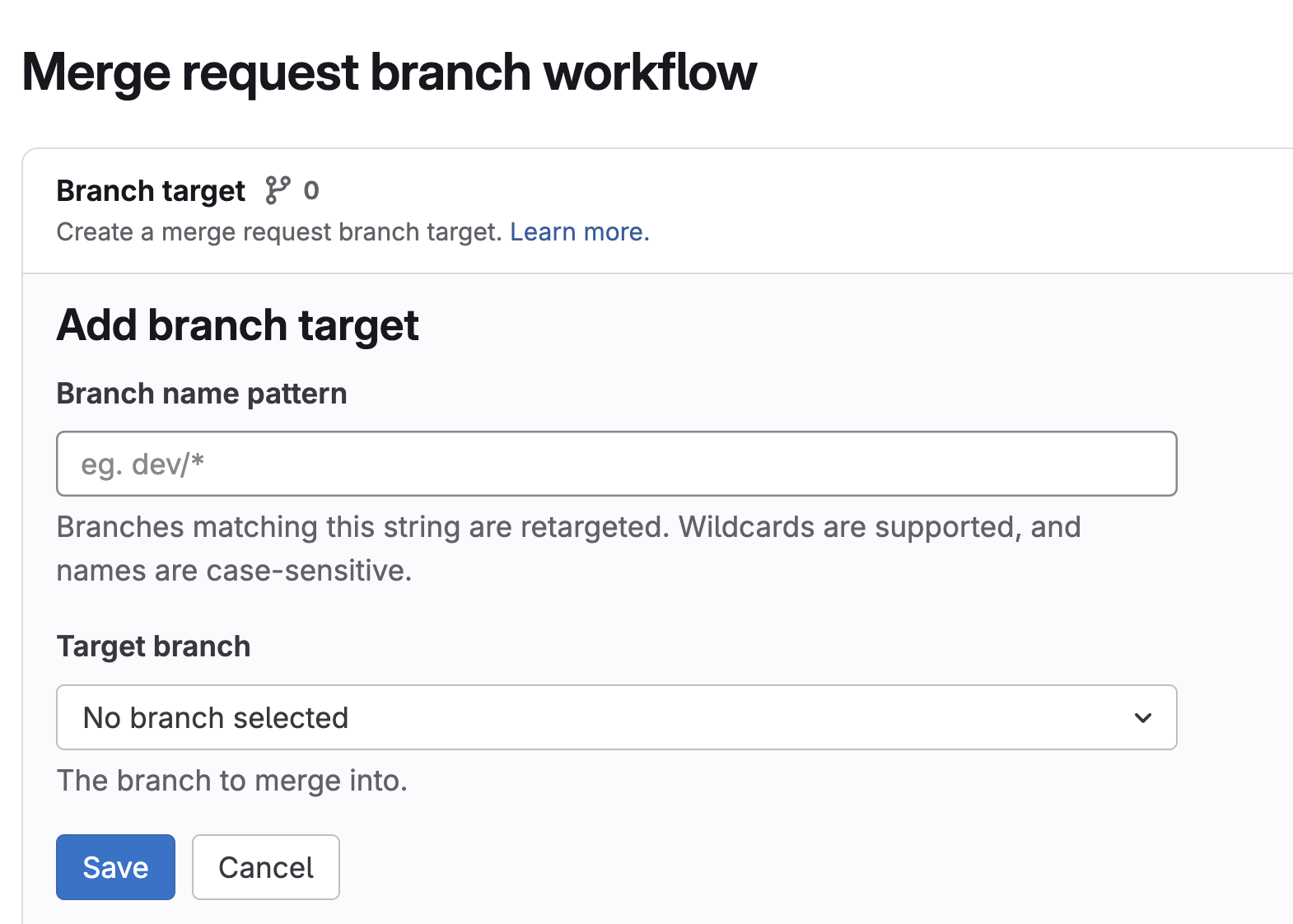
Since we're not going this route, we'll keep the protections enabled for the develop and main branches so that only repository maintainers can accept a merge request having these branches as target. "With great power comes great responsibility".
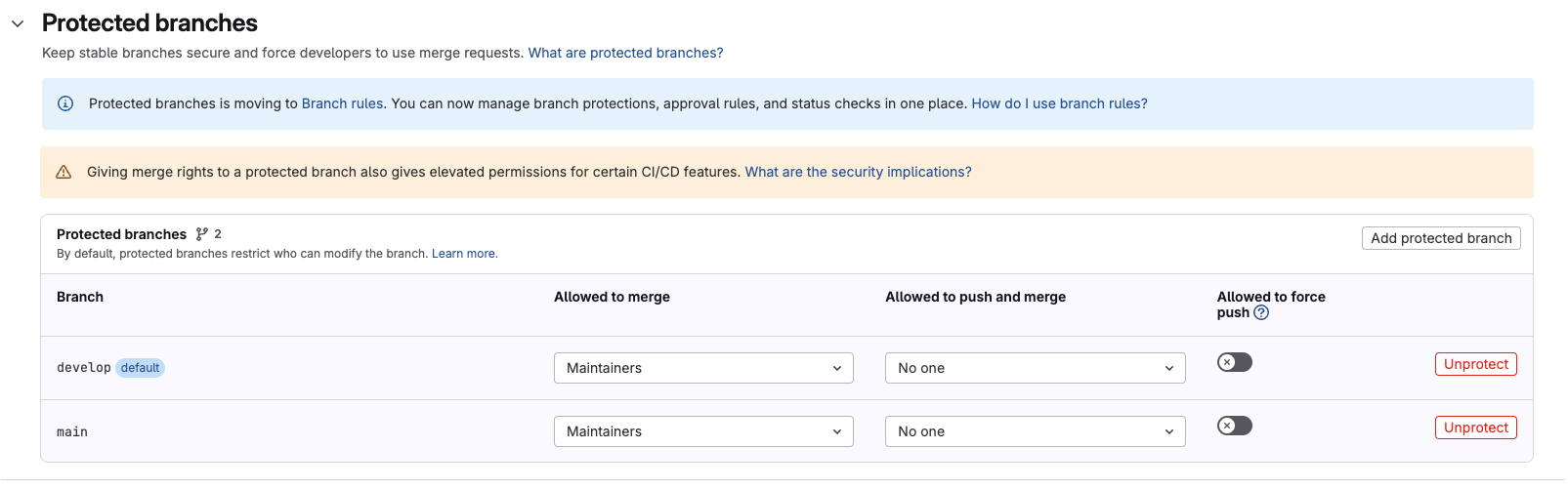
Here's what we'll need in the build stage to start.
# We're now changing the previous rule that was called .rules-only-main-mr
.rules-merged-accepted:
  rules:
    - if: '$CI_COMMIT_BRANCH == "develop" && $CI_PIPELINE_SOURCE == "push"'
      variables:
        TAG: latest # If it's develop the image tag will be latest
      when: always
    - if: '$CI_COMMIT_BRANCH == "main" && $CI_PIPELINE_SOURCE == "push"'
      variables:
        TAG: stable # If it's production the image tag will be stable
      when: always

# We'll need the build to generate the build folder that will be made available as an artifact.
build:
  stage: build
  needs: [] # But we can speed up the process so it executes faster.
  extends: [.rules-merged-accepted] # Leveraging the rule and saving code.
  script:
    - npm ci
    - npm run build
  artifacts:
    when: on_success
    expire_in: "1 hour"
    paths:
      - build/

build-image:
  stage: build
  needs: [build] # Just to remember, by default it downloads the artifacts.
  extends: [.rules-merged-accepted] # More code savings
  image:
    name: gcr.io/kaniko-project/executor:v1.23.2-debug # ATTENTION WE'LL TALK ABOUT THESE DEBUG IMAGES LATER
    entrypoint: [""] # ATTENTION WE'LL EXPLAIN WHY WE DISABLE THE ENTRYPOINT LATER
  variables:
    DOCKER_CONFIG: "/kaniko/.docker"
  before_script:
    - mkdir -p /kaniko/.docker  # Creates the Docker config directory
    # The DOCKER_USERNAME AND DOCKER_TOKEN variables must be defined in the repository
    # Kaniko uses this file to login to the registry in case of push
    - echo "{\"auths\":{\"https://index.docker.io/v1/\":{\"username\":\"$DOCKER_USERNAME\",\"password\":\"$DOCKER_TOKEN\"}}}" > /kaniko/.docker/config.json
  script:
    - >
      /kaniko/executor \
        --context "${CI_PROJECT_DIR}" \
        --dockerfile "${CI_PROJECT_DIR}/Dockerfile.release" \
        --tarPath "image.tar" \
        --destination "learn-gitlab-app:latest" \
        --no-push
    # We won't push, just generate the image and upload in the artifact with the name image.tar
  artifacts:
    paths:
      - image.tar
    expire_in: 1 hour

# The push process is the same as build the difference is that it uploads.
# Kaniko doesn't allow using the image.tar as we did above. It redoes the build completely. We'll solve this soon.
push-image:
  extends: [build-image] # Saving code!
  needs:
  - job: build-image
    artifacts: false # We won't need the artifact
  script:
    - >
      /kaniko/executor
      --context "${CI_PROJECT_DIR}"
      --dockerfile "${CI_PROJECT_DIR}/Dockerfile.release"
      --destination "docker.io/${DOCKER_USERNAME}/${CI_PROJECT_NAME}:${TAG}"
  artifacts: {}
We slimmed down the pipeline by taking advantage of extend concepts, improved the rule to create image only if the merge is accepted for specific branches, saved the artifact (/docs/pipeline/gitlab-ci/pics/image.tar), but the push is not being done from this image because kaniko can't do this, it needs to rebuild the image.
We could execute push-image in parallel because it doesn't make sense to wait for what we don't need, after all kaniko is not using the image that's in the artifact. We did this just to illustrate a dependency idea.
push-image:
  ...
  needs: # We could remove this entire block.
  - job: build-image
    artifacts: false
However what we want is to push the generated image and for this we have other tools capable of doing this (crane and skopeo). We'll talk about this soon.
DEBUG Images
An image like kaniko and crane that we'll use below have the entrypoint being the tool's own command line. To reduce the image everything is removed, including the shell. However GitLab needs a shell to execute the script. That's why we opt for images usually with the debug tag that include a shell inside, but still the entrypoint is the tool's command line and that's why we disable the entrypoint using (entrypoint: [""]) to change the entrypoint to the image's default shell. What matters to us in the image is what they offer us installed.
This way we can use before_script, script and after_script.
Using Crane
Knowing that Kaniko doesn't do what we want, let's adjust to push the image.tar artifact itself and for this we can use crane or even skopeo.
Let's adjust this pipeline to use crane.
.rules-merged-accepted:
  rules:
    - if: '$CI_COMMIT_BRANCH == "develop" && $CI_PIPELINE_SOURCE == "push"'
      variables:
        TAG: latest
      when: always
    - if: '$CI_COMMIT_BRANCH == "main" && $CI_PIPELINE_SOURCE == "push"'
      variables:
        TAG: stable
      when: always

build:
  stage: build
  needs: []
  extends: [.rules-merged-accepted]
  script:
    - node --version
    - npm --version
    - npm ci
    - npm run build
  artifacts:
    when: on_success
    expire_in: "1 hour"
    paths:
      - build/

build-image:
  stage: build
  needs: [build]
  extends: [.rules-merged-accepted]
  image:
    name: gcr.io/kaniko-project/executor:v1.23.2-debug
    entrypoint: [""]
  variables:
    DOCKER_CONFIG: "/kaniko/.docker"
  before_script:
    - mkdir -p /kaniko/.docker  # Creates the Docker config directory
    # the DOCKER_USERNAME AND DOCKER_TOKEN variables must be defined in the repository
    - echo "{\"auths\":{\"https://index.docker.io/v1/\":{\"username\":\"$DOCKER_USERNAME\",\"password\":\"$DOCKER_TOKEN\"}}}" > /kaniko/.docker/config.json
  script:
    - >
      /kaniko/executor \
        --context "${CI_PROJECT_DIR}" \
        --dockerfile "${CI_PROJECT_DIR}/Dockerfile.release" \
        --tarPath "image.tar" \
        --destination "learn-gitlab-app:latest" \
        --no-push
  artifacts:
    paths:
      - image.tar
    expire_in: 1 hour

push-image:
  stage: build
  needs: [build-image]
  extends: [.rules-merged-accepted]
  image:
    name: gcr.io/go-containerregistry/crane:debug # Debug....
    entrypoint: [""] # Zeroing the entrypoint
  variables:
    REGISTRY: docker.io
  script:
    - crane auth login $REGISTRY -u $DOCKER_USERNAME -p $DOCKER_TOKEN
    - crane push image.tar docker.io/${DOCKER_USERNAME}/${CI_PROJECT_NAME}:${TAG}
Now we're pushing the image.tar.