Performance and Limits
Let's start our pipeline with the node:22 image and do some tests. Add the .gitlab-ci.yml at the project root. If you don't want to use the specific runner you prepared, then remove the tag.
default:
  tags:
    - general # Running on our runner..
test:
  image: node:22
  script:
    - node --version
    - npm --version
❯ git add .gitlab-ci.yml
❯ git cm "add ci"
❯ git push origin pipe/base

And we'll have this log in the job.
Running with gitlab-runner 17.11.0 (0f67ff19)
  on general-debian jyvyfkmfg, system ID: r_szdZCOX2meST
Preparing the "docker" executor
00:57
Using Docker executor with image node:22 ...
Using helper image:  registry.gitlab.com/gitlab-org/gitlab-runner/gitlab-runner-helper:x86_64-v17.11.0
Authenticating with credentials from job payload (GitLab Registry)
Pulling docker image registry.gitlab.com/gitlab-org/gitlab-runner/gitlab-runner-helper:x86_64-v17.11.0 ...
Using docker image sha256:c7faacb47f4dbac2ce2a8181978106fdd2632d6abf2979bd22cb2fc038af0067 for registry.gitlab.com/gitlab-org/gitlab-runner/gitlab-runner-helper:x86_64-v17.11.0 with digest registry.gitlab.com/gitlab-org/gitlab-runner/gitlab-runner-helper@sha256:02f7f7d9d1d9cadbcb359b03d51bb32558dd147b00bf77a98d6c1673397616b0 ...
Pulling docker image node:22 ...
Using docker image sha256:c5602f2ebc084a8e7e1fb08f993c842c4667f50fd93af7da35a40096f0c0ee11 for node:22 with digest node@sha256:473b4362b26d05e157f8470a1f0686cab6a62d1bd2e59774079ddf6fecd8e37e ...
Preparing environment
00:01
Running on runner-jyvyfkmfg-project-69186599-concurrent-0 via 1d8224d47375...
Getting source from Git repository
00:03
Fetching changes with git depth set to 20...
Initialized empty Git repository in /builds/puziol/learn-gitlab-app/.git/
Created fresh repository.
Checking out 7a54fc17 as detached HEAD (ref is pipe/base)...
Skipping Git submodules setup
Executing "step_script" stage of the job script
00:01
Using docker image sha256:c5602f2ebc084a8e7e1fb08f993c842c4667f50fd93af7da35a40096f0c0ee11 for node:22 with digest node@sha256:473b4362b26d05e157f8470a1f0686cab6a62d1bd2e59774079ddf6fecd8e37e ...
$ node --version
v22.15.0
$ npm --version
10.9.2
Cleaning up project directory and file based variables
00:01
Job succeeded
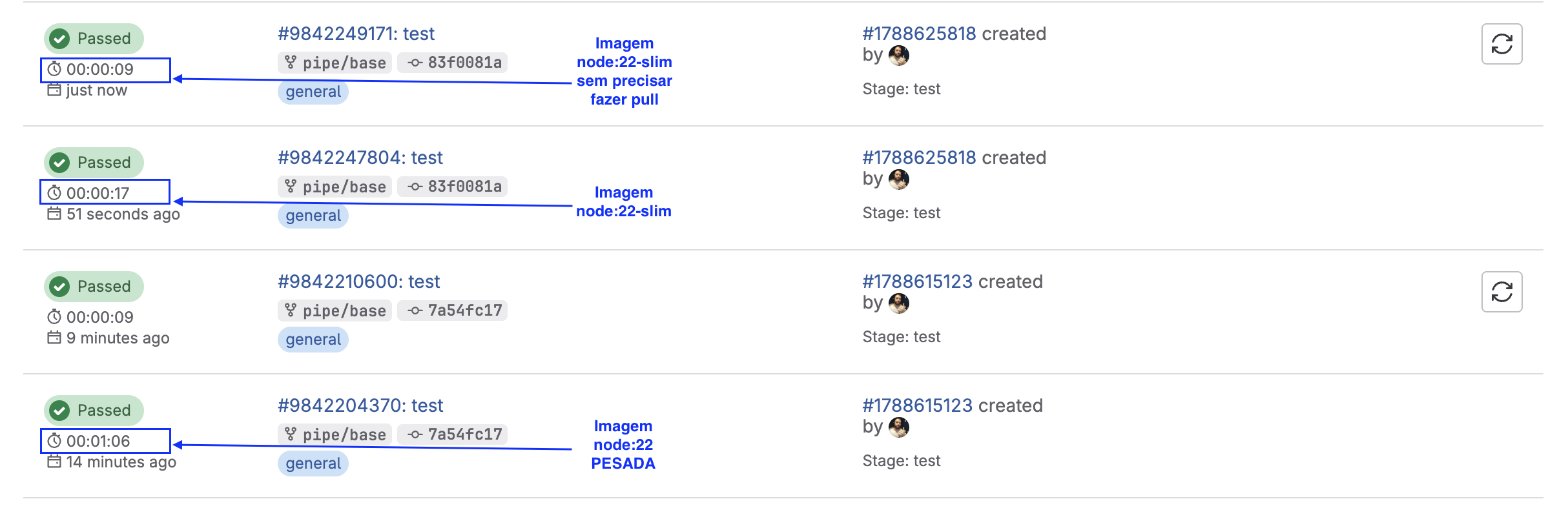
It downloaded the node:22 image to the host, as it didn't exist in the system.
 docker images | grep node
node                                                                22                c5602f2ebc08   4 days ago      1.12GB
Do we really need 1.1GB of image? Of course not, let's solve this by changing to a smaller and more direct image.
| Image | Size | Observation |
|---|---|---|
| node:22 | ~1.1GB | Full, complete, slow. |
| node:22-slim | ~200MB | Best choice for 90% of projects. |
| node:22-alpine | ~60MB | Very light, but may lack lib (e.g.: glibc, python). |
Let's opt for node:22-slim to start and at the end of everything, we can change to node:22-alpine to fine-tune the pipeline.
Tips
- Look for official images on dockerhub instead of using community images to avoid security problems. Anyone can create an image and publish with whatever they want.
- Using official images runs less risk of being removed from dockerhub.
- Avoid large images to gain performance and spend less resources. It's necessary to look for the most used images according to each type of project. Generally they always reduce using alpine as a base.
- If you're going to use something unofficial, know the project and its reliability.
- Check the documentation of the tool or framework you're using that generally indicates images that work well.
- Dockerhub has pull limitations, so it's good that you have these images somewhere that is just yours to remove this limit that can stop your pipeline.
- Docker Hub rate limit: if you're not logged in (anonymous), it's 100 pulls per 6 hours per IP. If you're logged in (free account), it's 200 pulls per 6 hours.
- If you exceed this limit, you'll start getting error 429 Too Many Requests.
- Performance: each pull downloads the entire image (if not cached on the runner), which is slow and wastes bandwidth.
- Reliability: if Docker Hub has instability (it happens sometimes), your pipeline can fail without even being your fault.
Yeah... that's how they make money.
What can we do? Tell gitlab-runner to only download if it doesn't have the image, this will drastically decrease. In the gitlab-runner config.toml file we can pass this configuration.
  [runners.docker]
    tls_verify = false
    image = "debian:bullseye-slim"
    privileged = false
    disable_entrypoint_overwrite = false
    oom_kill_disable = false
    disable_cache = false
    volumes = ["/cache"]
    shm_size = 0
    network_mtu = 0
    pull_policy = "if-not-present"  # <<< added here
With the new image we're going to use (node:22-slim) let's test, including the time.
default:
  tags:
    - general # Running on our runner..
test:
  image: node:22-slim
  script:
    - node --version
    - npm --version
❯ git add .gitlab-ci.yml
❯ git cm "change image to slim"
❯ git push origin pipe/base
Namespace Limit
GitLab gives you 10 GB per namespace (includes repositories + artifacts + container registry).
Further ahead we'll see more about artifacts and how they are generated and depending on the plan you have on GitLab, it's not worth keeping artifacts for a long time, being a good idea to keep only main/master branch artifacts for longer.
Container Images we can store outside GitLab, generally in the cloud it's very cheap so it's worth using, or use your own registry like Harbor, for example.
Storing test reports is much better to be done in GitLab itself to not lose integration with GitLab tools, we'll see about reports further ahead.