Environment and Anchors
Let's imagine we have 2 branches (Protected) with the following rule in our development team.
- develop: everything on this branch should be deployed to the develop environment.
- main: this branch will be the production branch.
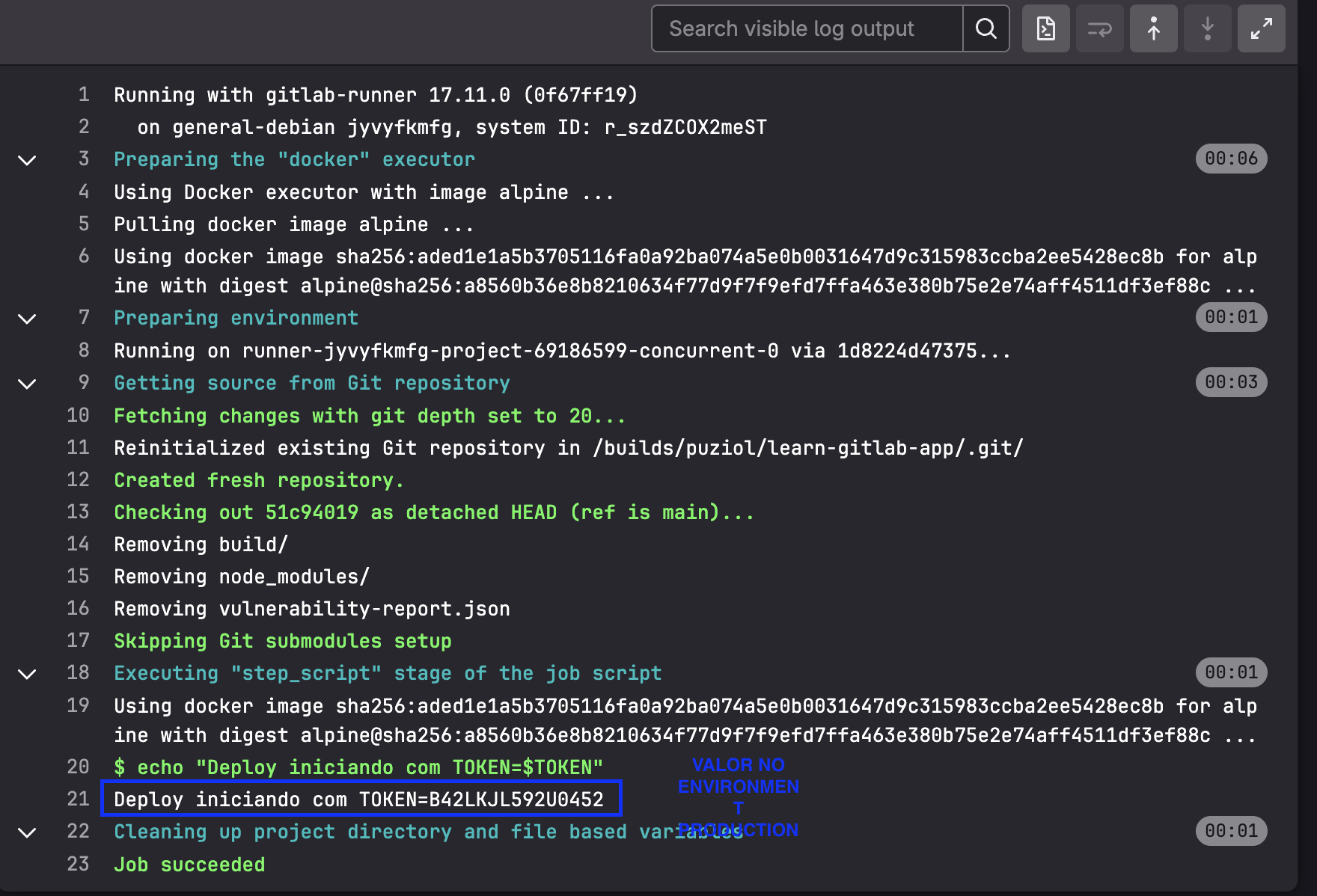
We can define the same variable, for example, TOKEN that we'll use to do something. However, if it's in the development environment TOKEN=develop123 and if it's in the production environment TOKEN=B42LKJL592U0452.
How can we do this?
When adding a variable, only all is available. In the repository, go to Operate > Environments and create two environments; develop and production.
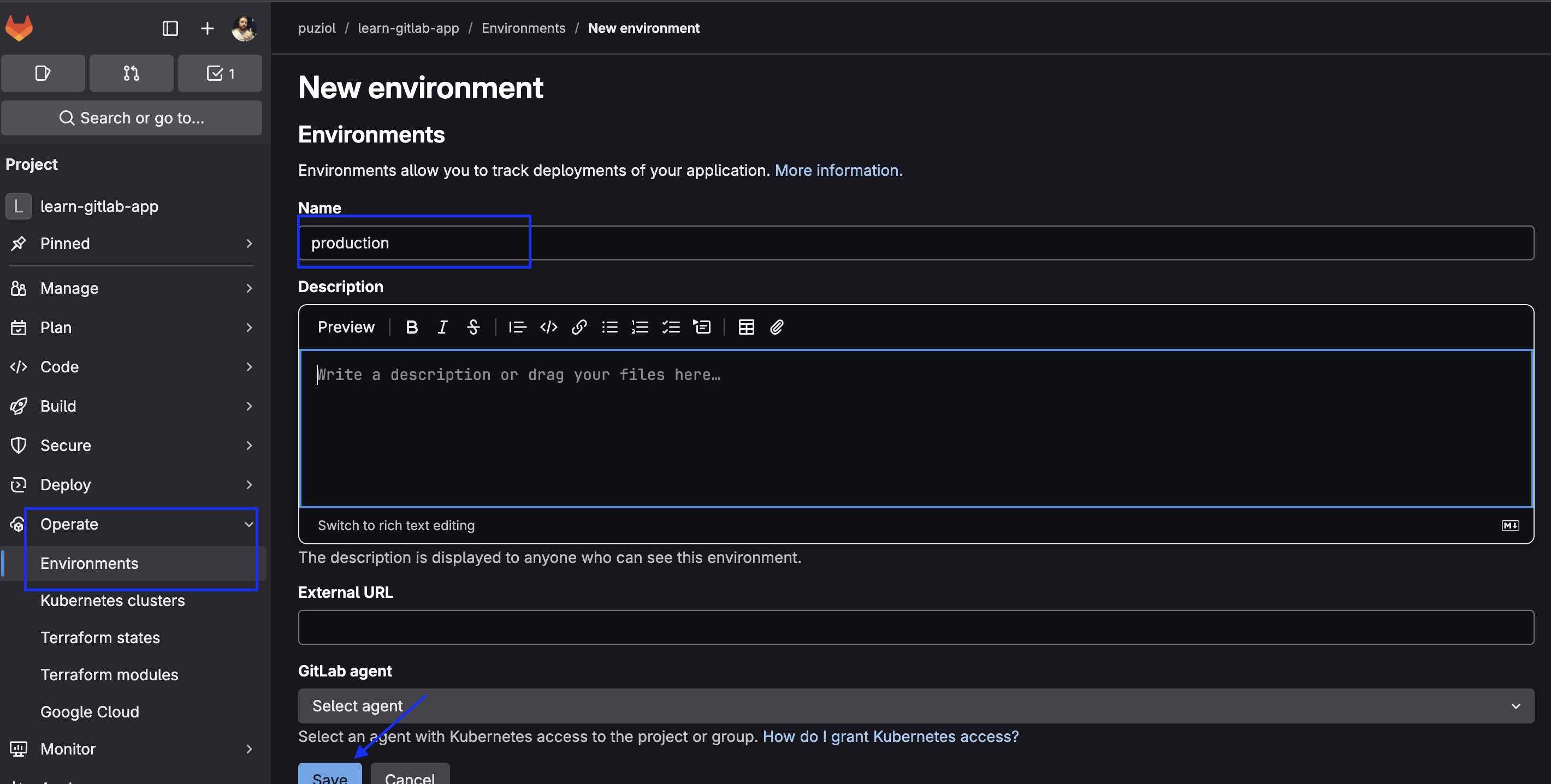

There are many more functionalities on top of this, but for now we only need to define these environments and nothing else.
Now create the TOKEN variable for each of the environments as you can choose.
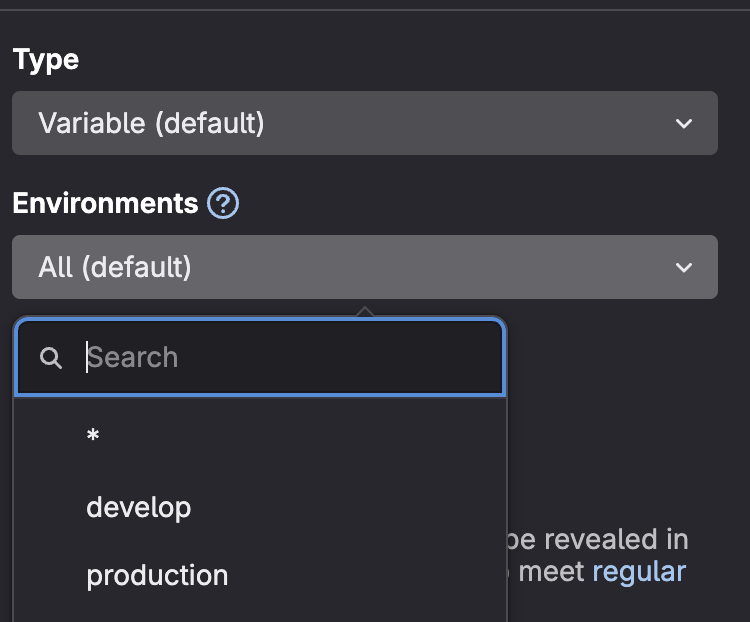

Let's start with this skeleton to talk about environment...
stages:
  - check
  - build
  - deploy # Added

deploy-develop:
  stage: deploy
  environment:
    name: develop
  script:
    - echo "Deploy starting with TOKEN=$TOKEN"
  rules:
    - when merge is accepted to develop

deploy-production:
  stage: deploy
  environment:
    name: production
  script:
    - echo "Deploy starting with TOKEN=$TOKEN"
  rules:
    - when merge is accepted to main
Until now our steps have only been CI right? So they run to check things so that a merge can be approved. After a merge is approved and accepted, the code is actually merged.
If a merge is accepted what does that mean?
When a merge request (MR) is accepted (merged), what happens is an automatic push made by GitLab to the target branch (develop, main, etc.) with the resulting content from the merge.
Accepting an MR = GitLab does a git merge and pushes to the target branch
This will generate another pipeline with a new event. We're going to delve even deeper into this, but it's good to understand this scenario, so let's fill in our rule.
deploy-develop:
  stage: deploy
  environment:
    name: develop
  script:
    - echo "Deploy starting with TOKEN=$TOKEN"
  rules:
    - if: '$CI_COMMIT_BRANCH == "develop"'

deploy-production:
  stage: deploy
  environment:
    name: production
  script:
    - echo "Deploy starting with TOKEN=$TOKEN"
  rules:
    - if: '$CI_COMMIT_BRANCH == "main"'
With this rule, if the commit is on main or develop, regardless of how it happened (direct or via merge request), then the job will participate in the pipeline workflow.
The correct way would be through a merge, but a direct git push from someone could be done. We can work around this by protecting the branches, but we could also ensure it in rules if someone unprotects them.
When creating the merge request we have the following pipeline running.
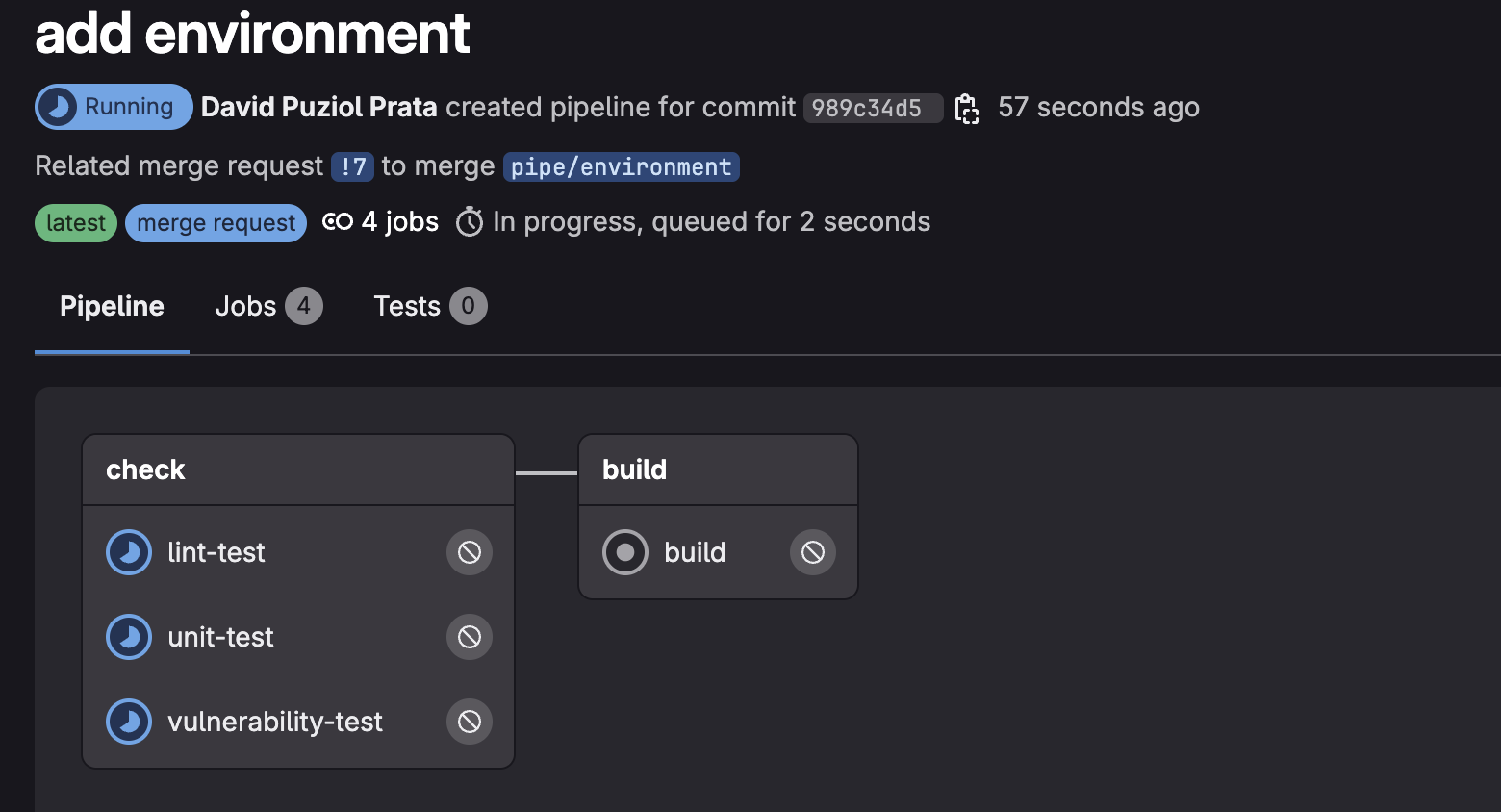
The event here was merge request to main and not commit to main or develop.
The entire workflow (sequence of jobs) of the pipeline is generated before creating the jobs. However, before accepting this merge request that would trigger the (fake) deploy-only stage, let's improve our code a bit more and learn another method of code reuse.
Both jobs are very similar, we can define develop and only adjust the difference in main. Let's learn the concept of anchor.
deploy-develop: &deploy-develop  # Defining the anchor here
  image: alpine
  stage: deploy
  script:
    - echo "Deploy starting with TOKEN=$TOKEN"
  rules:
    - if: '$CI_COMMIT_BRANCH == "develop"'
  environment:
    name: develop

deploy-production:
  <<: *deploy-develop  # Inheriting the deploy-develop configuration
  environment:
    name: production  # Changing to the production environment
  rules:
    - if: '$CI_COMMIT_BRANCH == "main"'  # Changing the rule for the main branch
Here we reused little code, but this is a typical scenario where you can slim down a lot.
Extends vs Anchor
Extends and anchors (& and <<) may seem similar at first glance, as both are used to reuse configurations in GitLab CI, but there are some important differences between them.
Extends allows a job to inherit configurations from another job. GitLab treats this in a way more geared towards job structure inheritance, like you would do with classes in object-oriented programming.
- Easier to merge the extends list.
Anchors in YAML with the << operator are a YAML feature and are not exclusive to GitLab CI. They allow you to repeat configurations by defining an anchor and referencing it in different parts of the YAML file.
- More flexible use: They are more generic and can be used for any part of YAML.
- Allows hash merging: The
<<operator performs a hash merge, that is, it simply incorporates the content of an anchor elsewhere, without creating a link as explicit as extends. - Simplicity and readability: Less complexity, since you're not creating an inheritance structure, just reusing a set of configurations.
YAML is processed from top to bottom. This means you must first create the anchor to then use it. HOWEVER THIS IS ALSO VALID FOR EXTENDS, THE TEMPLATE MUST BE DEFINED FIRST.
Example of anchor usage.
deploy-develop: &deploy-develop  # Defining the anchor here
  stage: deploy
  image: alpine
  script:
    - echo "Deploy starting with TOKEN=$TOKEN"
  environment:
    name: develop
  rules:
    - if: '$CI_COMMIT_BRANCH == "develop"'

deploy-production:
  <<: *deploy-develop  # Inheriting the deploy-develop configuration
  environment:
    name: production  # Changing to the production environment
  rules:
    - if: '$CI_COMMIT_BRANCH == "main"' # Changing the rule for the main branch
One thing anchors do that extends doesn't. Silly example, but it reflects everything.
blocodechaves: &blocodechaves
  name: production
scriptdeploy: &scriptdeploy
  - |
    echo "starting script"
    echo "finishing script"
deploy-production:
  stage: deploy
  image: alpine
  environment:
    <<: *blocodechaves # Direct injection without needing to define the entire structure.
  script:
    <<: *scriptdeploy # Direct injection of just the code.
  rules:
    - if: '$CI_COMMIT_BRANCH == "main"'
If we were to do the same using templates and extends it's necessary to define the entire yaml structure.
# Template only for the script
.script-template:
  script: # Need to pass the script block
    - echo "starting script"
    - echo "finishing script"

# Template only for the environment
.environment-template:
  environment: # Need to pass the environment block
    name: production

deploy-production:
  extends:
    - .script-template  # Will bring the entire block
    - .environment-template  # Will bring the entire block
  stage: deploy
  image: alpine
  rules:
    - if: '$CI_COMMIT_BRANCH == "main"'  # Condition to execute the job on the main branch
Now let's talk about reality. Always seek to use extends for some reasons:
- It's more expressive, reliable and better supported by GitLab.
- Anchors don't have validation support in GitLab and errors can be hard to debug.
- Extends is a native feature maintained by GitLab, it's part of the official CI/CD mechanism.
- GitLab recommends using extends.
- GitLab doesn't control YAML behavior, it only interprets what arrives.
What would our final result look like according to best practices?
.deploy:
  stage: deploy
  image: alpine
  script:
    - echo "Deploy starting with TOKEN=$TOKEN"
  environment:
    name: develop
  rules:
    - if: '$CI_COMMIT_BRANCH == "develop"'

deploy-develop:
  extends: .deploy

deploy-production:
  extends: .deploy
  environment:
    name: production
  rules:
    - if: '$CI_COMMIT_BRANCH == "main"'
However, we could define this production variable at runtime according to the branch and already remove that template there.
deploy:
  stage: deploy
  image: alpine
  script:
    - echo "Deploy starting with TOKEN=$TOKEN"
  environment:
    name: $DEPLOY_ENV
  rules:
    - if: '$CI_COMMIT_BRANCH == "develop"'
      variables:
        DEPLOY_ENV: develop
    - if: '$CI_COMMIT_BRANCH == "main"'
      variables:
        DEPLOY_ENV: production
Commit everything and open the merge to check both pipelines, one from the merge request and another from the commit once you accept the merge.
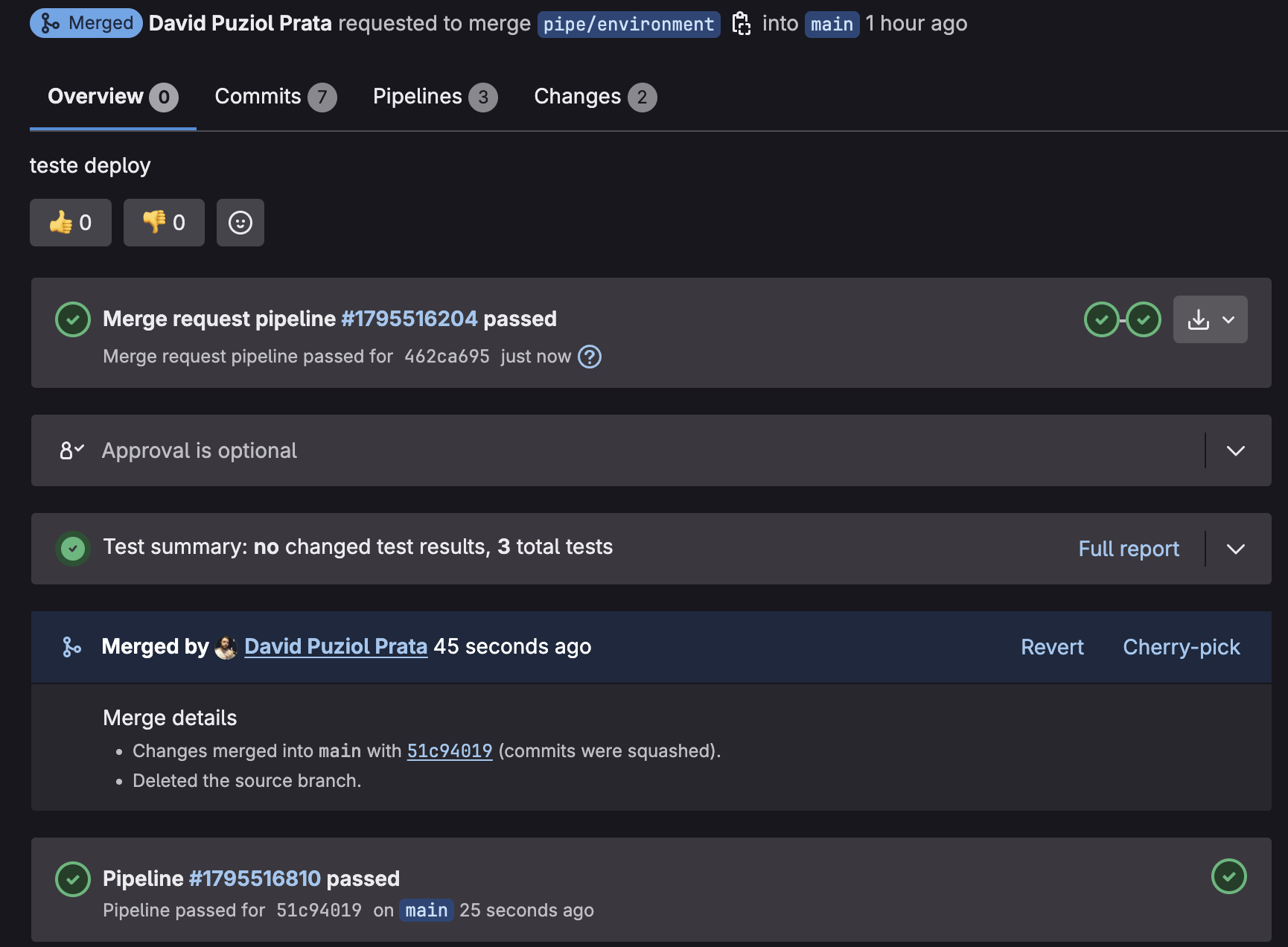

Default
If we observe the definition below, it works as an implicit template, even though it's not a .default. Once defined, all jobs by default extend this.
default:
  tags:
    - general
  image: node:22-alpine