Cache
Cache is used to temporarily save files or directories between pipeline executions. This way, it prevents jobs from having to download/install everything again. It's a way to store temporary files between jobs and pipelines, such as:
- Dependencies (e.g., node_modules, .m2, venv, etc.)
- Intermediate builds
- Test results (in some cases)
Don't confuse with artifacts, which are used to pass files between jobs in the same pipeline. Cache can be reused between different pipelines (by branch or tag, if configured that way).
Cache is not for delivering final build, but to speed up the process.
Let's analyze what we can leverage cache from jobs.
.check:
  stage: check
  before_script: # All jobs below that extend this template do the npm ci process
    - npm ci
  artifacts:
    when: always
    expire_in: "3 months"

.rules-only-mr-main-develop:
  rules:
    - if: '$CI_MERGE_REQUEST_TARGET_BRANCH_NAME == "main"'
      when: always
    - if: '$CI_MERGE_REQUEST_TARGET_BRANCH_NAME == "develop"'
      when: always

lint-test:
  extends:
    - .check
    - .rules-only-mr-main-develop
  # Only this job has a different image because the lint command needs some libs not in node:22-alpine which is the default image
  image: node:22-slim
  script:
    - npm run lint
  artifacts:
    reports:
      codequality: gl-codequality.json

unit-test:
  extends:
    - .check
    - .rules-only-mr-main-develop
  script:
    - npm test
  artifacts:
    reports:
      junit: reports/junit.xml

vulnerability-test:
  extends: [.check,.rules-only-mr-main-develop]
  script:
    - npm audit --audit-level=high --json > vulnerability-report.json
  artifacts:
    paths:
      - vulnerability-report.json
All jobs are running the same thing, including the build stage job itself also runs this command. The difference is that this is inside script after two commands.
build:
  stage: build
  needs: []
  extends: [.rules-merged-accepted]
  script:
    - node --version
    - npm --version
    - npm ci
    - npm run build
  ....
We can change to the proposal below. Now all of them have the same before_script which is to install dependencies.
build:
  stage: build
  needs: []
  extends: [.rules-merged-accepted]
  before_script:
    - npm ci
  script:
    - npm run build
Even if we change the project code, if the lib dependencies are the same and haven't received any update npm-ci will always install the same modules. We can save all this temporarily as a cache to gain speed (and other advantages) and only when a difference is found in the dependencies do we change the cache.
The way I'll do it here is just a project decision.
Doing a review of .gitlab-ci.yml
default:
  tags:
    - general
  image: node:22-alpine

stages:
  - check
  - build
  - deploy

include:
  - 'cicd/globals.yaml' # We'll include all templates that can be global to all jobs here. Must come before the job includes.
  - 'cicd/**/*.yaml'
Inside globals we'll put templates that we can reuse in any of the jobs from any stage.
# cicd/globals.yaml
.setup-node-deps: # template we'll use now.
  before_script:
    - echo "Using npm ci with smart cache"
    - npm ci
  cache: # Remembering that cache can be overwritten in any of the jobs if necessary.
    key:
      files:
        - package-lock.json
    paths:
      - node_modules/ # Items we'll cache

.rules-only-mr-main-develop: # Rule for merge request in both main and develop
  rules:
    - if: '$CI_MERGE_REQUEST_TARGET_BRANCH_NAME == "main"'
      when: always
    - if: '$CI_MERGE_REQUEST_TARGET_BRANCH_NAME == "develop"'
      when: always

.rules-merged-accepted: # Rule for commit to main or develop
  rules:
    - if: '$CI_COMMIT_BRANCH == "develop" && $CI_PIPELINE_SOURCE == "push"'
      variables:
        TAG: latest
      when: always
    - if: '$CI_COMMIT_BRANCH == "main" && $CI_PIPELINE_SOURCE == "push"'
      variables:
        TAG: stable
      when: always
We see that in .setup-node-deps we have the cache block and we'll concentrate on this block that can be defined in any of the jobs. It was defined as a template so we can extend in multiple jobs and already get the before_script and cache block.
Official documentation about cache
The basic syntax is this.
###...
  cache:
    key: cache-name
    paths:
      - path/to/cache
###...
Key
- If you change the key it changes the cache.
- Can be fixed, by branch, by file, etc.
We could think of having a different cache per branch with the example below,
  cache:
    key: "$CI_COMMIT_REF_NAME"
    paths:
      - path/to/cache
But what we did is have a different cache based on a hash of a file. When the pointed file changes its bit set the hash will change, so a new cache will be created, otherwise we leverage the same one that was previously cached.
For this nodejs project we can leverage using the package-lock.json file, because it records exactly which versions of each package (and their subdependencies) are in the node_module folder which is what we want to cache.
  cache:
    key:
      files:
        - package-lock.json
    paths:
      - node_modules/
    policy: pull-push  # default: pull-push
    when: on_success   # default: on_success | when to apply? Allowed values: on_success, on_failure and always
    untracked: false   # default: false | cache all unversioned files if true (like `.gitignore`)
To control cache usage we have policy.
pull-push: downloads and saves (default) if not declared.pull: only downloads, doesn't updatepush: only saves, doesn't download
Cache storage depends a lot on how the runner was configured.
In the case of a local docker runner, as I'm doing here, for each cache a docker volume is created that is mounted in the job when it requests it.
Generally these volumes start with runner-.
Here's an example of docker volumes that were created earlier.
 docker volume ls --format '{{.Name}}' | grep '^runner-'
runner-jyvyfkmfg-project-69186599-concurrent-0-cache-3c3f060a0374fc8bc39395164f415a70
runner-jyvyfkmfg-project-69186599-concurrent-0-cache-c33bcaa1fd2c77edfc3893b41966cea8
runner-jyvyfkmfg-project-69186599-concurrent-1-cache-3c3f060a0374fc8bc39395164f415a70
runner-jyvyfkmfg-project-69186599-concurrent-1-cache-c33bcaa1fd2c77edfc3893b41966cea8
It's good to create a cronjob to delete these volumes weekly or monthly depending on the need. Here's a basic script for this purpose.
#!/bin/bash

echo "Starting cleanup of docker runner- volumes..."

volumes=$(docker volume ls --format '{{.Name}}' | grep '^runner-')

if [ -z "$volumes" ]; then
  echo "No runner- volume found to delete."
  exit 0
fi

for vol in $volumes; do
  echo "Trying to remove volume: $vol"
  docker volume rm "$vol" 2>/dev/null && echo "Removed: $vol" || echo "Could not remove: $vol (maybe in use)"
done

echo "Cleanup finished."
We can also have this cache stored elsewhere (s3, gcs, azure) if configured in config.toml
 [runners.cache]
    MaxUploadedArchiveSize = 0
    # Nothing here is configured
    [runners.cache.s3]
    [runners.cache.gcs]
    [runners.cache.azure]
If you're using a GitLab runner it will probably be storing the cache inside one of these storages, usually with a lifetime of 7 days. If the cache is not accessed during this lifetime then it's eliminated to save space.
Cache is not shared between different projects (repositories). If we have an identical project A and project B they have different caches even if the file hashes are the same and the key is identical.
In the case of the local runner via Docker, these volumes that start with runner- are Docker volumes created dynamically by GitLab Runner to persist cache between jobs. There is no automatic TTL configured by native GitLab Runner. These volumes stay there until you remove them manually or until Docker cleans orphan volumes (via docker volume prune). That's why I put the sweep script above for cleaning.
Let's start an improvement by separating the linter from other tests so it comes first and creates the cache before other tests. Actually I consider linter not a test per se but a pre-check before anything else.
Let's make the following modification to .gitlab-ci.yml.
stages:
  - pre-check # added
  - check
  - build
  - deploy
To maintain project structure, let's create the linter in cicd/pre-check/pre-check.yaml and maintain our project structure. Create the folder if necessary.
#cicd/pre-check/pre-check.yaml
lint-test:
  stage: pre-check # New stage
  extends:
    - .setup-node-deps #  Necessary extends
    - .rules-only-mr-main-develop
  image: node:22-slim
  script:
    - npm run lint
  artifacts:
    reports:
      codequality: gl-codequality.json
Now for cicd/check/check.yaml we can reuse everything and eliminate the linter from here.
.check: # Template for check stage
  stage: check
  extends:
    - .setup-node-deps
    - .rules-only-mr-main-develop
  artifacts:
    when: always
    expire_in: "3 months"

unit-test:
  extends: [.check]
  script:
    - npm test
  artifacts:
    reports:
      junit: reports/junit.xml

vulnerability-test:
  extends: [.check]
  script:
    - npm audit --audit-level=high --json > vulnerability-report.json
  artifacts:
    paths:
      - vulnerability-report.json
Build will only happen if the merge request is accepted and a push happens. It's not necessary to redo all tests if it was already approved before. I see in many companies this recheck happening in a way that the pipeline for develop or main is complete again. Personally I don't think it's necessary, if it reached develop then the only thing we have to do is prepare for deploy, but this is a matter of opinion.
The opinion above has a lot to do with the permission we give to repository maintainers. Generally when I'm responsible, nobody including maintainers can force a direct push to the develop branch if it has a deploy environment. If this is allowed, it's necessary for the pipeline to run in all jobs.
build:
  stage: build
  #needs: [] #  Removed, because it's the beginning of this deploy-only workflow.
  extends:
    - .setup-node-deps
    - .rules-merged-accepted
  script:
    - npm run build
  artifacts:
    when: on_success
    expire_in: "1 hour"
    paths:
      - build/

build-image:
  stage: build
  needs: [build]
  extends: [.rules-merged-accepted]
  image:
    name: gcr.io/kaniko-project/executor:v1.23.2-debug
    entrypoint: [""]
  variables:
    DOCKER_CONFIG: "/kaniko/.docker"
  before_script:
    - mkdir -p /kaniko/.docker  # Creates the Docker config directory
    # the DOCKER_USERNAME AND DOCKER_TOKEN variables must be defined in the repository
    - echo "{\"auths\":{\"https://index.docker.io/v1/\":{\"username\":\"$DOCKER_USERNAME\",\"password\":\"$DOCKER_TOKEN\"}}}" > /kaniko/.docker/config.json
  script:
    - >
      /kaniko/executor \
        --context "${CI_PROJECT_DIR}" \
        --dockerfile "${CI_PROJECT_DIR}/Dockerfile.release" \
        --tarPath "image.tar" \
        --destination "learn-gitlab-app:latest" \
        --no-push
  artifacts:
    paths:
      - image.tar
    expire_in: 1 hour

push-image:
  stage: build
  needs: [build-image]
  extends: [.rules-merged-accepted]
  image:
    name: gcr.io/go-containerregistry/crane:debug
    entrypoint: [""]
  variables:
    REGISTRY: docker.io
  script:
    - crane auth login $REGISTRY -u $DOCKER_USERNAME -p $DOCKER_TOKEN
    - crane push image.tar docker.io/${DOCKER_USERNAME}/${CI_PROJECT_NAME}:${TAG}
When pushing to the repository we immediately have our checks in the merge request.
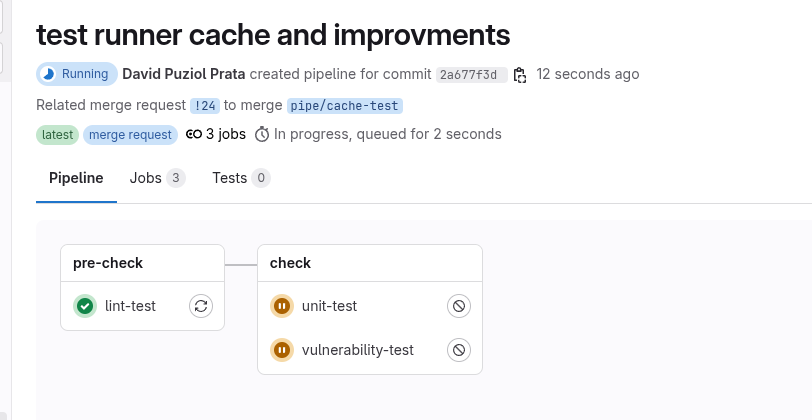
In the linter we have the following log.
...
$ echo "Using npm ci with smart cache"
Using npm ci with smart cache
$ npm ci
added 477 packages, and audited 478 packages in 19s
162 packages are looking for funding
  run `npm fund` for details
1 moderate severity vulnerability
To address all issues, run:
  npm audit fix
Run `npm audit` for details.
$ npm run lint
> [email protected] lint
> eslint -f json -o gl-codequality.json .
Saving cache for successful job
00:06
Creating cache 0_package-lock-704695cbac4cd3d8bf2f2d21eab7ba69acb76ff6-2-non_protected...
node_modules/: found 15696 matching artifact files and directories
No URL provided, cache will not be uploaded to shared cache server. Cache will be stored only locally.
Created cache
Uploading artifacts for successful job # As there was no cache before it created the cache
00:02
Uploading artifacts...
gl-codequality.json: found 1 matching artifact files and directories
Uploading artifacts as "codequality" to coordinator... 201 Created  id=10068991800 responseStatus=201 Created token=eyJraWQiO
Cleaning up project directory and file based variables
00:01
Job succeeded
Already in the case of a later job (unit-test for example) we have.
Running on runner-jyvyfkmfg-project-69186599-concurrent-0 via d9e6ad7b6e46...
Getting source from Git repository
00:06
Fetching changes with git depth set to 20...
Reinitialized existing Git repository in /builds/puziol/learn-gitlab-app/.git/
Created fresh repository.
Checking out 2a677f3d as detached HEAD (ref is refs/merge-requests/24/head)...
Removing gl-codequality.json
Removing node_modules/
Skipping Git submodules setup
Restoring cache # Reused the cache
00:15
Checking cache for 0_package-lock-704695cbac4cd3d8bf2f2d21eab7ba69acb76ff6-2-non_protected...
No URL provided, cache will not be downloaded from shared cache server. Instead a local version of cache will be extracted.
Successfully extracted cache
Executing "step_script" stage of the job script
00:40
Using docker image sha256:97c5ed51c64a35c1695315012fd56021ad6b3135a30b6a82a84b414fd6f65851 for node:22-alpine with digest node@sha256:152270cd4bd094d216a84cbc3c5eb1791afb05af00b811e2f0f04bdc6c473602 ...
$ echo "Using npm ci with smart cache"
Using npm ci with smart cache
$ npm ci
added 477 packages, and audited 478 packages in 33s
162 packages are looking for funding
  run `npm fund` for details
1 moderate severity vulnerability
To address all issues, run:
  npm audit fix
Run `npm audit` for details.
$ npm test
> [email protected] test
> vitest
 RUN  v3.1.2 /builds/puziol/learn-gitlab-app
 ✓ src/App.test.jsx > an always true assertion > should be equal to 2 2ms
 ✓ src/App.test.jsx > App > renders the App component 70ms
 ✓ src/App.test.jsx > App > shows the GitLab logo 10ms
 Test Files  1 passed (1)
      Tests  3 passed (3)
   Start at  08:27:13
   Duration  2.38s (transform 167ms, setup 278ms, collect 104ms, tests 84ms, environment 1.05s, prepare 302ms)
JUNIT report written to /builds/puziol/learn-gitlab-app/reports/junit.xml
 HTML  Report is generated
       You can run npx vite preview --outDir reports/html to see the test results.
Saving cache for successful job
00:11
Creating cache 0_package-lock-704695cbac4cd3d8bf2f2d21eab7ba69acb76ff6-2-non_protected... # GENERATED ANOTHER CACHE
node_modules/: found 15699 matching artifact files and directories  # SEE THAT here node_modules has a different number of files than the linter which was 15696
No URL provided, cache will not be uploaded to shared cache server. Cache will be stored only locally.
Created cache
Uploading artifacts for successful job
00:03
Uploading artifacts...
reports/junit.xml: found 1 matching artifact files and directories
Uploading artifacts as "junit" to coordinator... 201 Created  id=10068991801 responseStatus=201 Created token=eyJraWQiO
Cleaning up project directory and file based variables
00:01
Job succeeded
Let's understand why this happened. We generated two different caches for the same npm-ci command. We have the node_modules folder but the npm-ci command will run, but much faster, but avoids downloading packages.
What happened that even running on another image more packages were installed adding package to the cache and creating a new cache.
And this will repeat, every time npm-ci runs and finds a difference it updates the cache and in the end we'll always be updating the cache instead of being able to maintain a fixed cache. If all images were exactly the same we wouldn't have a problem.
A great strategy that works for everything is to always keep cache per job. We'll definitely have more caches, but we'll avoid this type of setback and it will work for any scenario.
When accepting the merge request we have another pipeline in a way and build will also leverage the cache, in this case it should leverage the unit test cache that redid the cache.
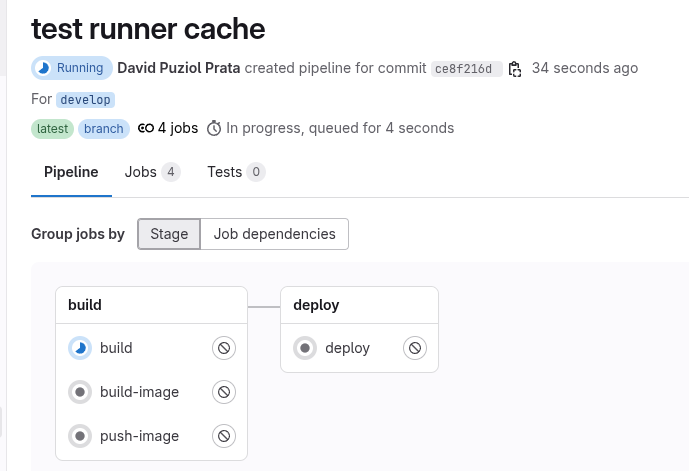
We expect the cache to be used....
#....
Restoring cache
00:02
Checking cache for 0_package-lock-704695cbac4cd3d8bf2f2d21eab7ba69acb76ff6-2-protected...
No URL provided, cache will not be downloaded from shared cache server. Instead a local version of cache will be extracted.
WARNING: Cache file does not exist
Failed to extract cache # BUT IT WASN'T!
Executing "step_script" stage of the job script
00:21
Using docker image sha256:97c5ed51c64a35c1695315012fd56021ad6b3135a30b6a82a84b414fd6f65851 for node:22-alpine with digest node@sha256:152270cd4bd094d216a84cbc3c5eb1791afb05af00b811e2f0f04bdc6c473602 ...
$ echo "Using npm ci with smart cache"
Using npm ci with smart cache
$ npm ci
added 477 packages, and audited 478 packages in 17s
162 packages are looking for funding
  run `npm fund` for details
1 moderate severity vulnerability
To address all issues, run:
  npm audit fix
Run `npm audit` for details.
$ npm run build
> [email protected] build
> vite build
vite v6.3.2 building for production...
transforming...
✓ 31 modules transformed.
rendering chunks...
computing gzip size...
build/index.html                   0.47 kB │ gzip:  0.30 kB
build/assets/react-CHdo91hT.svg    4.13 kB │ gzip:  2.05 kB
build/assets/index-n_ryQ3BS.css    1.39 kB │ gzip:  0.71 kB
build/assets/index-BcKvuBhg.js   147.40 kB │ gzip: 47.66 kB
✓ built in 1.15s
Saving cache for successful job
00:06
Creating cache 0_package-lock-704695cbac4cd3d8bf2f2d21eab7ba69acb76ff6-2-protected...
node_modules/: found 15697 matching artifact files and directories
No URL provided, cache will not be uploaded to shared cache server. Cache will be stored only locally.
Created cache
Uploading artifacts for successful job
00:02
Uploading artifacts...
build/: found 7 matching artifact files and directories
Uploading artifacts as "archive" to coordinator... 201 Created  id=10068999747 responseStatus=201 Created token=eyJraWQiO
Cleaning up project directory and file based variables
00:01
Job succeeded
If you observe the log you'll see it didn't find the cache because it considered different keys. But how if the keys are generated from the hash of the same file that had no modification?
In pipeline 1 (from merge request) the unit test that regenerated the cache we have:
Creating cache 0_package-lock-704695cbac4cd3d8bf2f2d21eab7ba69acb76ff6-2-**non_protected**
And in pipeline 2 we have:
Checking cache for 0_package-lock-704695cbac4cd3d8bf2f2d21eab7ba69acb76ff6-2-**protected**
The key suffix (-protected vs -non_protected) is different.
GitLab automatically adds this suffix to the cache:key if you're using a cache scoped with protected: true|false, or if you're in a job that runs on a protected or non-protected branch/tag.
- MR coming from fork or non-protected branch? ➝ -non_protected
- Protected branch (main, develop)? ➝ -protected
This prevents jobs in MRs or forks from writing to the cache used in protected branches, for security.
In our case build is happening in a develop branch that is protected.
If you want to allow it a specific configuration is needed in the repository or group in GitLab.
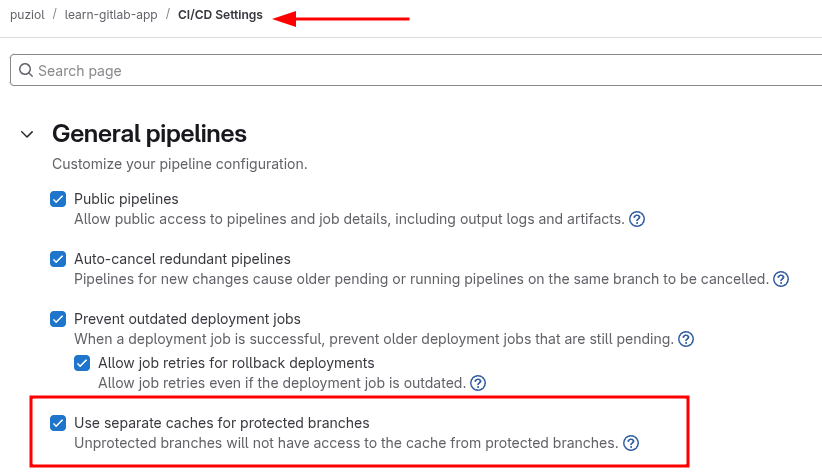
Uncheck the option Use separate caches for protected branches and running the pipeline again we'll get build to also use the cache.
Let's solve the problem of these caches by putting a cache per job thus we gain speed in future pipelines.
.setup-node-deps:
  before_script:
    - echo "Using npm ci with smart cache"
    - npm ci
  cache:
    key:
      # Combines job name with package-lock.json hash
      prefix: "${CI_JOB_NAME}-"
      files:
        - package-lock.json
    paths:
      - node_modules/