Tests
In a second stage, we'll run tests. We can run various types of tests, but let's start with the first one, which are unit tests. In development, it's good practice to generate unit tests for the code. We're not going to generate an image without testing the build first, right?
However, we can test much more than just unit tests, for example:
- Code quality
- Security issues
- Packages with CVEs
- Code linter
- etc
Why would we build the code if there's already a problem with the linter? So this process should come before the build to not even waste time. We'll run the unit test at this point.
To execute a unit test, it's necessary to develop it, but the project in question already has the unit test we'll use. We won't go into details about this, just show how to execute it for our job.
Unit tests are developed to test a small isolated piece of code, usually a function or method. If the input values generate the expected output then the test passes.
❯ tree src
src
├── App.css
├── App.jsx
├── App.test.jsx # This is the test for App.jsx
├── assets
│   ├── gitlab.svg
│   └── react.svg
├── index.css
└── main.jsx

2 directories, 7 files

# Running unit test
npm test

> [email protected] test
> vitest


 DEV  v3.1.2 /Users/davidprata/Desktop/gitlab/learn-gitlab-app

 ✓ src/App.test.jsx (3 tests) 27ms
   ✓ an always true assertion (1)
     ✓ should be equal to 2 1ms
   ✓ App (2)
     ✓ renders the App component 22ms
     ✓ shows the GitLab logo 3ms

 Test Files  1 passed (1)
      Tests  3 passed (3)
   Start at  09:26:10
   Duration  920ms (transform 34ms, setup 190ms, collect 33ms, tests 27ms, environment 409ms, prepare 48ms)

JUNIT report written to /Users/davidprata/Desktop/gitlab/learn-gitlab-app/reports/junit.xml
 HTML  Report is generated
       You can run npx vite preview --outDir reports/html to see the test results.
 PASS  Waiting for file changes...
       press h to show help, press q to quit
So let's add this to our pipeline. Running the npm test command depends on some packages that are installed and that's why it's necessary to run npm ci first.
default:
  tags:
    - general

stages:
  - build

build:
  stage: build
  image: node:22-slim
  script:
    - node --version
    - npm --version
    - npm ci # Installing dependencies
    - npm run build # Will generate the .build folder
    - echo "ACCESS_TOKEN=abc123" > .env # A test just for the reports
  artifacts:
    when: on_success # Already the default
    expire_in: "1 hour"
    paths:
      - build/ # The entire folder without exclusions
    reports:
      dotenv: .env

unit-test:
  stage: test
  image: node:22-slim
  script:
    - echo "ACCESS_TOKEN IS EQUAL TO $ACCESS_TOKEN" # Test to see if it received the variable from the previous job
    - npm ci # Installing dependencies
    - npm test
When uploading this we have...
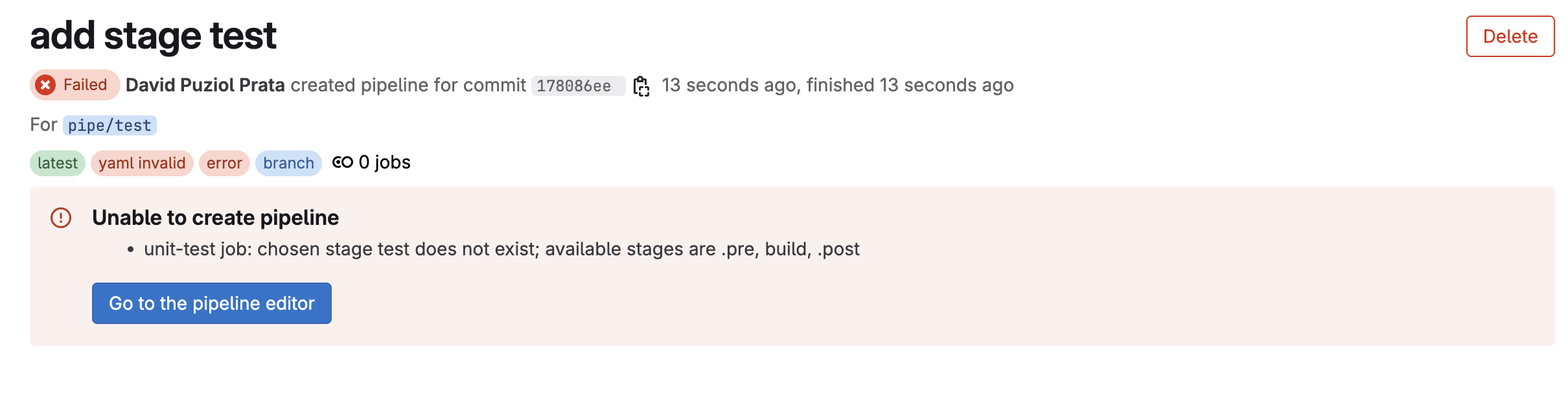
In other words, we cannot define a stage stage: test if it is not defined within stages:.
❯ git add .gitlab-ci.yml
❯ git cm "add stage test fixed"
❯ git push origin pipe/test
And we have the log:
Using docker image sha256:a7bca975c7f3a862dc60f3d8aaa3862fce3208066dd3567f060381b506f38402 for node:22-slim with digest node@sha256:157c7ea6f8c30b630d6f0d892c4f961eab9f878e88f43dd1c00514f95ceded8a ...
$ echo "ACCESS_TOKEN IS EQUAL TO $ACCESS_TOKEN"
ACCESS_TOKEN IS EQUAL TO abc123 # The environment variable is here
$ npm ci
added 440 packages, and audited 441 packages in 27s
152 packages are looking for funding
  run `npm fund` for details
found 0 vulnerabilities
$ npm test
> [email protected] test
> vitest
 RUN  v3.1.2 /builds/puziol/learn-gitlab-app
 ✓ src/App.test.jsx > an always true assertion > should be equal to 2 3ms
 ✓ src/App.test.jsx > App > renders the App component 82ms
 ✓ src/App.test.jsx > App > shows the GitLab logo 16ms
 Test Files  1 passed (1)
      Tests  3 passed (3)
   Start at  12:38:02
   Duration  5.05s (transform 313ms, setup 543ms, collect 168ms, tests 103ms, environment 1.85s, prepare 692ms)
JUNIT report written to /builds/puziol/learn-gitlab-app/reports/junit.xml
 HTML  Report is generated
       You can run npx vite preview --outDir reports/html to see the test results.
Cleaning up project directory and file based variables
00:01
Job succeeded
Security Tip
Both reports and paths are automatically injected into the next job. This demonstration was made so that environment variables needed in one job can be used in other jobs as well. However, there is a serious problem here and we should pay attention whenever any pipeline undergoes changes and we need a review.
  script:
    - node --version
    - npm --version
    - npm ci
    - npm run build
    - echo "ACCESS_TOKEN=abc123" >> .env
    - echo "SECRET=$SECRET" >> .env # We're putting the SECRET variable (masked) from the repository into the .env
Masking protects it from appearing in the console output, but not from appearing in the artifacts, so be alert. Here's the artifact value:
ACCESS_TOKEN=abc123
SECRET=platform-engineer-is-the-new-devops
Parallel Execution
We can run multiple tests at the same time and gain speed. We don't need to wait for one test to finish before starting another. Jobs within the same stage run in parallel if there are no dependencies between them. We'll talk about dependencies later.
We have the eslint.config.js file in the repository, let's also create a lint with it. To run this we need to execute npm run lint
ESLint is a linting tool for JavaScript (and other files, like JSX, TypeScript, etc.), and its main function is to analyze code to identify patterns or practices that can be improved, or that may cause errors. It checks code for problems ranging from syntax errors to inconsistent or problematic coding practices. ESLint helps ensure that code is clean, understandable, and free of common errors.
I really like the idea of using linters so that code doesn't deviate from proper formatting, mainly.
default:
  tags:
    - general

stages: # We could remove this because the two stages below are GitLab defaults, but it's good practice to keep it
  - build
  - test

build:
  stage: build
  image: node:22-slim
  script:
    - node --version
    - npm --version
    - npm ci
    - npm run build
  artifacts:
    when: on_success
    expire_in: "1 hour"
    paths:
      - build/

unit-test:
  stage: test # same stage
  image: node:22-slim
  script:
    - npm ci
    - npm test

lint-test:
  stage: test # same stage
  image: node:22-slim
  script:
    - npm ci
    - npm run lint
Just to remember, we're using GitLab's default stages (build and test), so we wouldn't even need to define stages: [build, test]. If we omitted this it would work normally.
Uploading and testing:
❯ git add .gitlab-ci.yml
❯ git commit -m "add test lint and remove reports"
❯ git push origin pipe/test
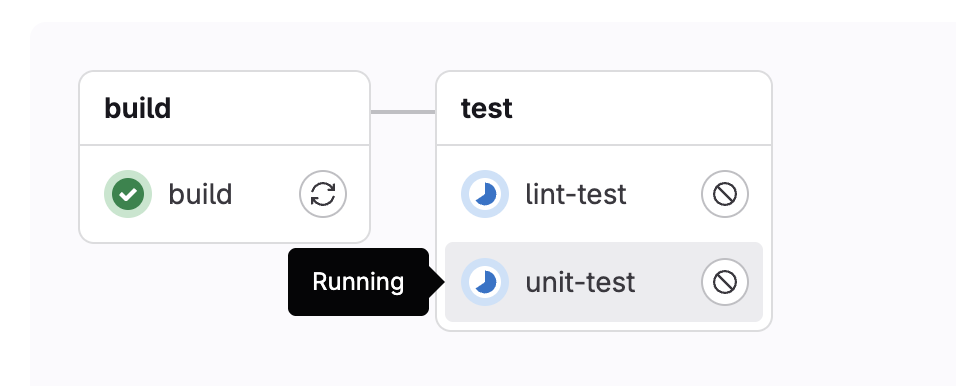
Notice that the jobs are running in parallel, as they started at the same time, but the lint-test job failed with this error:
$ npm run lint
> [email protected] lint
> eslint -f json -o gl-codequality.json . # This is the command being executed
Oops! Something went wrong! :(
ESLint: 9.25.1
TypeError: Expected lint-test.artifacts.reports.codequality to be one exact path, got: undefined
    at getOutputPath (/builds/puziol/learn-gitlab-app/node_modules/eslint-formatter-gitlab/index.js:51:11)
    at eslintFormatterGitLab (/builds/puziol/learn-gitlab-app/node_modules/eslint-formatter-gitlab/index.js:268:54)
    at Object.format (/builds/puziol/learn-gitlab-app/node_modules/eslint/lib/eslint/eslint.js:1054:12)
    at printResults (/builds/puziol/learn-gitlab-app/node_modules/eslint/lib/cli.js:365:33)
    at async Object.execute (/builds/puziol/learn-gitlab-app/node_modules/eslint/lib/cli.js:719:4)
    at async main (/builds/puziol/learn-gitlab-app/node_modules/eslint/bin/eslint.js:160:19)
Cleaning up project directory and file based variables
00:00
ERROR: Job failed: exit code 1
When we run npm run lint, it actually ran the command "eslint -f json -o gl-codequality.json ." and this is inside packages.json
{
  "scripts": {
    "dev": "vite",
    "build": "vite build",
    "test": "vitest",
    "e2e": "npx playwright test",
    "lint": "eslint -f json -o gl-codequality.json .",
    "preview": "vite preview"
  },
}
If we change it to eslint . the job will pass. Do this and upload again. When we talk more about reports we'll go back to the standard. What matters here is running things in parallel.
Another test we could do is about security in the packages used using npm audit. Snyk is also a very popular tool for finding package vulnerabilities and we have many others.
When using the command npm audit --json > vulnerability-report.json we're saving the output to the file and we can, for now, export it as an artifact. However, this wouldn't break the pipeline if any vulnerability was found. The job would be generating the report and nothing more. For the npm audit command output to force an error (exit 1), it's necessary to pass the level, so if it finds a problem above that level, it forces a non-zero exit (success).
default:
  tags:
    - general

stages:
  - build
  - test

build:
  stage: build
  image: node:22-slim
  script:
    - node --version
    - npm --version
    - npm ci
    - npm run build
  artifacts:
    when: on_success
    expire_in: "1 hour"
    paths:
      - build/

unit-test:
  stage: test # same stage
  image: node:22-slim
  script:
    - npm ci
    - npm test

lint-test:
  stage: test # same stage
  image: node:22-slim
  script:
    - npm ci
    - npm run lint

vulnerability-test:
  stage: test # same stage
  image: node:22-slim
  script:
    - npm ci
    - npm audit --audit-level=high --json > vulnerability-report.json
  artifacts:
    when: on_failure # Will only generate the report in case of failure
    expire_in: "1 hour"
    paths:
      - vulnerability-report.json
Now we have 3 running in parallel.
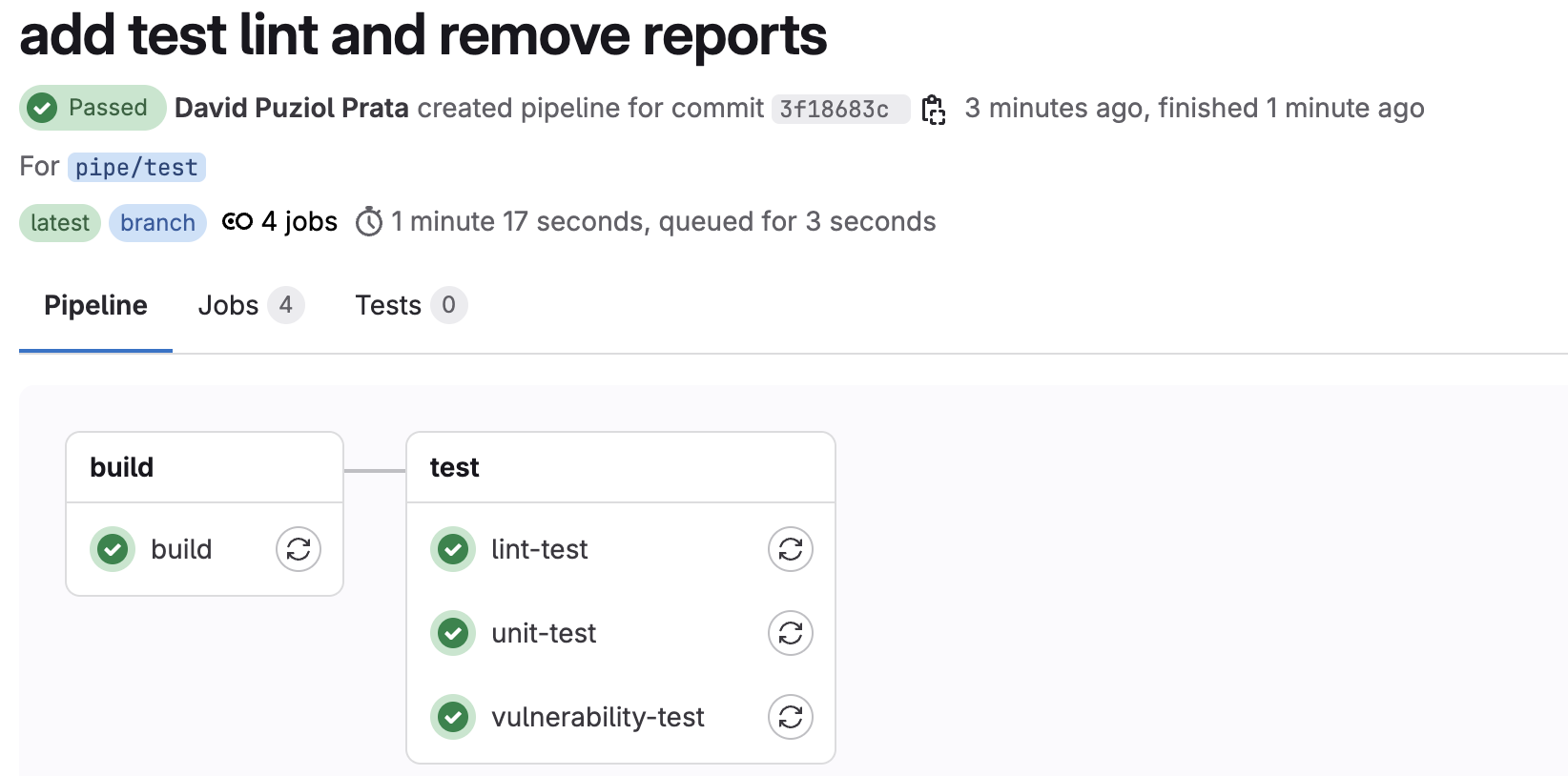
This is the perfect type of case to work with reports. Tools that generate reports we can work with in this way, but it's much more elegant to work with reports putting everything in its proper place.
  artifacts:
    when: on_failure # Will only generate the report in case of failure
    expire_in: "1 hour"
    paths:
      - vulnerability-report.json