ArgoCD Plugins
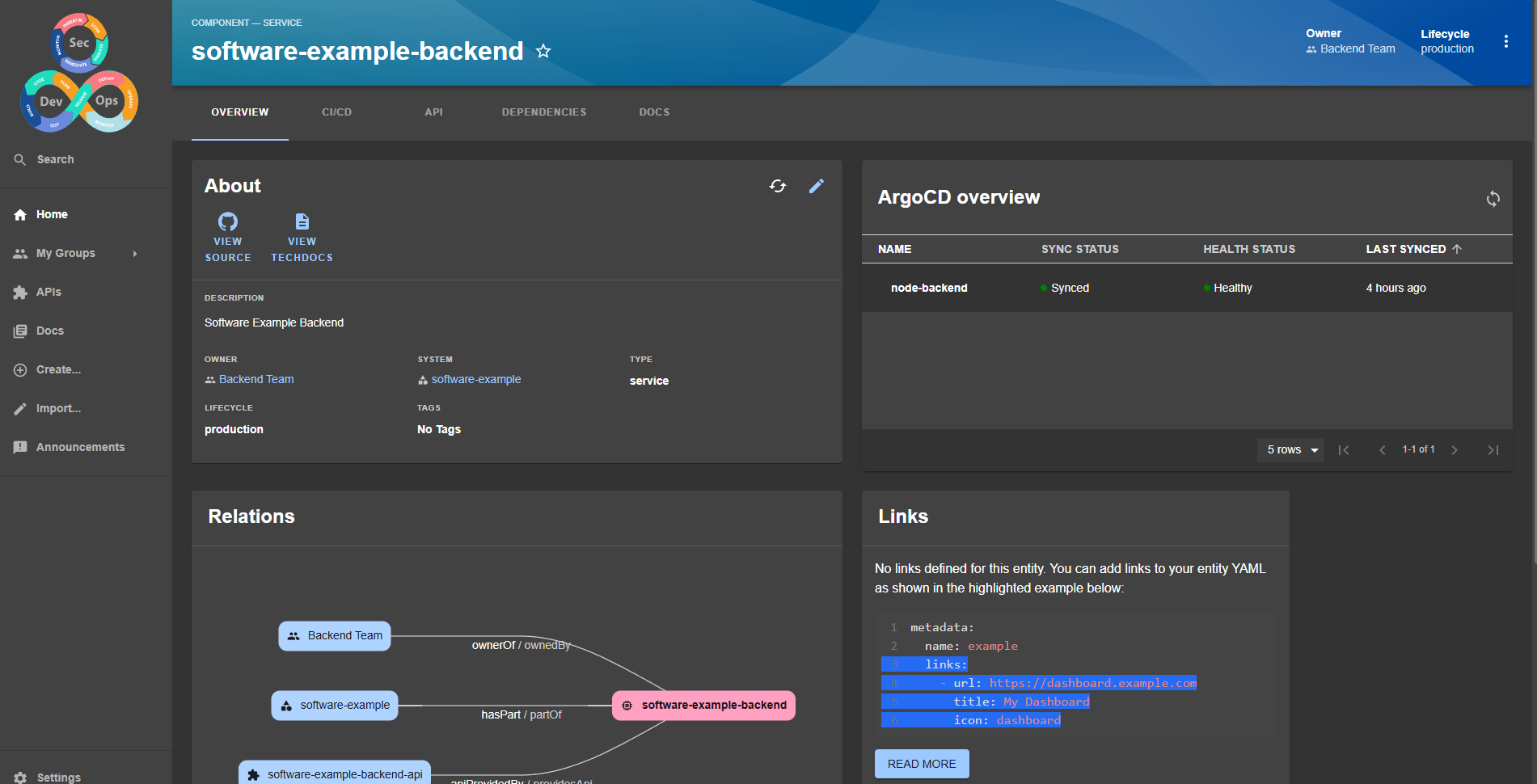
This plugin only displays a card in a component with the application status in ArgoCD.
Before starting, create a role in ArgoCD called backstage or any other name you prefer. For study purposes, give all permissions to this role and generate a token. If you are using the lab, this was already done inside the values.yaml we used to deploy ArgoCD. We also configured RBAC permissions there.
The token needs to be exported in environment variables as we will reference it. It needs to be in the format below.
ARGOCD_AUTH_TOKEN_BACKSTAGE='argocd.token=xxxxxxxxxxxxxxxxxxxxxxxxxxxxxxxxxxxxxxxx'
yarn --cwd packages/app add @roadiehq/backstage-plugin-argo-cd
The app-config.yaml needs to receive the configuration for argo.
proxy:
  '/argocd/api':
    target: http://argo.localhost/api/v1/
    changeOrigin: true
    # only if your argocd api has self-signed cert
    secure: false
    headers:
      Cookie:
        $env: ARGOCD_AUTH_TOKEN_BACKSTAGE
For multiple ArgoCD instances, consult the plugin documentation.
Now let's add argo to the catalog on the entities page.
import {
  EntityArgoCDOverviewCard,
  isArgocdAvailable
} from '@roadiehq/backstage-plugin-argo-cd';

const overviewContent = (
  <Grid container spacing={3} alignItems="stretch">
    {entityWarningContent}
    <Grid item md={6}>
      <EntityAboutCard variant="gridItem" />
    </Grid>
    <EntitySwitch>
      <EntitySwitch.Case if={e => Boolean(isArgocdAvailable(e))}>
        <Grid item sm={6}>
          <EntityArgoCDOverviewCard />
        </Grid>
      </EntitySwitch.Case>
    </EntitySwitch>
    <Grid item md={6} xs={12}>
      <EntityCatalogGraphCard variant="gridItem" height={400} />
    </Grid>
    <Grid item md={4} xs={12}>
      <EntityLinksCard />
    </Grid>
    <Grid item md={8} xs={12}>
      <EntityHasSubcomponentsCard variant="gridItem" />
    </Grid>
  </Grid>
);
I created a repository with a frontend and backend application in node called backstage-argocd-app.
Explaining the structure. The idea is to simulate a monorepo in Backstage, which is the worst case.
Since Backstage is scanning the repository looking for catalog-info.yaml, we will have it in various parts of the code.
# This first catalog defines a system, since a system is a set of components.
tree -L 2
.
├── LICENSE
├── README.md
├── catalog-info.yaml # Defines a system in backstage
└── project # folder containing the various projects.
    ├── backend
    ├── docker-compose.yaml
    └── frontend
Inside project we have the frontend and backend which are two components, each has its own docs folder and catalog, and even being in the same repository they belong to different teams (groups). These components have a key that defines the application name in ArgoCD.
#...
  annotations:
    backstage.io/techdocs-ref: dir:.
    github.com/project-slug: davidpuziol/backstage-argocd-app
    # This is the same name we will give to the application later.
    argocd/app-name: node-frontend
#...
Both projects are components and belong to the system defined in the project called software-example.
In the case of the backend, it also has an API that was referenced inside the components.
In each project we have two folders:
- kubernetes: contains the helm chart that creates the application in kubernetes. This will be applied by argocd.
- argocd: contains the application manifest that defines an argocd application. The same name we give to it will be the same name as the annotation.
When we installed ArgoCD we already gave it the credentials for GitHub and GitLab accounts, so just apply the manifests.
# Example applications.yaml
apiVersion: argoproj.io/v1alpha1
kind: Application
metadata:
  name: node-frontend # The annotation name
  namespace: argocd
spec:
  project: default
  source:
    repoURL: 'https://github.com/davidpuziol/backstage-argocd-app'
    targetRevision: HEAD
    # where the helm chart is located inside the repository
    path: project/frontend/kubernetes/node-frontend
  destination:
    server: 'https://kubernetes.default.svc'
    namespace: applications
  syncPolicy:
    automated:
      prune: true
      selfHeal: true
    syncOptions:
      - Validate=false
      - CreateNamespace=true
---
apiVersion: argoproj.io/v1alpha1
kind: Application
metadata:
  name: node-backend # The annotation name
  namespace: argocd
spec:
  project: default
  source:
    repoURL: 'https://github.com/davidpuziol/backstage-argocd-app'
    targetRevision: HEAD
    # where the helm chart is located inside the repository
    path: project/backend/kubernetes/node-backend
  destination:
    server: 'https://kubernetes.default.svc'
    namespace: applications
  syncPolicy:
    automated:
      prune: true
      selfHeal: true
    syncOptions:
      - Validate=false
      - CreateNamespace=true
kubectl apply -f applications.yaml
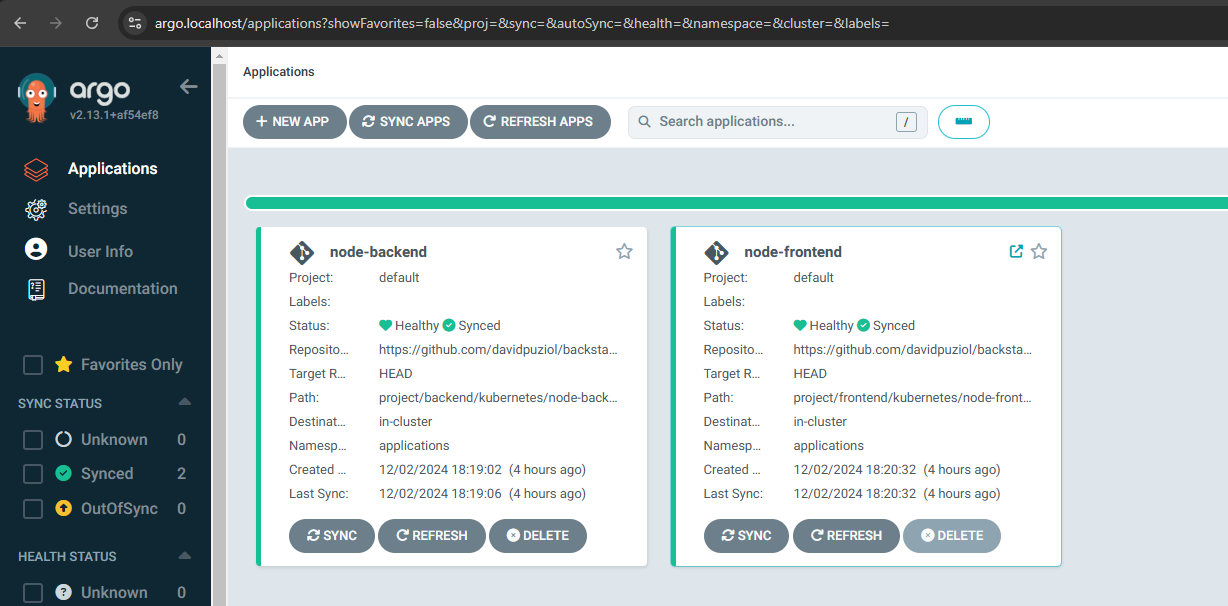
And we have this in argocd.
And in Backstage we have the ArgoCD card.