Cataloging Our Resources
We already have access to repositories using the accounts configured through the GitHub and GitLab integration done during installation.
The Catalog in Backstage is one of the main components of the platform. It serves as a centralized inventory of all resources and services in your infrastructure, helping teams organize, document, and manage the application and service ecosystem efficiently.
The catalog forms a hub of types, where entities are ingested from various authorized sources and maintained in a database, subject to automated processing, and then presented through an API for quick and easy access by Backstage and others.
-
Ingestion. Identity providers fetch data from external sources and store it in the database. The most common source is YAML files that are in some repository.
-
Processing: After ingestion, the data is processed for error checking, relationships with other entities, etc.
-
Stitching: The processed data
Component
If you are an engineer and work at a company with several developers, you will probably have multiple services, multiple software components such as:
libraries, toolkits, internal websites, pipelines, etc. Anything of this type is what we call components. They are the parts, the pieces, that make up the software.
In Backstage, we create models in YAML files to define things, just like in Kubernetes. The kind is the type, the model of that entity, and when it is a component we have kind: Component.
An example from the documentation itself.
apiVersion: backstage.io/v1alpha1
kind: Component # Our type
metadata:
  name: artist-web # In this case it needs to be UNIQUE.
  description: The place to be, for great artists
  labels:
    example.com/custom: custom_label_value
  annotations:
    example.com/service-discovery: artistweb
    circleci.com/project-slug: github/example-org/artist-website
  tags:
    - java
  links:
    - url: https://admin.example-org.com
      title: Admin Dashboard
      icon: dashboard
      type: admin-dashboard
spec:
  type: website # There are no specific types, this is just a string. You can set any type you want.
  lifecycle: production
  owner: artist-relations-team
  system: public-websites
Let's take advantage of this and do the following; Create a repository that Backstage can access and put this inside. I created in my account the repository backstage-things-1 and this YAML above calling it component-website.yaml. We'll see later what we're going to do with this.
API
This is the type that will define interfaces that are exposed by some component. You know that moment when you need to know the API of one of the services and don't need to search for its documentation? Using this we can express an API in different formats, such as OpenAPI, AsyncAPI, GraphQL, gRPC, etc.
The manifests are practically the same as the component.
Initially there is a sidebar just for this type of component.
Resource
A resource describes something in the infrastructure, something physical, like a database, cache, instances, VPC, VPN, etc.
The repository we created could be any repository and we defined a YAML inside, but we need to tell the catalog where it needs to look.
The first way to do this is to manually create the resource. In catalog we can click CREATE, in the upper right corner on REGISTER EXISTING COMPONENT, pass the URL of the desired YAML file in the repository and do an ANALYZE.
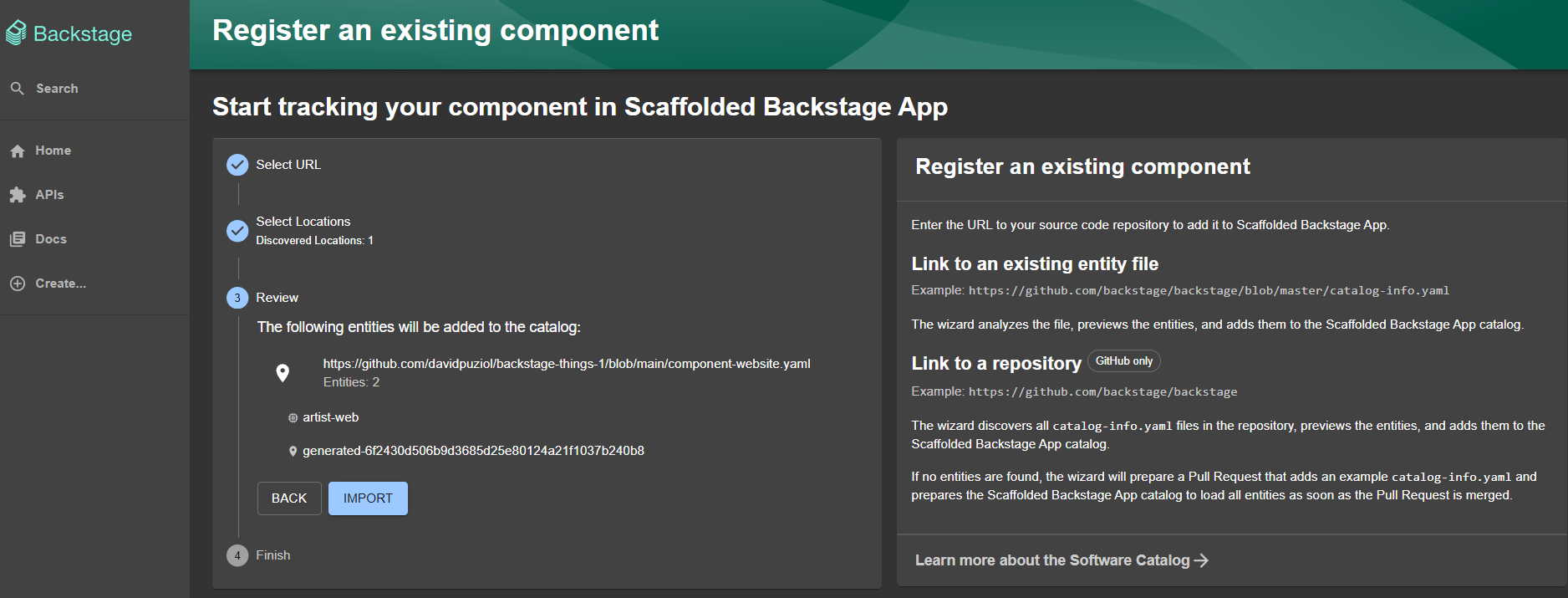
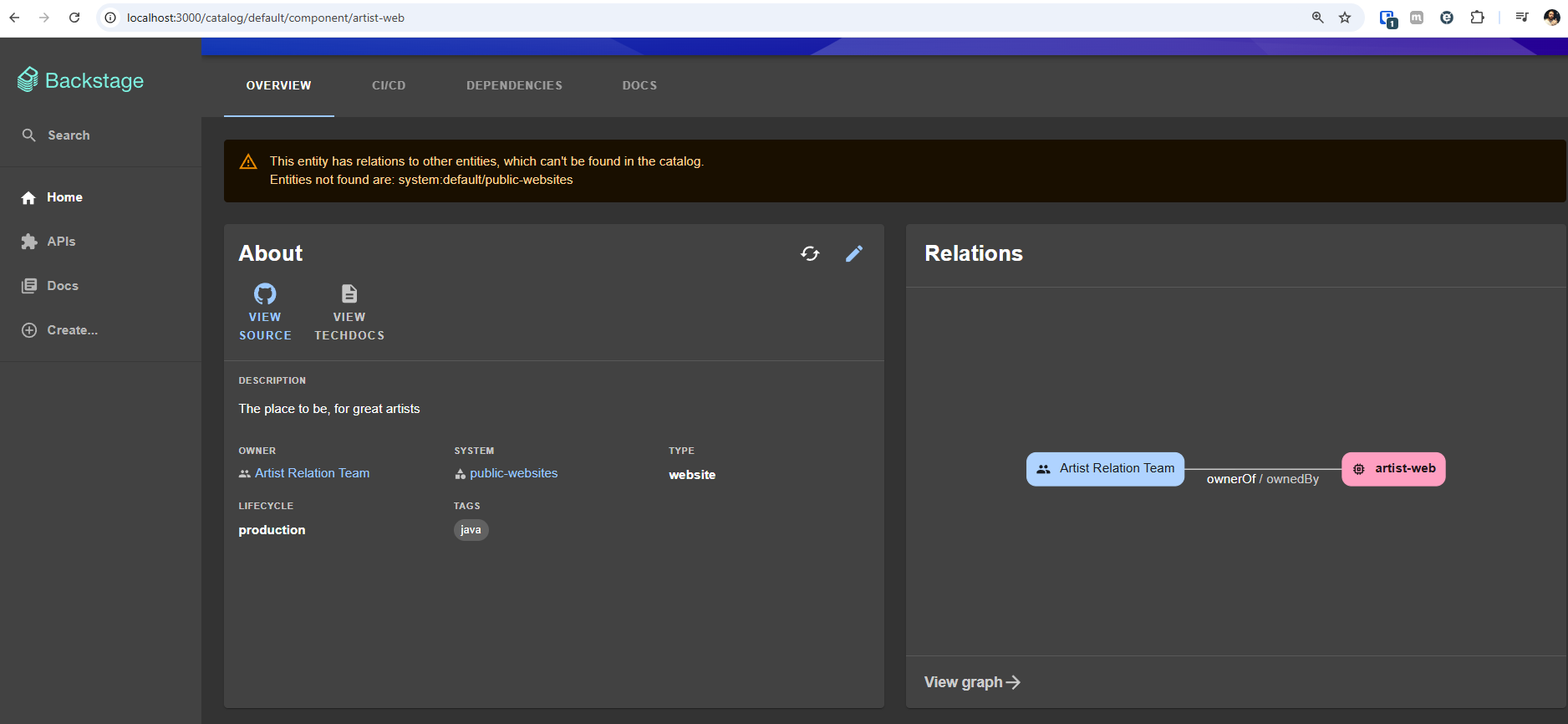
And we immediately receive this.
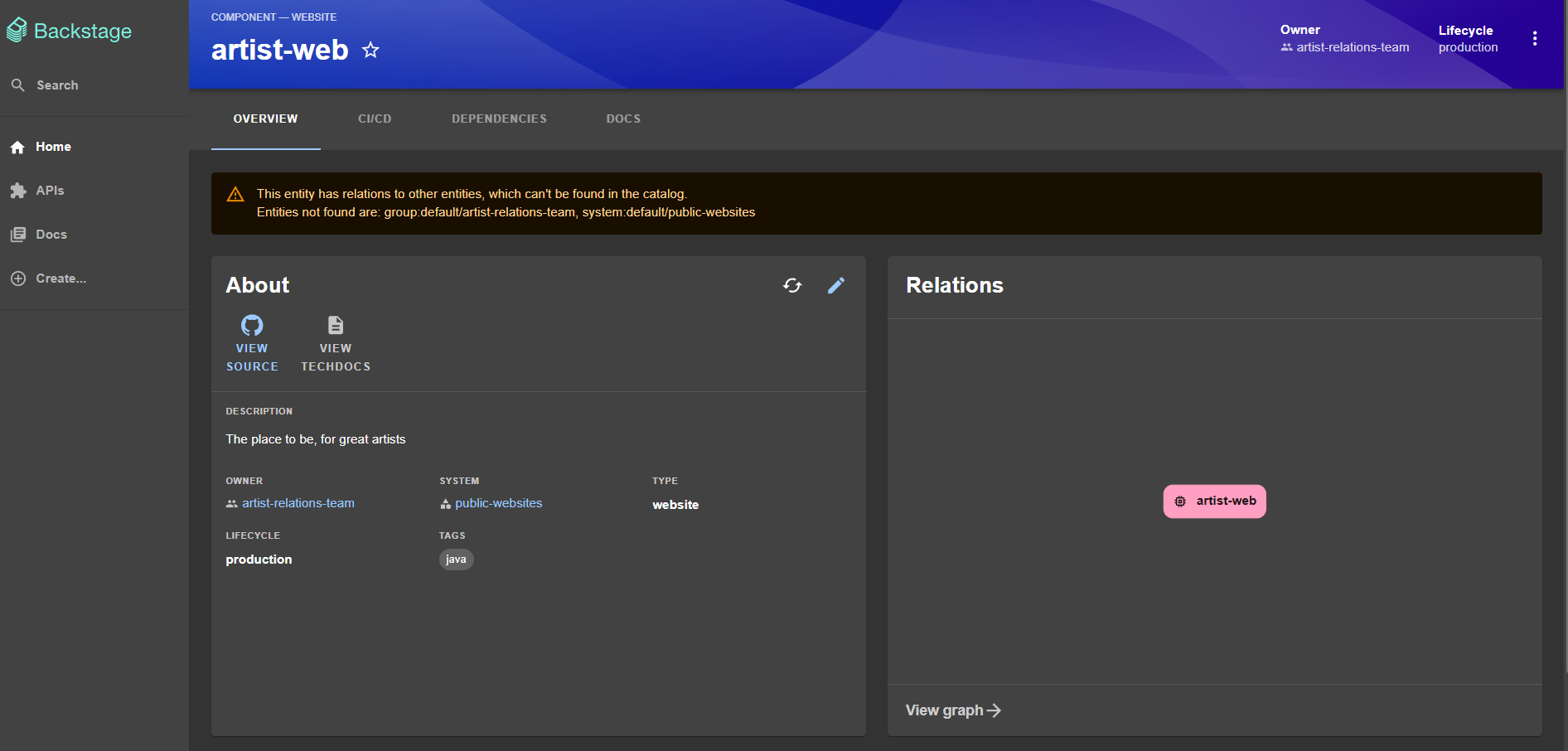
This message occurred because of this line
spec:
   ...
  owner: artist-relations-team
We defined the project owner, but it doesn't exist in the system. It expects a group, so let's create a group in the repository itself.
Group
A group describes an organizational entity, such as a team, a business unit, or a loose collection of people in an interest group.
-
A group may or may not belong to another group. In this case we declare the parent. A group can only have one parent.
-
A group may or may not have subgroups where each subgroup is also a group. In this case we declare the list of children, the groups
-
A group may or may not contain group members which in this case are user.
A user describes a person, such as an employee, a contractor, or similar. Users belong to Group entities in the catalog.
Let's create the group, a YAML file called group.yaml in the same repository.
apiVersion: backstage.io/v1alpha1
kind: Group
metadata:
  name: artist-relations-team
  description: Artist Relation Team Unit
spec:
  type: business-unit
  profile:
    displayName: Artist Relation Team
    email: [email protected]
    picture: https://sbm.wpenginepowered.com/wp-content/uploads/2017/02/feature-image-12-1024x535.jpg
  parent: ops
  children: [backstage, other]
  members: [davidpuziol] # Already added myself as a member
Now let's do the same process and import manually.
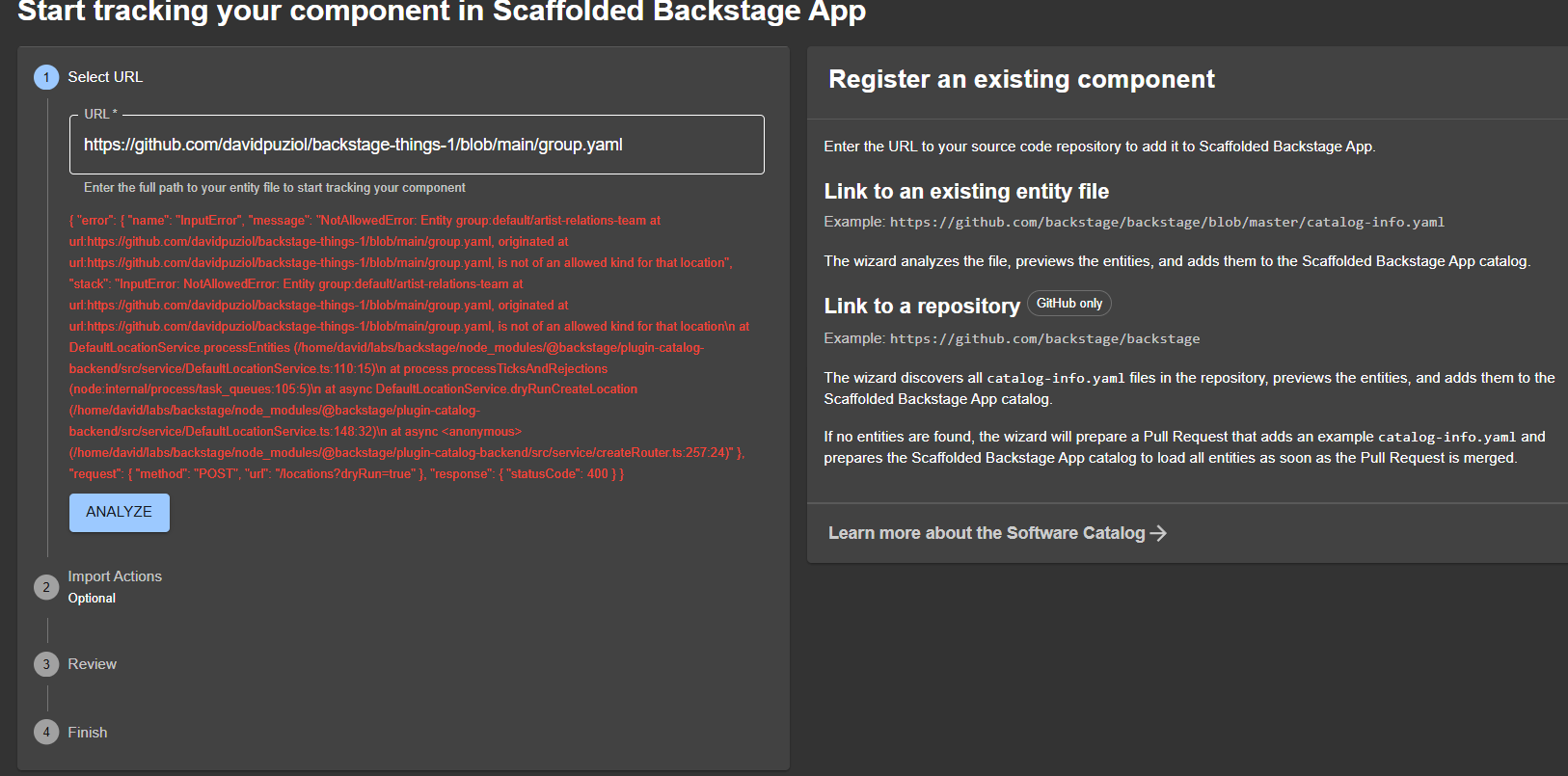
What happened was that permission is required to register groups in the system.
In app-config.yaml we have the following.
catalog:
  #...
  rules:
    # Only these components can be registered
    - allow: [Component, System, API, Resource, Location]
Company groups could be managed by the platform engineers team with some type of synchronization because they define permissions on resources. It is not common for anyone to create groups or users.
Let's add it since we are studying, and restart Backstage again.
  rules:
    - allow: [Component, System, API, Resource, Location, Group, User]
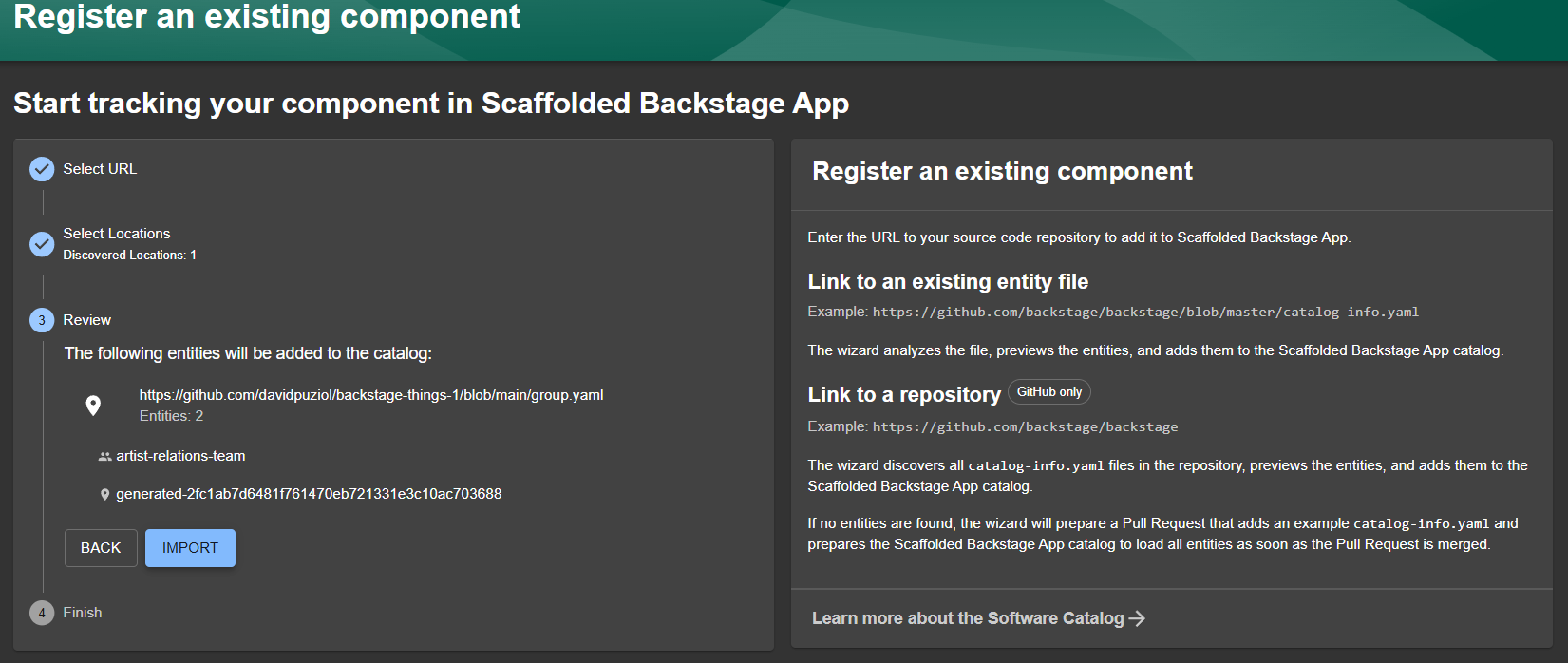
The first relationship was created, but we will still have some failures, because we need more groups and other things.
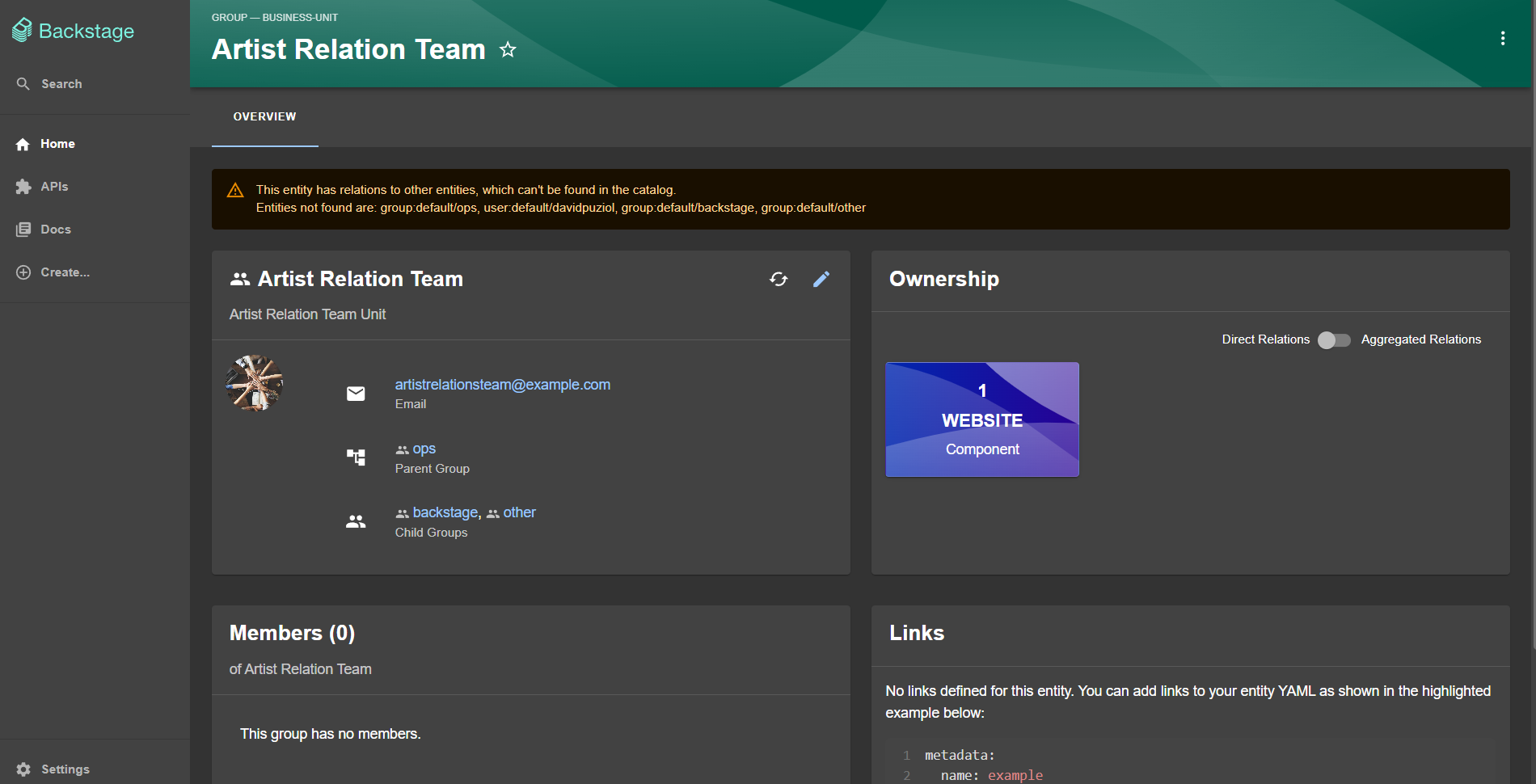
Another method to do this is to create yaml files inside our code and point to them, just as was done with the example file. Forget this because it won't happen in real life.
Users
Speaking a bit about users:
- A user must mandatorily be a member of some group.
- If a user is not a member of any group then they belong to the default group.
- A user can be a member of more than one group.
- We can reference a user as a member of a group in the user entity itself or they can be placed as a group member in the group's own definition.
GitOps Backstage Catalog
We've already seen that we can create things manually by pointing to files in the repository. If you haven't noticed yet, we can just point to the repository URL and it will automatically look for the catalog-info.yaml file, which should contain all the definitions inside, but it's not mandatory to be this way.
We can put it directly in the code pointing to the location of things in app-config.yaml with the examples that come with Backstage, but this is impractical on a daily basis.
catalog:
  #...
  locations:
    - type: file
      target: ../../examples/entities.yaml
Or we can move to have everything in the repository and make GitOps happen!
Defining a study standard here, the proposal will be to create a folder at the root of each repository and all files that exist there will be automatically scanned and read by the catalog.
Let's standardize
our rule: All manifests that exist must be inside thebackstagefolder of any of the repositories.
This is not the correct approach, but we will only understand the reason later when we study docs. What happened was that when studying I wanted to do it differently, creating a new structure, and only later understood why it needed to be as it is, so I think it's worth leaving here to show the error later.
Most integrations have a discovery provider. In the case of GitHub, discovery will automatically register entities according to the configurations we pass. For example the GitHub discovery documentation.
Following the documentation we need to configure in app-config.yaml and in the backend.
In the case of Gitlab it involves another type of configuration, I won't do it now, at another time I'll add here because it involves the use of webhooks.
In app-config.yaml.
catalog:
  #...
  providers:
    github:
      providerId:
        organization: davidpuziol
        schedule:
          frequency: { minutes: 3 }
          timeout: { minutes: 3 }
        filters:
          - repository: /.*/  # Regex to include all repositories
        catalogPath: '/backstage/**/*.{yaml,yml}'  # Searches recursively based on the rule we defined above.
Let's add the necessary dependencies for GitHub.
yarn --cwd packages/backend add @backstage/plugin-catalog-backend-module-github
It's also necessary to add the lines below.
// catalog plugin
backend.add(import('@backstage/plugin-catalog-backend'));
backend.add(
  import('@backstage/plugin-catalog-backend-module-scaffolder-entity-model'),
);
backend.add(import('@backstage/plugin-catalog-backend-module-github')); // This one
Now let's start the fun. Create a repository that will be the base.
git clone [email protected]:davidpuziol/backstage-base.git
cd backstage-base
mkdir users
mkdir groups
Users X Groups
For relationships to happen correctly, these rules must be maintained, otherwise we will see inconsistencies.
Let's create an initial structure of groups and users, trying to simulate what was shown.
- developers
- team-frontend
- dev-1
- dev-2
- team-backend
- dev-3
- team-frontend
- operations
- team-sec
- ops-1
- team-sre
- ops-2
- team-monitoring
- ops-3
- team-cloud
- ops-4
- team-sec
- platform
- team-backstage
tree
.
├── LICENSE
├── README.md
└── backstage
    ├── groups
    │   ├── development
    │   │   ├── development-group.yaml
    │   │   └── pics
    │   │       └── development-group.png
    │   ├── operation
    │   │   ├── operation-group.yaml
    │   │   └── pics
    │   │       └── operation-group.png
    │   └── platform
    │       ├── pics
    │       │   └── platform-group.png
    │       └── platform-group.yaml
    └── users
We created the initial groups, which will be the parents of the others and committed to the repository and let's see if backstage automatically scans and creates them.
After some time the catalog does its discovery and we have the following.
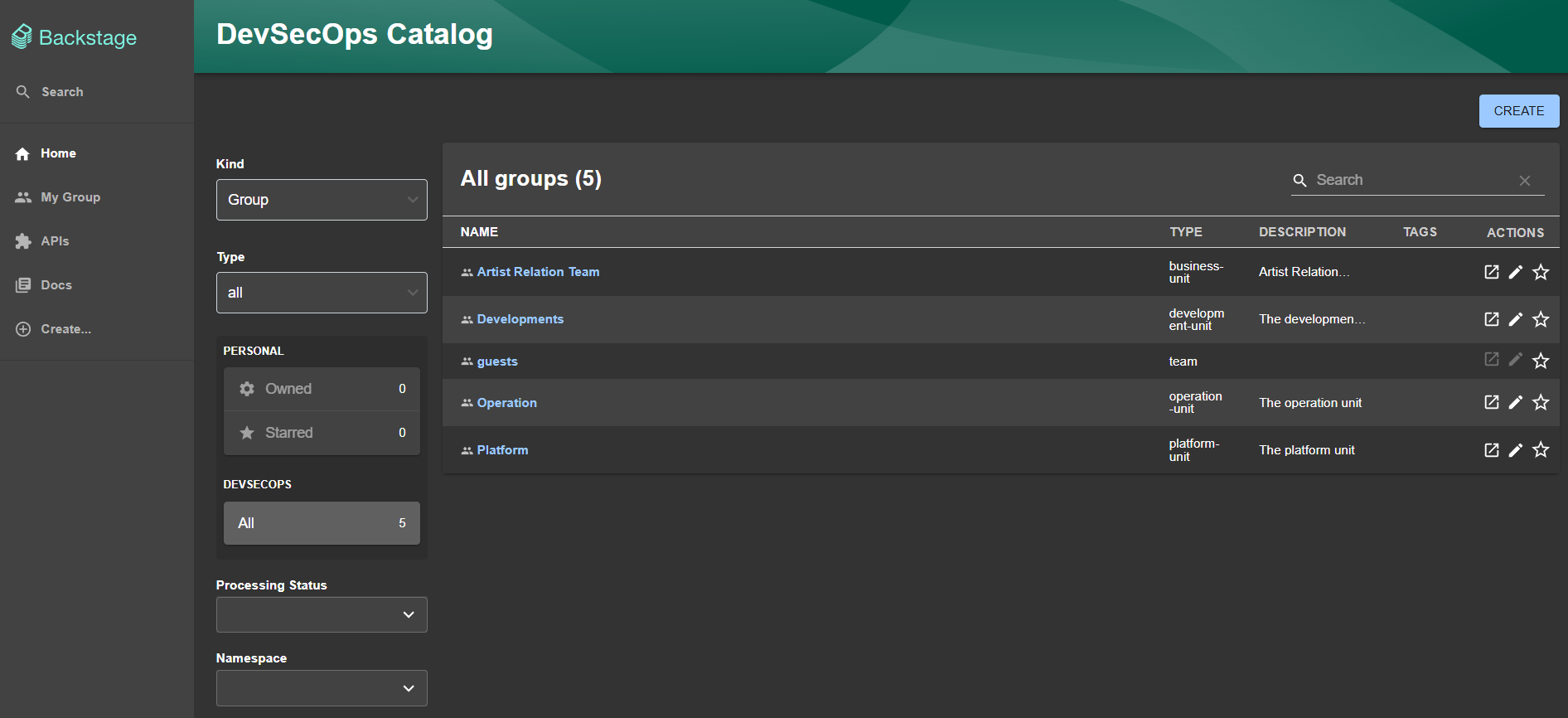
As predicted, we declared children and we don't have them, so we have the following message in the development group.
This entity has relations to other entities, which can't be found in the catalog. Entities not found are: group:default/team-backend, group:default/team-frontend
Let's declare the child groups and make adjustments with the parents.
Let's also create an initial user for our own account!
❯ tree backstage/users
backstage/users
└── default
    └── davidpuziol.yaml
apiVersion: backstage.io/v1alpha1
kind: User
metadata:
  name: davidpuziol
spec:
  profile:
    displayName: David Puziol
    email: davidpuziol@gmail.com
    picture: https://avatars.githubusercontent.com/u/32808515?s=400&u=86f4e3ff19eb20d1b142a3eedadc6c37e5cc3048&v=4
  memberOf: [team-idp, operation]
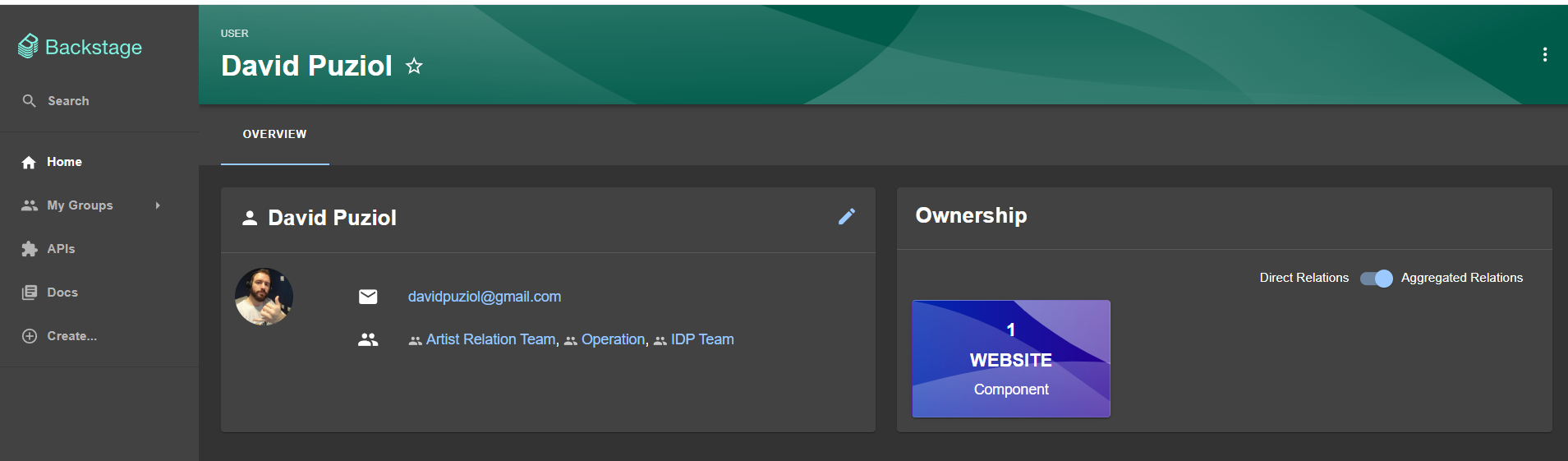
Now we can observe that our SSO was linked with a Backstage Identity.
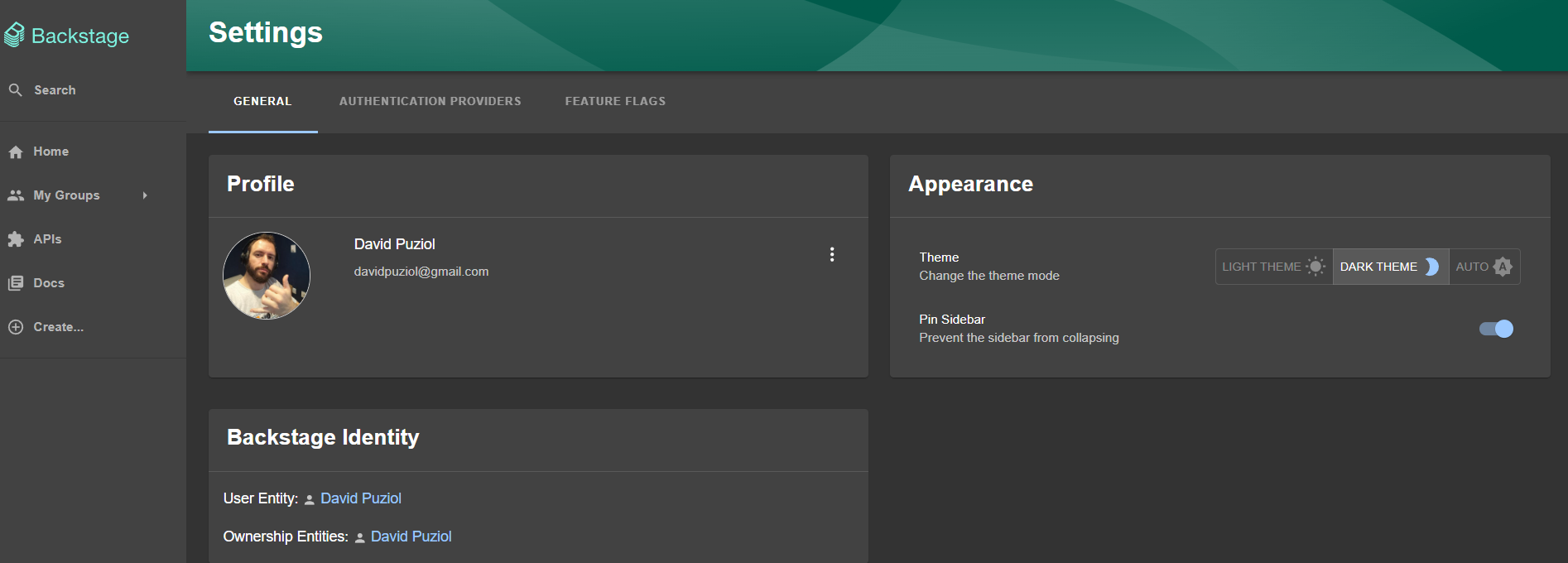
And the user identity davidpuziol shows as the ownership of a component website that we created manually earlier.
This happened because we declared a group manually, and said that davidpuziol was a member of this group and this group is the owner of the website, therefore davidpuziol will also be owner of the website.
// component
spec:
  type: website
  lifecycle: production
  owner: artist-relations-team
// group
metadata:
  name: artist-relations-team
// ...
spec:
  // ...
  members: [davidpuziol]
The groups that the user belongs to can be declared within the user itself and in other groups.
For things to be more granular and restrictive, it's interesting to avoid what we did like putting davidpuziol in the operation group, because automatically they will also be owner of every project of the child teams of operation.
// operation
//...
kind: Group
metadata:
  name: operation
//...
spec:
//...
  children: [team-security, team-sre, team-monitoring, team-cloud]
The diagram below can better explain the relationship between them.
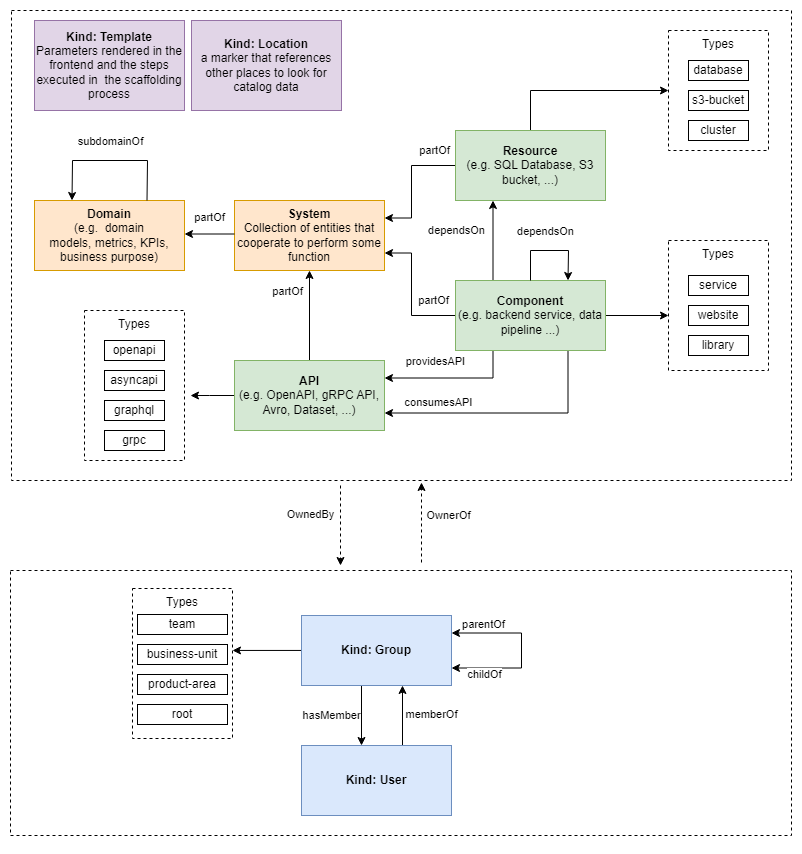
- The types of any of the objects can be any we want, what was shown is just an idea.
System
A system is a collection of resources, components, and APIs. In Backstage, the owner of a system is the singular entity (usually a team) that has final responsibility for the system and has the authority and ability to develop and maintain it. This is exactly how things work, a bunch of technology together, a bunch of stuff together that delivers the final function, or service.
In Backstage, Domains and Systems are fundamental concepts for organizing the components and services of a complex infrastructure, helping to better structure and visualize resources within the platform and who is responsible for that set.
Domain
A Domain groups a collection of systems. Let's imagine any area of a company. It is composed of several systems. Not always does a system deliver a final solution, a monolith, almost always a set of systems is necessary for the solution to actually work. Sometimes a system.
The division of things within the platform depends on how you want to do it.
A Domain can represent an area of responsibility within the organization. Let's imagine a Domain called Payments that could include all systems and services related to payment processing.
Complementary Catalog Plugins
Catalog errors are published in the events plugin. To install the events plugin.
yarn --cwd packages/backend add @backstage/plugin-events-backend
And we must add in packages/backend/src/index.ts
backend.add(import('@backstage/plugin-events-backend'));
We can also register events with warn level using a plugin.
yarn --cwd packages/backend add @backstage/plugin-catalog-backend-module-logs
And adding in the backend.
backend.add(import('@backstage/plugin-catalog-backend-module-logs'));