Authentication
Auth Documentation Identity Documentation
We can observe that initially we have a guest as provider. This provider makes all users share a single guest identity. It is only useful for testing purposes and getting started with Backstage, but not for production use. That's why one of the first things to configure is one or more providers.
As authentication providers we have the main ones in the market:
- Auth0
- Okta
- Github
- Gitlab
- Bitbucket
- Etc...
Usually the company's code is in some GitHub or GitLab account. Login within these platforms does SSO with the identity manager the company is using. We will implement GitHub here.
This configuration will be present in the app-config.yaml file. Below is what we have by default in the initial code.
auth:
  providers:
    guest: {}
Let's configure providers, GitHub, but we can use several.
To do this, you need to create the authentication provider in your GitHub account. This is done in Settings > Developer settings > OAuth Apps.
Since we can have different configs for different environments, we can also create more than one on GitHub. Initially we will create for local development.
- Homepage URL: This is the home page URL, meaning where this comes from
- Authorization callback URL: This is where the return information will be sent.
Following the documentation itself for local development, they show us these URLs.
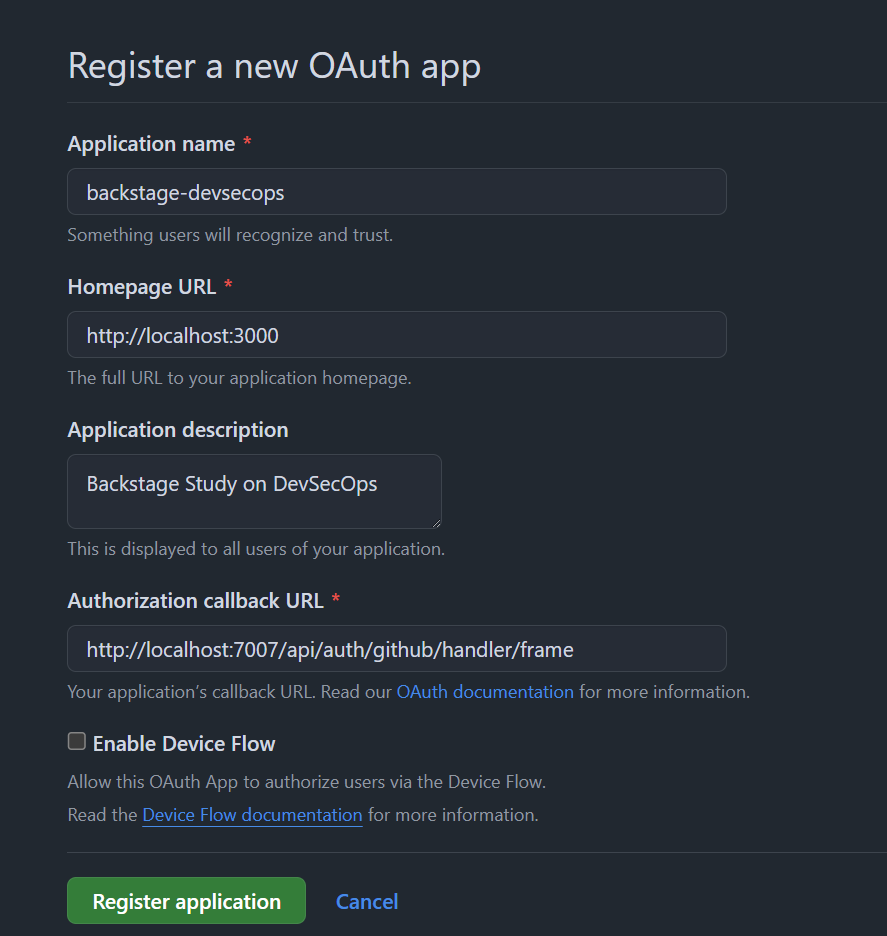
Once created, we will already have our Client ID which we need to save as it will be used, and click the generate a new client secret button to create the secret.
Export these environment variables in your terminal. We will use them later for image development.
export AUTH_GITHUB_CLIENT_ID=xxxxxxxxxxxxxxxx
export AUTH_GITHUB_CLIENT_SECRET=xxxxxxxxxxxxxxxxxxxxxxxxxxxxxxxxxxxxxx
If you want, we can also create one on GitLab. We need to create an application and define the return page. The following permissions are required:
- api
- read_user
- read_repository
- write_repository
- openid
- profile
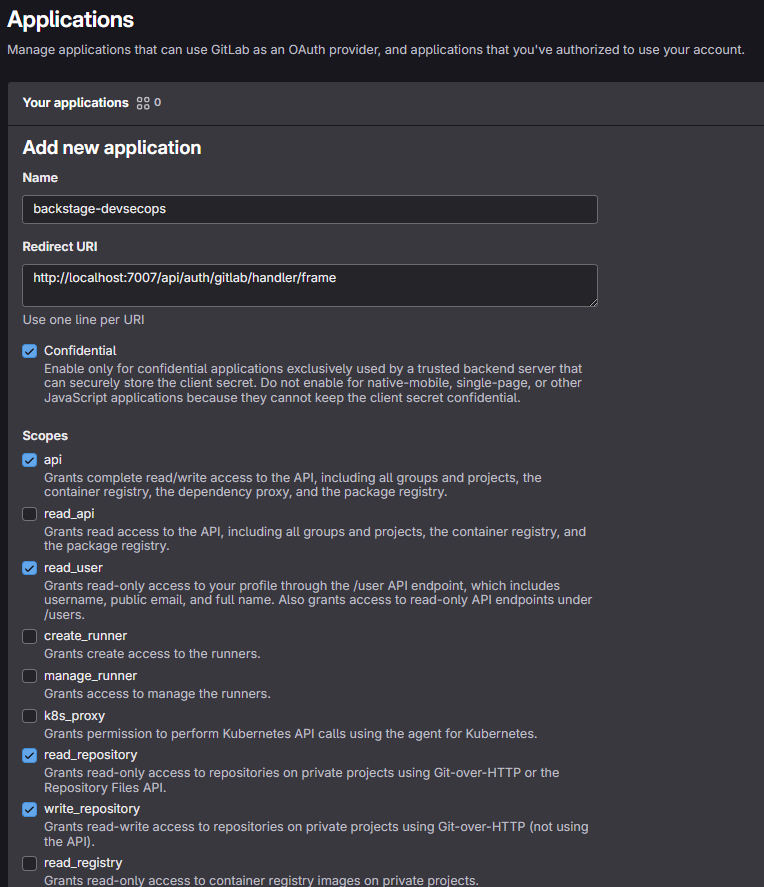
We will then have the application id which will be our AUTH_GITLAB_CLIENT_ID and the secret which will be our AUTH_GITLAB_CLIENT_SECRET and we will also need to export them.
export AUTH_GITLAB_CLIENT_ID=xxxxxxxxxxxxxxxxxxxxxxxxxxxxxx
export AUTH_GITLAB_CLIENT_SECRET=xxxxxxxxxxxxxxxxxxxxxxxxxxxxxxxxxxxxxxxxxxxxxxxxxx
auth:
  environment: development
  providers:
    # guest: {}
    github:
      development:
        clientId: ${AUTH_GITHUB_CLIENT_ID}
        clientSecret: ${AUTH_GITHUB_CLIENT_SECRET}
        signIn:
          resolvers:
            - resolver: usernameMatchingUserEntityName
    gitlab:
      development:
        clientId: ${AUTH_GITLAB_CLIENT_ID}
        clientSecret: ${AUTH_GITLAB_CLIENT_SECRET}
        signIn:
          resolvers:
            - resolver: usernameMatchingUserEntityName
The resolver is the information model that the provider will return based on the login performed. The list of available resolvers is different for each provider, as they often depend on the information model returned from the upstream provider service.
It is necessary to consult the resolver in each of the providers you want to implement to see what makes the most sense.
In the case of GitHub and GitLab, the value is the same that it will bring back.
emailMatchingUserEntityProfileEmail: Matches the email address from the authentication provider with the User entity that has a spec.profile.email.emailLocalPartMatchingUserEntityName: Matches the local part of the email address from the authentication provider with the User entity that has a name.usernameMatchingUserEntityName: Matches the username from the authentication provider with the User entity that has a name
Using usernameMatchingUserEntityName we are receiving the username and not the email address.
It's worth remembering that using emailLocalPartMatchingUserEntityName will bring, for example, only the part before @domain.com. In this case, it's good to define which domains will be accepted.
Since it's not just configuration, you also need to use it. Let's add this to the app backend package.
yarn --cwd packages/backend add @backstage/plugin-auth-backend-module-gitlab-provider
yarn --cwd packages/backend add @backstage/plugin-auth-backend-module-github-provider
yarn install
Now let's load these plugins.
Every backend plugin must be added in packages/backend/src/index.ts before the backend.start() line.
// auth plugin
backend.add(import('@backstage/plugin-auth-backend'));
// See https://backstage.io/docs/backend-system/building-backends/migrating#the-auth-plugin
// backend.add(import('@backstage/plugin-auth-backend-module-guest-provider'));
backend.add(import('@backstage/plugin-auth-backend-module-github-provider'));
backend.add(import('@backstage/plugin-auth-backend-module-gitlab-provider'));
Following the documentation itself
Now we need to make some adjustments in the App file.
// add
import { githubAuthApiRef, gitlabAuthApiRef  } from '@backstage/core-plugin-api';
//...

components: {
    // we comment out the line that uses guest, and add the new ones.
    // SignInPage: props => <SignInPage {...props} auto providers={['guest']} />,
    SignInPage: props => (
      <SignInPage
        {...props}
        providers={[
          // 'guest',
          {
            id: 'github-auth-provider',
            title: 'GitHub',
            message: 'Sign in using GitHub',
            apiRef: githubAuthApiRef,
          },
          {
            id: 'gitlab-auth-provider',
            title: 'GitLab',
            message: 'Sign in using GitLab',
            apiRef: gitlabAuthApiRef ,
          },
        ]}
      />
    ),
  },
Restarting the application again with yarn dev and logging in using one of these providers, we receive the following.
Login failed; caused by Error: Failed to sign-in, unable to resolve user identity. Please verify that your catalog contains the expected User entities that would match your configured sign-in resolver.
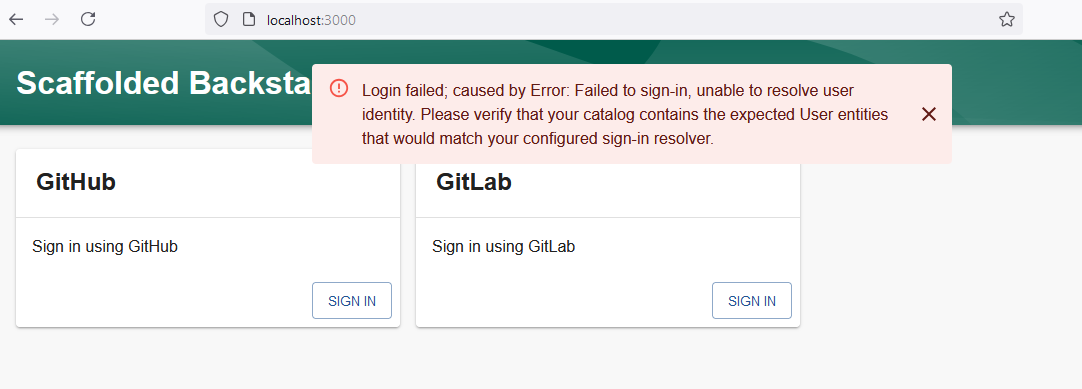
If you want to use an authentication provider to log in users, you need to explicitly configure it to have login enabled and also tell it how external identities should be mapped to user identities within Backstage.
What happened is that the resolver returned information and this user Identity doesn't exist in our catalog, we haven't created users within the system to check the information and do the mapping. It's necessary to create a custom resolver that doesn't need to do this match for now. In the future, if you configure the catalog to synchronize users from your SSO provider, it will be good and we can return to the resolver we have now.
Going back to the previous situation, the resolver used in each of the accounts was usernameMatchingUserEntityName making the reason for the error clearer.
Backstage User Entity
A user identity within Backstage is built from two main pieces of information:
- A user identity
- Ownership reference properties
When a user logs in, a Backstage token is generated, which is then used to identify the user within the Backstage ecosystem. It is encouraged that a corresponding user entity also exists within the Software Catalog, as happened above, but it is not mandatory. If the user entity exists in the catalog, it can be used to store additional data about the user.
Ownership references are used to determine what the user owns. For example, a user Jane (user:default/jane) can have the ownership references user:default/jane, group:default/team-a, and group:default/admins. Given these ownership claims, any entity that is marked as owned by any of user:jane, team-a, or admins would be considered owned by Jane. References can be used to resolve other relationships similar to ownership, such as a claim to a maintainer.
In Backstage, authentication resolvers map the identity of a user authenticated through an external provider (such as GitHub, GitLab, etc.) to an internal Backstage identity. This mapping is crucial because it defines who the user is and what permissions they will have on the platform.
Having multiple resolvers can cause identity conflicts, especially if the same user can access from different providers, but is treated as distinct identities in Backstage.
Imagine the following scenario: We can authenticate from both GitHub and GitLab. A user, let's say, David, has accounts on both providers:
- GitHub account: daviddevops
- GitLab account: daviddevsecops
If Backstage is not well configured to differentiate identities between the two providers, the following can happen:
- Backstage may interpret the two accounts (daviddevops and daviddevsecops) as two completely different users, even though it's the same person. This creates profile duplication, making it difficult to manage permissions and activities.
Note that while it is possible to configure multiple authentication providers to be used for login, you should be careful when doing so. It's best to ensure that the different authentication providers don't have overlapping users or that all users who manage to log in with multiple providers always end up with the same Backstage identity. For most organizations, it makes more sense to provide only one login method. In this case, we are enabling GitHub and GitLab because my username on both platforms is exactly the same name, so it should be mapped to the same user Identity.
If the company has a corporate email on GitHub for example, [email protected] using the emailLocalPartMatchingUserEntityName resolver it should match with fulano.tal eliminating @company.com. Nothing prevents [email protected] from logging in and mapping to the same user. So ensure that only specific domains are used in the integration.
auth:
  providers:
    github:
      development:
        ...
        signIn:
          resolvers:
            - resolver: emailLocalPartMatchingUserEntityName
              allowedDomains:
                - company.com
The Backstage token that encapsulates the user identity is a JWT.
Be careful when configuring login resolvers, as they are part of determining who has access to the Backstage instance and with which identity in the system. Having more than one authentication provider increases the risk of account hijacking.
Creating a Custom Resolver
We don't have users. Let's allow users to be created with the accounts that log in to GitHub and GitLab. This will just be a demonstration.
In packages/backend/src/index.ts we will add a custom resolver, but first let's remove the resolver from app-config.yaml, as it will try to use what was already defined.
auth:
  environment: development
  providers:
    github:
      development:
        clientId: ${AUTH_GITHUB_CLIENT_ID}
        clientSecret: ${AUTH_GITHUB_CLIENT_SECRET}
        # signIn:
        #   resolvers:
        #     - resolver: usernameMatchingUserEntityName
    gitlab:
      development:
        clientId: ${AUTH_GITLAB_CLIENT_ID}
        clientSecret: ${AUTH_GITLAB_CLIENT_SECRET}
        # signIn:
        #   resolvers:
        #     - resolver: usernameMatchingUserEntityName
Now let's customize one. Since I'm deploying in a controlled environment we won't do anything fancy, just accept what comes.
index.ts
import { githubAuthenticator } from '@backstage/plugin-auth-backend-module-github-provider'; // Keep both
import { gitlabAuthenticator } from '@backstage/plugin-auth-backend-module-gitlab-provider';
import { stringifyEntityRef } from '@backstage/catalog-model';

type AuthProviderId = 'github' | 'gitlab';  // Specific type for providers for code reuse

const customAuthResolver = createBackendModule({
  pluginId: 'auth',
  moduleId: 'custom-auth-provider',
  register(reg) {
    reg.registerInit({
      deps: { providers: authProvidersExtensionPoint },
      async init({ providers }) {
        const authProviders: AuthProviderId[] = ['github', 'gitlab']; // Typed list

        authProviders.forEach((providerId) => {
          providers.registerProvider({
            providerId,
            factory: createOAuthProviderFactory({
              authenticator: getAuthenticator(providerId),
              async signInResolver(info, ctx) {
                const { profile: { email } } = info;

                if (!email) {
                  throw new Error('User profile contained no email');
                }

                const [userId, domain] = email.split('@');

                if (domain !== 'gmail.com') {  // Adjust for the correct domain
                  throw new Error(
                    `Login failed, '${email}' does not belong to the expected domain`,
                  );
                }

                // creating the user entity
                const userEntity = stringifyEntityRef({
                  kind: 'User',
                  name: userId,
                  namespace: 'default',
                });
                // adding the token
                return ctx.issueToken({
                  claims: {
                    sub: userEntity,
                    ent: [userEntity],
                  },
                });
              },
            }),
          });
        });
      },
    });
  },
});

// Helper function with explicit type
function getAuthenticator(providerId: AuthProviderId) {
  switch (providerId) {
    case 'github':
      return githubAuthenticator;
    case 'gitlab':
      return gitlabAuthenticator; // Make sure you have the GitLab authenticator defined
    default:
      throw new Error(`No authenticator available for provider ${providerId}`);
  }
}

// At this point we will remove the ones we had before and use the new one

backend.add(import('@backstage/plugin-auth-backend'));
// See https://backstage.io/docs/backend-system/building-backends/migrating#the-auth-plugin
// backend.add(import('@backstage/plugin-auth-backend-module-guest-provider'));
// backend.add(import('@backstage/plugin-auth-backend-module-github-provider'));
// backend.add(import('@backstage/plugin-auth-backend-module-gitlab-provider'));
backend.add(customAuthResolver);
Restart the system with yarn dev and log in. One important thing is that in this case your GitHub and GitLab email needs to be visible in your profile.
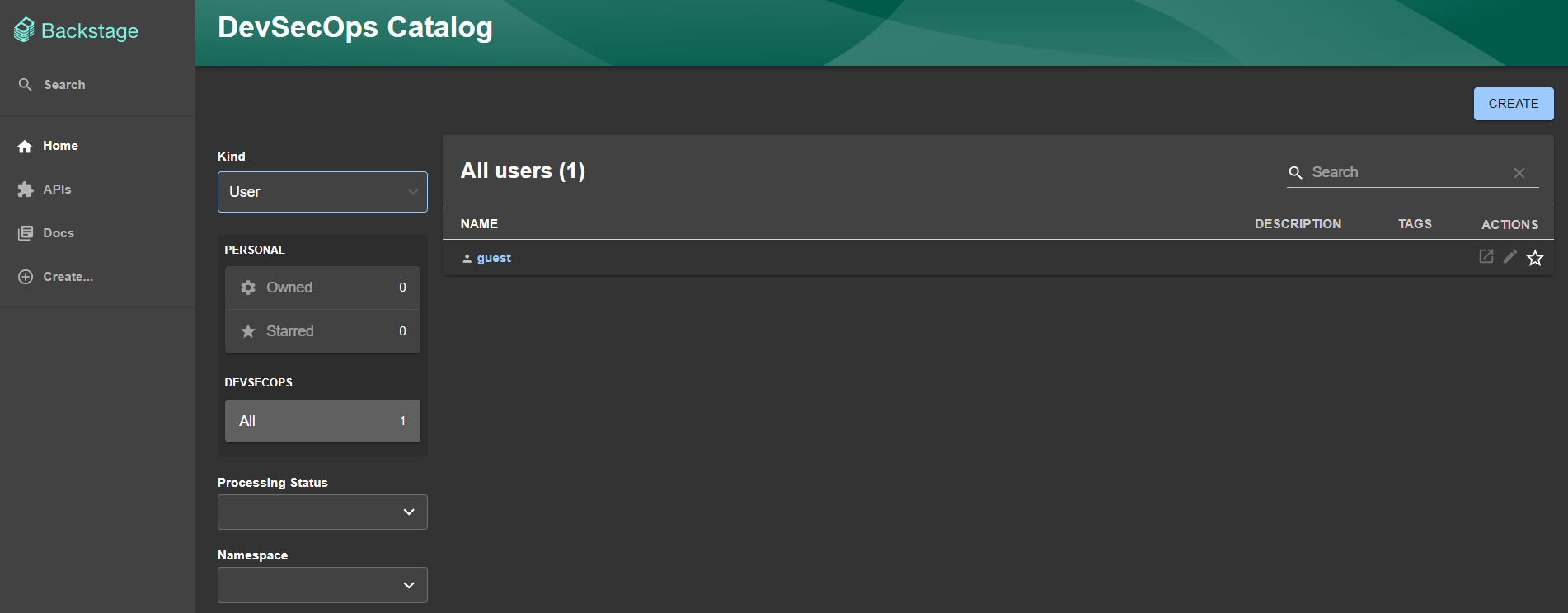
As expected, both arrived at the same place and use the same email.
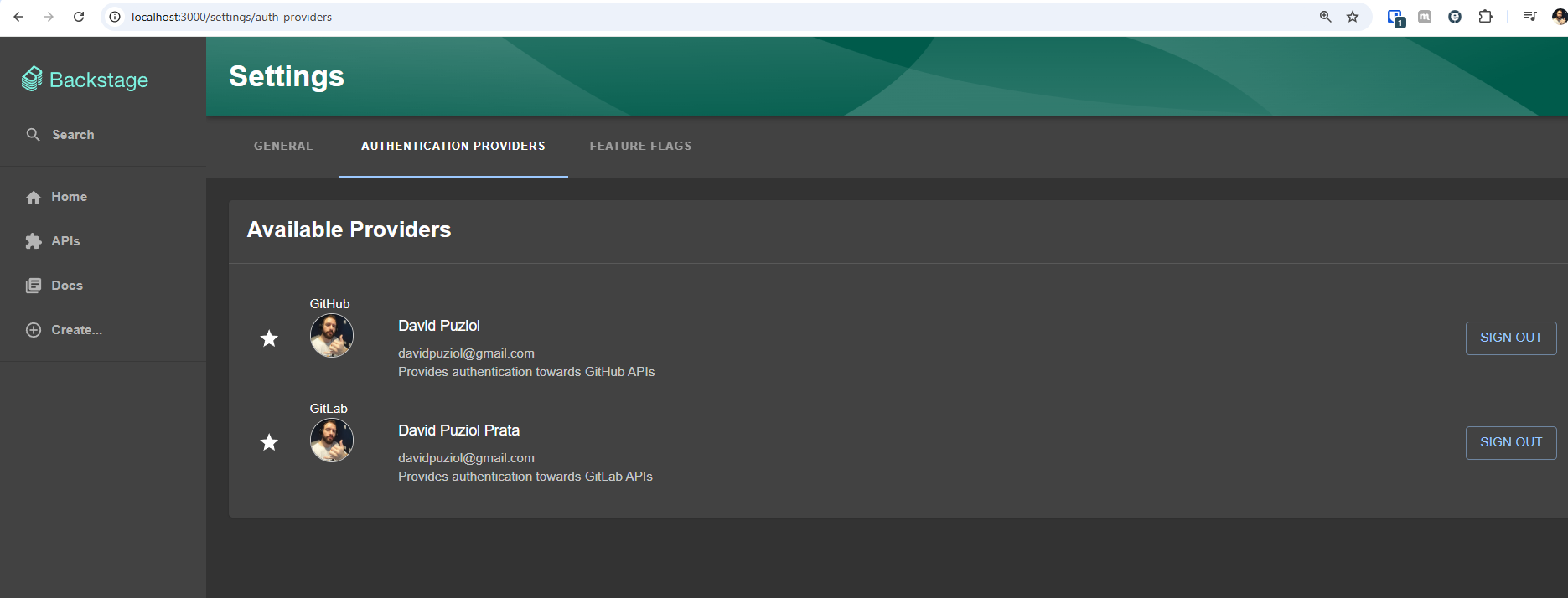
However, it was not mapped to any internal entity.
Automatic Logout
As a security mechanism, it's interesting to enable automatic logout which is designed to disconnect users in case of inactivity.
In packages/app/src/App.tsx we can add.
import { AutoLogout } from '@backstage/core-components';

// ... App.tsx contents

export default app.createRoot(
  <>
    // ...
    <AutoLogout
      idleTimeoutMinutes={30}
      useWorkerTimers={false}
      logoutIfDisconnected={false}
    />
    // ...
  </>,
);
Learn more about this at auto logout.