Install Backstage Local
- The project does not publish binaries, only source code.
- There is no container image you can use.
- There is no Helm Chart to install it on Kubernetes.
The project is there and do with it what you want. Dive deep into the documentation until you get something working.
- It's not the type of product you simply configure and run.
- It can be extended by plugins and you can choose those developed by others or write your own.
- It has components that represent some logical entities like applications and infrastructure.
- It has templates that can be used to create various items in the graphical interface.
Every time you decide to add a new plugin, you'll need to rebuild an image if running in containers.
If you want to use Backstage as a Service it's possible, but since we like to suffer to learn, let's create our own Backstage.
What we have here is source code that is the base for building what we need. Understanding this, it makes complete sense to start by running the project on our own machine, as we'll need to customize many things.
Let's install directly on our machine and see what happens.
Requirements:
- curl or wget installed
- node lts/iron installed (I recommend installation using nvm).
- yarn installed at version 4.4.1
- docker (in the lab it was already required before). Some internal processing of the techdocs plugin needs docker if using the default configuration. It's possible to work around this.
sudo apt-get install curl wget -y
# Check the documentation first for newer versions.
curl -o- https://raw.githubusercontent.com/nvm-sh/nvm/v0.39.5/install.sh | bash
nvm install lts/iron
npm install --global yarn
corepack enable
yarn set version 4.4.1
npx --version
10.9.0

node --version
v20.18.1

yarn --version
4.4.1

# This command will create the folder with the project name and pull the source code.
npx @backstage/create-app@latest
(node:1513718) ExperimentalWarning: CommonJS module /home/david/.nvm/versions/node/v23.2.0/lib/node_modules/npm/node_modules/debug/src/node.js is loading ES Module /home/david/.nvm/versions/node/v23.2.0/lib/node_modules/npm/node_modules/supports-color/index.js using require().
Support for loading ES Module in require() is an experimental feature and might change at any time
(Use `node --trace-warnings ...` to show where the warning was created)
Need to install the following packages:
@backstage/[email protected]
Ok to proceed? (y) y

(node:1514313) [DEP0040] DeprecationWarning: The `punycode` module is deprecated. Please use a userland alternative instead.
(Use `node --trace-deprecation ...` to show where the warning was created)
? Enter a name for the app [required] backstage
Creating the app...

 Checking if the directory is available:
  checking      backstage ✔

 Creating a temporary app directory:

 Preparing files:
  copying       .dockerignore ✔
  copying       .eslintignore ✔
  templating    .eslintrc.js.hbs ✔
  templating    .gitignore.hbs ✔
  copying       .prettierignore ✔
  templating    .yarnrc.yml.hbs ✔
  copying       README.md ✔
  copying       app-config.local.yaml ✔
  copying       app-config.production.yaml ✔
  templating    app-config.yaml.hbs ✔
  templating    backstage.json.hbs ✔
  templating    catalog-info.yaml.hbs ✔
  templating    package.json.hbs ✔
  copying       playwright.config.ts ✔
  copying       tsconfig.json ✔
  copying       yarn.lock ✔
  copying       README.md ✔
  copying       yarn-4.4.1.cjs ✔
  copying       entities.yaml ✔
  copying       org.yaml ✔
  copying       template.yaml ✔
  copying       catalog-info.yaml ✔
  copying       index.js ✔
  copying       package.json ✔
  copying       README.md ✔
  templating    .eslintrc.js.hbs ✔
  copying       Dockerfile ✔
  copying       README.md ✔
  templating    package.json.hbs ✔
  copying       index.ts ✔
  copying       .eslintignore ✔
  templating    .eslintrc.js.hbs ✔
  templating    package.json.hbs ✔
  copying       app.test.ts ✔
  copying       android-chrome-192x192.png ✔
  copying       apple-touch-icon.png ✔
  copying       favicon-16x16.png ✔
  copying       favicon-32x32.png ✔
  copying       favicon.ico ✔
  copying       index.html ✔
  copying       manifest.json ✔
  copying       robots.txt ✔
  copying       safari-pinned-tab.svg ✔
  copying       App.test.tsx ✔
  copying       App.tsx ✔
  copying       apis.ts ✔
  copying       index.tsx ✔
  copying       setupTests.ts ✔
  copying       LogoFull.tsx ✔
  copying       LogoIcon.tsx ✔
  copying       Root.tsx ✔
  copying       index.ts ✔
  copying       EntityPage.tsx ✔
  copying       SearchPage.tsx ✔

 Moving to final location:
  moving        backstage ✔
  fetching      yarn.lock seed ✔
  init          git repository ◜
 Installing dependencies:
  init          git repository ✔
  executing     yarn install ✔
  executing     yarn tsc ✔

🥇  Successfully created backstage


 All set! Now you might want to:
  Run the app: cd backstage && yarn dev
  Set up the software catalog: https://backstage.io/docs/features/software-catalog/configuration
  Add authentication: https://backstage.io/docs/auth/
With everything installed you can enter the folder and run the command below.
I won't provide a ready-made Backstage repository initially, as I believe we would skip steps.
export LOG_LEVEL=debug
# Backstage in newer versions needs this option exported for node.
export NODE_OPTIONS="--no-node-snapshot"
# Starts the frontend and backend using the configurations in app-config.yaml
yarn dev
And we have ours available at localhost:3000.
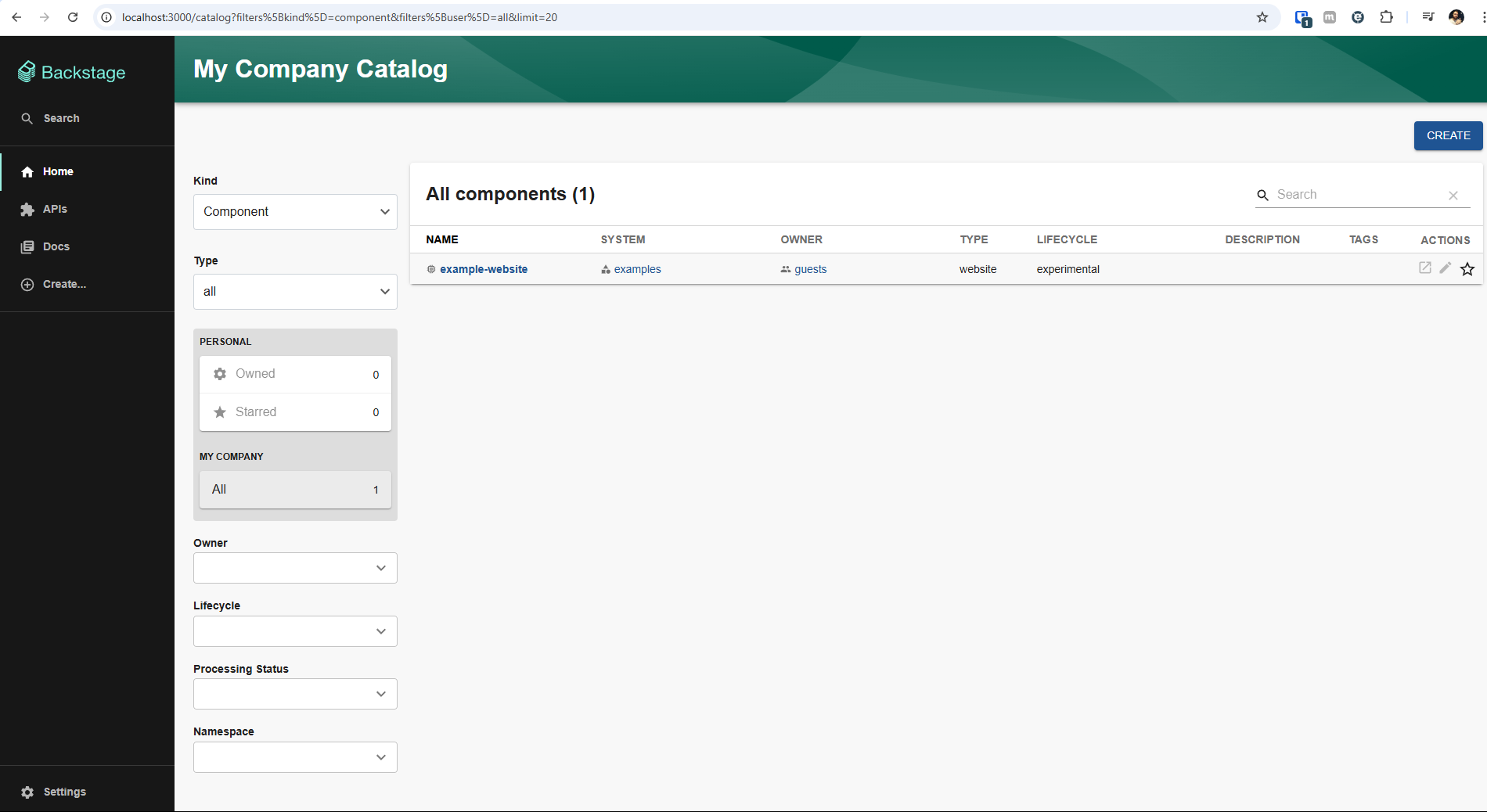
We can see that we already have an example website that we'll check out shortly.
In the root directory we have the app-config.yaml file which is the main configuration file, but not the only one. Not all configuration files are yaml, sometimes it's necessary to edit the typescript files.
app:
  title: `Scaffolded Backstage App`
  baseUrl: http://localhost:3000

organization:
  name: My Company

backend:
  # Used for enabling authentication, secret is shared by all backend plugins
  # See https://backstage.io/docs/auth/service-to-service-auth for
  # information on the format
  # auth:
  #   keys:
  #     - secret: ${BACKEND_SECRET}
  baseUrl: http://localhost:7007
  listen:
    port: 7007
    # Uncomment the following host directive to bind to specific interfaces
    # host: 127.0.0.1
  csp:
    connect-src: ["'self'", 'http:', 'https:']
    # Content-Security-Policy directives follow the Helmet format: https://helmetjs.github.io/#reference
    # Default Helmet Content-Security-Policy values can be removed by setting the key to false
  cors:
    origin: http://localhost:3000
    methods: [GET, HEAD, PATCH, POST, PUT, DELETE]
    credentials: true
  # This is for local development only, it is not recommended to use this in production
  # The production database configuration is stored in app-config.production.yaml
  database:
    client: better-sqlite3
    connection: ':memory:'
  # workingDirectory: /tmp # Use this to configure a working directory for the scaffolder, defaults to the OS temp-dir

integrations:
  github:
    - host: github.com
      # This is a Personal Access Token or PAT from GitHub. You can find out how to generate this token, and more information
      # about setting up the GitHub integration here: https://backstage.io/docs/integrations/github/locations#configuration
      token: ${GITHUB_TOKEN}
    ### Example for how to add your GitHub Enterprise instance using the API:
    # - host: ghe.example.net
    #   apiBaseUrl: https://ghe.example.net/api/v3
    #   token: ${GHE_TOKEN}

proxy:
  ### Example for how to add a proxy endpoint for the frontend.
  ### A typical reason to do this is to handle HTTPS and CORS for internal services.
  # endpoints:
  #   '/test':
  #     target: 'https://example.com'
  #     changeOrigin: true

# Reference documentation http://backstage.io/docs/features/techdocs/configuration
# Note: After experimenting with basic setup, use CI/CD to generate docs
# and an external cloud storage when deploying TechDocs for production use-case.
# https://backstage.io/docs/features/techdocs/how-to-guides#how-to-migrate-from-techdocs-basic-to-recommended-deployment-approach
techdocs:
  builder: 'local' # Alternatives - 'external'
  generator:
    runIn: 'docker' # Alternatives - 'local'
  publisher:
    type: 'local' # Alternatives - 'googleGcs' or 'awsS3'. Read documentation for using alternatives.

auth:
  # see https://backstage.io/docs/auth/ to learn about auth providers
  providers:
    # See https://backstage.io/docs/auth/guest/provider
    guest: {}

scaffolder:
  # see https://backstage.io/docs/features/software-templates/configuration for software template options

catalog:
  import:
    entityFilename: catalog-info.yaml
    pullRequestBranchName: backstage-integration
  rules:
    - allow: [Component, System, API, Resource, Location]
  locations:
    # Local example data, file locations are relative to the backend process, typically `packages/backend`
    - type: file
      target: ../../examples/entities.yaml

    # Local example template
    - type: file
      target: ../../examples/template/template.yaml
      rules:
        - allow: [Template]

    # Local example organizational data
    - type: file
      target: ../../examples/org.yaml
      rules:
        - allow: [User, Group]

    ## Uncomment these lines to add more example data
    # - type: url
    #   target: https://github.com/backstage/backstage/blob/master/packages/catalog-model/examples/all.yaml

    ## Uncomment these lines to add an example org
    # - type: url
    #   target: https://github.com/backstage/backstage/blob/master/packages/catalog-model/examples/acme-corp.yaml
    #   rules:
    #     - allow: [User, Group]

kubernetes:
  # see https://backstage.io/docs/features/kubernetes/configuration for kubernetes configuration options

# see https://backstage.io/docs/permissions/getting-started for more on the permission framework
permission:
  # setting this to `false` will disable permissions
  enabled: true
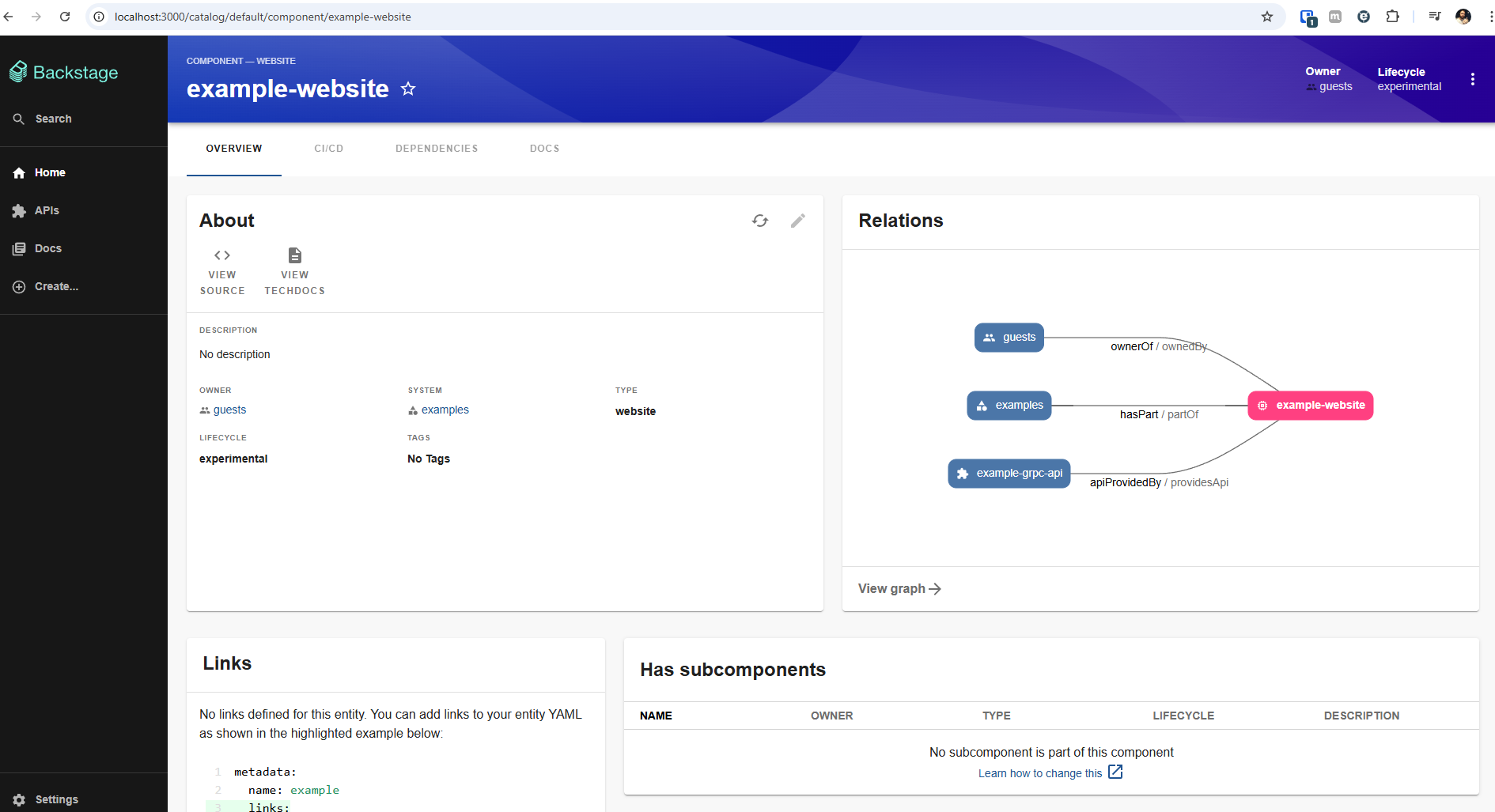
Inside the example-website, we can see that we have all the information about this website.
- Overview: Giving us the general view
- Documentation in a dedicated Tab.
- Relationship with other components.
- Useful links
- Etc.
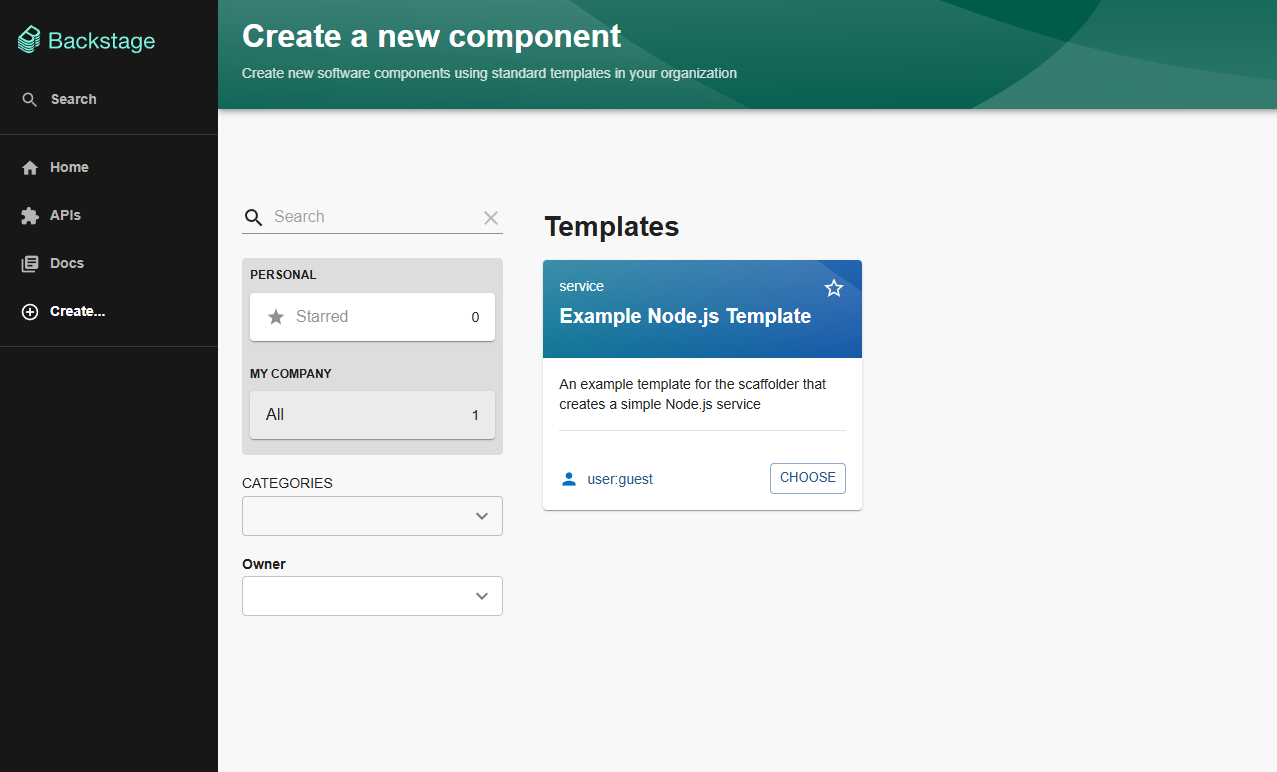
On the main screen we can create a new component where templates are located. There should be a list of forms that could be filled with data that can be transcribed to actions, but at this moment we only have the example which if you want to test you can do a lot with.
Going a Bit Further
If you followed the lab you should already have a localhost cluster with argocd installed, postgres installed and a service account for Backstage with a valid token. Some environment variables need to be exported in the terminal to use the config below.
# You need to create these tokens in your github or gitlab account or both if you want to use them.
export GITHUB_TOKEN=ghp_XXXXXXXXXXXXXXXXXXXXXXXXXXXXX
export GITLAB_TOKEN=glpat-xxxxxxxxxxxxxxxxxx
# A file was generated in the lab with the value of this variable
export KUBERNETES_BACKSTAGE_SA_TOKEN=xxxxxxxxxxxxxxxxxxxxxxxxxxxxxxxxxxxxxxxxxxxxxxxxxxxxxxxxxxxxxxxxxxxxxxxxxxxxxxxxxxxxxxxxxxxxxxxxxxxxxxxxxxxxxxxxxxxxxxxxxxxxxxxxxxxxxxxxxxxxxxxxxxxxxxxxxxxxxxxxxxxxxxxxxxxxxxxxxxxxxxxxxxxxxxxxxxxxxxxxxxxxxxxxxxxxxxxxxxxxxxxx
The database was deployed inside kubernetes. The ingress doesn't work with TCP redirection. It's necessary to do a port-forward so the database is exposed on localhost:5432. The database is already in kubernetes. In the future we'll deploy Backstage inside the cluster and this forward will no longer be necessary, but for now we're running Backstage outside the cluster because we haven't created an image for it yet. Since we'll be starting and stopping several times, creating an image for everything we do would take too long.
# Keep a terminal open with the forward running to access the database
kubectl port-forward --namespace backstage svc/backstage-postgres-postgresql 5432:5432 &
Let's use these things in our app-config.yaml
app:
  title: Scaffolded Backstage App
  baseUrl: http://localhost:3000

organization:
  name: DevSecOps # Adjusted

backend:
  baseUrl: http://localhost:7007
  listen:
    port: 7007

  csp:
    connect-src: ["'self'", 'http:', 'https:']

  cors:
    origin: http://localhost:3000
    methods: [GET, HEAD, PATCH, POST, PUT, DELETE]
    credentials: true

  database:
  # We removed the local sqlite database and already configured the postgres database (not necessary, but in case you want to test already)
    client: pg
    connection:
      host: localhost
      port: 5432
      user: admin
      password: devsecops
      database: backstage

integrations:
  github:
    - host: github.com
      token: ${GITHUB_TOKEN} # in the terminal this variable must be exported
  gitlab:
    - host: gitlab.com
      token: ${GITLAB_TOKEN} # in the terminal this variable must be exported

proxy:

techdocs:
  builder: 'local'
  generator:
    runIn: 'docker' # That's why we need docker.
  publisher:
    type: 'local'

auth:
  providers:
    guest: {}

scaffolder:
catalog:
  import:
    entityFilename: catalog-info.yaml
    pullRequestBranchName: backstage-integration
  rules:
    - allow: [Component, System, API, Resource, Location]
  locations:
    - type: file
      target: ../../examples/entities.yaml
    - type: file
      target: ../../examples/template/template.yaml
      rules:
        - allow: [Template]
    - type: file
      target: ../../examples/org.yaml
      rules:
        - allow: [User, Group]

kubernetes: # Adjusted
  serviceLocatorMethod:
    type: 'multiTenant'
  clusterLocatorMethods:
    - type: 'config'
      clusters:
        - name: 'kind-study'
          url: 'https://localhost:6443'
          authProvider: 'serviceAccount'
          skipTLSVerify: true
          skipMetricsLookup: true
          serviceAccountToken: ${KUBERNETES_BACKSTAGE_SA_TOKEN} # in the terminal this variable must be exported
permission:
  enabled: true
For Backstage to gain utility we need to fill its functionalities with plugins and components.
Initially what we can already do is spin up a kubernetes locally to use the pre-installed plugins.
One of the things we can already solve if the lab was set up is to change the local database to a postgres database
yarn --cwd packages/backend add pg