Backstage Production
As of now, Backstage does not provide official container images nor helm charts. The only thing we have is source code coming from a template and a Dockerfile.
If we want to run Backstage on Kubernetes, we need to create a Dockerfile and the manifests. The chart contained in the Backstage source code only works for demonstration purposes, running an image that is not customized for your purpose.
When we run the command npx @backstage/create-app@latest, the default code that we worked on to learn was generated, but I kept thinking about how I could maintain Backstage in a productive way. I was quite concerned about this, because if we are going to change the development culture and Backstage is at the center of everything, if it stops we will have a general problem. So I kept thinking about how to keep it updated, distributed, scalable, and secure.
Strategies
Backstage is a project that has recently gained favor with the community, so it is receiving many improvements. It will certainly be necessary to improve the architecture so that it can undergo updates more effectively. A backend architecture evolution has just happened, but the frontend is still in progress. How do we keep this project updated?
Working from Outside
For now, to get the most updated project, it is necessary to recreate the application from scratch using the command npx @backstage/create-app@latest. By generating this code in a source folder, for example, we will have clean code closer to the official documentation. We could always do this to get the new version of the project. However, every file that undergoes changes must be copied outside the source folder, to the root folder, maintaining the same folder structure, and copied back in at build time. But this creates problems and unnecessary effort.
- Complicated to develop locally.
- Multiple image builds required.
- Difficult to debug and see changes in real time.
- Specific pipelines needed for image build.
- Need to change dockerfile and COPY sources.
- etc.
I did not like this approach very much. I tried it and wasted time. Deep down, I realized that I would end up with the same code in the root folder and in the source folder and it would bring unnecessary complexity.
Working from Inside
Reading more about how Backstage updates work, I felt more comfortable maintaining a single codebase. Yarn itself will help us keep packages updated, and we need to make corrections even when working from outside.
Let's create the Dockerfile in the project root based on the official documentation using a multistage build.
############################## PREPARING YARN ##################################
FROM node:20-bookworm-slim AS packages

WORKDIR /app

COPY package.json yarn.lock ./
COPY .yarn ./.yarn
COPY .yarnrc.yml ./
COPY packages packages
COPY plugins plugins

RUN find packages \! -name "package.json" -mindepth 2 -maxdepth 2 -exec rm -rf {} \+

############################## INSTALLING PACKAGES AND DEPENDENCIES ##################################
FROM node:20-bookworm-slim AS build
# Set Python interpreter for `node-gyp` to use
ENV PYTHON=/usr/bin/python3

RUN --mount=type=cache,target=/var/cache/apt,sharing=locked \
    --mount=type=cache,target=/var/lib/apt,sharing=locked \
    apt-get update && \
    apt-get install -y --no-install-recommends python3 g++ build-essential && \
    rm -rf /var/lib/apt/lists/*

# We can later have a second Dockerfile for production removing sqlite to reduce image size since it won't be used in production
RUN --mount=type=cache,target=/var/cache/apt,sharing=locked \
    --mount=type=cache,target=/var/lib/apt,sharing=locked \
    apt-get update && \
    apt-get install -y --no-install-recommends libsqlite3-dev && \
    rm -rf /var/lib/apt/lists/*

USER node
WORKDIR /app

COPY --from=packages --chown=node:node /app .
COPY --from=packages --chown=node:node /app/.yarn ./.yarn
COPY --from=packages --chown=node:node /app/.yarnrc.yml  ./

RUN --mount=type=cache,target=/home/node/.cache/yarn,sharing=locked,uid=1000,gid=1000 \
    yarn install --immutable

COPY --chown=node:node . .

RUN yarn tsc
RUN yarn --cwd packages/backend build

RUN mkdir packages/backend/dist/skeleton packages/backend/dist/bundle \
    && tar xzf packages/backend/dist/skeleton.tar.gz -C packages/backend/dist/skeleton \
    && tar xzf packages/backend/dist/bundle.tar.gz -C packages/backend/dist/bundle

############################## FINAL ##################################

FROM node:20-bookworm-slim

ENV PYTHON=/usr/bin/python3

RUN --mount=type=cache,target=/var/cache/apt,sharing=locked \
    --mount=type=cache,target=/var/lib/apt,sharing=locked \
    apt-get update && \
    apt-get install -y --no-install-recommends python3 python3-pip python3-venv g++ build-essential && \
    rm -rf /var/lib/apt/lists/*

# We can later have a second Dockerfile for production removing sqlite to reduce image size since it won't be used in production
RUN --mount=type=cache,target=/var/cache/apt,sharing=locked \
    --mount=type=cache,target=/var/lib/apt,sharing=locked \
    apt-get update && \
    apt-get install -y --no-install-recommends libsqlite3-dev && \
    rm -rf /var/lib/apt/lists/*

# To run techdocs locally without needing docker in docker (ADDED)
ENV VIRTUAL_ENV=/opt/venv
RUN python3 -m venv $VIRTUAL_ENV
ENV PATH="$VIRTUAL_ENV/bin:$PATH"
RUN pip3 install mkdocs-techdocs-core

USER node

WORKDIR /app

COPY --from=build --chown=node:node /app/.yarn ./.yarn
COPY --from=build --chown=node:node /app/.yarnrc.yml  ./
COPY --from=build --chown=node:node /app/yarn.lock /app/package.json /app/packages/backend/dist/skeleton/ ./

RUN --mount=type=cache,target=/home/node/.cache/yarn,sharing=locked,uid=1000,gid=1000 \
    yarn workspaces focus --all --production && rm -rf "$(yarn cache clean)"

COPY --from=build --chown=node:node /app/packages/backend/dist/bundle/ ./
COPY --chown=node:node app-config*.yaml ./
COPY --chown=node:node examples ./examples
# This will be the default if nothing is passed
ENV NODE_ENV=production
ENV NODE_OPTIONS="--no-node-snapshot"
CMD ["node", "packages/backend", "--config", "app-config.yaml", "--config", "app-config.production.yaml"]
During image build, docker checks the .dockerignore. What comes initially will cause problems, so it needs to be changed to:
dist-types
node_modules
packages/*/dist
packages/*/node_modules
plugins/*/dist
plugins/*/node_modules
*.local.yaml
Before building, we need to adjust how we will work with configs. In this approach, it is important to understand that app-config.yaml will be the base for production. In production, we will change this.
app:
  baseUrl: ${BACKSTAGE_HOST} # This will be our domain, not localhost

backend:
  baseUrl: ${BACKSTAGE_HOST} # This will be our domain, not localhost
  listen: ':7007' # I left this here, but this needs to be the same listen as app-config.yaml. It didn't need to be here.

  database: # We define a database
    client: pg
    connection:
      host: ${POSTGRES_HOST}
      port: ${POSTGRES_PORT}
      user: ${POSTGRES_USER}
      password: ${POSTGRES_PASSWORD}

catalog:
  locations: # Examples removed

kubernetes:
  frontend: # We will allow pod deletion in production in the kubernetes plugin. In development it will not be possible to delete
    podDelete:
      enabled: true
Now let's go to app-config.yaml which is the base for production. Some adjustments are necessary so that we can have a container in development mode.
app:
  title: Scaffolded Backstage App
  baseUrl: http://localhost:7007 # SAME PORT AS BACKEND. Originally it was port 3000, we need to fix this in app-config.local.yaml

organization:
  name: My Company

backend:
  baseUrl: http://localhost:7007
  listen: ':7007'
  csp:
    connect-src: ["'self'", 'http:', 'https:']

  cors:
    origin: http://localhost:3000
    methods: [GET, HEAD, PATCH, POST, PUT, DELETE]
    credentials: true

  database: # The default database is in memory, in production we made the change
    client: better-sqlite3
    connection: ':memory:'

integrations:
  github:
    - host: github.com
      token: ${GITHUB_TOKEN}
  gitlab:
    - host: gitlab.com
      token: ${GITLAB_TOKEN}

proxy:
  '/argocd/api':
    target: http://argo.localhost/api/v1/
    changeOrigin: true
    # only if your argocd api has self-signed cert
    secure: false
    headers:
      Cookie:
        $env: ARGOCD_AUTH_TOKEN_BACKSTAGE

  builder: 'local'
  generator:
    runIn: 'local'
  publisher:
    type: 'local'
    local:
      publishDirectory: '/app/backstage-site'

auth:
  providers:
    github:
      development:
        clientId: ${AUTH_GITHUB_CLIENT_ID}
        clientSecret: ${AUTH_GITHUB_CLIENT_SECRET}
    gitlab:
      development:
        clientId: ${AUTH_GITLAB_CLIENT_ID}
        clientSecret: ${AUTH_GITLAB_CLIENT_SECRET}

scaffolder:
  defaultAuthor:
    name: Backstage Scaffolder

catalog:
  import:
    entityFilename: catalog-info.yaml
    pullRequestBranchName: backstage-integration
  rules:
    - allow: [Component, System, API, Resource, Location, Group, User, Domain]
  providers:
    github:
      github:
        organization: ${GITHUB_ACCOUNT}
        schedule:
          frequency: { minutes: 3 }
          timeout: { minutes: 3 }
        filters:
          branch: 'main' # string
          repository: '.*' # Regex
        catalogPath: '/**/catalog-info.{yaml,yml}'

  locations: # This was removed from production
    # Local example files can be loaded in development but instead of using ../examples running locally with yarn dev it is necessary to adjust to ./examples because inside the container the path is different.
    - type: file
      target: ./examples/entities.yaml

    - type: file
      target: ./examples/template/template.yaml
      rules:
        - allow: [Template]

    - type: file
      target: ./examples/org.yaml
      rules:
        - allow: [User, Group]

kubernetes:
# Here we don't have permission to delete pod
  serviceLocatorMethod:
    type: 'multiTenant'
  clusterLocatorMethods:
    - type: 'config'
      clusters:
        - name: 'cluster-kind'
          # url: 'https://localhost:6443'   We adjusted this for local
          url: 'https://kubernetes.default.svc'  # Inside the cluster the pod needs to reference the kubernetes service. Localhost would be inside the pod itself.
          authProvider: 'serviceAccount'
          skipTLSVerify: true
          skipMetricsLookup: true
          serviceAccountToken: ${KUBERNETES_BACKSTAGE_SA_TOKEN}


permission:
  enabled: true
events:
  http:
    topics:
      - gitlab
      - github
Now to run this in a local environment, we need app-config.local.yaml to fix the modifications we made in app-config.yaml to run in container. Running yarn dev implies loading the base app-config.yaml and then overwriting what we have in app-config.local.yaml.
Remember to remove this file from .gitignore!
app:
  baseUrl: http://localhost:3000 # changes the frontend port relative to the backend

techdocs:
  generator:
    runIn: 'docker' # uses docker instead of local
  publisher:
    local:
      publishDirectory: '/tmp/backstage'

auth:
  # enables guest
  guest: {}

catalog:
  rules:
    - allow: [Component, System, API, Resource, Location, Group, User, Domain]

  locations: # We fixed the paths from ./examples to ../../examples
    - type: file
      target: ../../examples/entities.yaml

    - type: file
      target: ../../examples/template/template.yaml
      rules:
        - allow: [Template]

    - type: file
      target: ../../examples/org.yaml
      rules:
        - allow: [User, Group]

kubernetes:
  clusterLocatorMethods:
    - type: 'config'
      clusters:
        - name: 'cluster-kind'
          url: 'https://localhost:6443'  # Readjusted to localhost when developing locally
          authProvider: 'serviceAccount'
          skipTLSVerify: true
          skipMetricsLookup: true
          serviceAccountToken: ${KUBERNETES_BACKSTAGE_SA_TOKEN}
Now yarn dev works.
Building the Image
To build and run in development initially
docker build -t backstage . --no-cache

# To run remember to have all variables exported
# Here we are running as development because we changed NODE_ENV and we will change the CMD.
docker container run --rm --interactive --tty --publish 7007:7007 \
    --env NODE_ENV=development \
    --env GITHUB_ACCOUNT=$GITHUB_ACCOUNT \
    --env GITHUB_USER=$GITHUB_USER \
    --env GITHUB_USER=$GITHUB_USER \
    --env GITHUB_TOKEN=$GITHUB_TOKEN \
    --env GITLAB_TOKEN=$GITLAB_TOKEN \
    --env ARGOCD_AUTH_TOKEN_BACKSTAGE=$ARGOCD_AUTH_TOKEN_BACKSTAGE \
    --env AUTH_GITHUB_CLIENT_ID=$AUTH_GITHUB_CLIENT_ID \
    --env AUTH_GITHUB_CLIENT_SECRET=$AUTH_GITHUB_CLIENT_SECRET \
    --env AUTH_GITLAB_CLIENT_ID=$AUTH_GITLAB_CLIENT_ID \
    --env AUTH_GITLAB_CLIENT_SECRET=$AUTH_GITLAB_CLIENT_SECRET \
    --env KUBERNETES_BACKSTAGE_SA_TOKEN=$KUBERNETES_BACKSTAGE_SA_TOKEN \
    backstage node packages/backend --config app-config.yaml
To push...
# change to your repository
docker tag backstage:latest davidpuziol/backstage:v1.0.0
docker push davidpuziol/backstage:v1.0.0
Now we have an image to run on kubernetes. Just to remind you, kubernetes needs to be able to pull the image, if the repository is public, the repository credentials will be needed.
Kubernetes
What do we need to run on kubernetes?
- We need a deployment and in it we will need to reference several environment variables. If it is production we have a different set than development.
- Defining healthchecks will be done later as it requires using extra plugins.
- We need a service account to not use the namespace default, which does not need to be mounted on the pod as it will not have access to the api through this service account.
- We need a service to control access to the pods.
- We need an ingress to expose our Backstage.
- We need a volume to store the docs (I will do this later) if you don't use an external service, but I think it's not necessary since the documentation always rebuilds itself.
- We need an hpa for horizontal scaling
Check the repository davidpuziol/backstage in the backstage folder for the helm chart code I created. To avoid redundancy, see the values.yaml in the repository.
Requirements:
- You need to create the secret with all defined environment variables.
- Change the values.yaml for your configuration
- Change the repository and tag.
- Change the secret name pointing to the one you created if necessary.
- Change the ingress host to what you defined.
- Change the postgres host to where your database is
- Change the hpa if you want.
This is just an initial chart, which we will still change by defining a volume to store techdocs, readiness and liveness to ensure healthcheck, security context to implement more security, and better analyze resources with load testing.
## With the repository cloned in the backstage folder
helm install backstage -n backstage .

## A general view of what we have in the backstage namespace besides what we just deployed.
## We have postgres (statefulset) running in the same namespace as specified in the lab.
## We have the service account backstage-sa and the token we will use in backstage.
## We have the secret backstage-env-secrets with all the necessary credentials.

kubectl get deployments.apps,ingress,svc,replicasets.apps,statefulsets.apps,pod,serviceaccounts,persistentvolume,persistentvolumeclaims,secrets,configmaps -n backstage
NAME                        READY   UP-TO-DATE   AVAILABLE   AGE
deployment.apps/backstage   2/2     2            2           6h32m

NAME                                  CLASS   HOSTS                 ADDRESS     PORTS   AGE
ingress.networking.k8s.io/backstage   nginx   backstage.localhost   localhost   80      6h32m

NAME                                       TYPE        CLUSTER-IP      EXTERNAL-IP   PORT(S)    AGE
service/backstage                          ClusterIP   10.101.44.219   <none>        7007/TCP   6h32m
service/backstage-postgres-postgresql      ClusterIP   10.101.74.104   <none>        5432/TCP   2d19h
service/backstage-postgres-postgresql-hl   ClusterIP   None            <none>        5432/TCP   2d19h

NAME                                   DESIRED   CURRENT   READY   AGE
replicaset.apps/backstage-74857d8858   2         2         2       6h32m

NAME                                             READY   AGE
statefulset.apps/backstage-postgres-postgresql   1/1     2d19h

NAME                                  READY   STATUS    RESTARTS        AGE
pod/backstage-74857d8858-64qnd        1/1     Running   2 (6h31m ago)   6h32m
pod/backstage-74857d8858-sfsnf        1/1     Running   0               6h32m
pod/backstage-postgres-postgresql-0   1/1     Running   2 (6h28m ago)   2d19h

NAME                                           SECRETS   AGE
serviceaccount/backstage                       0         6h32m
serviceaccount/backstage-postgres-postgresql   0         2d19h
serviceaccount/backstage-sa                    0         2d19h
serviceaccount/default                         0         2d19h

NAME                                                        CAPACITY   ACCESS MODES   RECLAIM POLICY   STATUS   CLAIM                                            STORAGECLASS   VOLUMEATTRIBUTESCLASS   REASON   AGE
persistentvolume/pvc-5f559753-bb50-4383-a217-1d7fcdf27fbe   5Gi        RWO            Delete           Bound    backstage/data-backstage-postgres-postgresql-0   standard       <unset>                          2d19h

NAME                                                         STATUS   VOLUME                                     CAPACITY   ACCESS MODES   STORAGECLASS   VOLUMEATTRIBUTESCLASS   AGE
persistentvolumeclaim/data-backstage-postgres-postgresql-0   Bound    pvc-5f559753-bb50-4383-a217-1d7fcdf27fbe   5Gi        RWO            standard       <unset>                 2d19h

NAME                                              TYPE                                  DATA   AGE
secret/backstage-env-secrets                      Opaque                                11     2d4h
secret/backstage-postgres-postgresql              Opaque                                2      2d19h
# backstage-sa-token was generated in the lab
secret/backstage-sa-token                         kubernetes.io/service-account-token   3      2d19h
secret/sh.helm.release.v1.backstage-postgres.v1   helm.sh/release.v1                    1      2d19h
secret/sh.helm.release.v1.backstage.v1            helm.sh/release.v1                    1      6h32m

NAME                         DATA   AGE
configmap/kube-root-ca.crt   1      2d19h
These environment variables should not be passed this way. They were only used this way because we are in a controlled environment and what mattered to us here was deploying on kubernetes.
It is necessary that they be injected at runtime using a Vault or some other secret manager.
I strongly recommend that postgres be a cloud service. We are talking about a production environment that cannot stop because it will impact all developers in the company.
Obviously, SSO must be implemented using the company's domain.
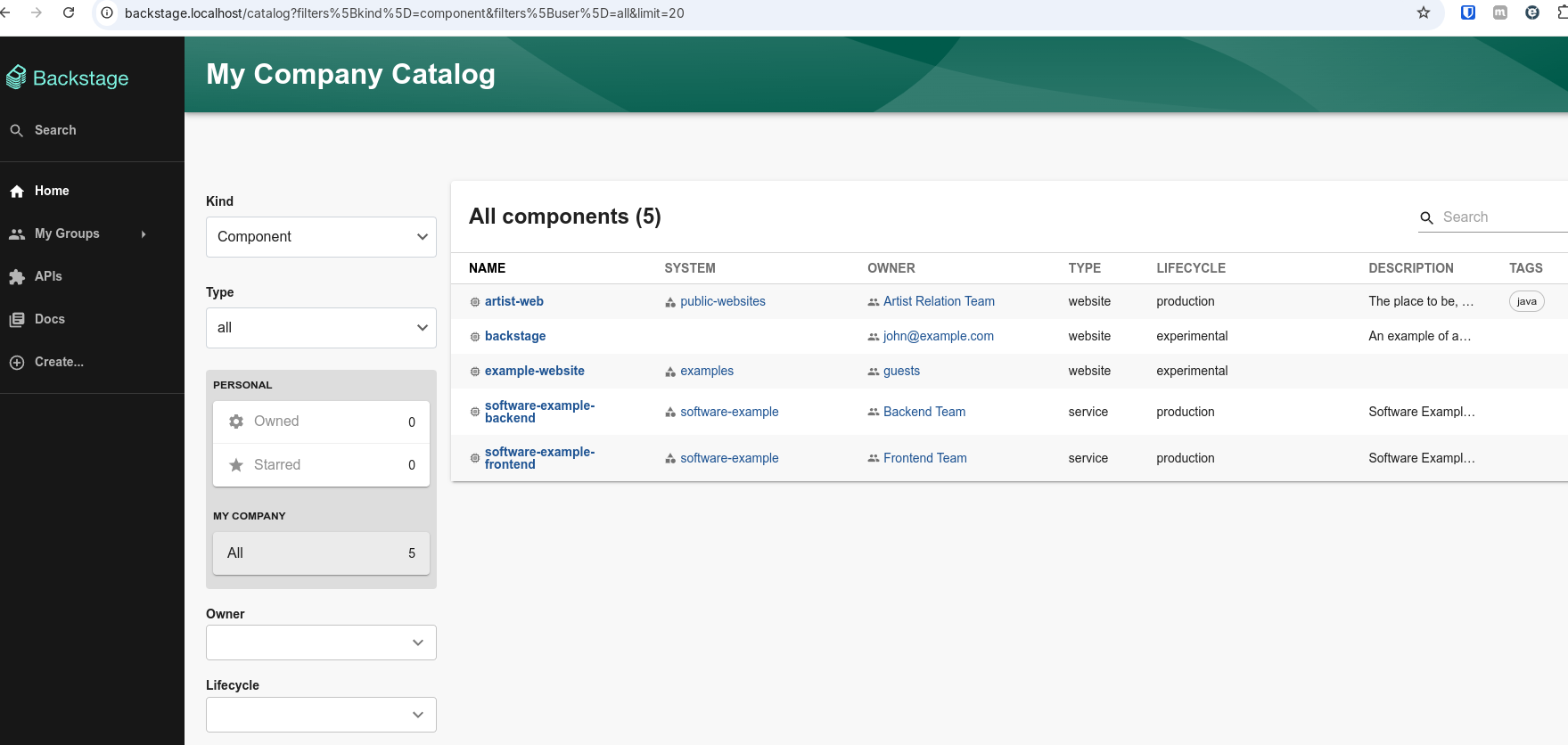
And we have our backstage running at backstage.localhost